PNC bank upgrade affecting Quicken downloads?
Answers
-
Boatnmaniac, I too have used this process for over 20 years without any problems. All you say is possible. However, sometimes the "check" turns out to be an ACH electronic process. All I wanted was confirmation they sent it, and by which method. It has never taken 14 days (weekends included) for any of my "checks" through quicken/PNC to clear in over 20 years. Since my downloads stopped at the same time (today) I am looking for answers, and perhaps gun shy with all the PNC/Q issues. I do have 4 transactions at PNC that posted yesterday and 2 days ago: a wire, two payments and a deposit - none of which has downloaded as of 5 minutes ago. Thanks for your reply. We are all in the same boat here!🙃
0 -
I got a new PIN from PNC on Dec 10. Entered it and changed it according to instructions. Quicken shows direct connect for PNC but does not process any instructions or update balances.
0 -
@Rick8 -
However, sometimes the "check" turns out to be an ACH electronic process.
PNC will always send bill pays via ACH when they have the Payee's bank information (routing number, account number) in their system.
When they don't have that information in their system, PNC will print and mail a check. With ACH payments the minimum lead-time from the process date to the delivery date is usually 3 days. But for most check payments that minimum lead-time is 5-6 days. Per the picture you posted there was 6 days from the process date to the delivery date…a pretty good indication that the check was mailed.
Yes, I suppose it is possible that PNC messed up but yours is the first post like this that I've seen since the PNC DC issues began on 10/24.
Is this a recurring payment for you? If so, you could log into your online account and find one of the prior payments made. If you click on the transaction and if it was paid by check there will be the front and back images of that check. On the back image will be the endorsement with the date that the check was cashed. If the prior payment was paid by check you can be very sure that this missing payment was also paid by check.
It has never taken 14 days (weekends included) for any of my "checks" through quicken/PNC to clear in over 20 years.
I suggest that a 1X occurrence over 20+ yrs is not an indication of a reliability issue. It's an indication that there might have been a 1X fluke that might not ever occur, again. Now, if it happens again then maybe there is an issue but where does the cause of the issue lie? More information is needed. In this instance, if previous payments were indeed paid by check, then the odds are really high that the cause was after the payment was processed and mailed. Then the USPS or or improper receipt/handling by the payee would be the prime suspects.
I do have 4 transactions at PNC that posted yesterday and 2 days ago: a wire, two payments and a deposit - none of which has downloaded as of 5 minutes ago.
I've noticed that PNC seems to be processing and downloading transactions on a somewhat delayed basis. I had one payment that showed on the PNC website as being posted on 12/5. It just downloaded this morning….5 days later. But other transactions have downloaded pomptly by the next day. My guess is that your transactions will download tomorrow or the next day. But, yes, that is a problem. It seems that PNC's "improved" system is not working very efficiently, yet.
Quicken Classic Premier (US) Subscription: R66.23 on Windows 11 Home
1 -
My PNC direct connect is not working. Checking the password vault, it does indicate that a Password is not required so that is apparently the issue. Is there any solution other than deleting the password vault and starting over with saving all of my online passwords? Why doesn't Quicken or PNC fix the issue? I do not feel it is my responsibility to do all the work after all I am paying a subscription fee.
0 -
A few people have reported that doing Validate & Repair fixed their PW Vault issue. You might want to try that because if it does then only the DC connection set up for PNC will need to be deactivated
Deleted PW Vault does not deactivate any accounts regardless of the connection method used.
If the PW Vault is deleted all EWC and EWC+ connected accounts will continue to function normally with OSU because the login and token info is not saved in PW Vault (it's why we see "Not required" for them in PW Vault).
With non-PNC DC connected accounts, the DC connections will remain intact and function but you will need to manually enter the PWs during OSU. Once the new PW Vault is set up you can then manually enter them in there so the accounts will be automatically updated during OSU, again.
The PNC DC accounts will need to be deactivated and set up, again, though. But what I've found is the process to do this is very specific at this time and any deviation from that process will result in failure. For quick reference, here is the process, again…after the PW Vault has been deleted:
- Back up the file before proceeding.
- For EACH PNC account: Account Register > upper right Gear icon > Edit Account Details > Online Services tab > Deactivate > General tab > remove all financial institution information (everything above the Contact Name field).
- After all PNC accounts have been deactivated: Tools > Add Account > PNC Bank - Direct Connect > Advanced Options (a link at the lower right of th PNC Bank - Direct Connect view in Add Account) > select Direct Connect > enter your DC UserID and PW (as were provided to you by PNC) > when prompted make sure to LINK each downloaded account to the accounts that are already in Quicken. (NOTE: If prompted to create a new DC PW for PNC do NOT do that. If you do that you will likely need to contact PNC Tier 3 to get something reset in their system. Instead, cancel the process and start over, again.)
This has worked for many, but not for all (including not for me). For most if not all of us we needed to first go to File > Copy or Backup File > Create a copy or template > Next > use the default file name (which is the same as the original file with "Cpy" added to the end of it or give it a different unique file name > Open the copied file. This process will create an exact copy of the original file except that all online services will be broken and will need to be set up, again. IMPORTANT: To set up all the connections again, for PNC make sure to follow steps listed above.
Why doesn't Quicken or PNC fix the issue?
We know that Quicken has been working with PNC to resolve the DC connection/downloading issues. What we do not know is where they are at in that process. It will get fixed. It's just a question of when.
I do not feel it is my responsibility to do all the work after all I am paying a subscription fee.
I think we all feel the same way. But we are not doing all the work because we are simply doing a workaround. It is not a program fix and that is where the real work is done to come up with a fix.
We have an option. We can either wait for their fix to become available (and who knows when that might be) and manually manage the accounts in the interim. Or we can take the workaround steps to resolve the issue so we don't have to manually manage our accounts. The choice is ours.
Quicken Classic Premier (US) Subscription: R66.23 on Windows 11 Home
0 -
Staying in loop on this one. I rely on PNC Direct Connect for Bill Pay through PNC. It has not worked since PNC update. I'm hesitant to try fixes listed here and elsewhere. Hopefully Quicken and PNC will give us a quick fix!
0 -
Here's my approach. First I set my 2 checking accounts and 1 credit card account for Express Web Connect. Each morning after 9am (that seems to be a magic hour for financial transactions) I do an update for each account ignoring any messages. Even when told my account doesn't exist, it will sometimes update. I put off manual entry as long as possible.
If there are any odd message from Quicken during the EWA, there's no reason to try the deactivate approach suggested here since it surely won't work. When EWA is clean, I'll try the deactivate approach (again for the 16th time).
On the payment side, PNC has a pretty good bill pay environment which I have set up. My use has been limited but successful. When I get more experience, I'll let you (everyone) know.0 -
what I’ve been doing with pnc bill pay is setting up a payment on bill pay then go into Quicken and create a reminder for that payment and exact name. I set up my mortgage payment on pnc bill pay with quicken recurring reminders. Gave up on Quicken mortgage process as every year was a nightmare to change the payment after escrow recalc.
0 -
Eventually pnc/quicken will play nice and this Texas two step will go away
1 -
Perhaps. My take on this his that PNC will discontinue DC so I've already set up EWC (see my prior message) and PNC's bill pay looks good.
0 -
How can you tell that it was a mailed check and not ACH? I've never been able to distinguish these until the check clears and I see the cleared transaction history on the PNC website or statement. It isn't clear to me how to learn this from the data in Quicken.
0 -
Unfortunately, PNC makes the decision on which payment method to use (based upon what is most efficient for them) and they are not very transparent about that. But they do download some data that is a good indication of which payment method will be used.
Once the bill payment has been sent there will be a lightning bolt in the Check # column of the account register for that transaction. Click on that and you will see something like this:
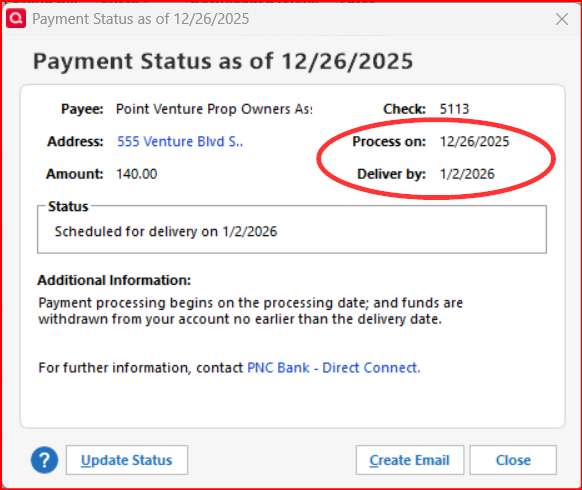
If the difference between the Process on date and the Deliver by date is 3 business days, it is scheduled for payment via ACH.
If the difference between the 2 dates is 5 or 6 business days, it is scheduled to be paid by mailed check.
Another indication of which payment method will be used is if when setting up the bill pay the delivery date is inside the required Process on-Deliver by window you will get a pop up that will tell you that the delivery date needs to be changed (pushed out) to comply with what is required by the payment method. For example if you set up a bill payment on 12/1 for delivery on 12/4 and if the payee is set up by PNC to have payment made by ACH then the bill payment will be scheduled as requested. But if the payee is set up by PNC to have payment made by check then you will get a popup telling you that the delivery date will be pushed out from 12/4 to 12/6 (or later) because of the mail transit time that is needed.
Quicken Classic Premier (US) Subscription: R66.23 on Windows 11 Home
1 -
I just want to go back to using Quicken Classic to pay my bills. PNC Bank may never fix this problem. Can you tell me if there is a bank, or other financial institution that does work with Quicken Direct Connect? Does Wells Fargo Bank? Other Bank?
0 -
@strattonrd - I think for most people (including me) PNC Bank's DC works well now, including for Bank Bill pay.
There are still quite a few banks that support DC Bank Bill Pay. Here is a Support Article listing these banks: . Note that this list is a bit old and there are a few banks that should be added to the list. It's been requested that Quicken Inc. update the list but that has not been done, yet. Still, it's a very good place to start.
Also, note that some banks will charge a monthly fee for DC connection service (Quicken never charges a fee for that). Some will also require a unique DC login (different from your online account login). You will need to confirm with whatever bank(s) you consider whether or not they offer DC support for no fee and whether or not they require a unique DC login.
I use Wells Fargo (it is free) for one person's file that I manage and it works well but the process requires that you first complete the DC approval on the Wells Fargo website and then go to Quicken within just a few minutes to do Add Account and set up the WF account(s) with DC. During the Add Account process there will be a popup saying where you need to go to in your browser to get the approval completed.
I also use Old National Bank (it is free) for another person's file that I manage and it has worked well. The set up is easy because the login for DC is the same as is used for logging into the online account.
Quicken Classic Premier (US) Subscription: R66.23 on Windows 11 Home
0 -
For those still struggling with this, I got frustrated and gave up. I'm using WebConnect+ and pay bills on the PNC website. I'm not having any issues. I'm not happy about losing functionality given the price of Quicken, but I don't have time to fight with this. Once they announce it officially fixed by both Quicken and PNC, then maybe I'll go back to Direct Connect. Just want to be sure you know there's a workaround. PNC's online bill payments is actually rather good.
2 -
Same experience here. I just wanted folks to know, as did you, that there is a workaround.
0 -
My plans exactly until Direct Connect repaired.
1 -
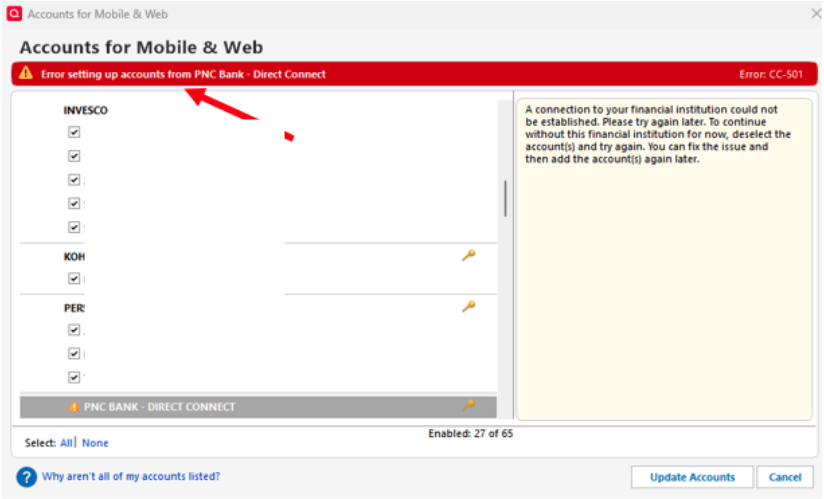
Still Happening!!
[Edited - Removed partial account numbers]
0 -
Yes it is! [Removed - Off Topic/Rant]
0 -
I get somewhat different behavior each day when I do my trial update routine. Today I tried to reset only my credit card and was told one of my checking accounts didn't exist. 0 steps forward 10 steps back.
0 -
Resetting a single account set up with EWC+ when there are multiple set up accounts at that FI often returns odd results. I think this is because there can be only 1 security token for EWC+ authorizations with that FI and trying to reset only 1 account conflicts with that security token which includes all the other accounts.
The general rule of thumb I have been following is when needing to reset one EWC+ connected account with a FI one should first deactivate all EWC+ connected accounts with that FI. Only then do Add Account or Set Up Now which will then no longer cause such a conflict and will reauthorize all of the accounts.
Did you check your other PNC accounts to make sure they are still connected and downloading? Sometimes when trying to reset a single account with a multiple account EWC+ FI I have observed the same thing you did but also noticed that one or more of my other accounts ended up getting disconnected during that process. The only thing that resolves that for me is to deactivate all of the accounts and then do Add Account or Set Up Now, again.
Why were you trying to reauthorize that credit card? Was there an issue with downloading from that account?
Quicken Classic Premier (US) Subscription: R66.23 on Windows 11 Home
0 -
Boatmaniac, I have issues with 2 checking and 1 credit card account. Sometimes they update and sometimes they don't. Sometimes I'm told the account doesn't exist ad then it updates anyway. My routine is to try an update then to re-authorize. My latest credit card wackiness is that when I went to update, the option I had next to the transaction was "delete." De-activation seems to have gotten me some headaches like creating barnd nes, empty accounts. That happened with the credit card account at least once. So I'm content with my routine and all I'm looking for is tat EWC works because DC will be phased out anyway.
0 -
I can't seem to find a search button here, so I apologize for asking this if it was already asked. I'm not going to go through 16 pages of posts. Almost every time I download transactions now, I am unable to reconcile. The last few times I was able to figure it out, but now I am scratching my head on this last one. Is anyone else having this issue? I don't want to just make a plug entry.
0 -
Which connection method is your account(s) set up with? Direct Connect? Express Web Connect+?
Before proceeding:
- Delete any account balancing transactions you entered to address this reconciling issue. If you don't do that, then the following steps cannot fix your account balance.
- Have you checked the Opening Balance transaction (the 1st and oldest transaction in the account) to confirm that the account balance shown there is correct or incorrect? If it is incorrect it will need to be corrected. (You might need to open a backup file dated from before when this issue first started to see what the Opening Balance transaction dollar amount should be.)
- Have you scrolled backward through your account register looking for duplicate transactions and deleted one of each of any duplicates that are found? (Generally, if there are any duplicates they will appear within the 90 days prior to when you first encountered this issue.)
- Have you checked to see if there are any transactions missing in the time period between now and when you first observed this issue? You will likely need to compare the account register in Quicken to what is shown in the transactions records of your online account or perhaps use a bank statement(s) for the comparison.
Quicken Classic Premier (US) Subscription: R66.23 on Windows 11 Home
0 -
December 18 Update for PNC Direct Connect
After two weeks I have received my new PIN and tried to attempt to reconnect my 8 PNC checking/saving accounts. Unfortunately I got the exact same results as 2 weeks ago while trying to re-activate. At the very end of the process it throws an error "We encountered an error while connecting to your bank". The accounts appear to be set up with DC and BillPay in the account list, but I can't send payments or download because I get an OL-293-A error. Just like two weeks ago. I disconnected all accounts.
I spent a total of 2.5 hours on the phone with Quicken. We tried a file copy and a blank profile when attempting to add DC and BillPay and got the same error before completion…. and OL-293-A when trying to connect. Unfortunately Quicken support pointed in the direction of PNC for a fix. They had no suggestions.
After I hung up, I wondered if the errors were caused by a single account or all my accounts (I have no idea why I didn't think of this earlier). I went in to "add account", and one at a time I added my accounts. BINGO! I was able to add every account without an issue EXCEPT for my main checking account (where most of my activity is). With 7 of my 8 accounts connected, OSU works every time and I was able to bill pay from another checking account (which really doesn't help). Nothing missed and no duplicates in the 7 accounts. I simply can not add this 8th account either "linked" or as a new account without getting the set up error and the OL-293-A update error.
The DC and BillPay problem is just with a single checking account. @Boatnmaniac can you think of a reason for the issue with a single account? Any ideas of what the fix might be? This is the account where 95% of all my activity is….. many BillPays. I contacted PNC Tier 3 again and they opened a ticket and escalated it to the "resolution team" and had me email them the OFX log. Fingers crossed…..
Any advice from the forum is appreciated.
Charlie
0 -
I received my PIN yesterday and my experience was very similar to yours. I attempted to reactivate my accounts (I've got two) while on the line with PNC Tier 3 and got the same "We encountered an error while connecting to your bank" message at the end. My accounts also appeared to be set up afterwards, but any attempt to update resulted in the OL-293-A error. The PNC rep had me send my connlog file, told me she would escalate it to the resolution team, and that I should expect a call back in a few days.
That said, there is one thing that should have occurred during the attempted setup but did not: PNC requires you change to change your password as the PNC-supplied PIN is for setup only. The PNC rep I was on the phone with expected me to see a prompt to do so, which I also recall seeing in the past, but it never happened. I tried several more deactivate/reactivate cycles, including one with a Quicken copy of my data file, but got the same results — no request for a password change and the same errors as above.
Did you ever get the prompt to change your password? I'm wondering if that missed step in the process is why it did not complete for me. And I would guess it is the DC service provider, Intuit, whose software produces that prompt, not Quicken. Perhaps @Boatnmaniac will have some insight about this anomaly as well.
It's interesting that you got all of your accounts but one working. I've a checking and a savings account, so will try adding one at a time and see if one or the other works.
Hoping to hear back from PNC soon to see what they say, and am sure you are as well!
Greg
Quicken Classic Deluxe - Windows
Quicken User Since 2004
0 -
I did get the prompt to change the PIN and I did. I have been using the new (user created PIN) since. BTW, If you delete the user created PIN in Quicken, you will still need the original PIN mailed from PNC.
3 savings accounts and 4 checking accounts. Some have BillPay active, and it works too on the activated accounts.
There are three players involved with Direct Connect. On the user end there is Quicken, in the middle is Direct Connect (the company that does the OFX mapping and is owned by Intuit) and then there is PNC (the bank). I suspect the authentication (PIN) is a passthrough …. from Quicken to PNC for security reasons, but I am only guessing.
The one account that will not activate for me is a checking account where I have many downloads and many BillPays. When it does the BillPay part of the activation it takes a couple minutes to complete. I wonder if this account just has too much "stuff" going on or has triggered some artificial limit. It worked great for two weeks after PNC fixed DC.
Although it does me little good, OSU on my 7 accounts has been working well. I will stay in touch and let you know if anything gets resolved. Please do the same. Good luck!
Charlie
0 -
I had problems with connections about a month ago for a few days, then everything was fine, and now I get consistent 293 connection errors. This is NOT OK!
1 -
Do you have multiple DC accounts with PNC? If you do, disconnect them all and then try reconnecting them one at a time. Try OSU after you add each account. In my case it was just one of my 8 accounts that caused the OL-293 error. It would help PNC tier 3 to know that it is a specific account. My guess is that this is not a Quicken problem …. and probably a PNC issue….. but I am no expert.
0 -
I have checking and savings. I noticed actually right after that post that it claimed savings had been updated less recently than checking, which I thought odd. I disconnected savings and hoped checking would work, but it didn't. I can try disconnecting and reconnecting that; my worry is that I will have PIN issues.
0

