Portfolio graph by account defaults to half-month interval; unable to change the default interval

The Portfolio Graph by Account defaults to a half-month interval. I’ve tried changing the interval to Monthly and saving the report, as well as deleting and recreating it, but none of these attempts changed the default, it always reverts to half-month. Are there any additional suggestions to resolve this? 🤷♂️
Comments
-
So that we're all looking at the same report or view …
Can you please capture one or more images of the parts of your Quicken window showing the issue, sensitive information blacked out as necessary to protect your privacy and attach the image(s) here?
How do I post a screenshot in the community from a macHow do I post a screenshot in the community from windows
Please save images to files of file type PNG or JPG only. They're easier to work with than PDF files.
0 -
I've never used that particular report, so I found that report and opened it, set the interval to Month, and saved the report. It actually surprised me that Quicken actually saved the report under Reports > My Saved Reports and Graphs! The report under the "Home" tab actually stayed on the Half-Month default, but the saved report under Reports > My Saved Reports and Graphs did open with the Month interval.
Very odd.
0 -
This report was created by customizing a page on the Home tab and adding the Portfolio Value Graph.
While the small graph on the HOME tab displays a monthly interval, expanding it to full size always defaults to a half-month interval.
I hope this makes sense. This has been happening for quite some time. I’ve learned to use the drop-down to change the interval, but it would be nice if it defaulted to monthly. It used to do that so long ago I can’t remember when it changed, possibly when half-month intervals were introduced.
-1 -
That “home view” graph is really just a precustomized variation of a basic report/graph. In this case, it is a variation of the graph from the Portfolio Value & Cost basis report/graph. When you show the full graph, you are seeing a Portfolio Value & Cost basis graph albeit under a different title.
It used to do that so long ago I can’t remember when it changed, possibly when half-month intervals were introduced.
I suspect it changed when the ‘Day’ interval was added. Some pointer is saying default to the fourth interval option. That used to be Month but when Day became an interval, the fourth option became Half-month. This is not the only place that happened.
Programmers need to change the pointer. Nothing (I know of) you can do with respect to that home view graph and how it expands to full graph. As @Tom Young identified, you can save the customized graph itself, possibly having a link to it on you Quicken tool bar.
1 -
What needs to be done to escalate as a bug to be fixed?
-1 -
Hello @Fred Flintstone,
Thank you for taking the time to visit the Community to report this issue, though we apologize that you are experiencing this.
I was able to replicate the issue in my Quicken and forwarded it to the proper channels to be further investigated. In the meantime, we request that you please navigate to Help > Report a problem and submit a problem report with log files attached in order to contribute to the investigation.
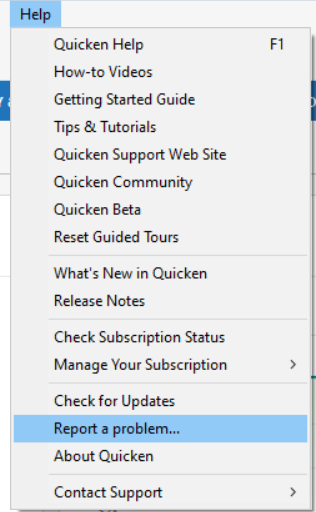
While you will not receive a response through this submission, these reports will help our teams in further investigating the issue. The more problem reports we receive, the better.
We apologize for any inconvenience!
Thank you.
(CTP-15804)
Quicken Kristina
Make sure to sign up for the email digest to see a round up of your top posts.
1 -
Done! Fingers crossed! Thank you!
1 -
Don’t keep those fingers crossed too long. They might get stuck that way. Sometimes those little fixes take the longest. Sometimes not.
2 -
I estimate this issue has been occurring since November 2021. Has it really not been reported before? Are you able to investigate whether it has been reported previously?
0 -
I did find another one around that November 2021 time:
I expect the guess that adding the "day" interval messed things up is correct, but Quicken, like God, moves in mysterious ways.
1 -
I realize this may have some history within the community. I’m curious whether there’s a way to see if others have formally reported this issue through “Report a Problem” to the team that handles actual changes.
0 -
Thank you for the follow-up,
No, there isn't any tool that allows customers to see what issues others have reported through Report a Problem. Those reports go to a database which is reviewed daily to track potential trending issues and for troubleshooting/escalation purposes.
You are able to see which issues have been reported to Support enough to get a Community Alert created. Those alerts can be viewed in the Alerts, Online Banking & Known Product Issues section of the Community: .
I hope this helps!
Quicken Kristina
Make sure to sign up for the email digest to see a round up of your top posts.
0 -
Kristina,
I understand that the general community does not have visibility into our submissions.
However, regarding your comment — “I was able to replicate the issue in my Quicken and forwarded it to the proper channels to be further investigated. In the meantime, we request that you please navigate to Help > Report a problem and submit a problem report with log files attached in order to contribute to the investigation” , are you or other members of the moderator team able to research or reference your submitted report?
I’m trying to understand whether moderator submissions are accessible to the team conducting the investigation, or if each user submission is handled independently.
Thank you for the clarification.
0 -
Thank you for your reply,
Yes, when we forward an issue to the proper channels, we create a ticket which moderators and our teams are able to see. The ticket number for this issue is CTP-15804.
Thank you!
Quicken Kristina
Make sure to sign up for the email digest to see a round up of your top posts.
0 -
Thanks, Kristina. Is the ticket reviewed periodically? If so, could your team please update this thread if the priority or ETA changes?
0


