I'm wondering if I'm paying for more than I need

I've been using Quicken's Classic Business & Personal version for several years. Over the last 10 years Quicken has been increasing the price they require paid. I've been OK with the price increase, until this year. It is now about $150, which for my family's budget, it has gotten to be more than I can justify. I work full time, and have a small side business, which some years doesn't bring anything in at all. My wife occasionally sells dog treats, but that is inconsistent. We don't really have inventory, even for her, as what she makes, she sells. The two side gigs bring in a few hundred dollars, but that's it. We don't have any rental properties.
With the latest increase that Quicken demands, I just don't see that we need what we're paying for Quicken's Classic Business & Personal version. What version of Quicken would be better suited to our circumstances?
Best Answer
-
Hello @Rod F.,
Thank you for reaching out! The easiest way to figure out which subscription tier will best meet your current needs is to consider which features you currently use/need.
Do you currently use any of the business features? If you do, which ones do you use? Do you track investment accounts in your Quicken? Which reports do you use?
For a general side-by-side comparison of which features are in which subscription tier, I recommend checking this section of our website: . Scroll down to where it says "Business & Personal, Premier, or Deluxe?" and review to see which subscription tiers the features you need can be found in.
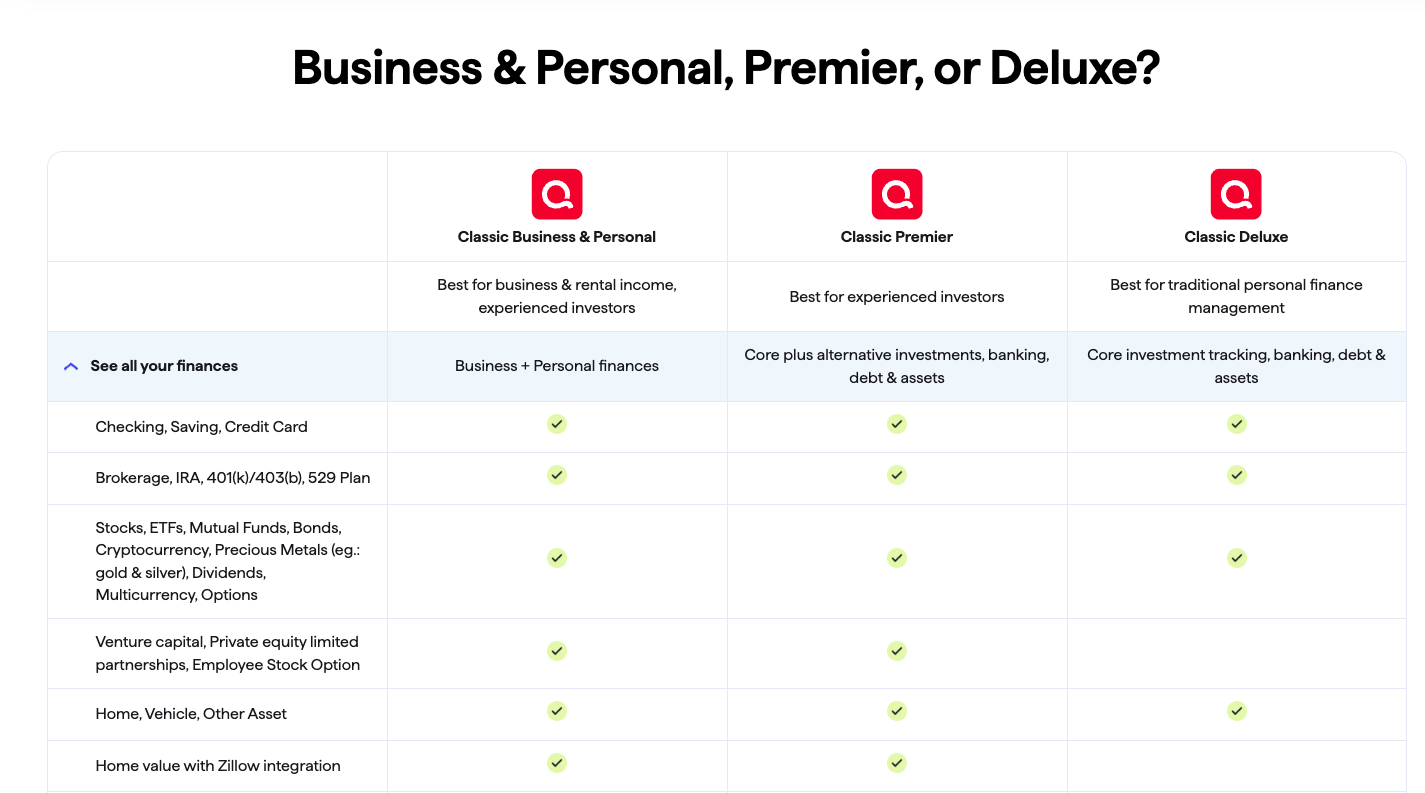
If there's a feature you need that isn't listed on that page, please let me know and I'll look it up for you.
I hope this helps!
Quicken Kristina
Make sure to sign up for the email digest to see a round up of your top posts.
1

Answers
-
Hello @Rod F.,
Thank you for reaching out! The easiest way to figure out which subscription tier will best meet your current needs is to consider which features you currently use/need.
Do you currently use any of the business features? If you do, which ones do you use? Do you track investment accounts in your Quicken? Which reports do you use?
For a general side-by-side comparison of which features are in which subscription tier, I recommend checking this section of our website: . Scroll down to where it says "Business & Personal, Premier, or Deluxe?" and review to see which subscription tiers the features you need can be found in.
If there's a feature you need that isn't listed on that page, please let me know and I'll look it up for you.
I hope this helps!
Quicken Kristina
Make sure to sign up for the email digest to see a round up of your top posts.
1 -
You can track income and expenses that are reported on IRS Schedule C with Premier and I think also Deluxe. Business & Personal can produce invoices and estimates and the reports that are on the Reports > Business and > Rental Property menus. If you don't need any of those, Premier or (I think) Deluxe should be fine.
Mrs. H taught piano for several years and Premier was fine for that.
QWin Premier subscription6 -
Just to confirm what @Jim_Harman said you could certainly use Deluxe for this. In the area of tax reports Quicken Deluxe has less "individual reports" like Schedule A, B, and D, but it has the Tax Schedule and Tax Summary reports which will give the same information.
Premier does have more features though like Zillow, Morning Star Portfolio, the Performance tab and such but Deluxe is still quite usable.
0 -
Thank you everyone for your feedback. Looking over what you've said, I've got a couple questions.
First, it looks to me like Classic Premier would be sufficient for our needs. How do I get that/downgrade to that?
Second, I'm guessing that Classic Premier is like Classic Business & Personal, in that I would install it on my desktop. However, I think that Quicken has either a web version or perhaps a mobile version. Is the web/mobile version cheaper than the equivalent Classic versions?
0 -
Thank you for your reply,
Quicken Classic Premier is still the same Quicken Classic program, just a different subscription tier, so you wouldn't have access to the features which are exclusive to Quicken Business & Personal. For information about downgrading your Quicken subscription, please see this article: .
There is something important about downgrading that the article does not make clear: When you downgrade, you are not downgrading your current subscription. You are renewing your subscription at a lower tier.
The web/mobile version would be Quicken Simplifi. It is a bit less expensive than the comparable Classic version. For more information, please review this section of the Quicken website: . That said, there are a few things you should know if you're considering switching:
- Currently, there is no tool to convert Quicken Classic data to Quicken Simplifi or vice versa. You'd be starting fresh.
- Quicken Simplifi has a lot fewer report options.
- Quicken Simplifi's features for investments are far behind what's available in Quicken Classic.
I hope this helps!
Quicken Kristina
Make sure to sign up for the email digest to see a round up of your top posts.
0

