Planning for Bilt 2.0 Mastercards & Quicken Downloads

Planning ahead for the new Bilt 2.0 Mastercards and how to download transactions.
Bilt 1.0 Mastercard was with Wells Fargo.
Bilt 2.0 Mastercards are serviced by Cardless, Inc. and issued by Column N.A., Member FDIC.
I cannot find Column N.A. in the 14,000+ supported institutions. HOWEVER…………
Column National Association (Column N.A.) is a nationally chartered bank, formerly Northern California National Bank.
Northern California National Bank ("NorCal") was acquired in 2021 by investors Annie and William Hockey for approximately $50 million. Following the acquisition, the Chico-based bank was rebranded to Column National Association.
Northern California National Bank is still listed as one of the 14,000+ supported institutions.
Will be interesting how to download Bilt 2.0 transactions…….
Comments
-
Have you asked the bank's management itself for their comment on this matter?
It's up to the bank to decide if and how they want to support third party downloads thru Intuit Inc. as the service provider. If they do and once the service is available, then there will (should) be appropriate instructions on the credit card website.-1 -
I have the same issue. I'm not able to connect to Bilt from Quicken to download transactions.
0 -
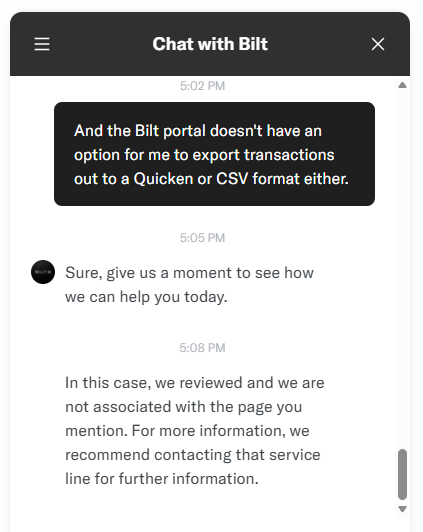
This is Bilt's response -
 0
0 -
Any update Quicken regarding being able to connect to Bilt 2.0?
0 -
Updates would have to come from the bank. They, and they alone, can authorize downloads into Q as the bank needs to make system changes on their side in order for it to happen.
Q user since February, 1990. DOS Version 4
Now running Quicken Windows Subscription, Business & Personal
Retired "Certified Information Systems Auditor" & Bank Audit VP0 -
Quicken Simplifi got the Bilt 2.0 via Plaid. Hopefully Classic gets it in the next update. 🤞
https://community.simplifimoney.com/discussion/15691/bilt-mastercard-no-longer-supported-via-wells-fargo-api-switched-to-cardless-inc-edited5 -
Is there a way to escalate this into the Quicken Subscription as they're working to escalate it into Quicken Simplifi?
0 -
It doesn't feel like these posts are even monitored. It's unclear whether the successful Simplify integration with Bilt 2.0 indicates the same capacity for "Classic." I don't see why not, but can someone (anyone) provide a response?
0 -
@Quicken Janean @Quicken Anja Do you have any insights when Windows/Mac Classic will get the Bilt 2.0 integration via Plaid.
For reference,https://community.simplifimoney.com/discussion/15691/bilt-mastercard-no-longer-supported-via-wells-fargo-api-switched-to-cardless-inc-edited
0 -
Hello everyone,
Thank you for posting.
We do have an active Alert regarding Bilt Rewards (Bilt 2.0) connectivity issues through Plaid, including transactions not downloading, $0 balances, and “INSTITUTION NOT RESPONDING” errors.
Please refer to this Community Alert. This issue has been escalated internally and is currently being investigated. While we do not have an ETA at this time, updates will be posted to the Alert as they become available.
To receive notifications, please bookmark the Alert thread.
Thank you!
[Edited - Link Removed, See Update Below]
-Quicken Anja
Make sure to sign up for the email digest to see a round up of your top posts.0 -
Thank you @Quicken Anja. Following the alert.
0 -
When I click on "community alert" in Anja's post I get the error "Discussion Not Found"
0 -
thank you for the update, i to am looking to download bilt 2.0 transactions, as we were able to download both previous bilt banks into quicken classic. hopefully this gets resolved quickly.
0 -
Hello everyone,
I apologize for any confusion and want to clarify what happened with the Community Alert.
After further internal review, it was determined that the connectivity issue referenced in the Alert that was previously linked above applies specifically to Quicken Simplifi (which supports Plaid connections). As a result, the Alert was reclassified and remains active in the Simplifi Community, but it does not apply to Quicken Classic.
At this time, Bilt 2.0 is supported in Simplifi via Plaid. However, Quicken Classic (Windows and Mac) does not currently support Plaid connections, and Bilt 2.0 is not available through Classic’s aggregation channels.
We understand this is disappointing, and our teams are continuing to review options with our aggregation partners, but there is no ETA to share regarding Classic support at this time.
We apologize for any inconvenience, thank you!
-Quicken Anja
Make sure to sign up for the email digest to see a round up of your top posts.0 -
Thank you for the update @Quicken Anja Hopefully this will be resolved very soon for those of us on Quicken Classic!
0 -
You're welcome @MamaHutt—we appreciate your patience as we continue to explore options for Quicken Classic.
-Quicken Anja
Make sure to sign up for the email digest to see a round up of your top posts.0 -
Appreciate the update @Quicken Anja. 🤞hoping Plaid support in Classic sooner than later.
In the mean, I'm doing offline tracking and Bilt doesn't support Quicken export, so alot manual work. It is what it is.0 -
I found a workaround! (thanks for the BILT Rewards group on FB: https://www.facebook.com/groups/622902726089949)
I'm using Quicken Classic for Mac
+ I had to first get, yet another subscriptions - one for their separate product, Quicken Simplifi (get it via Rakuten as there is 10% ref WWW.RAKUTEN.COM/R/MAC751 - btw this ref link gives $50) - first year $50, regular is $100 annual. (Btw, Simplifi and Classic are 2 different Quicken products, in case you were wondering - which is another story that makes no sense at all LOL)
+ Simplifi uses Plaid, of which BILT is connected with. Transactions automatically downloaded.
+ Simplifi has Export to CSV
+ Used my free LibreOffice (you could likely also use Google Docs or MS Word), and when opening, have it convert the Date from “Mar 1, 2026” to MM/DD/YYYY. LibreOffice will ask you when you first open the CSV file. Keep this open.
+ Quicken Classic for Mac, Import - choose from Mint CSV. First download the sample CSV, as it needs to have the same column headings, in the same order, and formats. Open the Sample for reference.
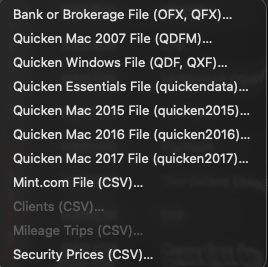
+ Within LibreOffice, rename and reorder the columns to match the sample. Leave debit/credit column with blank entries.
+ Go back to Quicken Classic and complete the Import. Copy full set to manually created BILT card.
+ Repeat each month or whatever schedule.
Using Quicken Simplifi for just that one Import/Export feature LOL. So for me, the extra $100/year is just the cost of getting all these extra points - happy camper!
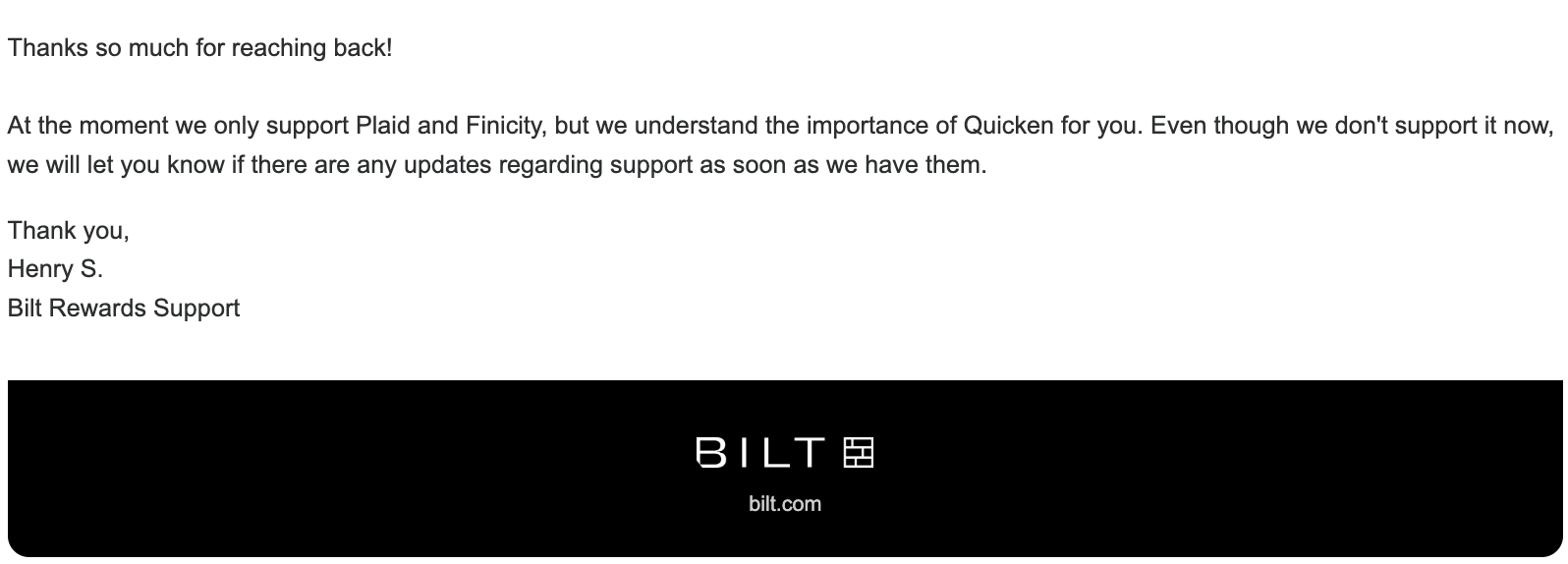
Btw, I did email BILT and they were quick to respond in a day as follows:
At the moment we only support Plaid and Finicity, but we understand the importance of Quicken for you. Even though we don't support it now, we will let you know if there are any updates regarding support as soon as we have them.
 0
0 -
I called Bilt and the representative had never heard of Quicken.
0 -
@mchinsomboon Thank you for taking the time to share this information, that's very helpful!
@rakeshagarwala Most frontline customer service agents may not be familiar with third-party software such as Quicken. When that happens, we recommend asking to speak with a supervisor or a Tier 2 support agent, as they may be more familiar with external integrations.
Thank you!
-Quicken Anja
Make sure to sign up for the email digest to see a round up of your top posts.0 -
C'mon, Quicken. It's ridiculous that Quicken Classic still cannot connect to Bilt 2.0 credit cards. How can a leading financial software product not be able to connect through Plaid, which almost every major financial institution now uses. Don't you have coders on staff to address this?
0 -
Hi @fredwooch,
We completely understand your concerns regarding Quicken not yet supporting Bilt 2.0.
Please be assured that our team is actively working on adding Bilt 2.0. Updates of this nature can sometimes take longer than anticipated, and at this time, there isn’t a confirmed timeline for resolution.
We truly appreciate your patience and understanding, and we will share any new information as soon as it becomes available.
Thank you!Quicken Carlos
Make sure to sign up for the email digest to see a round up of your top posts.
0 -
I'm not sure if this is a new feature Bilt just added but here's a solution ( no, it's not automated imports, but it's also better than manually typing in the transactions )
Step 1 : Create Bilt card transaction export file
- Go to Bilt Website
- Navigate to Wallet ( cards) and click on your Bilt credit card
- Section under the card image is Recent Transactions. Click on "View All" in top right corner of that section
- Click on the three vertical dots to the right of "Recent transactions" and "Download as CSV"
- Choose the date range you want and hit "Download"
Step 2 : convert CSV to proper import Quicken format
Create the following macro in Excell. This assumes the Bilt credit card account name in your quicken is Bilt.
If it's not — change the name in the macro below accordingly
Sub bilt_transform()
'
' bilt_transform Macro
''
Columns("C:C").Select
Selection.Cut
Columns("B:B").Select
Selection.Insert Shift:=xlToRight
Columns("C:C").Select
Selection.Insert Shift:=xlToRight
Columns("E:E").Select
Selection.Cut
Columns("D:D").Select
Selection.Insert Shift:=xlToRight
Columns("E:E").Select
Selection.Insert Shift:=xlToRight
Selection.Insert Shift:=xlToRight
Range("H1").Select
ActiveCell.FormulaR1C1 = "Account"
Range("H2").Select
ActiveCell.FormulaR1C1 = "Bilt"
Range("A1").Select
ActiveCell.FormulaR1C1 = "Date"
Range("B1").Select
ActiveCell.FormulaR1C1 = "Payee"
Columns("G:G").Select
Selection.Delete Shift:=xlToLeft
Range("G2:G11").Select
Selection.FillDown
Range("E2").Select
ActiveCell.FormulaR1C1 = "Debit"
Range("E2:E11").Select
Selection.FillDown
End SubOpen the export file created in step 1, and run the macro against that file
you may need to populate more rows with the "bilt" account name and "Debit" in transaction type if your file has more than 10 transactions. If it has fewer, clean up these 2 field for empty records.
If you have any "return" transactions, you need to manually populate "Credit" in this column, instead
Save the file.
Step 3: import into quicken
In Quicken, click on File → File Import → Banking transactions → from (.CSV) file → "choose .csv file to import"
select the proper converted file
The transactions should appear in your Quicken register. You may want to go through them and assign categories — as you normally would when importing transactions.
0 -
Hello @pit239,
Thank you for taking the time to share such a detailed workaround! This will be really helpful for anyone using Quicken Classic for Windows who wants to track Bilt 2.0 transactions without having to manually enter everything.
While this isn’t an automated import, it’s a great interim solution until Quicken Classic supports Bilt 2.0 natively via Plaid. Your step-by-step instructions will make it much easier for users to follow along.
Thanks for sharing!
-Quicken Anja
Make sure to sign up for the email digest to see a round up of your top posts.0



