Principal Financial 401(k) shows wrong balance
Answers
-
Glad I found this thread, originally added Principal 401k as a manual account recently. I noticed Principal was supported as an online service and was about to connect it. I will hold off for now until someone can confirm the reported issue is fixed
1 -
Status ? Three months waiting on this to be corrected.
2 -
Hello @jc999,
Thank you for reaching out. The ticket is still open and in work. There are no new updates.
Thank you!
(CTP-14320)
Quicken Kristina
Make sure to sign up for the email digest to see a round up of your top posts.
0 -
Hello All,
Thanks for checking in. I took another look at the internal ticket for this Principal 401(k) issue, and it is still open and actively being worked on by our teams. A fix is in progress; however, we don’t have an ETA available at this time.
I know this has been a long-running frustration, and we really do appreciate everyone’s continued patience and the reports you’ve submitted.
Thank you!
-Quicken Anja
Make sure to sign up for the email digest to see a round up of your top posts.1 -
Anja, thank you for the update!
0 -
@Geiswood You're welcome!
-Quicken Anja
Make sure to sign up for the email digest to see a round up of your top posts.0 -
Our scripting team is looking for more examples and has asked if you both could please attempt to update your online accounts (all accounts), and then submit new log files and a screenshot of the issue via Help > Report a problem again.
Please let me know once that is done! Thank you.
-Quicken Anja
Make sure to sign up for the email digest to see a round up of your top posts.0 -
Sent. Problem persists.
-mk
0 -
@mk0 Thank you! I will get them submitted to our team.
-Quicken Anja
Make sure to sign up for the email digest to see a round up of your top posts.0 -
I just downloaded a new 401(k) account with Principal into my Quicken for Mac and I have the same issue. Doesn't look like it is resolved yet.
1 -
same issue here. also using quicken for mac.
1 -
Has it been determined if this is a Mac version only issue?
1 -
Hello @BryanK,
So far, only Quicken for Mac users have reported this issue. Are you encountering this issue in Quicken for Windows?
I look forward to your response!
Quicken Kristina
Make sure to sign up for the email digest to see a round up of your top posts.
1 -
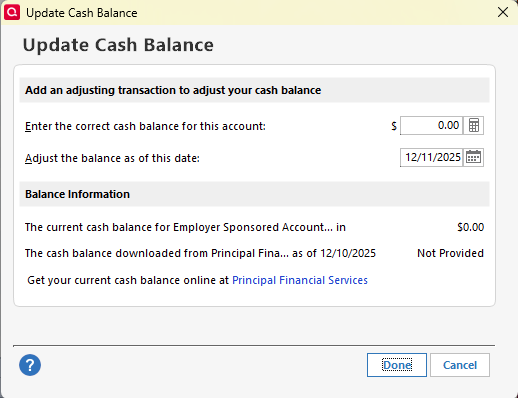
I primarily use Quicken on a mac, but I have access to a Windows machine so I downloaded and tested my Principal account there. The main difference I found is that when adding (and then updating) the account, Quicken Classic for Windows asked me to verify and enter the cash balance for the account because that data point isn't being provided by Principal, apparently. I don't know if this helps the developers with the problem, but the balance is correct for my account in Quicken Classic for Windows and it is double (because of the wrong cash balance) in Quicken Classic for Mac. Happy to provide any more information if it will help solve this problem more quickly. It's been months.
 2
2 -
Issue persists with Quicken for Mac 8.4 - Principal 401k problem persists. Total Market value is doubled because the Cash Balance still incorrectly = the Fund balance. I've submitted a fresh Error report via the app.
1 -
This issue is coming up on 5 months old. When will this be resolved?
1 -
Hello @mk0,
Thank you for your patience—I completely understand how frustrating this ongoing issue is.
The Principal 401(k) balance discrepancy is still being actively investigated, and our teams are working closely with the financial institution and our service providers to resolve it. Because the resolution depends on coordination between multiple parties, we don’t have an ETA to share at this time.
We really appreciate everyone submitting logs and screenshots, as those reports continue to be very helpful in moving things forward.
Thanks again for your patience!
-Quicken Anja
Make sure to sign up for the email digest to see a round up of your top posts.0 -
I am also experiencing this issue. Perhaps time to find a new provider. Please send updates.
0 -
Hello @Cyclone,
Thanks for checking in. As mentioned above, this Principal 401(k) balance issue is still actively being worked on, and resolution requires coordination with the financial institution and our service providers. At this time, we don’t have an ETA to share.
If you’d like to be included in the investigation, please submit the following via Help > Report a problem in Quicken:
- Log files
- Screenshots showing the issue
- A sanitized copy of your data file
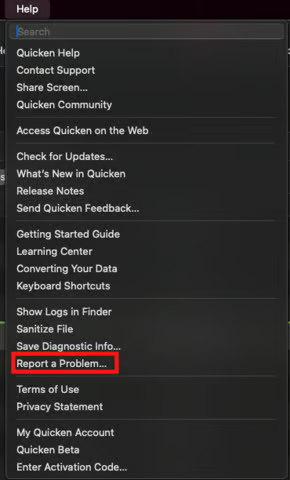
Those reports help our teams gather additional examples and continue moving the investigation forward.
Let us know once you have done so! Thank you.
-Quicken Anja
Make sure to sign up for the email digest to see a round up of your top posts.0 -
Quicken - I have been using quicken for 33 years and this problem should have been fixed by now. We pay a lot of money for this service and this is just silly that it hasn't been fixed.
0 -
6 months now…. Absurd.
1 -
Perhaps the team could implement something like the Windows side has, the ability to manually enter and edit the cash balance…
0 -
We may have a fix happening on the Principal side - as Anja mentioned. This morning's connection I had a negative adjustment show in transactions to correct my balance. I deleted the positive and negative adjustments manually from the transaction screen (holding the option button) and reconnected again and the balance came through correct. Hopefully this holds and is the fix we needed.
0 -
I see the same, an adjustment to the cash balance to wipe it out. Question to Quicken - if we remove our principal account and re-add it, will it come in as a new accoucnt with or without this cash balance problem?
What this is, is a go forward fix. It does not correct the data from the last 6 months. For example, the account Portfolio Tab shows that my account balance halved overnight.0 -
Hello All,
A developer on our internal ticket confirmed that a Principal Financial 401(k) account we were testing now reflects the correct balance. When you have a chance, could you please check your account and confirm whether your balances are now showing correctly?
Your feedback helps us verify the fix across affected users.
Thank you!
-Quicken Anja
Make sure to sign up for the email digest to see a round up of your top posts.0 -
Yes, it's correct, but as noted above, the last 6 months of history is incorrect. would delete and re-adding the Pricipal account fix that?
0 -
My account seems correct after removing and re-adding it. I’ve only had an account at Principal for 5 months so I can’t test how far back history holds if I had more history I wanted to maintain.
0 -
Huzzah!
The balance on my Principal 401(k) account is CORRECT!
Thank you to all for their efforts.
And especially, thanks to Quicken Anja for her persistence and patience.
Stephen
1 -
Hello @mk0, @thoff, and @Geiswood,
Thanks for the updates! I’m glad to hear the balances are now showing correctly for many of you.
@mk0—yes, you can try removing and re-adding your Principal account to see if it resolves the historical balance issues. However, I would strongly recommend saving a backup first so you have something to revert to if needed.
For everyone else, please continue to monitor your accounts and let us know if you notice any discrepancies. Your feedback is helping verify the fix across different users.
Thank you all for your patience and for sharing your experiences!
-Quicken Anja
Make sure to sign up for the email digest to see a round up of your top posts.0 -
Balance looks good on my end as well! Cash is showing $0. Thank you!
0


