Tax Planner Errors
Answers
-
Hello All,
Thank you for taking the time to report this issue!
We will be forwarding this issue to the proper channels to have this further investigated. However, we request that you please navigate to Help > Report a problem within your Quicken program and submit a problem report with log files and screenshots attached in order to contribute to the investigation.
It would also aid the investigation to include a sanitized file when submitting the problem report. A sanitized file is a data file that removes personally identifiable information so you can comfortably share this file with the Quicken team.
While you will not receive a response through this submission, these reports will help our teams in further investigating the issue. The more problem reports we receive, the better.
Please let us know once that is done, and we apologize for any inconvenience in the meantime! Thank you.
(CBT-1029)-Quicken Anja
Make sure to sign up for the email digest to see a round up of your top posts.0 -
Please provide instructions on creating a sanitized file.
Thank you
0 -
When you do Report a Problem and select the option to provide a Sanitized file, Quicken will automatically create the Sanitized file so there is nothing you need to do in that regard.
Optionally, you can manually go to Help > Contact Support > Sanitize Data File Copy. Then you can attach the copied file to your reporting of the problem. But that's just more work for you.
Quicken Classic Premier (US) Subscription: R66.23 on Windows 11 Home
0 -
@petermartin1950 as @Boatnmaniac mentioned, Quicken will automatically create the sanitized file when you submit it through Help > Report a problem.
To add a bit more detail, in the Report a problem window, you’ll see a checkbox option to include a sanitized data file. Just make sure that box is selected before submitting.
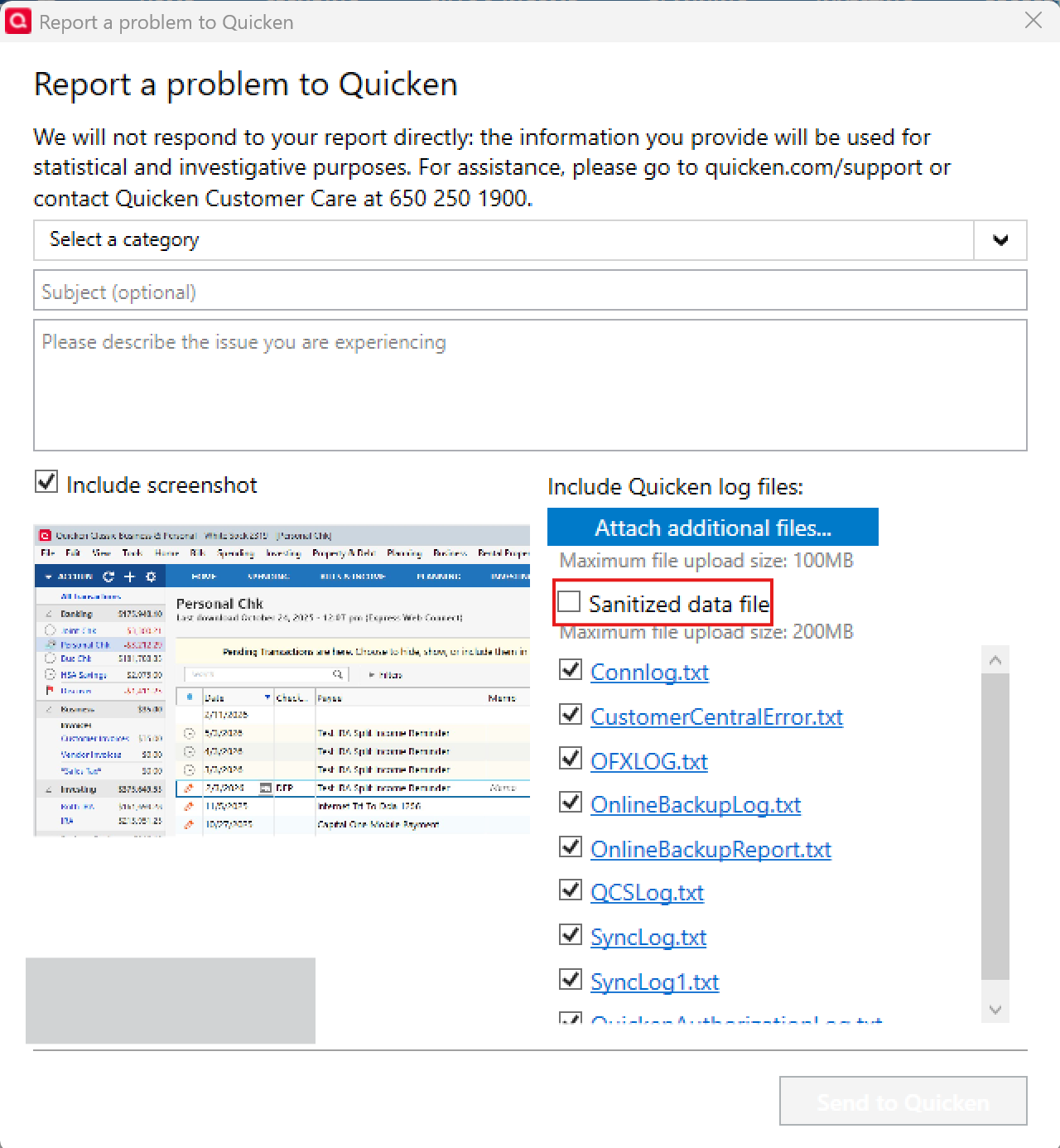
Hope this helps!
-Quicken Anja
Make sure to sign up for the email digest to see a round up of your top posts.0 -
The title of this thread is "Tax Planner Errors" but agree with @markus1957 that the primary issue here appears not to be a Tax Planner issue/error. It is an issue related to Reminders losing stability. The Tax Planner errors are symptoms of the issue, not the cause of the issue.
There still is the Tax Planner issue that I and @Jim_Harman both mentioned earlier in the thread where Tax Planner is not retaining manually entered edits thereby periodically requiring review and correction edits to be made but this does not appear to be the primary issue of this thread.
Quicken Classic Premier (US) Subscription: R66.23 on Windows 11 Home
2 -
Excellent sleuthing. But I don't think this goes anywhere from here to the people at Quicken who fix program errors. You would have to enter all this over again in the Quicken Program Help/Report a problem… menus. You need to send the a "Sanitized" file of your data. I don't know how to create a "Sanitized" file of my data.
I don't expect much "fixing" of the issues with the Program using this platform.
-1 -
I told you how to create the Sanitized file as did @Quicken Anja. It's so simple…just go to Help > Report a Problem > give a brief description of the problem > check the box for Sanitized file and Quicken will do it for you as the report is being sent.
When you submit the report you can insert the URL for this discussion thread into the body of the text you enter to describe the issue. That will help the Development Team tie the report directly to this thread.
I have had enough direct communications with Development Team members and their leadership over the years to know that they really do pay a lot of attention to the reports that have been submitted. And the Moderators can also help to escalate issues that have been reported both via Report a Problem and via Quicken Support.
Quicken Classic Premier (US) Subscription: R66.23 on Windows 11 Home
1 -
Thank you. I'll give that a try. I have other issues that's been happening for years but I'm reluctant tot spend the time describing them literally.
-1 -
One at a time. Take care of this one first and then, at your leisure, report another at a later time. I think people who get the most frustrated with Quicken fall into 1 of 2 categories: (1) Those who try to fix every issue all at the same time and (2) those who never bother reporting any of the issues they are experiencing.
Quicken Classic Premier (US) Subscription: R66.23 on Windows 11 Home
0 -
Painfully discovered with Marco at Quicken Support that my Sanitized Data file is too large to upload.
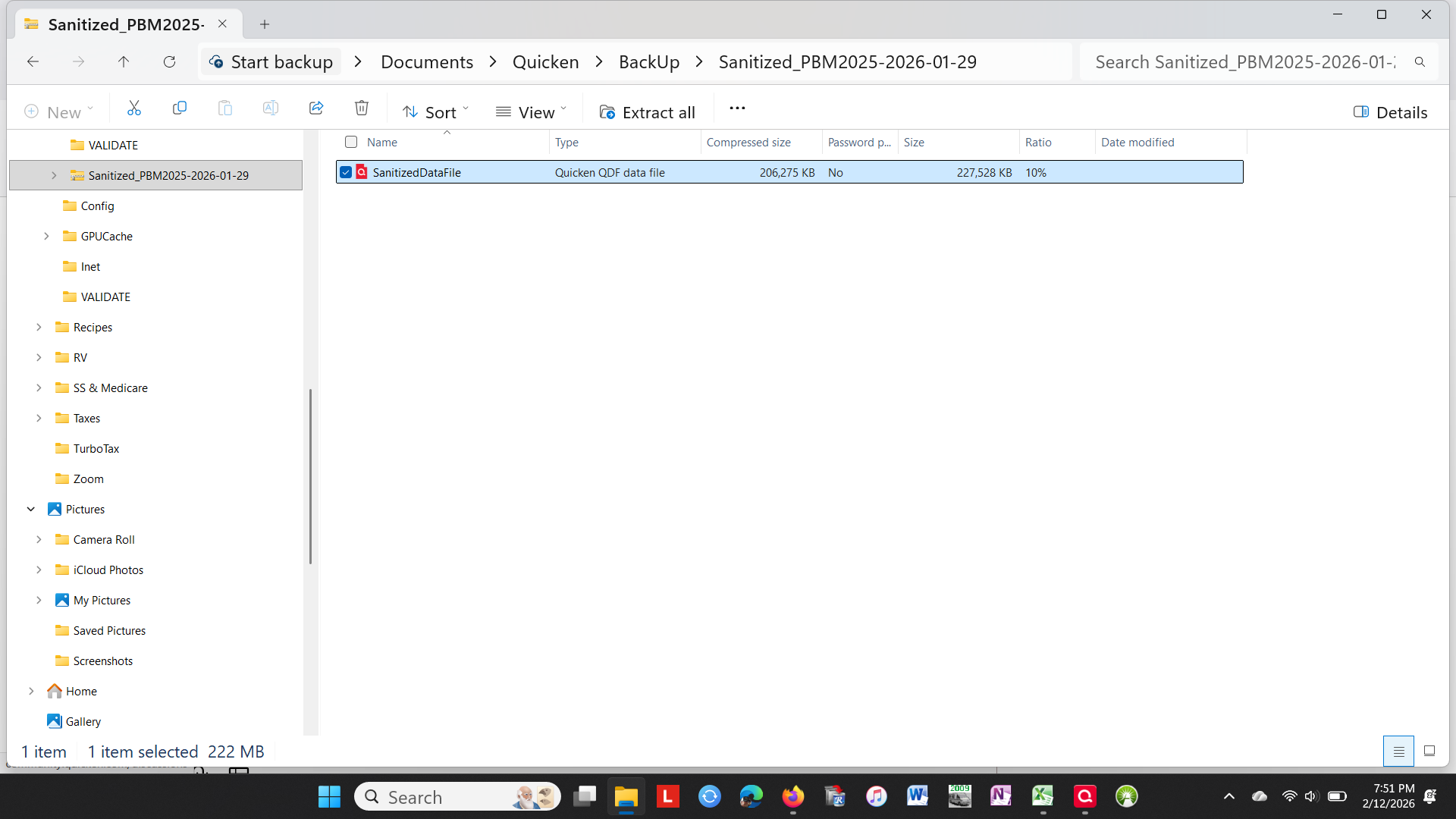
What do we do next? I believe these program issues need to be resolved. Otherwise this program does not work as intended and rendered useless for Planning purposes.
0 -
@petermartin1950 if a sanitized version of your working data file is too large to upload, about all you can do to help Quicken diagnose this problem is to see if you can tell what reliably triggers it.
As we have discussed above, it appears the there are at least 2 issues that cause Tax Planner results to get scrambled. One is that the tax planner settings sometimes change unexpectedly. I don't think that is the issue you are seeing.
The other issue is that split Reminders including paychecks sometimes get scrambled, and that in turn affects the Tab Planner results. I think that is the issue you are seeing. This appears to be related to syncing to the Quicken Cloud, but no one has yet been able to describe exactly what happens.
If someone can produce a test file that repeatedly causes this problem, that would be very helpful for the developers.
In the meantime, you can try disabling syncing and/or going through the recovery steps described by @markus1957 to see if that stops the problem you are seeing.
Please let us know what you find.
QWin Premier subscription0 -
I fully understand what you are telling me. And I agree. From what I've done repeatedly to fix this error I can surmise this:
Scheduled transactions not yet posted get scrambled. When? How? that's for the programmers to find.
Once a scheduled transaction is posted, the TP picks it up correctly.
My temporary fix to save my sanity was to eliminate the split Scheduled transaction. Now life is good.
0 -
BTW what reliably triggers the scheduled transaction scrambling in the TP Projected Amounts is closing the TP or Quicken. Perhaps Syncing to the Cloud may also be an issue.
0 -
The main discussion about scrambled splits in Reminders is here
and there are several other related discussions that you can find by searching for the tracking number CBT-746.
It appears that the Tax Planner errors that @petermartin1950 is seeing are a result of this scrambling. Apparently it is not just the order of the split lines that is changing, but sometimes the split amounts are being assigned to the wrong Categories. Because the Tax Planner uses the Reminders for its projections,
@Quicken Anja The earlier discussions of the CBT-746 issue have been closed. Is there any update on the status of that issue? Have the developers been able to replicate the problem in house, or do they still need more data?
QWin Premier subscription0 -
[Update- While the following process works, it is simpler to reproduce as Jim Harman has outlined below]
I believe I have come up with a means of reproducing the scrambled splits in scheduled reminders. I created a template copy of my production file which reliably scrambles splits when Mobile Sync is turned On but maintains its integrity when Mobil Sync is turned Off. The steps I used follow.
- Create a Template Copy of your problem production file where SYNC has been turned Off and NO accounts are selected for syncing.
- When copying select 1/1/2026 as the start date to simplify the data set.
- Note that you do not have to reconnect the accounts in the copy to their FIs to reproduce the reminder scrambling. They can be used as manual accounts to perform the test.
- My problem reminders were all associated with my checking account, so I deleted all old accounts and investment accounts from the datafile copy leaving only the checking account and a few credit card accounts.
- Delete all memorized payees, renaming rules and securities for privacy. Delete all reminders not associated with the accounts remaining in the copy.
- Super validate the template copy and verify your Reminders are intact.
- Create another template copy of the copy to create a datafile that makes the previous deletions permanent.
- Use Template Copy #2 as the base file that you submit a sanitized version of to the developers via Report a Problem
- Super validate this copy and verify the Reminders are still intact. Save it as the base version if needed again.
- Create another Template Copy #3 from Copy #2 to use as your testing file to reproduce reminders getting scrambled.
- Turn Sync On in Copy #3. Verify your reminders are intact.
- No accounts should be selected for Syncing. In the Mobile tab, choose Sync Now and verify the reminders are still intact.
- Still in the Mobile tab, select all accounts for Sync and Sync Now. You will see the reminders have been scrambled.
If a moderator @Quicken Anja provides the subject line for a Report a Problem submission, I will send a report with a sanitized file in the Copy #2 state so it can be corrupted by the developers using the Steps 2 & 3. Other users could verify this work and if they too can reproduce the jumbled splits, send in a report.
It is a very tedious process to trim down an older data file so beware it might take you a while. Deleting the Securities was a PIA as it has to be done one at a time.
0 - Create a Template Copy of your problem production file where SYNC has been turned Off and NO accounts are selected for syncing.
-
Thanks @markus1957. I am about to try starting with a new test file with one account and a split Reminder to see if I can replicate the problem there by turning Sync on.
QWin Premier subscription0 -
I set up a test file with one account, a split reminder for salary and withholding, and syncing enabled. This is a plain split Reminder, not created by the Paycheck Wizard. The split lines in the Reminder look like this
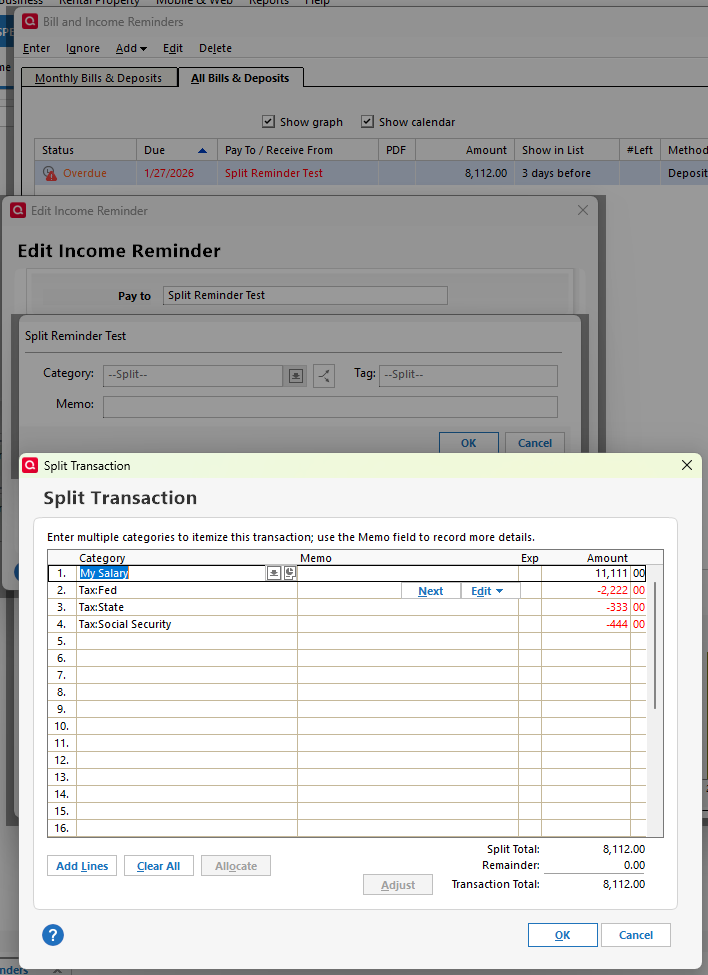
I made a template copy of the file and on the copy, did a Sync now on the Mobile and Web tab.
I checked the Reminder and the Tax Planner and nothing has changed.
Is there something else I need to do to trigger the scrambling - access the data via Quicken on the Web or something? I will continue to experiment.
[adding] I enabled Sync to cloud on closing, exited and restarted Quicken, and did a Sync now.
Now the order of the split lines in the Reminder has changed, but the amount for each split is still correct. The Tax Planner results have not changed. The reordered split lines look like this:
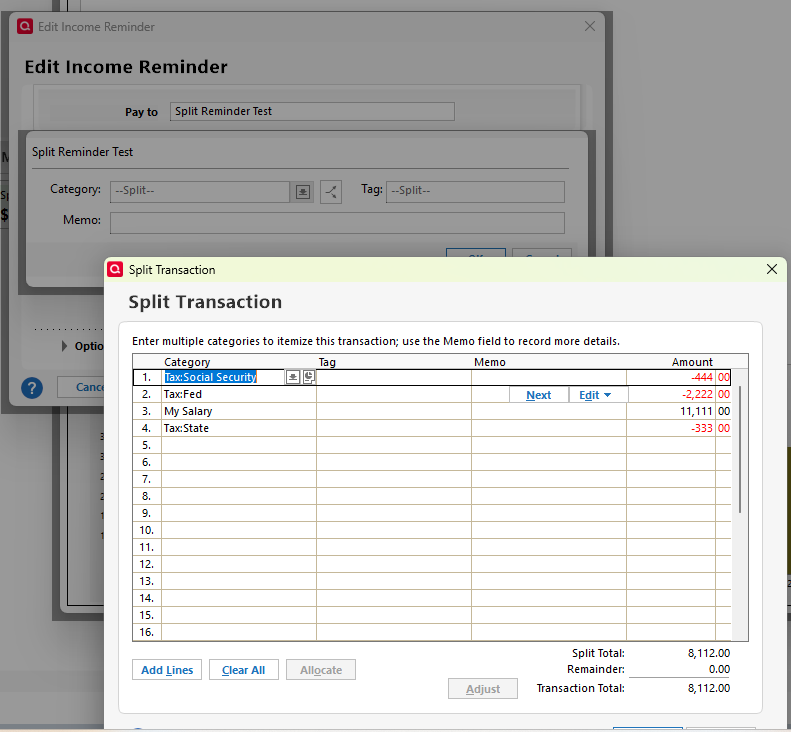
So I am able to replicate the reordering of the split lines after a Sync, but because the amount for each line is the same, the Tax Planner results are not affected.
QWin Premier subscription2 -
I've seen that happen now and then where the splits just get reordered.
0 -
@markus1957 when your splits get scrambled, what happens? Do the numbers stay the same but get assigned to the wrong categories, or what?
QWin Premier subscription0 -
With the test file sequence above, I'm only seeing the splits getting jumbled out of order, the same as you reproduced. The categories and amounts assigned to those categories were preserved. So, tax planner is not impacted.
On the other hand, if I expose my production file to mobile sync, the categories and amounts get scrambled independently so that tax planner is impacted along with reports that rely on category amount summaries.
So, the stripped-down test file that originated from my production file is behaving differently than my production file when exposed to cloud sync. Your method of a new test file with a single reminder should be much easier for the developers to troubleshoot.
I think if you login to the web product and look at your test file, you will see the split in what I'll call the wrong order because it differs from the split created on the desktop. The desktop split should not be changed by the cloud sync process.
Adding- I played around with one of the test files and found that if you login to the web app after a sync you can confirm the splits are shown jumbled in the web app. If you edit the reminders in the web app, it forces a sorting of the split rows by Amount from lowest to highest. Sync jumbles the split rows but there does not seem to be any sorting logic to the jumbled sort.
0 -
I have sent a problem report in 2 parts with sanitized test files, referencing CBT-746. This demonstrates the scrambling of the split lines after syncing to the Quicken Cloud. The first part is before syncing and the second part is after, showing the scrambled split lines.
QWin Premier subscription1 -
Hello @Jim_Harman and @markus1957,
Thank you both for the detailed testing and observations.
I’m checking internally whether this issue can be further investigated based on the new information you’ve provided, or if a new report would be the best next step. I’ll follow up here as soon as I have an update.
Thank you!
-Quicken Anja
Make sure to sign up for the email digest to see a round up of your top posts.0 -
Dismiss
0 -
That is another annoying Tax Planner bug.
In that case, try switching the selection at the bottom to User Entered and back to Scheduled Bills and Deposits.
Does that fix it?
QWin Premier subscription0 -
Hello again,
Just following up that the ticket CBT-746/CTP-13929 has been reopened, and the files @Jim_Harman provided have been added to the ticket.
Thank you!
-Quicken Anja
Make sure to sign up for the email digest to see a round up of your top posts.2 -
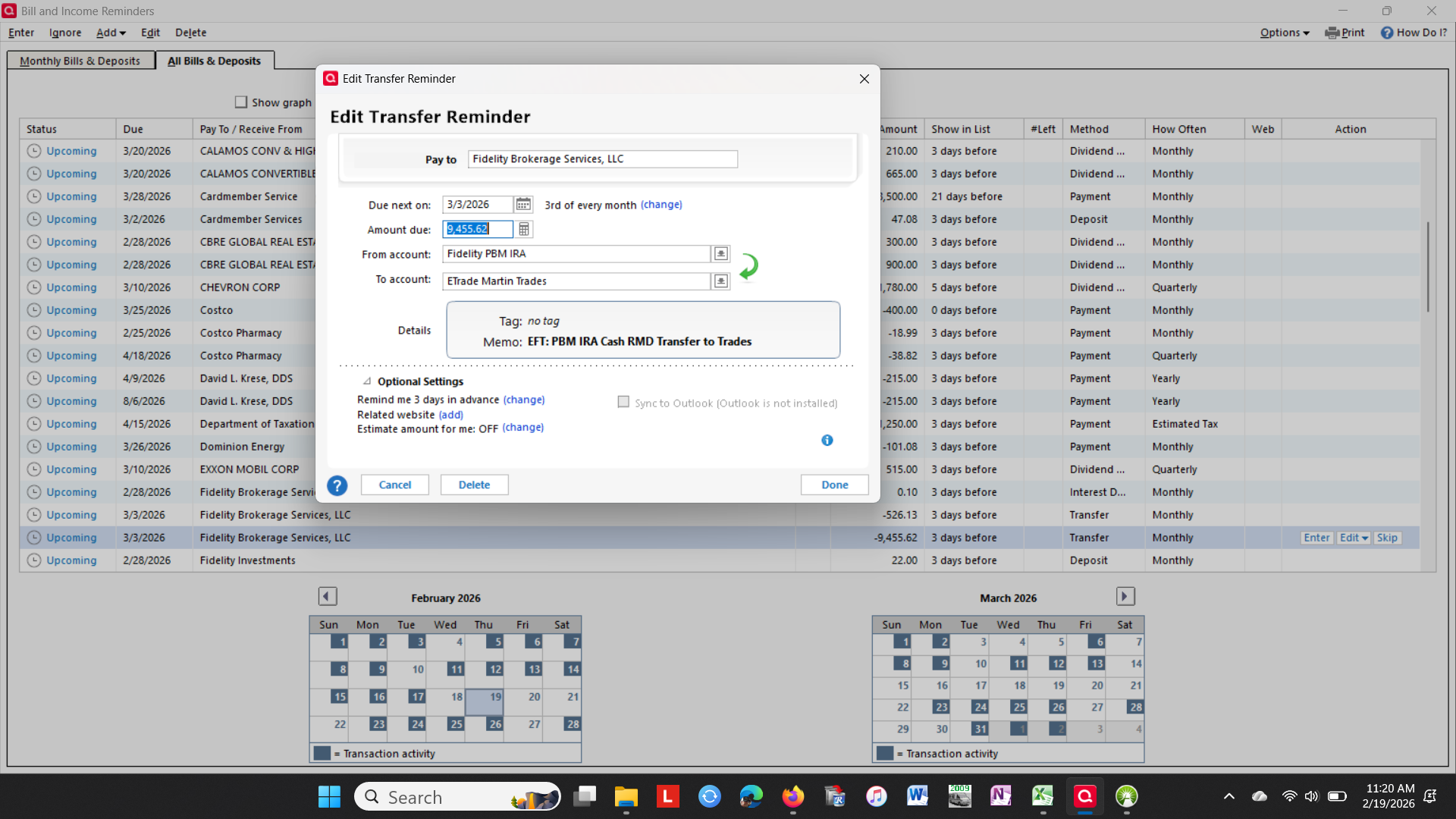
Today's screen for TP. No split scheduled transactions involved. This is just plain gobbledigook.
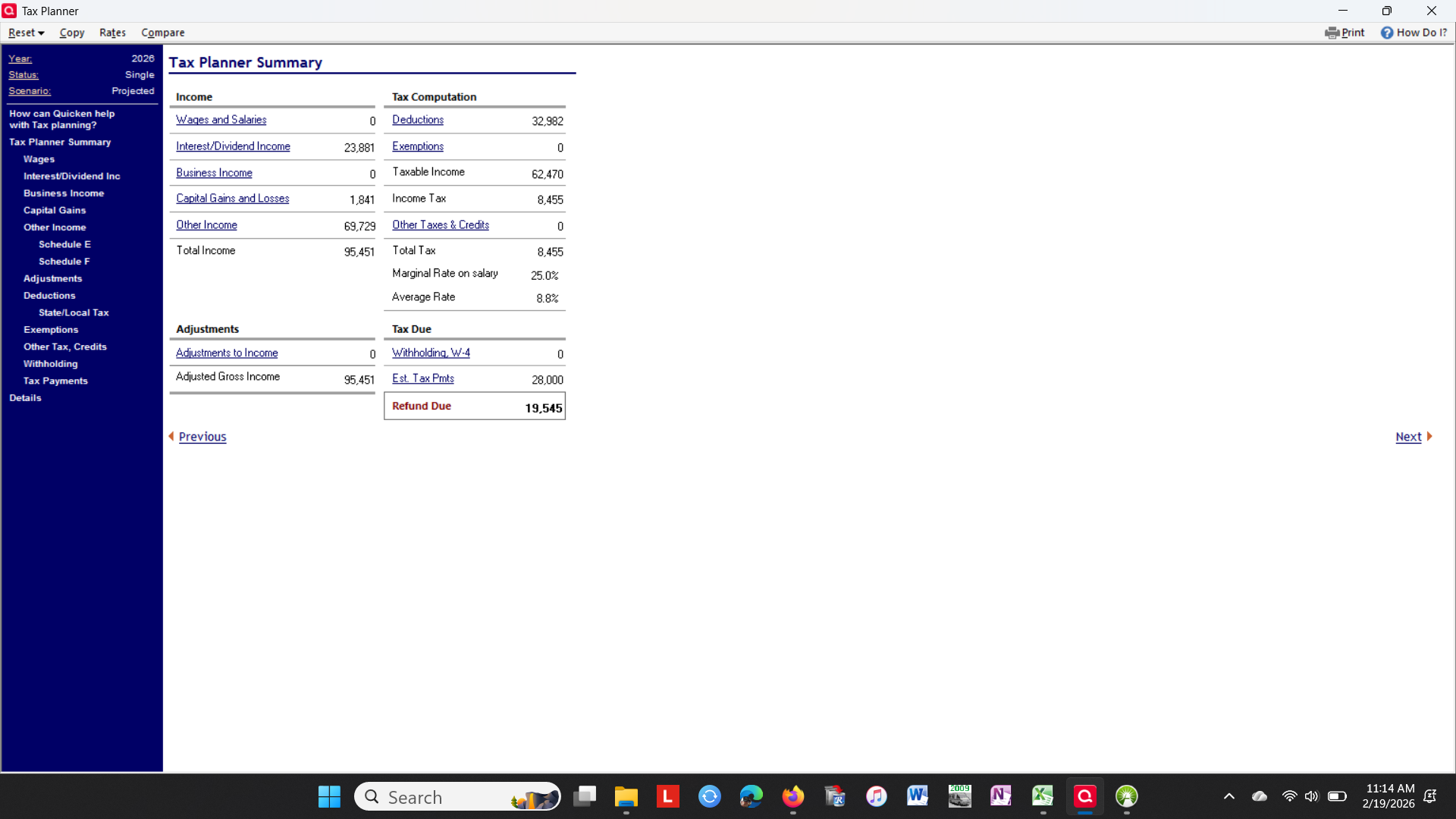
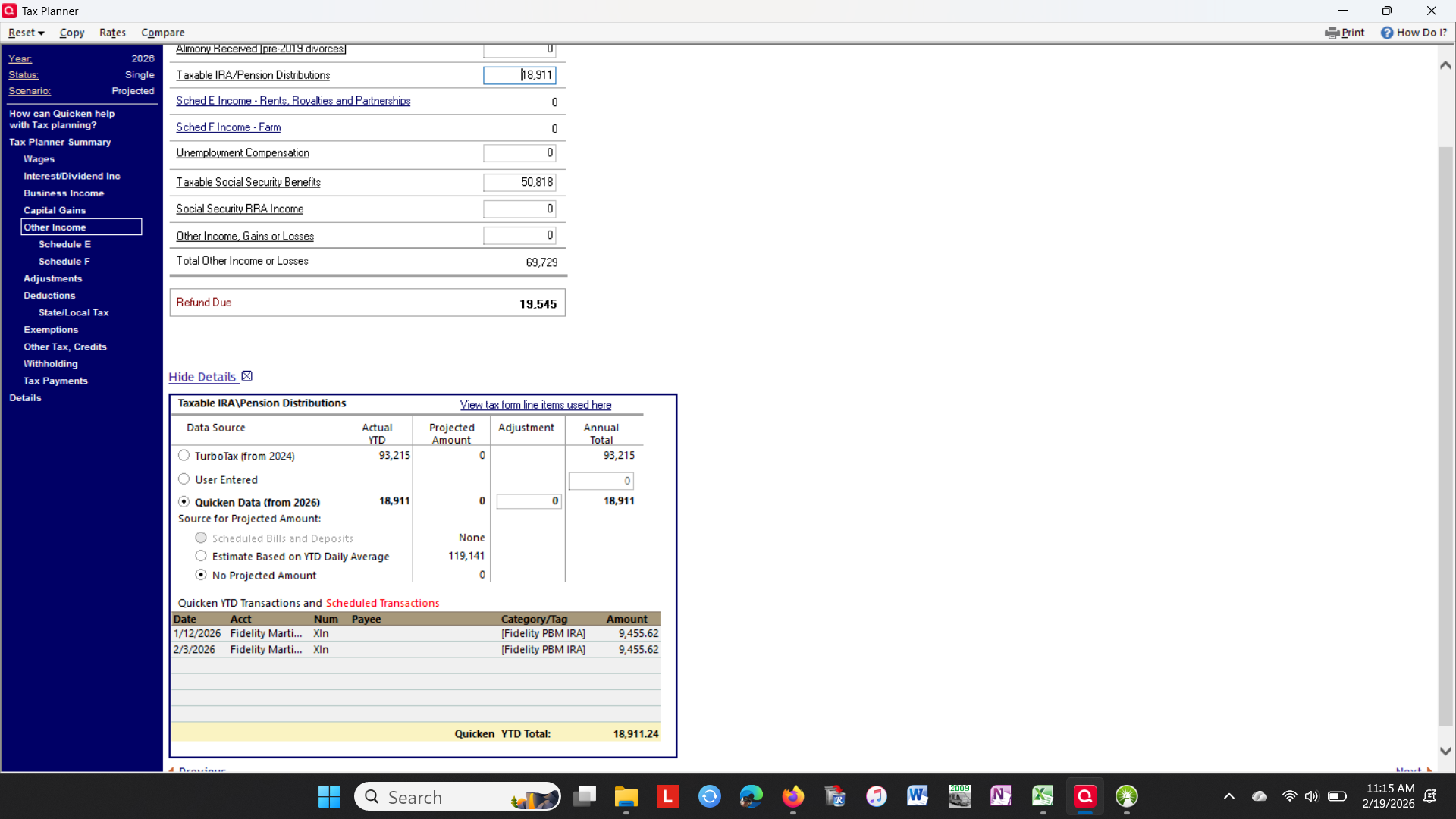
Scheduled (Transfer) transaction (non-Split) are not being picked up for Taxable IRA/Pension Distribution.
 0
0 -
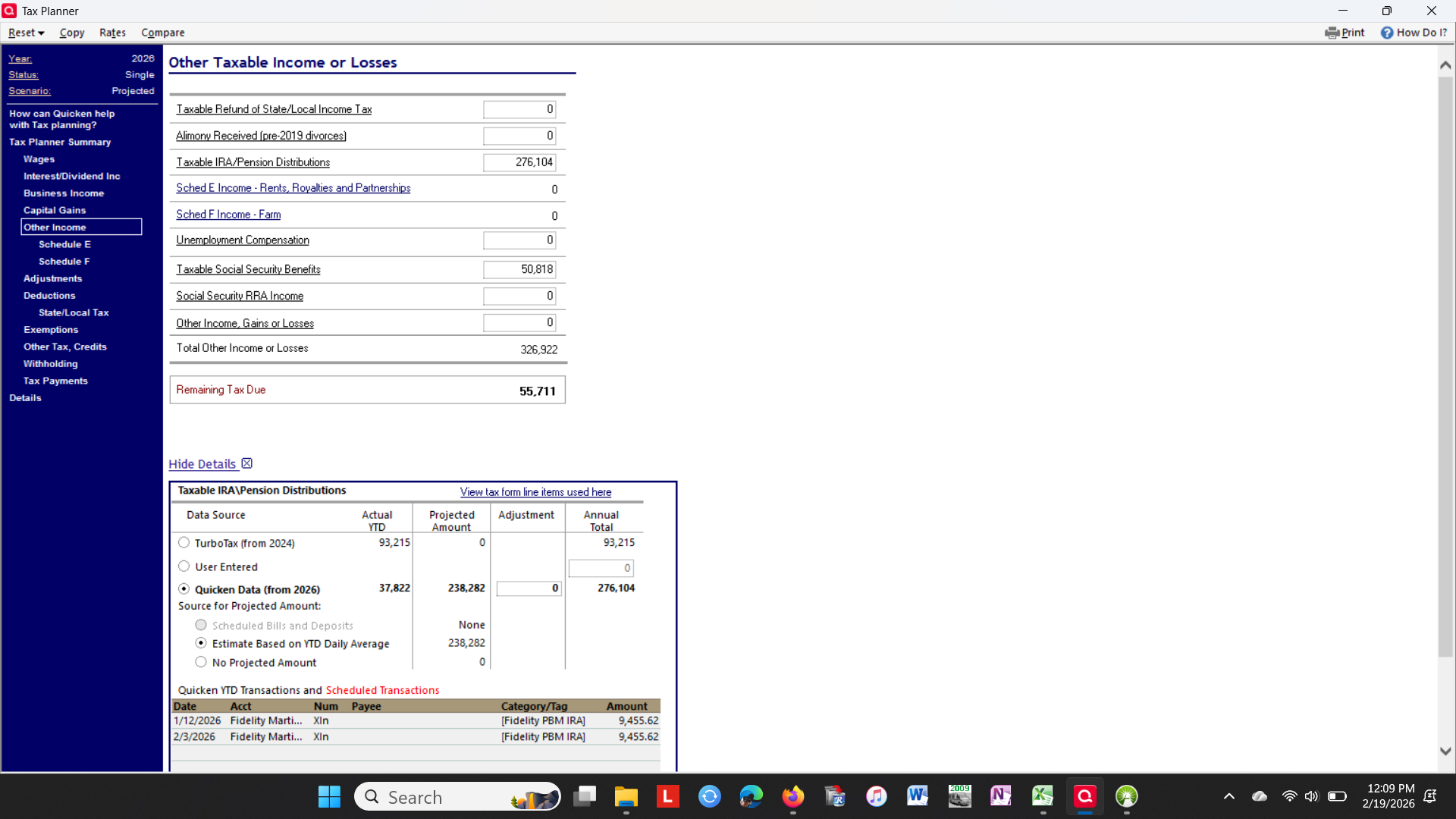
I have deleted the Transfer for IRA distribution to another Investment account. That made things worse. The scheduled transactions still don't show in Scheduled Transactions in TP. The Taxable /Pension Distribution is even more messed up. Have no idea where this $276,104 figure comes from.
 0
0 -
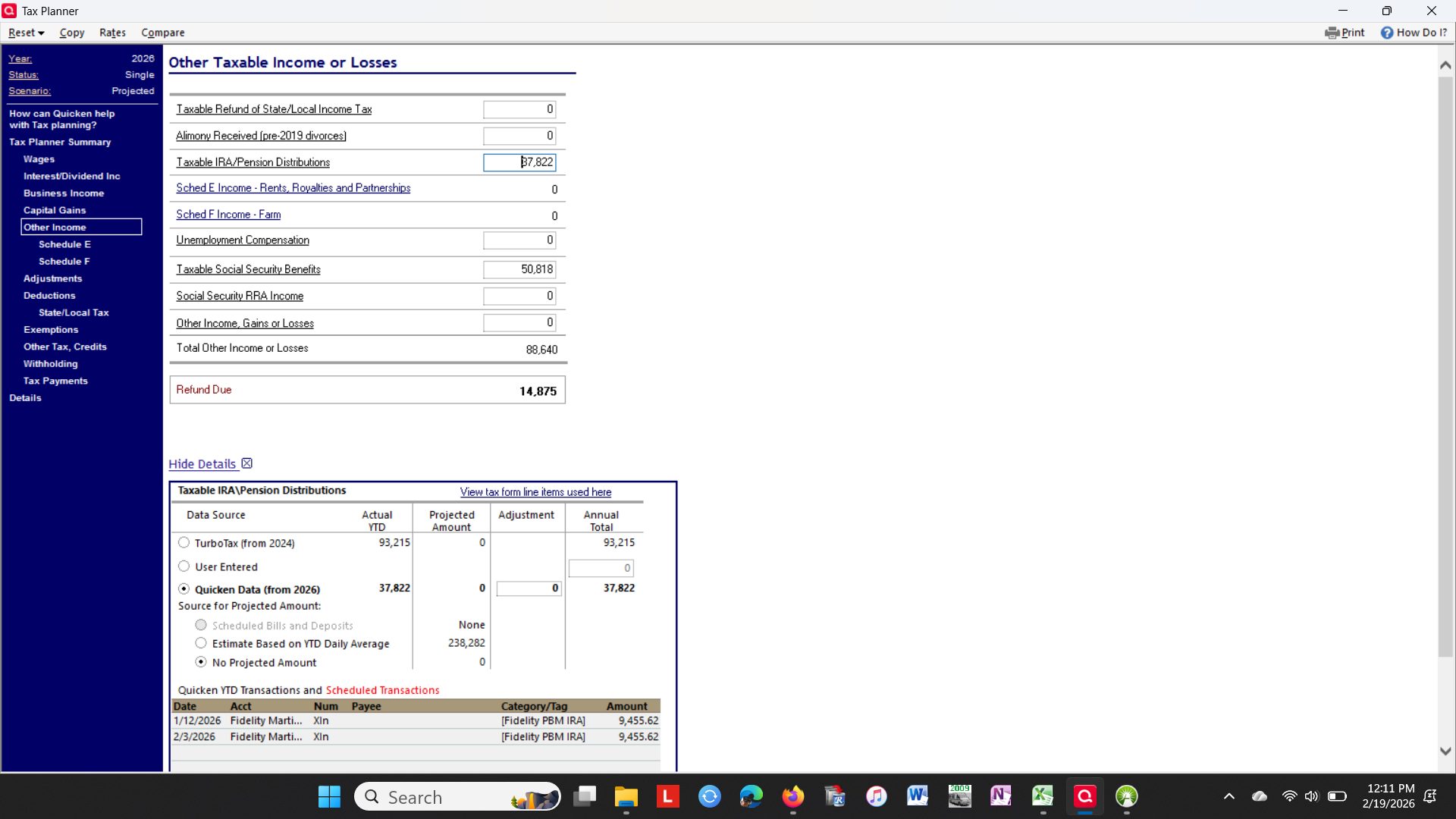
Removed the Estimate based on Daily Average. This screen shot shows up. Again no clue where this program is pulling these figures from. This $37,822s 4 months or entries. Notice the source from "Scheduled Transactions" is absent from the screen.
 1
1





Categories
- All Categories
- 6 Product Ideas
- 34 Announcements
- 253 Alerts, Online Banking & Known Product Issues
- 19 Product Alerts
- 265 Welcome to the Community!
- 301 Before you Buy
- 1.5K Product Ideas
- 55.8K Quicken Classic for Windows
- 16.9K Quicken Classic for Mac
- 1K Quicken Mobile
- 834 Quicken on the Web
- 129 Quicken LifeHub