Accounts at CIT bank and Everbank

This morning I initiated a OSU for all accounts. I received errors for both CIT and Everbank. (Forgot the specific error!) I then tried to update the accounts individually. Still not successful. Went to my account listing and tried "Reset" for both accounts. Neither was successful saying Quicken couldn't find a "non-zero balance account" for either of them. I just decided to wait and update later. Now, when I look at the "online" status of the accounts in my account listing, it shows that neither of them is set for downloads. When I click on "Set Up Now", it still cannot find either account. If anyone knows the secret to getting these accounts "reset", please let me know. Thanks.
Comments
-
Update: After trying to "reset" both accounts unsuccessfully, Quicken now shows both as unconnected. Tried to set them up again. No luck. Tried to "add new account" for both. No luck.
My log in info is correct and works at the online site of the banks. I'm on Windows 11 and running Quicken Classic Premier, Ver. R66.18
ALSO: When I click on the "About Quicken" option under "Help", it states that my subscription expired. The renewal payment was made successfully but this choice under "About" does not acknowledge the payment.
0 -
ALSO: When I click on the "About Quicken" option under "Help", it states that my subscription expired. The renewal payment was made successfully but this choice under "About" does not acknowledge the payment.
Try Help / Refresh Sign in or, if that doesn't work,
Go to Edit / Preferences / Quicken ID & Cloud Accounts
Click the "Sign in as a different user" link on the right side.
Sign out, then sign back in to your Quicken account using your existing Quicken ID.0 -
OK. Than UKR. I signed out/in and the subscription info is now correct.
Also, I signed on late this afternoon and found an update was available for the software. I now am running R66.23. After making this change, I was finally able to get the two bank accounts in question to be recognized by Quicken. Even though a OSU takes (IMHO) a very long time to process, all accounts did update.
That is all. Smokem if you've gottem.
0 -
I updated Quicken last night (to R66.23), and today I am not able to download Everbank transactions. I attempted to reset the account, but this failed and now I have no connection. When I attempt to set up again, I get "We encountered an error while connecting to your bank." There is no error number. I will try again later today.
0 -
It's baaaaccckkk! Once again today, I am not able to download transactions from either Everbank or CIT bank online. Same issue as khg above. Will not reset. After trying to reset, I have no connection at all. No error.
0 -
I am having issues with EverBank the last few days as well. "We cannot find an account with non-zero balance or with any transactions in the last 12 months.", error code CC-601. Last successful download was 2026-02-28. This morning I updated to Quick R66.23, tried to download again, and received the same error, so at least for me the issue started before 66.23. I'm guessing it's not tied to the Quicken release, but rather yet another issue on the EverBank side.
0 -
I agree that the issue was prior to the R66.23 release. However, I'm guessing this is a Quicken issue since it impacts both Everbank and CIT bank online.
0 -
Very valid point Doug! I think I immediately assumed EverBank because, well, it's happened quite a bit since EverBank became TIAA to become EverBank. :-) That said, unless the interface between Quicken and EverBank / CIT are both handled by the same third party, it does sound like a Quicken issue.
0 -
I am also having problems with CIT bank. Using R66.18 on windows 11. I believe it started on 2/28. I only update this account at the beginning of the month so last time it was successful would be approximately 2/1 or 2/2.
I login with my ID and password. I know these are correct because I can login in directly to their website with them. Quicken then says "Looking for accounts at CIT bank online." After several minutes it says "We encountered an error when connecting to your bank". No error code. I then have the option to try again or enter transactions manually. Tried again several times with no luck. When I use the enter transactions manually option it tries to add a new account.
0 -
With respect to EverBank, given the ongoing issues (CC-601) with downloading transactions in Quicken, I downloaded a Quicken file directly from the website. Attempting to open it generates the following prompt in Quicken: "Quicken is currently unable to verify the financial institution information for this download". The data in the QFX shows the following relevant data fields for identifying the financial institution:
<FI>
<ORG>EverBank
<FID>3997
</FI>0 -
One more comment… searching around, I found multiple posts from the past where EverBank started to send over the FID 3997, which is a number previously associated with them. Further down in the file the <INTU.BID> value is set properly to 70459. Given the FID issue in a QFX downloaded directly from EverBank has this issue, it sure seems like at least part of the issue is with EverBank itself. Fun. Hopefully @Quicken Kristina , @Quicken Anja , etc can look into this.
0 -
Hello All,
We have forwarded this issue with Everbank to the proper channels to be further investigated. In the meantime, we request that you please navigate to Help > Report a problem and submit a problem report with log files attached and (if you are willing) a sanitized copy of your data file in order to contribute to the investigation.
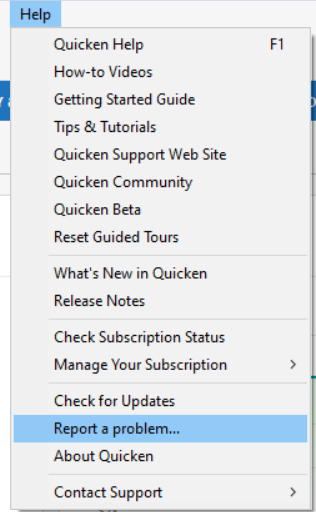
While you will not receive a response through this submission, these reports will help our teams in further investigating the issue. The more problem reports we receive, the better.
The issue with CIT bank has been reported to our Development and Product teams for further investigation and resolution. Though we do not currently have an ETA, you can bookmark this Community Alert to get updates when available and to know when the issue is resolved. If you do not see the bookmark icon at the upper right, please make sure you are logged into the Community.
We apologize for any inconvenience! Thank you.(CTP-16510)
Quicken Kristina
Make sure to sign up for the email digest to see a round up of your top posts.
0 -
I have the same 601 error at Everbank.
1 -
Hello @davemcdonald,
Thank you for letting us know you're seeing this issue also. To contribute to the investigation, please send a problem report with log files attached. For instructions, please see my earlier post:
Thank you!
Quicken Kristina
Make sure to sign up for the email digest to see a round up of your top posts.
0 -
As @Quicken Kristina requested, I just used the Quicken "Report A Problem" function. I tend to not use that for one simple reason - as Kristina pointed out, you will never receive a response through this submission (not even to acknowledge it was received). It makes it easy to assume that nobody is looking at those reports (not saying that's the case - just that the lack of reply / acknowledgement gives that impression).
I did not want to include the sanitized version of the data file as I wasn't clear on how much it removed. I also unchecked the "include a screenshot" image that is checked by default, because that screenshot clearly showed my Accounts bar - showing all of my accounts and balances for anyone reviewing it.
A side note, as much as I appreciate the community alerts, I wish they were handled different when resolved. More often than not, I see an alert when I log in that one was updated; click a Community Alert link in a forum post more than a week or so old; or return to a community alert I had bookmarked myself, the alert has been taken down, and the user is greeted with a permissions error. I can guess reasons why this is done that would benefit Quicken, but it really reduces the values of the forums when those links quickly become useless. Just my two cents.
Thanks for escalating the EverBank issue, here's hoping it gets resolved soon.0 -
Thank you for your reply,
Thank you for sending the problem report with log files attached. It will help our teams investigate the issue.
If you want to confirm what is in a sanitized file, you can create one to review by navigating to Help>Contact Support>Sanitize Data File Copy.
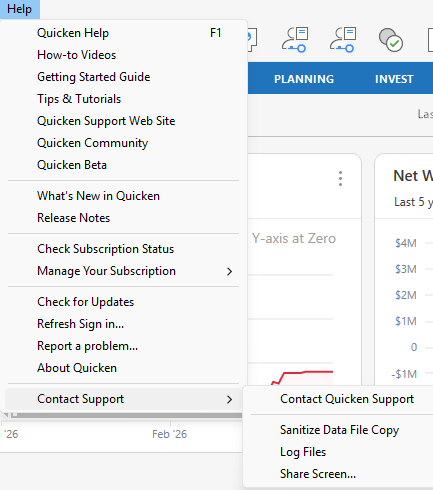
Thank you!
Quicken Kristina
Make sure to sign up for the email digest to see a round up of your top posts.
1 -
Hello All,
We now have a Community Alert that you can bookmark to be notified of any updates and to know when the issue is marked resolved:
Thank you!
(Ticket #12269329/ CTP-16510)
Quicken Kristina
Make sure to sign up for the email digest to see a round up of your top posts.
0 -
I am having the same issue with CitBank.
0 -
Hello @Brad2,
Thank you for letting us know you're seeing this issue with CIT bank. If you haven't already done so, I recommend bookmarking the Community Alert linked in my earlier post to be notified of any updates and to know when the issue is resolved.
Thank you!
Quicken Kristina
Make sure to sign up for the email digest to see a round up of your top posts.
0 -
My Cit Bank connection has been restored as of today and seems to be working.
Thanks!
1 -
Hello All,
We’d like to check in and ask that you please try connecting to these accounts again to see if the issue has been resolved.
If you are still receiving the FDP-101/CC-601 error after attempting to reconnect, please contact Quicken Support directly so they can gather additional details from your specific case and escalate further if necessary.
Thank you for your patience as this is being worked on.
Quicken Alyssa
Make sure to sign up for the email digest to see a round up of your top posts.
0 -
@Quicken Alyssa , I ran a One Step Update approximately 40 minutes ago. Instead of reporting CC-601, EverBank reports CC-800, and says "It appears one or more account(s) at EverBank Consumer have been deleted. This could happen if you have restored from a backup file. You must add the account(s) to Quicken again. Select Fix it to resolve this error".
I have chosen to not click the "Fix It" button, and figured I'd give it a day since the issue is being actively worked on. I just used the "Report a problem to Quicken" feature to report the new CC-800.1 -
Just tried and CiT Bank now works for me, it hasn't the last couple of days. Don't have an Everbank account.
1 -
CIT is working for me now.
1 -
Hello All,
Thank you for trying to connect and reporting back. I am happy to hear some of you are finding success!
Please follow the steps outlined in this Support Article for CC-800 errors. Here is the first step to get you started:
Deactivate the affected accounts:
- Select Tools > Account List
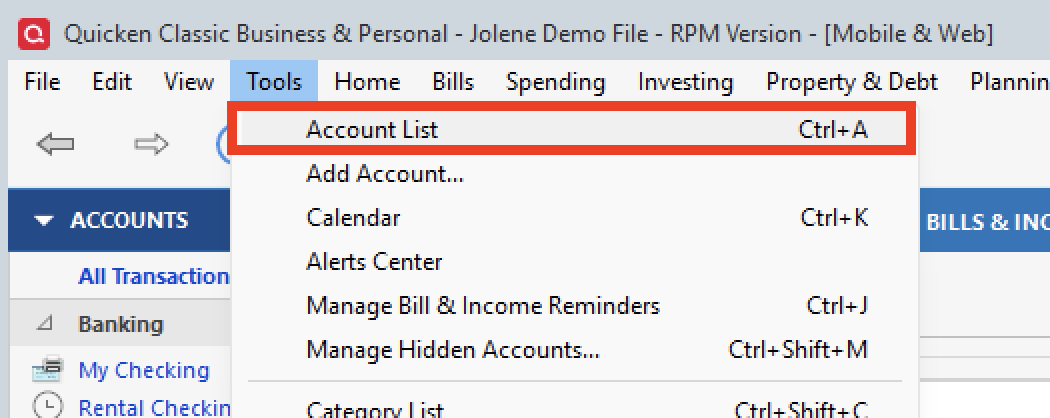
- If present, select the Show Hidden Accounts checkbox at the bottom of the Account List.
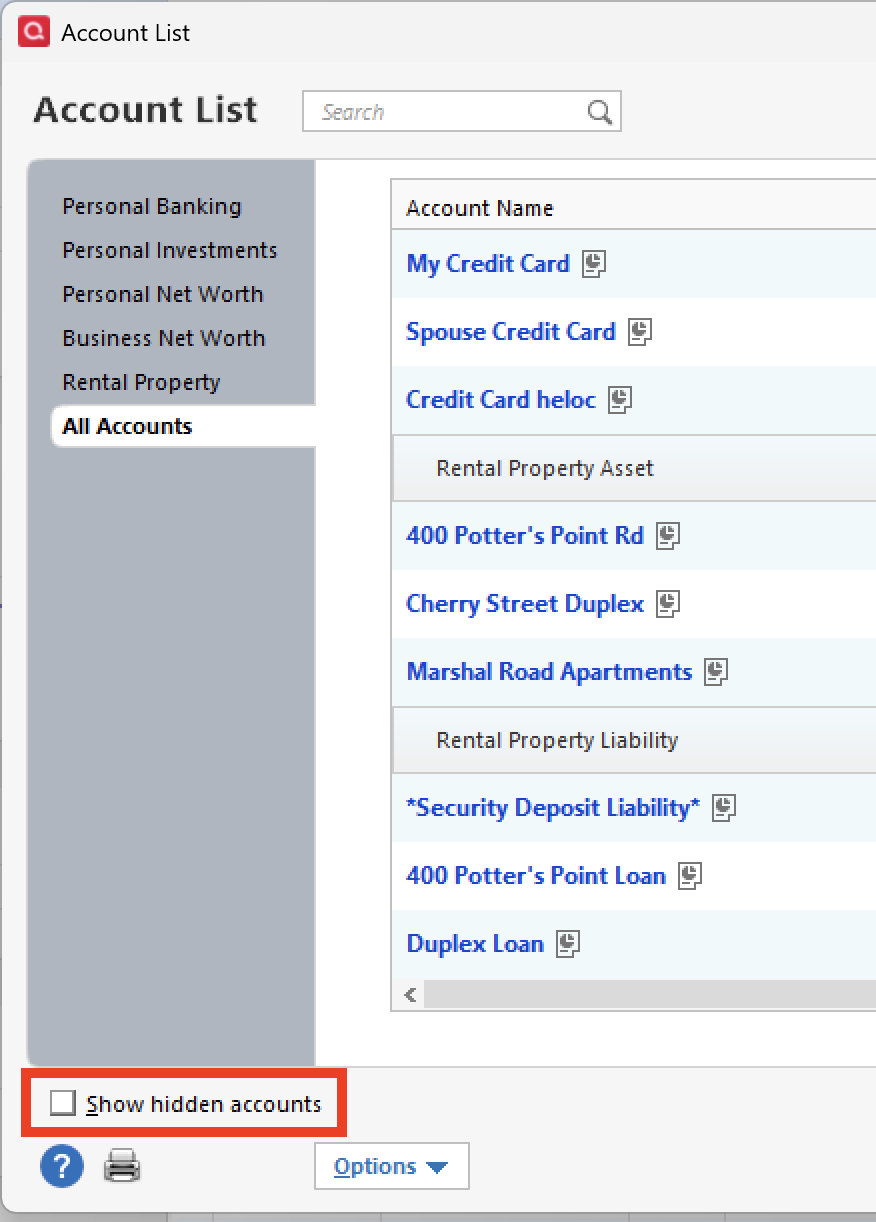
- Select Edit on each account with this error and Deactivate them on the Online Services tab.
- When finished, close the Account List.
If the steps do not resolve the issue, please contact Quicken Support for further assistance.
Thank you!
Quicken Alyssa
Make sure to sign up for the email digest to see a round up of your top posts.
0 - Select Tools > Account List
-
Both CIT and Everbank are working normally for me during my latest OSU. Thank you!
0 -
Hi @Quicken Alyssa ! I followed the process for CC-800 with mixed results. The good news is the account now syncs without errors. The bad news is that despite indicating it synced the last XXX transactions when the account was readded, none of the transactions after 2026-02-28 showed up in my register, though the Online Balance has been updated to the correct amount. Fortunately, running live update a few minutes after re-adding / syncing the account brought over the missing transactions. Hopefully things will be smooth with tomorrow's scheduled update.
1 -
Thank you for completing the recommended steps and coming back to let us know how it went.
I am happy to hear that everything seems to be in working order now. If you need more help, let us know!
Thanks again!
Quicken Alyssa
Make sure to sign up for the email digest to see a round up of your top posts.
0



Categories
- All Categories
- 6 Product Ideas
- 34 Announcements
- 248 Alerts, Online Banking & Known Product Issues
- 19 Product Alerts
- 265 Welcome to the Community!
- 301 Before you Buy
- 1.5K Product Ideas
- 55.8K Quicken Classic for Windows
- 16.9K Quicken Classic for Mac
- 1K Quicken Mobile
- 834 Quicken on the Web
- 129 Quicken LifeHub