"Matching" transaction no longer match existing entries

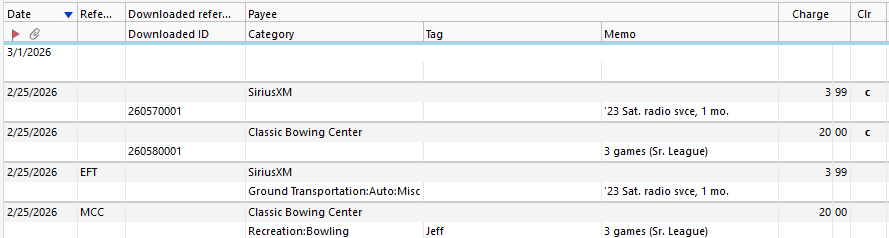
Q Classic-Windows. I record credit transaction as they occur, then download weekly to confirm I didn't miss or mis-enter something. For decades, the downloaded transactions matched as long as Payee and Amount were identical, and date "close". No longer. Now the download reads "match" but is enter as a new transaction when accepted; the download copy is 'cleared', original is not. Example att'd. Not matched: Category, Tag, Memo, Downloaded ID. Hasn't mattered before. How would credit agency know how the Category/Tag/Memo I used? How would I know the Download ID in advance? I first noticed this is in the last week or two. Is there now a way to configure Q which fields to consider when matching download vs. existing transactions?
Answers
-
Making sure I understand. The lower 2 txn were manually input, and the top 2 were downloads. Correct?
And I also input card txn when they happen … and I've not encountered your issue.
SO, a bit more info is needed. What Q product are you running and what RELEASE of that product? This info is at HELP, About Quicken.
Also, in the downloaded txn, the Memo field seems to be WAY too specific to have downloaded. Did you add that after the download?
And Category and Memo don't impact the match, because neither your bank, not Intuit (who provides the download function for Q) can know/provide those.
Q user since February, 1990. DOS Version 4
Now running Quicken Windows Subscription, Business & Personal
Retired "Certified Information Systems Auditor" & Bank Audit VP0 -
Quicken (Windows) Classic Premier, v R66.18, build 27.1.66.18
Yes, should've mentioned: I sorted newest to top so I could get the transactions in question closer to the column labels for the screen-scrape.
The transactions with more detail are those I entered manually (on the date shown). The transactions showing nothing but Payee, Date, amount, and Downloaded ID are those downloaded today. They showed "Match" in the register before I accept them (never auto-accept on download); when I accepted these they turned into new entries, as shown - matching Date, Payee, Amount. This is new behavior.
(I hadn't heard of Downloaded ID - never display it - until today when I began to investigate why the downloads are misbehaving now.) Lemme know more questions.0 -
PS: should also mention, recently upgraded (over the top of W10) to Windows 11. That ended up breaking existing Q install (wouldn't load), so I uninstalled Q and reinstalled Q fresh (to same version, afaik), which did fix the load failure issue). Dunno if that's related to the matching issue at hand.
0 -
I see this as well. Using the latest version of W11 Quicken (R66.23) but I think this happened about a week ago with an earlier recent update.
To reiterate, I see the same thing as OP. I manually input transactions AS I INCUR THEM. Then I do daily downloads (OSU) and normally about 2-3 days later, the would download and most would match properly based on payee, amt, and date. Now as @Jeff Kantner says, it creates a new entry, and not even one that shows as "unmatched", but one that shows up as a new, cleared entry. Whatever you did, it changed the near seamless auto matching AND seems to make new entries, NOT just show them as unmatched downloads. Please revert to the previous way.
0 -
I have been having the same problem as well for several weeks, maybe longer
W11 Quicken (R66.23)
0 -
Same here
0 -
I oftentimes enter checking account transactions manually to keep things in synch or to enter splits etc. When the transactions download from BofA, they match to the manual entries. It's worked this way for years, but it's stopped. The downloaded transactions are in the register as well as the manual entries. The problem seems to have started 2-3 weeks ago when I updated from BofA - Quicken to the new BofA connection method, although I'm not 100% sure.
Anyone else seeing this?
0 -
I am having the same problem. I am still using W10 Pro. This started happening right after the lastest Quicken upgrade Version R66.23 HF3 (Mar. 2026). Quicken Classic.
0 -
I think you're confusing the Quicken software by using the Reference field for a credit card charge. A credit card charge would not be entered as an EFT (Electronic File Transfer). And, I'm not sure what MCC is. I enter my charges like you do and wait for them to match with subsequent transaction downloads as a confirmation. I don't use or display the Reference field in my credit card registers.
1 -
I'm on R66.23 on Windows 11 using Quicken Premier and I am experiencing the same issue. Started within the last two weeks for me.
0 -
Hello All,
Thank you for letting us know you're encountering this issue. To clarify, is the issue you're seeing the same as the issue discussed in this earlier thread:
I look forward to your replies!
Quicken Kristina
Make sure to sign up for the email digest to see a round up of your top posts.
0 -
What you've quoted sounds very similar to, but is not the exact same flavor of the issue I'm seeing. The OP, @jtomalley, said they see the problem when they enter transactions via the Calendar but when they enter transactions manually, they match fine. I never enter transactions via the calendar although I DO enter them via the Bill and Income Reminder list. Perhaps both methods are using the same code and that's wherein the problem lies?
Note that I am only seeing this with my Bank of America checking account. All credit cards and brokerage accounts are (as of now) matching as they should be, but come to think of it, in none of those cases do I enter manual transactions via the Bills & Income Reminders list. I have a transaction that should download tomorrow. I'm going to key it in rather than enter it from the list. I will let you know what happens.
I suspect the Bill & Income Reminders list/Calendar is the place to look for the source of the problem.
FTR - I'm running R66.18, Build 27.1.66.18 on WIN 11 (fully updated)
1 -
Today's download from BofA matched a txn that was manually keyed directly into the register. So, it appears that transactions entered via the Bills & Income Reminders list (and per others, the Calendar) are those that are not matching. Txns keyed directly into the register are matching.
2 -
Thank you for letting me know you're seeing a similar issue and for sharing the details of what is happening. The Bills & Reminders tab and the calendar are very similar; reminders created in one view will be visible in the other, so it's highly likely that the same root cause is behind the issue. I added both of you to the ticket & shared the additional details you provided. Thank you for submitting a problem report @mrzookie; it will help our teams investigate the issue!
Thank you!
(CTP-16657)
Quicken Kristina
Make sure to sign up for the email digest to see a round up of your top posts.
1 -
I am having the exact same issue - R66.28
0 -
Same issue here. Problem started about 2 weeks ago, unclear if it correlates to a Quicken update. My problem is not specific to a single financial institution. I'm seeing issues matching transactions with Chase, Citi, and Huntington Bank. Running R66.23.
0 -
And the plot thickens. I just ran a quicken account update, and I had a transaction that was downloaded, and did not match the transaction manually entered. The account auto-reconciled, and I went to delete the uncleared and unreconciled transaction (the one manually entered). Quicken is now showing a message indicating asking if I'm sure that I want to delete a "cleared ( R ) item, when this item is not cleared or reconciled. Now running Quicken Version R66.28.
Please fix this!
0 -
Add me to the list, Version 66.28, Build 27.1.66.28.
Transactions downloaded from PSECU are not matching existing entries, most create from Bill and Income Reminders, also manually created entries.
0 -
Hello @jackerman, @j_reed, 7 @Joe Magid,
Thank you for letting us know you're also seeing this issue. I added all of you to the ticket.
Thank you!
Quicken Kristina
Make sure to sign up for the email digest to see a round up of your top posts.
0 -
FYI:
Not sure this has been mentioned or not (I haven't see it) but in my case, this is NOT happening with Deposit transactions. I've had multiple deposits that I've entered via the Bills and Income list, including Cash deposits, Refunds, Transfers in, and Paycheck transactions with multiple expense categories, and all have matched fine. For me, this is only happening with Expense transactions.
1 -
It looks like @Quicken Anja closed a similar/duplicate/related issue yesterday
To confirm (as of downloads this morning), if something is entered into the register from a reminder in the calendar/stack view, when the transaction is downloaded from the bank/credit card, it does NOT auto match, but rather creates a new register entry and shows "matched". Unsure what matched to as it creates a new one. I can then go into the unmatched register entry (from the calendar) and match to a downloaded transaction which will then match/merge that and the downloaded one, but the AUTO matching isn't working for things entered from the calendar (regular reminders).
[Edited - Readability/Enabled Link]
0 -
Hello @AgBrewer97
Thank you for letting us know you're also affected by this. I added you to the ticket.
Thank you!
Quicken Kristina
Make sure to sign up for the email digest to see a round up of your top posts.
0 -
to add something to @AgBrewer97 comments. The transaction that is created and not matched has to be manually deleted even after you do the manual matched the correct transaction.
0 -
Hello @Axe21,
Thank you for the additional information!
Quicken Kristina
Make sure to sign up for the email digest to see a round up of your top posts.
0 -
Add me in here too.
Here is my post in another thread:
March 24 "Although I cannot recall the exact date this began happening, it's within the last couple of weeks.
I too am running R66.18, Build 27.1.66.18 on WIN 11.
I am entering transactions manually (most) and some by Bill & Income Reminders and some transactions I'm not entering at all, they show up as a result of the 1-Step Update such as Amazon purchases I didn't know my husband made. :)
I am not using the Calendar for any transactions at all.
1-Step Update is downloading transactions from my local Hometown Community Bank, Capital One bank accounts and Chase Bank (cc) and is downloading many of the same transactions each day, which I have already entered with a tag (single or split categories) and replacing the transactions with a new transaction, new name, and single or no tag category. For example, a check I wrote, manually entered on 3/7/36 has been downloaded & accepted on at least 3 separate days.
I've even noticed the 1-Step Update somehow removing transactions that were already cleared and reconciled, messing up my previous month's bank reconciliation.
After running 1-Step Update today (3/24/26), the top of my checking & savings accounts & Chase account register says "Last download March 4, 2026" which is inaccurate and I am definitely receiving downloaded transactions made well after March 4. Something in Quicken isn't updating after the downloads?"
April 6 "Today I have downloaded (again) the exact same transactions for the 5th or 6th time, plus some new ones. Quicken also decided to reach back about 6 months and re-download transactions again from my Target credit card."
April 7 Bill & Income reminders have been scheduled, entered and then the downloaded transaction deletes this entry & replaces with the downloaded transaction.
Manually entered transactions are entered, then the downloaded transaction deletes this entry & replaces with the downloaded transaction. I have to re-enter all my category splits every single time this happens.
Manual entries have been entered. Then deleted. Then reappear after a 1-step update.
Entries not entered at all are downloaded on one day (example Monday 4/6) and accepted. On Tuesday 4/7, the exact same transaction was downloaded again and accepted.
So far, for me, it looks like this is specifically affecting transactions across all accounts starting around 3/19 (give or take) through the current date. Actually, just observed that a check cleared on 3/13 keeps re-appearing in every one-step download updated so issue reaches back at least to 3/13.
Scheduled & unscheduled deposits = affected
Scheduled payments = affected
Unscheduled transfers = affected
Unscheduled expenses = affected
Bank-initiated interest deposits = affected
This is infuriating…
0 -
I'm experiencing this as well with JP Morgan Chase and USAA accounts. I download transactions to reconcile and it states in the register it is matched and when I select "accept" it creates a new duplicate transaction instead of marking the matched transaction as cleared. These original transactions were entered via the calendar originally.
0 -
Hello All,
Thank you for adding to this discussion.
The escalation ticket for this issue remains open. @MRocke, I can see you recently submitted log files, so I will add those to the ticket.
If you would like to contribute to the investigation, you can go to Help>Report a Problem>Send to Quicken.
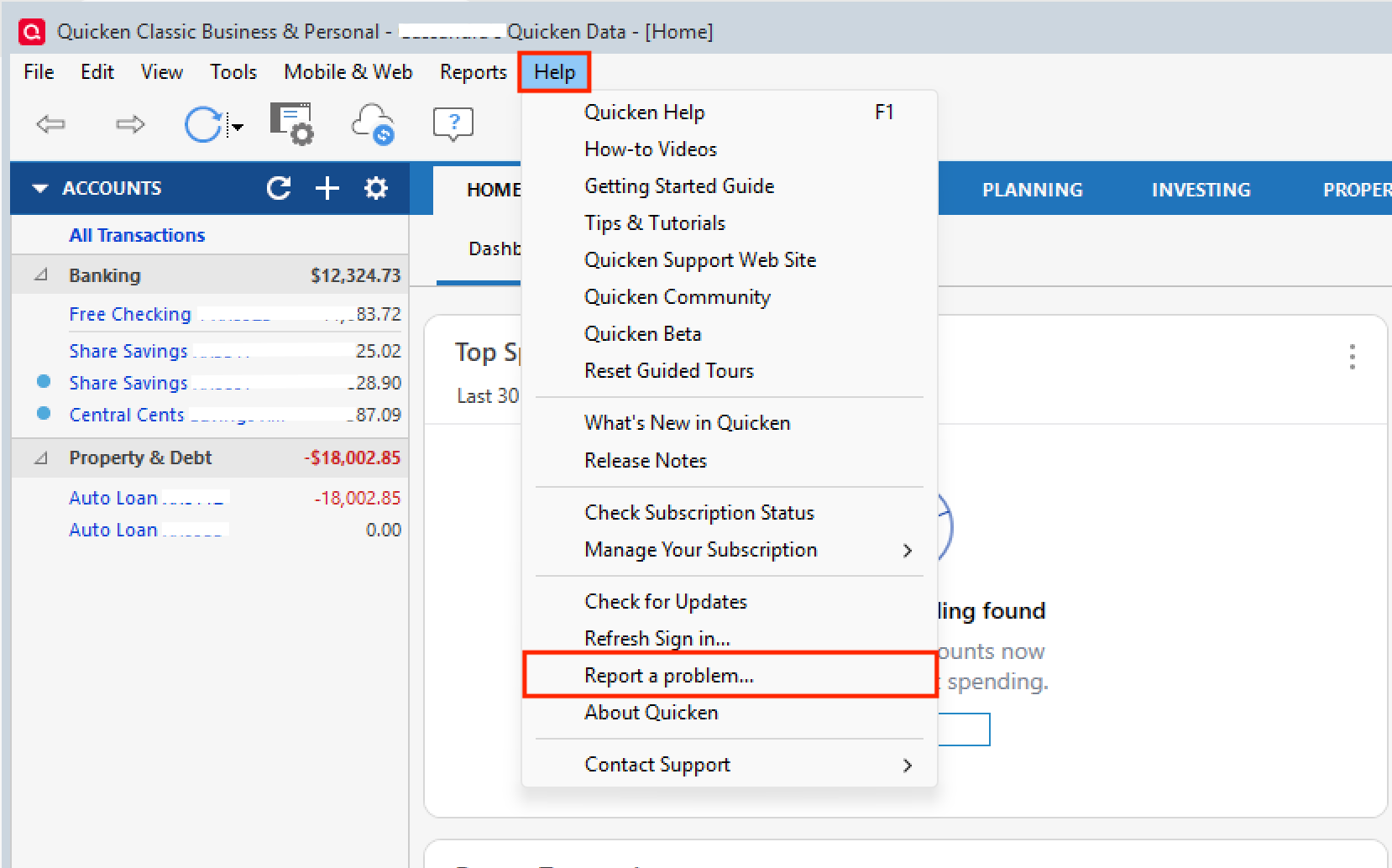
From there, you will submit your log files. Make sure to let us know if you do submit them so we can get them added to the ticket.
Thank you!
[CTP-16657]
Quicken Alyssa
Make sure to sign up for the email digest to see a round up of your top posts.
0 -
FWIW, I, too, am having this issue sometimes. This morning it happened after OSU in my Costco Citi Bank account. The entries were from manual bills that I entered. OSU added new transactions and matched on those instead.

 1
1 -
Reported a problem this morning and uploaded log files.
0





