Duplicate screen entries after downloading and while accepting entries process
Comments
-
Quick feedback. I had two downloaded transactions today. One in checking and one in a credit card. Both had been manually entered earlier by me, and both were on my MPL list. Both also displayed "Matched".
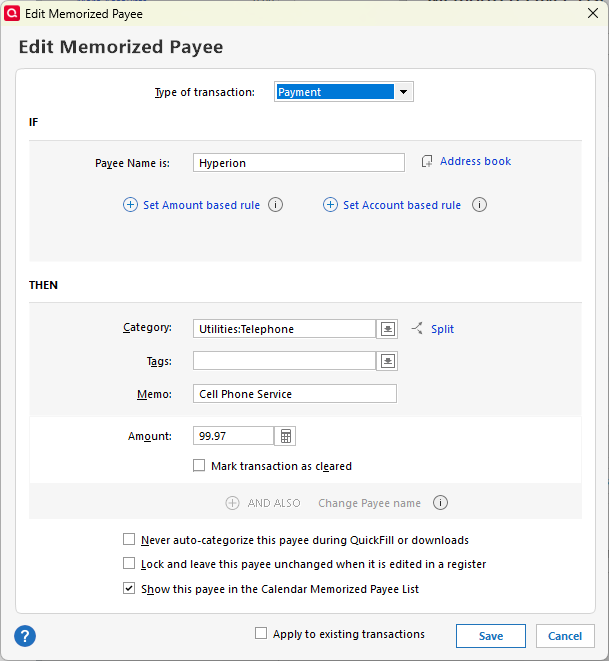
Before I clicked on either downloaded transaction, I checked their MPL entries. Neither had "Mark as cleared" option checked in the MPL.
When I did accept them, they both created new, duplicate entries with no category. I deleted the new entries and manually matched the downloaded ones to my manual entries.
Quicken Deluxe for Windows 11 Pro. Latest subscription version. I've been a user for decades.
- Jim S.
1 -
OK thanks. That is a different situation than what I saw with the New transactions.
To complete the picture, how did you accept the transactions: click on the transaction in the register and hit Enter, click on the green Enter button to the right of the transaction, click on Accept just below the downloaded transaction, or click on the larger Accept button next to Accept all at the bottom?
I have found that clicking on the green Accept button next to the transaction in the register does not usually create duplicates, but I have not tested it thoroughly with the latest releases.
QWin Premier subscription0 -
FYI. I'm running the latest Quicken Version R66.28, Build 27.1.66.28.
I click on the transaction in the register and the green Enter button to the right of the transaction. However, if the duplicate is already shown, Quicken chooses that one so I don't click enter, delete the duplicate, and manually match the download to my correct manual entry before clicking on Enter.
When Quicken doesn't enter a duplicate immediately, it seems to always pick my correct one. Then clicking on the green Enter button to the right of the transaction clears the transaction and no duplicate is made.
Quicken Deluxe for Windows 11 Pro. Latest subscription version. I've been a user for decades.
- Jim S.
1 -
As I stated on March 11, I have been dealing with this for several weeks. I noticed as others have said on the suggested matched transactions on the download the matched ones already appear duplicated with the duplicated one missing the category. HOW is this not happening to everyone?
It has been mentioned that the Marked transaction as cleared is check is causing this.
The following is the one that duplicated for me today. It is not checked.
 Member since 1984.
Quicken Premier.0 -
What is MPL?
This problem still exists for me. Some reminders still in my Bill & Income Reminders, because I thought if I delayed entering them, it might help. Some B&I Reminders I do enter, but they are still not cleared, and duplicates happen. Transfer detection is off, and it does not help.
I do not clear any transaction unless it is downloaded and matched up.
0 -
MPL is Memorized Payee List.
QWin Premier subscription1 -
Hello All,
Thank you for taking the time to visit the Community to report this issue, though we apologize that you are experiencing this.
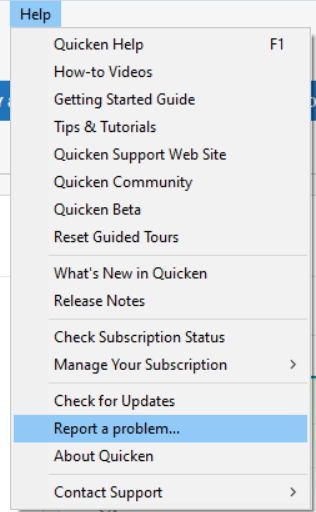
We have forwarded this issue to the appropriate channels for further investigation. In the meantime, if you haven't done so already, please navigate to Help > Report a problem and submit a problem report with log files attached and (if you are willing) a sanitized copy of your data file in order to contribute to the investigation.
While you will not receive a response to this submission, these reports will help our teams further investigate the issue. The more problem reports we receive, the better.
We apologize for any inconvenience! Thank you.
(CTP-16752)
Quicken Kristina
Make sure to sign up for the email digest to see a round up of your top posts.
1 -
Submitted new report with todays 2 Duplicates in only 1 of 2 datafiles that does NOT use SYNC.
1 -
Hello @miklk,
Thank you for letting us know you're also affected by this issue, and for sending the problem report with logs and a screenshot attached. It will help our teams investigate the issue! I added you to the ticket.
Thank you!
Quicken Kristina
Make sure to sign up for the email digest to see a round up of your top posts.
0 -
Thank you Quicken Kristina - when problem occurs next time, I will submit a report!
0 -
Today I received a new and a match.
The match is to a manually enter transaction into the register.
I added a category to the new transaction and did an accept. It Worked
I selected the match and did an accept. It worked.
My next transaction should have matches to ones automatically enter by quicken. I will update then.
Edit. 3/25/2026 Received another matched transaction to a previously manually entered transaction. It Worked
Member since 1984.
Quicken Premier.0 -
@Bill44 and others, I have found differences in how Quicken behaves depending on whether I accept a downloaded transaction by hitting Enter after editing the transaction in the register, clicking on the transaction's green Save button, clicking Accept below the transaction in the Downloaded Transactions area, or clicking on Accept at the bottom of the Downloaded transactions area.
It also seems to matter if it is the last transaction in the register or not.
All these variations may help explain why different users see different results and the duplication appears to be intermittent, and why sending screenshots and logs without a step by step description of when the problem occurs may not be sufficient.
For me, clicking on the green Save button seems to be the most trouble-free, but I have not thoroughly tested all the variations, and there may be other causes as well.
QWin Premier subscription2 -
Report submitted today about more duplicate entries after download. I had entered a reminder, transferring $25 from one account at another, both at same bank (WF). Today at download, both accounts show the duplicate. I am able to identify the one I entered in the sending account because I had created an extra term in the NumList, called automatic. So, I am able to match it up, but then I still need to delete the 2nd/duplicate transactions that remain. Thanks.
1 -
For the last 3 weeks, when downloading transactions from Citi Bank for my American Airlines MC, transactions are duplicating in the ledger when accepted.
I just downloaded 14 transactions, all of them matching to previously entered transactions. After hitting accept, 4 transactions entered as new transactions, not matching previously entered transactions. When this happened prior, I thought I had just entered some wrong, but now that I am looking for it, there is obviously a bug in the system.
I have validated my data file, and reset the Citi account, this has made no difference.
Version: R66.28
Build: 27.1.66.28
[Merged Post]
0 -
I am having the same issue for several weeks now. When I do an update through my credit union it matches a transaction in the register but brings in a duplicate for that same transaction. I have been manually deleting them.
0 -
The issue is happening across many financial institutions. Here is the main discussion on the issue:
[Merged Post]
Quicken user since Q1999. Currently using QW2017.
Questions? Check out the Quicken Windows FAQ list1 -
Hello All,
Thank you to everyone who has added to this discussion.
I merged your post into this thread. @mshiggins Thank you for directing us here.
This issue has been escalated. If you haven't done so already, please navigate to Help > Report a problem and submit a problem report with log files attached and (if you are willing) a sanitized copy of your data file in order to contribute to the investigation.
While you will not receive a response to this submission, these reports will help our teams further investigate the issue. The more problem reports we receive, the better.
Please let us know if you do a submission so we can add it to the escalation ticket.
I have added yours. Thank you for sending those over!
Thank you!
(CTP-16752)
Quicken Alyssa
Make sure to sign up for the email digest to see a round up of your top posts.
0 -
3/28/2026 - I have 2 matching transactions:
1 to an automatically quicken entered transaction. It worked.
1 to a manually entered transaction. I Worked.
I will continue watching closely the match process However it is starting to look like when I deleted all of the 435 Memorized Payee List the problem went away. The MPL is starting to build again and only time will tell if this starts up again or not.
I had discussed with the wife before doing this and explained the next time you add a transaction for the 1st time it will not prefill. She agreed it was worth a try, and it seems to have been worth it.
Member since 1984.
Quicken Premier.1 -
Thanks @Quicken Alyssa - I submitted another report today, problem still ongoing. Thank you.
0 -
And, problem ongoing, I know it's being worked on.
Today, not only was there a duplication, there was a triplication. My entry was in a sending and receiving account. Then the receiving account should a double, although nothing had downloaded to that account. And, the sending account showed a triple, so two extra entries in addition to mine. There was only 1 download though.
Report submitted. I fixed it all now that I know what to watch for.
0 -
Thank you for sharing what worked for you. Let us know if that changes.
Thank you for sending over the log files. I will get them added to the ticket.
Thanks again!
Quicken Alyssa
Make sure to sign up for the email digest to see a round up of your top posts.
0 -
I have now sent two log reports, last week and today. This problem is really getting annoying. Given the length of time this has been occurring, it feels like this problem is not much of a priority to Quicken.
0 -
Thank you for contributing to this discussion with your comments and concerns, and for sending over your log files. They will help with the investigation of this issue.
I have added your log files to the escalation ticket.
Thanks again!
Quicken Alyssa
Make sure to sign up for the email digest to see a round up of your top posts.
0 -
Yes, a onetime delete of the Memorized Payee List took care of the problem. The Memorized Payee's are still being automatically added as they normally do. It has been three weeks and not one single duplicate transaction. My wife normally does this part of our quicken input and I took it over to debug what was going on. Monday the 6th I turn it back over to her because the duplicate problem no longer happened.
Having to enter a transaction one time without the autofill is definitely preferable to not cleaning up the duplicates.
Member since 1984.
Quicken Premier.0 -
@Bill44 I have deleted my memorized payee list per your recommendation. I will see what happens.
1 -
I have no memorized payees, so that's not the problem for me.
The issue was still occurring as of yesterday. I have some upcoming transfers, I'll keep watch to see how they're handled and will send another report if needed.
0 -
@Bill44 I deleted all my memorized payee list. It worked for 5 days, but the duplication returned today. This is such a frustrating problem. @Quicken Alyssa is anybody working on this problem?
0 -
Hello All,
Thank you for continuing to update this thread.
Yes, this issue has been escalated internally and is being investigated. We do not have an ETA as to when it will be fully resolved, and we apologize for the inconvenience.
We appreciate your continued patience!
[CTP-16752]
Quicken Alyssa
Make sure to sign up for the email digest to see a round up of your top posts.
0 -
That's too bad. I am at a month now and still working for me. My MPL has pretty much rebuilt.
Member since 1984.
Quicken Premier.1 -
@Quicken Alyssa Is there any update on this problem? This continues to be an issue?
0






