Bank of America - User not eligible
Comments
-
"Our team is actively working to resolve it" response is not adequate for 3 weeks straight. We need to know progress and specifics at this point.
@Axel Foley "Our team is actively working to resolve it" can often mean "we are waiting for the financial institution to fix it", but Quicken never throws the financial institution under the bus by saying that. The moderators generally have no insight into the detailed status of what is/isn't happening, and they never have specifics on progress to post.
Quicken Mac Subscription • Quicken user since 19930 -
I agree, after 3+ weeks, I question how actively this is being worked on. This certainly should warrant more specifics than a canned response at this point. It feels like some sort of credit for our subscription fee would be warranted. Also, please stop thanking me for my patience; that was gone a couple of weeks ago.
0 -
Hi all,
We understand this has been frustrating, and we appreciate the reports you’ve shared; they’ve been helpful in moving this forward. The Community Alert was updated a couple of days ago with new information.
We have re-enabled the previous Bank of America connection, which should allow you to connect your accounts successfully. If you have already migrated your accounts without any issues, no further action is needed.
For additional details, please refer to the Alert.
Thank you!
Quicken Laura
Make sure to sign up for the email digest to see a round up of your top posts.
0 -
Thank You for also posting the resolution here about the update that was posted on March 20th.
I received a sign in to quicken window when I opened Quicken this morning.
Choosing Bank of America - Quicken connection to download transactions has resolved the issue for me.
0 -
Hi @Axel Foley,
That’s great news! I’m glad to hear everything is working now.
If you have any additional questions, please don’t hesitate to reach out!
Quicken Laura
Make sure to sign up for the email digest to see a round up of your top posts.
0 -
When I used Bank of America- Quicken I was able to connect, however, it shows the online balance as $0 which then does not allow me to reconcile. Any updates on this issue
0 -
Hi @Mike Schuster,
The issue with incorrect balances caused by pending transactions is still ongoing. In the meantime, as a possible workaround, I recommend connecting the account using a different instance, such as Bank of America – All Other States, if you haven’t already tried that.
I hope this helps!
Quicken Laura
Make sure to sign up for the email digest to see a round up of your top posts.
0 -
Laura,
I have tried All Other States, both with technical support on Friday and again this morning on my own and I still get the user not eligible error. Am in the process of reporting to technical support now
0 -
For clarification, it does not chow an incorrect balance based on pending transactions, it actually shows $0 as the balance. The actual balance in the Quicken register is correct
0 -
I reviewed your previous tickets, and you’re absolutely right; thank you for pointing that out. I also appreciate you reaching out to Technical Support via chat or phone; they can escalate the issue in real time if needed.
Please feel free to let me know if you have any additional questions.
Quicken Laura
Make sure to sign up for the email digest to see a round up of your top posts.
0 -
This issue has just been escalated by technical support
0 -
I reviewed the new ticket, and it looks like the process worked successfully in a test file. Based on that, the recommendation is to either restore a backup or export/import your data into a new account. I’ve included the steps below in case you’d like to try this:
- Go to File > View/Restore Backups....
- Browse your computer or external media to find the backup file you want to restore. The Quicken backup file has the extension .quickenbackup
- Select the file to restore.
- Click Choose.
Before proceeding, please make sure to back up your Quicken file.
To Create the New Account:
- Click the Add Account button (the + icon) at the top of the sidebar.
- On the Add Account screen, scroll to the bottom and select Offline Account.
- On the Offline Accounts screen, choose the appropriate account type (for example, Checking under Banking).
- Be sure to select the same account type as the old account.
Enter the Account Details:
- In the Account Name field, enter a name that helps you distinguish the new account.
- Confirm the correct Account Type is selected.
- Enter the account’s start date in the On This Date field.
- Leave the Balance Equals field blank.
- For Primary Use, select Business (if applicable).
- Click Finish.
To Transfer the Transactions:
- Open the old account register.
- Click the first transaction.
- Scroll to the bottom of the register.
- Hold down Shift, then click the last transaction to highlight all transactions.
- From the Transactions menu, choose Move Transaction....
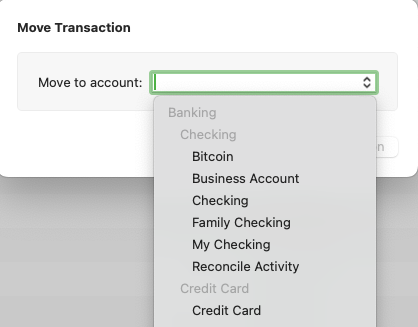
- Click on the Move to account dropdown and select the desired account.
- Click Move Transaction.
OR
- Select the transaction account from the left-hand account list to open the register.
- Right-click on the desired transaction(s) and select Move Transaction....
Once completed, please reactivate the account and review the balances appear correct.
I hope this helps!
Quicken Laura
Make sure to sign up for the email digest to see a round up of your top posts.
0 -
@Mike Schuster I understand your frustration, truly, but if Quicken were to give refunds every time one of 10,000+ financial institutions did something to break connectivity, Quicken would quickly go bankrupt. Or they would have to charge several hundred dollars a year for the subscription. 🤣 There are connectivity issues with multiple financial institutions every day of the year, as the small Quicken team, and more often the larger team at their aggregation provider Intuit, play whack-a-mole trying to resolve issues as quickly as possible. Those that can be fixed internally are often fixed much faster than those that require code fixes by a financial institution or simultaneous fixes by both. These fixes are certainly a priority issue for affected Quicken users, but in the scheme of all the technology and security issues facing the IT departments at major financial institutions, these are often not deemed high priorities, and fixes can take weeks or months.
As I wrote above, Quicken will never post to throw blame on a financial institution; Quicken depends on their cooperation, and a financial institution which decides Quicken is too much of an annoyance to support could drop support entirely. (It has happened.) And almost without exception, Quicken does not provide any details of what the problem is (or is thought to be), who needs to do what to fix it, and when that is expected to happen.
Banks often have fixed schedules for technology deployments, and even a small fix might sit for a long time until it is implemented, tested and rolled out. Sometimes a financial institution may tell Intuit that a fix is scheduled in a code update for a specific date, but the schedule may slip, and many times they don't even provide a date. That's why we get those "no ETA" messages from the moderators; there is almost always "no ETA".
As for the moderators here, saying "thank you for your patience" is about all they can do, because they can't provide any useful information. Would you like them to tell you you're going to have to suck it up for a while longer? 🤣 They're just trying to politely acknowledge they know you're frustrated and that the issue is still pending resolution. It's not unusual for users to discover and post here that a problem has been fixed before the moderators get official word through their channels that a fix has been deployed.
Quicken Mac Subscription • Quicken user since 19930


