QFX download for CREDIT CARD displaces name with 17 character code

For a year, Coastal Credit Union has provided buggy QFX downloads. The name field, once imported, shows some of the unwanted code listed with Capitalized first letter and a few characters of the name. Nothing more. Not enough to make sense. The Memo field has the 17
digit code and more characters of the name field. This is Quicken Premier on Windows Desktop. Operating system completely updated, and so is Quicken Premier. Full malware scan complete. Zero issues.
After import the Coastal Credit Union import looks like this in the register:
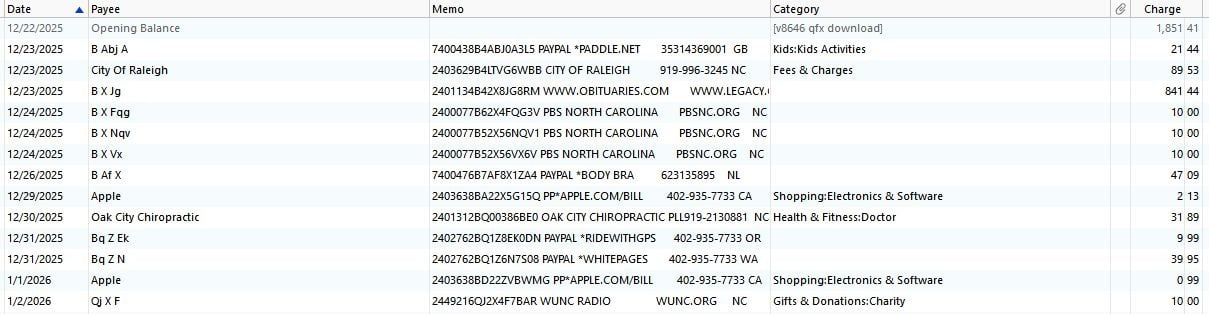
Contacting both Quicken and the Credit Union has not budged this problem one bit. Each blames the other. I make rounds to each every two months.
Even testing with fresh Quicken software installation, fully updated, opened a new QDF file, and tried to import the QFX file. The name field is a mess of truncated Code and truncated name.
And now, some of the downloads won't even import at all.
It's obvious the programmer needs to fix the query, or adjust the code that is pulling the data in order to get it right. As to why this is allowed to continue for a year without improvement is baffling.
No wonder people drop using Quicken.
I have tried editing the downloaded QFX file and now Quicken is blocking that.
I have tried conversion software on CSV downloads, like Propersoft, but the file it makes is blocked from importing to Quicken. I have also tried editing this QFX file. That is also being blocked upon attempt to import.
This is for Credit Card accounts only.
How can Quicken just let the bank continue to do this? It ruins the utility of the Quicken software. The bank says there data aggregator doesn't provide anything else, so they are stuck with it. Since when does a business subcontract their work, and then drop responsibility for it?
Has anyone seen this problem before?
Comments
-
Hello @20yearsQ,
Thank you for reaching out! To help troubleshoot, please provide more information:
- When you open the QFX file, does it show the truncated names/codes you described in your post?
- You said that Quicken blocks you from importing after editing the QFX file and after using a conversion tool. What exactly is happening when you try to import?
- Do you see any error messages/codes?
I look forward to your response!
Quicken Kristina
Make sure to sign up for the email digest to see a round up of your top posts.
0 -
Is this the Credit Union you're talking about?
- 09250 09250 09250 Coastal Credit Union https://www.coastal24.com 1-800-868-4262 https://digital.coastal24.com/login ACTIVE BANKING&WEB-CONNECT BANKING,CREDIT,ACCOUNTINFO&EXP-WEB-CONNECT NOT_QBP NA
If so, the bank appears to support downloading transactions from within Quicken, using One Step Update.
Have you tried this, to see if the download works any better?
IMHO, Express Web Connect downloading from within Quicken usually is more reliable than downloading QFX files from a bank's website.The weird code generated from the downloaded Memo text comes from stripping the numbers out of the first "word", i.e., what appears to be a transaction tracking number:

If you do want to continue using QFX files and, perhaps using Propersoft conversion, you may want to try stripping this first "word" off the Memo text, using the remainder (or parts of it) to build a more useful Payee Name.
Also be sure to make Propersoft use the correct bank ID number as <FID> and/or <INTU>BID> in the converted QFX file. Their default number may be what's causing Quicken to reject your converted QFX file on import.0 -
- Propersoft is using the very same INTU.BID as is in the Bank provided QFX files. it is 9250
- The downloaded QFX file for Credit Card Accounts has a 17 character unwanted code listed first in the NAME and MEMO fields, both.
- It's been this way for a year. Neither Coastal nor Quicken will fix it.
- renders the utility of coastal online services to a very low rating
- And now the online transactions for credit cards have the same 17 character code in the NAME and MEMO fields, displacing the needing information to identify Name or Memo.
- Bank says it is a quicken problem. Sometimes they say it is their data aggregator problem. But they do nothing to fix it, in a year's time
- This renders the utility of Quicken software to ZERO, when dealing with Coastal Credit Union.
- Worse — Now Quicken conjugates a made up payee name when it imports, by extracting non digital characters from the 17 character code. As to how Quicken could change the data provided — even when renaming rules are all turned off and all memorized transaction have been deleted…. I do not know.
0 -
Same problem trying to pull in the data from within Quicken using One Step Update
0 -
Thank you for your reply,
Would you be willing to share how it looks directly in the QFX file?
If you're not comfortable sharing that information here, please use Help>Report a Problem and either attach a text document or include the sample in the description of the issue.
I look forward to your reply!
Quicken Kristina
Make sure to sign up for the email digest to see a round up of your top posts.
0 -
This a financial institution problem, there is nothing Quicken Inc can do about it. Believe it or not, Quicken Inc can't compel a financial institution to do something they don't want to do or have little control over. And it is a bit more complicated than that anyways.
If you are using One Step Update for this the process is that Quicken Inc pays Intuit (their aggregator) to deal directly with the financial institution. And many financial institutions, especially credit unions, pay other companies to provide the service of providing their transactions data to the aggregators like Intuit.
I still sort bet that the problem is within the financial institution's control, but they might not want to change it for their own reasons. If that extra information is in their transactions on their website, then it would stand to reason that the third-party service would just be exporting that out. The third-party service certainly wouldn't want to customize their code to remove things from the transactions. On the other hand, if that information isn't on the original transactions, then maybe it is the fault of the third-party service software, but for whatever reason they don't seem to be willing to change it.
On the Web Connect/QFX file, this is directly generated at the financial institution, Intuit isn't involved in this except that they deal with the financial institution to know if they want to support Web Connect, which where the INTU.BID number comes in. It either allowed or not for that account type. Intuit provides this information to Quicken through this file:
I suppose, but don't know for sure, but it seems likely the Web Connect/QFX file might be generated by the third-party service for the financial institution.
As for Quicken (the program) blocking importing Web Connect/QFX files. The only blocking Quicken does is at the INTU.BID level. One should be able to download a QFX file from a supported financial institution and edit it and import it into Quicken (provided you don't introduce any syntax errors), and that goes for doing a conversion from CSV to QFX with a third-party converter. But do note, that every transaction has a FITID field. This is the unique Id for this transaction. Quicken records these for a given account and will only allow importing that unique ID/transaction once.
Given that you provided the INTU.ID I was able to look it up in the fidir.txt file:
09250 09250 09250 Coastal Credit Union https://www.coastal24.com 1-800-868-4262 https://digital.coastal24.com/login ACTIVE BANKING&WEB-CONNECT BANKING,CREDIT,ACCOUNTINFO&EXP-WEB-CONNECT NOT_QBP NA
Given this part of it, BANKING&WEB-CONNECT "Banking" includes checking and savings accounts (note not credit cards). So, provided that you have a checking or savings accounts you should be able to import Web Connect/QFX files.
Given this why aren't using Quicken's payee renaming rules to normalize the payee's name?
Is it because that garbage information at the beginning of the payee's name means that the payee's name is getting truncated and therefore there isn't enough of the real payee's name to identify the payee? If so, there really isn't anything that can be done. Even editing the QFX file doesn't solve that kind of problem.
As a test I ran a CSV file through my converted (ImportQIF) and it worked fine. I do see that you said you used 9250. The actual INTU.BID number is 09250, if that isn't what you are using, try that instead.
 0
0


