Bill Reminders wiped when One-Step Update for a credit card is run

I have monthly bill reminders for prop tax, car/house insurance etc. When I one-step update a westjet mastercard (which has NONE of those transactions in it) the next occurance of those monthly reminders is wiped from the calendar. Ie if I ran it today, the April 2-5 reminders would be wiped but not the May ones.
I can then go into those reminders and bring the next occurance back a month to put them back. I can literally watch them vanish while the one-step is running. If I run one-step again, it will wipe the next occurance again only if it's within the next month. Ie it won't keep wiping the next and the next and so on.
The really weird part is my car and home insurance are identical, on the same day, just different amounts. The one-step update wiped the car but not the house. I then put the "next date" back a month and it comes back. But it leaves the other one alone.
Win 11, latest update, latest version. R66.26
Comments
-
Hello @Khyron,
Thank you for taking the time to report this issue to the Community. We apologize for any frustration or inconvenience experienced.
This issue is a bug that has been reported to our Development and Product teams for further investigation and resolution. I see that you already sent a problem report with log files attached. It will help our teams investigate the issue! I added you to the ticket.
Although we do not currently have an ETA, once a solution is developed, it will be made available in a future release.
Thank you!
(CTP-15510)
Quicken Kristina
Make sure to sign up for the email digest to see a round up of your top posts.
0 -
I have been dealing with issue for almost 2 years and reported and still it’s not fixed.
0 -
Hello @Michael_CAN,
Thank you for chiming in and sharing that you’ve been experiencing this as well.
The ticket for this issue is still open and actively being worked on by our teams. To help further the investigation, please go ahead and submit a problem report with your log files via Help > Report a Problem in Quicken.
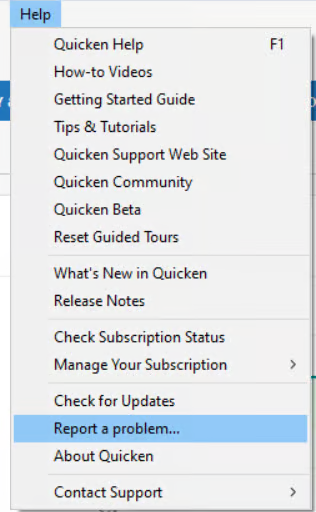
Once submitted, let us know here and we can make sure your details and files are added to the existing ticket.
We appreciate your continued patience as this is being worked on!
(CTP-15510)-Quicken Anja
Make sure to sign up for the email digest to see a round up of your top posts.0 -
I think I had a few months where it was working with no issues, I want to say late 2025? Before that I didn't trust one-step for other reasons.
The fact that it wipes 1 instance but not the other identical instance should make it pretty easy for the dev to figure out I would hope.
0 -
@Khyron ,
- Are you Syncing to Mobile/Web? Is the Sync option in Edit / Preferences / Mobile & Web turned on?
AND - do you actually use the Mobile app on your smartphone or the Quicken on the Web browser-based app?
The Sync process has been suspected of a number of weird things happening with Quicken, up to and including unwanted changes or deletions of reminders. Could your problem be caused by Sync?
• If you answer "yes" to the 1st question and "no" to the 2nd question, turn Sync off completely. You don't need it. The Sync process should only be used in conjunction with the Quicken app for Smartphones or the Quicken on the Web browser app. It cannot be used as a replacement for backing up and restoring your Quicken data file.
• If you answer "yes" to both questions, try to Reset Sync so that the current cloud sync file is replaced with a fresh complete copy … however, it might be better if you did not Sync until the bug can be fixed.
Do note that a full Sync process may take many minutes to complete.How to reset Sync to Cloud
• Log out of your mobile app, then do this on your desktop / laptop:
• Go to Edit / Preferences / Mobile and Web
• Click the "Reset your cloud data" link and follow the instructions until it is complete.
• Sync your desktop file to the cloud
• Now log back into your mobile appHow to turn off Sync to Cloud for the current data file
• Go to Edit / Preferences / Mobile and Web
• Change the Sync radio button and set it to OFF0 - Are you Syncing to Mobile/Web? Is the Sync option in Edit / Preferences / Mobile & Web turned on?


