PNC Bank - OL-297-A Error - Not Able to Connect or Download - Quicken Direct Connect

Received this OL-297-A error now for the last two days with PNC Bank. All of my other accounts are connecting and downloading just fine. I have PNC Direct Connect with 11 accounts. A similar problem occurred earlier in the year when PNC updated their website, however that problem was ultimately fixed. This current problem feels eerily similar. I tried rebooting. I really don't want to go through the whole deactivate/activate cycle if I can help it. Takes too long. Anybody else having this issue?
Comments
-
3/27 @ 5:36am Update - Just validated my Quicken file and attempted an update directly from one of my PNC accounts. Same OL-297-A error received. Unable to establish an internet connection. This error hits almost immediately upon attempting to connect with PNC.
0 -
Same issue for me the last two days…much like in the recent past I agree. I have tried it from two pc's on two different networks and still doesn't work
0 -
Thanks for reaching out! The OL-297 error in Quicken typically occurs when Quicken cannot establish a secure connection to your bank’s servers. This doesn’t mean your internet is down—you may still be able to log in to PNC’s website directly.
This error often happens around times when banks update their security settings or perform server maintenance, which can temporarily prevent Quicken from connecting.
Please follow the steps below that usually help resolve the issue:
Update your internet security settings
1. Click the Start button and select the Control Panel.
- Windows 10: The Control Panel is located in the Windows System folder in the Start menu.
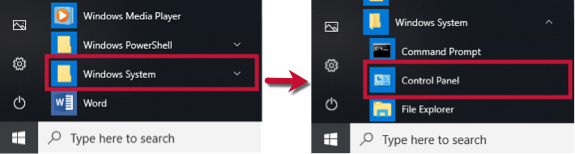
- Windows 11: Go to the Start menu and select All apps.
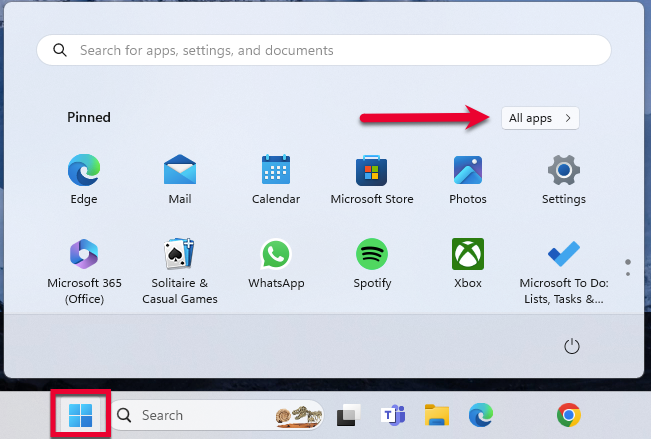
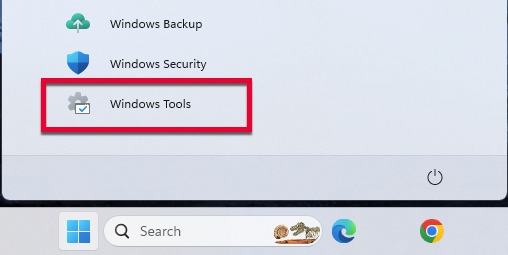
Then, go to Windows Tools and select Control Panel.
2. Select Network and Internet, then Internet Options.
3. Go to the Advanced tab.
4. Scroll down to the Security Section.
5. Verify TLS 1.2 is checked.
- If it is not, check it.
- If it is already checked, continue to the If the issue persists section below.
6. Click Apply, then OK.
7. Try your update in Quicken again.
If the issue persists
If updating the Advanced settings does not resolve the error, follow the additional steps below.
If you get this error with all of your banks
Check your system date and time settings
- Right-click the clock on the task bar at the bottom right corner of your screen and select Adjust date/time.
- In the Date & Time section, check to see if the time is correct. If it is not, fix it.
- To fix it, turn Set time automatically off, then click Change and make the necessary adjustment.
- Sometimes the time zone may be incorrect. In the Time Zone section, make sure it is set to the correct time zone.
- If you made any changes to the time or time zone, open Quicken and attempt your online request again.
Restart your computer
- Save your work and close all open applications.
- From the Start menu, choose Restart.
- Select Restart and click OK.
- Once you're back up and running, try your Quicken online request again.
Reconfigure your firewall
- Verify that the Quicken program (qw.exe) has full and unrestricted access to the Internet. For more information, take a look at Configuring Firewalls.
If you get this error with some (not all) of your banks
If only one bank is showing this error, it's likely a temporary issue; if this is the case, wait until the next business day and then try to update again.
In the meantime, make sure the settings are correct for accepting cookies.
1. Click the Start button and select the Control Panel.
- Windows 10: The Control Panel is located in the Windows System folder in the Start menu.
- Windows 11: Go to the Start menu and select All apps.
Then, go to Windows Tools and select Control Panel.
2. Select Network and Internet...
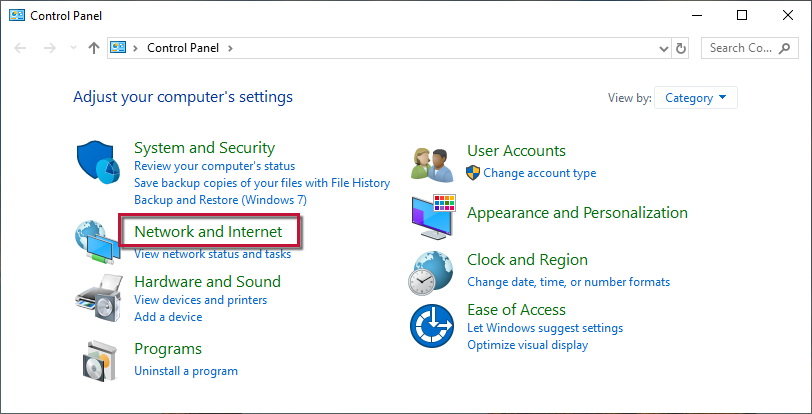
...then Internet Options.
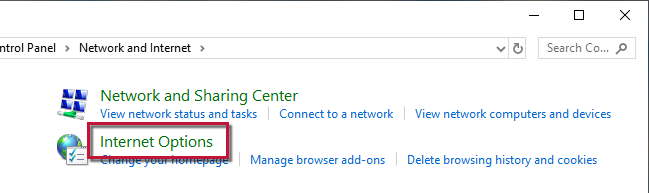
3. Select the Privacy tab.
4. Click on the Advanced button.
5. If available, check the Override automatic cookie handling option.
6. Confirm that First-party and Third-party Cookies are both set to Accept.
7. Press OK, then Apply and OK again.
8. Close Internet Options and try updating Quicken again.
If the issue persists only with PNC, it is likely temporary. Since Quicken does not have access to the bank’s servers, you will need to contact PNC’s Online Services support for assistance. Ask to speak with a representative who handles transaction download issues. Sometimes a brief escalation is required if the standard support team cannot resolve it.
Thank you!
-Quicken Anja
Make sure to sign up for the email digest to see a round up of your top posts.0 -
This may be off topic…. if so, I'll start a new thread.
Been getting my PNC Direct Connect without issue for 9 weeks (after a 2 month outage). Got downloaded items and processed a BillPay today at 11:00AM EDT.
Suddenly, as of 2PM EDT today when I try to connect for DC/BillPay, all I get is the red ball with an OL-297-A error (Quicken is unable to establish an internet connection). Happens immediately.
Same computer, no issue with internet or WAN connectivity. No updates to W11 or network configuration.
Seems this is some kind of server side issue with being able to hit the DC servers.
Anyone else seeing OL-297-A errors today? I'm hoping it's temporary.
1 -
Hello @charlieo.Hemlock,
Thank you for letting us know you're also encountering this issue. I moved your post to the active discussion on the issue. If you haven't done so already, please try following the troubleshooting recommended in @Quicken Anja's earlier post:
I hope this helps!
Quicken Kristina
Make sure to sign up for the email digest to see a round up of your top posts.
0 -
Wow. I wondered where my post went so quickly. Thank you!!
UPDATE:
As of 3:40PM EDT today I was able to connect to PNC Direct Connect and process BillPay and download via OSU.
Because of the intermittent nature of the outage, I do believe this was some kind of server side problem at the Direct Connect servers and NOT a local PC configuration issue or Quicken application problem. The red ball appeared instantly everytime, so I don't think there was time to attempt to authenticate with PNC. (that kind of error in my experience is more likely an OL-293-A).
At least in my case, this time, I do not believe Quicken (the application) or PNC were at fault here. I hope everyone understands that Direct Connect (the company that does all the OFX mapping) sits between our Quicken application and PNC. Direct Connect (the company) , I believe is still owned by Intuit…. where as Quicken isn't. :-)
Hoping this stays "fixed".
Charlie
1 -
I believe it's caused by PNC server issues and that fits well with what the Support Article says about the OL-297-A error code. The general guidance after getting this error code after OSU and when doing Update Now does not fix the issue is to wait until the next day and try, again.
I first got this error code with PNC DC the morning of 3/25 and continued to get it that evening and the morning of 3/26. Then the evening of 3/26 it stopped being an issue for 2 data files.
This morning it worked well during OSU, again, and even let me do a follow-up afterward with Update Now to schedule a bill payment. But I just now (4pm CST) tried Update Now and got that error code, again. UPDATE, 3/27/2026, 8:14 P.M. CST: I just ran OSU and PNC DC updated the accounts without any errors encountered.
I've also noticed that some (not many) transactions are taking PNC 4-6 days to process and post (per PNC's website).
It seems that PNC is continuing to have issues with their Oct system "upgrade". I'll try OSU, again, later tonight and see what happens.
Quicken Classic Premier (US) Subscription: R66.23 on Windows 11 Home
0 -
Hello All,
Thank you for taking the time to report this issue to the Community, although we apologize for any frustration or inconvenience experienced.
This issue has been reported to our Development and Product teams for further investigation and resolution. Though we do not currently have an ETA, you can bookmark the Community Alert linked below to get updates when available and to know when the issue is resolved. If you do not see the bookmark icon at the upper right, please make sure you are logged into the Community.
Thank you!
(Ticket#12318640)
Quicken Kristina
Make sure to sign up for the email digest to see a round up of your top posts.
1 -
OL-297A Error, connection/no connection, download/not downloading is occurring intermittently throughout the last several days. It does not work about 7 out of 10 connections. This has been happening since the last March update.
0 -
This has been happening since the last March update.
I do not think this OL-297-A error code issue has anything to do with any recent version update. I updated to R66.23 on 3/14 and have not yet updated to R66.28. For me this issue first began on 3/25…just two days ago and 11 days after my last version update. For me it has been a sporadic (about 50% of the time) issue over just the last 3 days but obviously it has been occurring for longer than that for some people.
Over the last couple of months, PNC DC has had previous OL-297-A issues. There have been 5 version updates since the beginning of Feb.
As stated in a previous post: IMHO this appears to be a PNC server/connectivity issue which correlates well with what the Support Article for this error code says when this error code has been occurring with a single financial institution.
Quicken Classic Premier (US) Subscription: R66.23 on Windows 11 Home
0 -
I agree that this doesn’t have to do with the Quicken version updates.
At least for me, in the last 12 months I have only seen this type of OL-297-A error maybe 6 times and the connection error never lasted more than minutes. I assumed it was just servers being overloaded and timing out. I never saw this error during the October changes at PNC that caused me to be offline for weeks.
I believe this is/was a Direct Connect server issue/outage. I wish there was a way to contact Direct Connect…. but that is a dream which will probably never come true :-)0 -
I don't recall getting any OL-297-A errors for the first few months after PNC's Oct system migration, either. I do recall getting this error code with PNC a few times earlier this year however, they were quickly resolved by doing Update Now after the error code was received so I never gave it too much thought, especially since I knew that PNC was still working through the issues caused by their system upgrade.
But the current issue starting for me on 3/24 has been a bit surprising in that it is lasting so long….it happened, again, for me this morning. I had to run Update Now 2X before the PNC accounts updated properly.
However, I won't have to deal with these PNC connection issues beyond early Apr. I've set up new DC accounts at another bank (Old National Bank) which is working well and interfaces better with Quicken regarding bill pay than does PNC. In about 2 wks the transition will be completed except for some straggling ACH deposits (from SS and the state of MN which won't be completed until the end of April).
BTW, I am changing banks not because of the issues with PNC but because they do not have a brick-and-mortar presence where I am now living so I've been planning to do this for quite a few months, now. The recurring connectivity issue with PNC this past month were just the kick in the pants I needed to get it done.
Quicken Classic Premier (US) Subscription: R66.23 on Windows 11 Home
0 -
Very smart of you. In my case it IS the local branch that is keeping me a PNC customer.
I had no errors today with OSU….. but maybe I will later today :-(
I hope you keep us updated on your DC experience with the new bank.
0 -
I've also seen this issue intermittently over the last couple of days, including my initial connection today.
Based on suggestions in another thread, I tried the following, after which I did have a successful connection. This is for a laptop on Windows 11.
- Closed Quicken
- Went into Control Panel (Settings>type "Control Panel").
- Clicked Internet Options icon.
- In General tab, clicked Delete and selected Temporary Internet Files and Cookies to delete.
- Reopened Quicken and refreshed the account (from my PNC account ledger, not One Step Update).
Side note: I would normally prefer to select which cookies to delete, and I know how to do so in Chrome. However, the Cookies addressed through the Control Panel are not the Chrome cookies; the Control Panel Cookies were where Internet Explorer stored its cookies. Though somewhere in the past I learned that Quicken also stored cookies in that location. Since I'm primarily using Chrome now, I thought it was relatively safe to delete all cookies through the Control Panel process.
I'll update if the problem returns.
1 -
If this permanently fixes the issue for you, then great! But I suspect that the issue will soon return which would indicate that they issue is caused by something else. If the issue returns, you might want to try doing Update Now (Account Register > upper right Gear Icon > Update Now). This often resolves the issue for me but sometimes I will need to repeat doing Update Now a few times before I get a good download update.
Quicken Classic Premier (US) Subscription: R66.23 on Windows 11 Home
1 -
Hello All,
Thanks for sharing your experiences with the OL-297-A error for PNC Direct Connect. As noted in the Community Alert, this issue has been reported and escalated internally, though an ETA for a resolution is not yet available.
We appreciate the detailed information you’ve provided; it’s very helpful for tracking the scope and pattern of this issue. The alert is being monitored internally, and any updates or resolutions will be posted there. Bookmark the alert to stay informed as new information becomes available.
Thank you for your patience!
-Quicken Anja
Make sure to sign up for the email digest to see a round up of your top posts.0 -
This issue started for me on March 27. In the morning I got the OL-297-A error. I tried again in the afternoon and it worked. Since then I have been unable to connect using PNC Direct Connect.
0 -
Hello @Daniel_USA,
Thank you for chiming in on this discussion to share your experience.
The Alert for this issue is open and ongoing. We don't have an ETA as to when it will be resolved, but you can bookmark it to be notified of any progress/changes as they occur.
Thank you!
Quicken Alyssa
Make sure to sign up for the email digest to see a round up of your top posts.
0 -
Thanks, as_hiker, this solution worked for me.
2 -
Thank you for following up to let us know what worked for you, as this may be helpful information for other users as well.
Thanks again!
Quicken Alyssa
Make sure to sign up for the email digest to see a round up of your top posts.
0 -
This solution worked for me as well. Now I'll just have to wait and see if it lasts.
1 -
Thank you for coming back to let us know this worked for you.
If you need more help, let us know!
Quicken Alyssa
Make sure to sign up for the email digest to see a round up of your top posts.
0 -
@Quicken Kristina what is going on now? Getting the following and so are others.
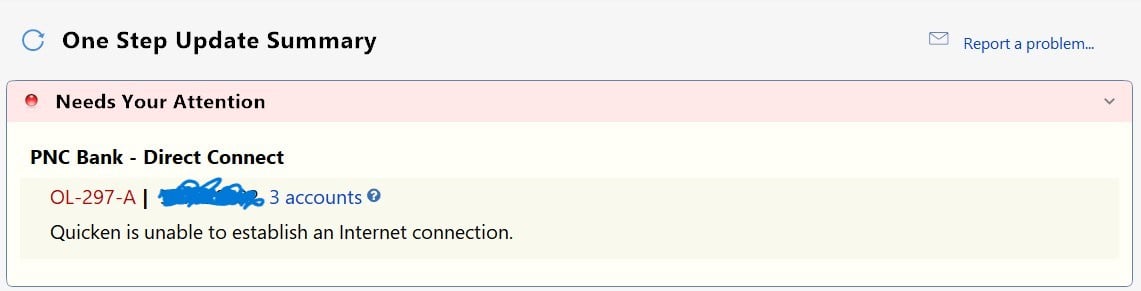
100% positive not a me issue or my software or my internet as I use this service with another bank and it work perfectly. Please advise!
1 -
@as_hiker this solution worked for me as well this morning. I'm not sure if it will hold, however. As many of you have indicated, the connection issue seems to occur intermittently during one-step-updates or direct account updates. Again, only PNC DC appears to be having the problem for me.
1 -
Thank you for sharing additional context and letting us know this worked for you as well.
I hope it sticks, but if you need more help, you know where to find us!
Thanks again!
Quicken Alyssa
Make sure to sign up for the email digest to see a round up of your top posts.
0 -
@Quicken Kristina Beginning on Saturday, March 28, 2026, I am now getting the OL-297-A message. No reliable downloads since February 23rd and now this new issue. No step(s) forward, but a step backwards. You posted on another thread that "we" are working on it. Any updates? Thank you.
0 -
Hello @RookieUser & @MBaron,
Thank you for letting us know you're also seeing the OL-297 issue. I moved your posts to the active discussion.
There are no new updates yet. To be notified of updates and to know when the issue is resolved, I recommend bookmarking the Community Alert:
Another customer posted a process that worked for them to bypass the issue. You may find it helpful.
Thank you!
Quicken Kristina
Make sure to sign up for the email digest to see a round up of your top posts.
0 -
@as_hiker @Quicken Alyssa clearing cookies etc is just a fluke, as I just got done doing all that before I went into Quicken to start my OSU's. It is an intermittant issue for some, for me everytime I have tried I get the same error. However, I am glad the ones who did that were able to get their transactions downloaded.
1 -
@Quicken Kristina was wondering how my post got overthere.
0 -
Thank you for adding your perspective.
I am sorry to hear it didn't work for you. We know this does not work for everyone, and we have an Open Alert for the error. Please make sure to bookmark it to stay updated on progress/changes as they occur.
Thanks again!
Quicken Alyssa
Make sure to sign up for the email digest to see a round up of your top posts.
0




Categories
- All Categories
- 3 Product Ideas
- 34 Announcements
- 249 Alerts, Online Banking & Known Product Issues
- 19 Product Alerts
- 266 Welcome to the Community!
- 42 Before you Buy
- 1.5K Product Ideas
- 55.8K Quicken Classic for Windows
- 16.9K Quicken Classic for Mac
- 1K Quicken Mobile
- 834 Quicken on the Web
- 84 Quicken LifeHub