What is the proper way to denote a transfer of funds between savings and checking?

I realize transfers in Quicken use brackets as transfers ( [xxxxx] ).
For a fund transfer within the same bank account (checking to savings and vice versa), the transfer should show in both registers. Correct? Addition of funds to one, reduction of funds from the other.
EXAMPLE: In a transfer of funds from checking to savings. The "payee" in both the checking and savings registers should have the bracketed savings account number. Correct? How is it denoted in both registers where the funds are coming from, in this case, checking?
Thanks in advance.
[Edited-Readability]
Answers
-
Hello @QwikOne,
Thank you for posing this question.
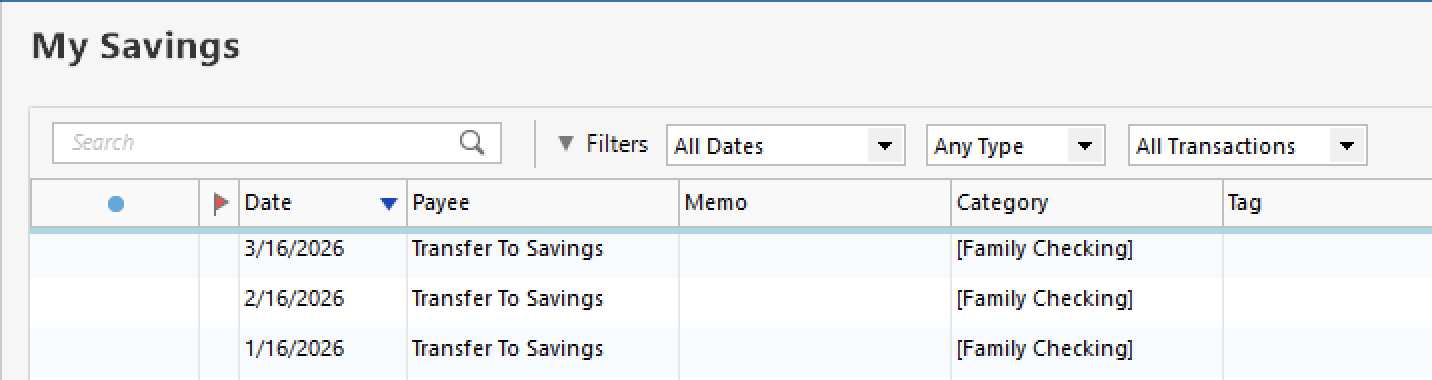
Using your example, in a transfer of funds from checking to savings, the payee can be any number of things, like "Transfer to Savings", or "Transfer from Checking". The brackets around account names go in the Category field. The transaction in the checking account would show the savings account name in brackets in the category column, and the savings account transaction would show the checking account name in brackets.
Here is an example of two transfers in my own Quicken. In the image below, you can see two transfer transactions. These are in a checking account. One is a credit card payment, and one is a transfer to savings.

This is what the same transaction looks like from the Savings account:
And here it is from the credit card account:

Does this answer your questions?
Looking forward to your response!
Quicken Alyssa
Make sure to sign up for the email digest to see a round up of your top posts.
0 -
For a fund transfer within the same bank account (checking to savings and vice versa)…
Just to clarify terminology, what you're describing here is a transfer within one financial institution between two accounts. And the two accounts in your Quicken mirror the two accounts in the real world.
As Alyssa illustrated, the Payee is not what designates the transfer; the Payee name can be whatever you want, as simple as "Transfer" to as precise as "Transfer Savings to Checking", or the names of the accounts, or whatever. You never need the account number in your register, unless it helps you distriguish between accounts, like "Checking -4321". It's the Category field, with the Quicken name of the account in brackets, that designates the transfer between two accounts. And with the transfer account in brackets, that's what makes this a linked transaction, with the same transaction showing up in the other account.
Quicken Mac Subscription • Quicken user since 19932 -
Just checking in, we haven't heard back from you in a while.
Do you still need assistance?
Thank you!
Quicken Alyssa
Make sure to sign up for the email digest to see a round up of your top posts.
0 -
Thanks everybody. This does help. Sometimes my OCD gets in the way of what otherwise is simple. When downloading a transaction from the bank EX: Transfer to savings rom checking ….. the category (can you say payer?) in the savings register will be [checking] and in the checking register category will say [savings].
Closer?
0 -
When downloading a transaction from the bank EX: Transfer to savings rom checking ….. the category (can you say payer?) in the savings register will be [checking] and in the checking register category will say [savings].
@QwikOne Don't say "payer," that just adds confusion. It would be more correct to say that when a transfer between accounts is recorded correctly in Quicken, the Category for the transaction in each account will have the name of the other account in [brackets]. Entering the transfer in one account will automatically create a linked transaction in the other account.
If you enter the transfer in Quicken before the transactions in each account download, the downloads should match to the existing transactions and all will be correct. However there is no information in the downloaded transactions that says which Quicken account the money should come from or go to. If you wait for the transactions to download, Quicken can be set to guess what the other account is and record the transfer correctly. It bases this guess on the timing of the transactions and the amounts being equal. Sometimes it guesses wrong.
For best results, you should record the transfer, either manually or by accepting a Reminder, before the transactions download.
QWin Premier subscription0


