Form 1040 Report Doesn’t Account for Estimated Tax Payments (Q Mac)

Estimated Federal and State tax payments are made 4 times over two calendar years. Three in the actual reporting calendar tax year and one in the following year. The report doesn’t include the fourth estimate made in the following calendar tax year. This could cause an incorrect tax filing if the three estimated are the only estimates reported. An option should be available to have the specific tax estimate category supersede the report date setting. It could be as simple as having a tab on the category settings providing that option.
Comments
-
Hi @RBC1,
Thank you for sharing what you’re experiencing.
What you’re seeing is expected behavior in Quicken. Tax reports, such as the Tax Schedule report, are based strictly on transaction dates, so only payments made within the selected date range will be included.
For estimated taxes, this can understandably be confusing, since the fourth quarterly payment is often made in January of the following year but applies to the prior tax year. Because Quicken does not apply tax-year logic in this case, a January payment will not appear in a report filtered to the previous calendar year.
As a workaround, you can expand the report’s date range to include the January payment or account for it manually. If you’d like to see this handled differently in the future, you may also consider submitting an Idea post so other users can vote on it.
Thank you!
Quicken Laura
Make sure to sign up for the email digest to see a round up of your top posts.
0 -
Another workaround I've used in the past is to change the date on the federal, state, and local Q4 estimated payments to December 31 for the purpose of a Quicken report with calendar year dates, and then changed the three transaction dates back to their original January dates. In fact, if you change the three transaction dates to December 31 and print the print, you can then do Undo (Command-Z) three times in a row to revert each of the transactions transaction to its original date.
I think modifying Quicken to treat estimated tax dates in January is potentially more tricky than it's worth. While you probably want just the total of the four federal estimated payments for the tax year, state and local estimated taxes have a different tax treatment if they're made in December or January.
Quicken Mac Subscription • Quicken user since 19930 -
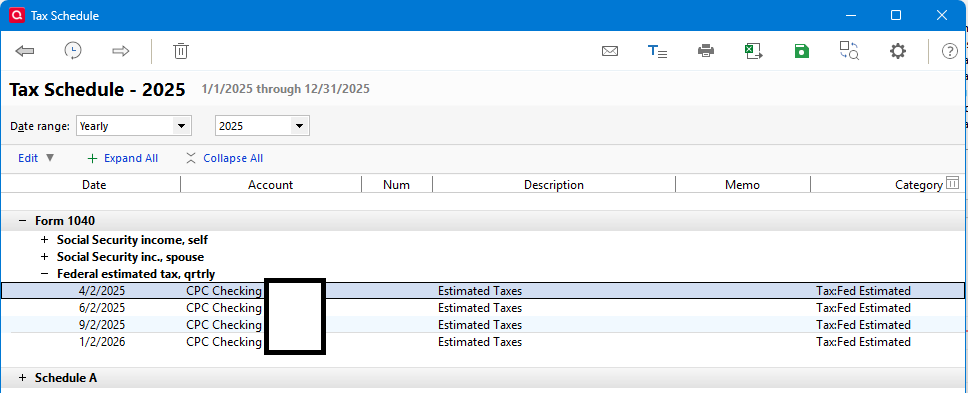
I will point out that Quicken Windows handles this correctly.
 1
1 -
I will point out that Quicken Windows handles this correctly.
@Chris_QPW Very interesting; thanks for pointing that out.
Sadly, to request the Quicken Mac team make this tweak in Quicken Mac entails starting an Idea topic, waiting for it to amass enough votes, and then if and when it does, have it sit on the developers' list for months or years until it rises up their priority list to act on. When it's something simple like this, I sometimes despair that it's not worth the effort and the multi-year wait to come to the attention of the developers.
Out of curiosity, what does Quicken Windows do if you have state estimated taxes on the same dates? For federal tax purposes, the Q4 estimated payment in January 2026 isn't tax-deductible in 2025, but a Q4 estimated payment from the prior tax year (2024) paid in January 2025 is deductible in 2025. Tax software understands this, but if Quicken is to product a straightforward report, it's not clear to me whether the January estimated state (and local) payments should or should not be included. If you're preparing your state taxes, you want to count that estimated payment; if you're preparing your federal taxes, you don't.
Quicken Mac Subscription • Quicken user since 19930 -
I don't pay State estimated taxes, so I've never looked into that. I might try making such an entry and seeing what it does later when I got a chance.
But I don't think Quicken does anything real special. I think simply that the tax reports and tax planner basically make a guess that a federal tax payment in January is the estimated tax. And yes I think it's a guess because I've also seen people talk about how they've made tax payments that aren't supposed to be estimated taxes and it gets confused.
0 -
And I should that there is nothing in Quicken windows that does state tax reporting in predictions.
0 -
QWin handles state estimated taxes using the Federal rules for them: the state payments are deductible on Sched. A in the year they are paid, even if your state treats then differently. This is handled correctly in the Tax Planner.
QWin Premier subscription1



