Quicken Windows R66.28 Build 27.1.66.28 Missing MiscExpX transaction category in IRA

I have used Quicken for Windows for years and successfully migrated from Microsoft Money years ago. I have several IRA accts created under Money. Each of those IRAs have separate Cash accounts linked to them. I receive dividends routinely on investments within these IRA accounts. Some dividends have misc fees associated with the dividend payment. To accomplish this in the IRA I would enter the dividend amount transaction using the DIVX category, which would deposit that amount into the linked Cash account. Then I would enter another transaction for the misc. fee as a MiscExpX transaction which would deduct the fee as a payment in the cash account. As of last week, this functionality worked in all my IRA accounts that were migrated from MS Money. However, the transaction categories DIVX and MiscExpX are no longer available as are INTX, etc, but BoughtX and SoldX still exist and those transactions are deposited into the checking/cash account that is linked to the IRA. So, some transactions are sent to the separate checking/cash account yet others are not! There is no consistency. How can this be fixed?
I have encountered this problem in the past and some kind of fix was put in place to replace this functionality. But it has disappeared again. Whatever happened to "backwards compatibility"?
This is creating big headaches for me. Help!
Thanks in advance for your help and suggestions.
Pat U.
Comments
-
Hello @Pat U,
Thank you for reaching out! To clarify, what process are you using when you enter the transactions?
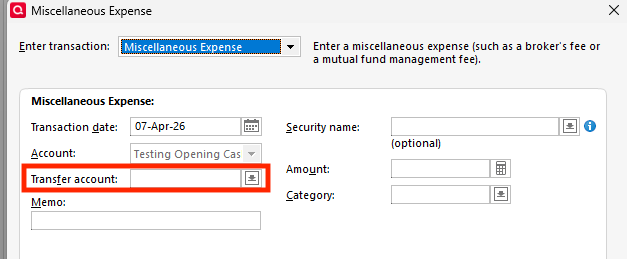
If you are using the Enter Transactions button and selecting the transaction type, are you missing the option to select the transfer account?
I look forward to your response!
Quicken Kristina
Make sure to sign up for the email digest to see a round up of your top posts.
0 -
This appears to be be another example of this issue with IRAs that were originally converted from Microsoft Money. See this discussion for a workaround.
QWin Premier subscription0 -
Quicken Kristina and Jim Harman,
I am using the Enter Transactions button, and miscellaneous expense. The account defaults to the IRA account in which I am working, but the Transfer Account field shows the name of the Checking/cash account that is directly linked to the IRA account and the field is grayed out, so it does not allow me to change that Transfer account field. I believe that this is all related to conversion from MS Money to Quicken all those years ago. I saw Jim Harman's message to my message and the workaround that he linked looks like it will probably fix my issue ultimately, but I have a related issue that I need to work on first.
So, I need to digest all these changes that I need to make and work on it to create a new IRA account as was recommended in the link that Jim Harman identified.
Thank you both for your responses and suggestions. I really appreciate your help.
Pat U
0

