Oakmark Funds & Janus Transaction Download - Issues with Password [Edited]
Comments
-
I wound up having a good offline conversation with one of the Reddit mods. She did assure me that this issue has been recorded and escalated (she provided some details that reassured me it wasn't just lip service, and she looked into my account to see how often I'd called about this and how far back my first call was).
I also got replies from other Redditors that their Janus downloads were working just fine (without moving to earlier versions). So go figure🤷
Patience is not one of my virtues but for now it appears I'll be working on that skillset. Crossing my fingers the resolution is close at hand.
0 -
Hello All,
Thank you for keeping this thread active with your comments and concerns.
The Alert for this issue is open and ongoing. Please ensure you have it bookmarked to be notified of any updates/changes as they become available.
Thanks again!
Quicken Alyssa
Make sure to sign up for the email digest to see a round up of your top posts.
0 -
Not working for Janus for me.
V 27.1.66.23
0 -
Still not working for me. And who are "Reddit mods"??????
[Edited - Language]
0 -
Quicken has a subreddit called QuickenOfficial and it has moderators.
1 -
This content has been removed.
-
I changed my Janus password. Janus requires password length over 10 characters. Quicken says that Quicken info is that Janus password cannot exceed 8 characters which is incorrect. So new password will not work with Quicken.
0 -
Cib that's not the reason read past post. Quicken did an upgrade in November and as soon as that upgrade patch hit everyone that had Janus accounts started having issues with downloading transactions Associated to password not working anymore.
1 -
Hello All,
Thank you for adding to this discussion.
Please continue to refer to the Open Alert for this issue. Ensure you have it bookmarked to receive notifications of progress and/or changes as they occur.
Thanks again!
Quicken Alyssa
Make sure to sign up for the email digest to see a round up of your top posts.
0 -
[Removed-Rant/Off Topic]
1 -
[Removed-Rant/Off Topic]
0 -
Hello All,
Thank you for continuing to add to this discussion.
We apologize that this issue has not yet been resolved. Rest assured, our teams are still working toward a resolution.
Please refer to the Open Alert for this issue. Ensure you have it bookmarked to receive notifications of progress and/or changes as they occur.
We appreciate your patience!
Quicken Alyssa
Make sure to sign up for the email digest to see a round up of your top posts.
0 -
I have zero confidence in this being resolved.
1 -
Has anyone tried the latest R67.7 release to see if this is fixed? Tired of upgrading Quicken, finding out it's broken, and downgrading to R64.30. Been doing that since November 2025.
[Edit] NVM, now Quicken only shows R66.28, and I know that doesn't work.
[Edited - Readability]
0 -
It seems to be working for me R67.7. I hope this is the end of that problem.
2 -
@gusto01 It's weird that I don't see that release anymore when I have Quicken check for updates. I had to go to the page that holds all the releases and I can find it there. That's the page where I downloaded the R64.30 release I've been using since that is the last one that has worked for me since Nov 2025 when this issue started.
I have downloaded the R67.7 patch file and I'll install it tomorrow to see if it fixes things for me.
0 -
This content has been removed.
-
I'm happy to report that R67.7 worked for me today accessing Oakmark. I'll reserve judgement whether it's really fixed until I've given it a few days with no errors. Of course, I won't know if it really works until I actually have some transactions to download, but at least it doesn't give me the password errors like the previous releases.
0 -
The "open alert" on the problem
has no new news.
0 -
Somehow this update disappeared on me (read something similar on Reddit). I got the alert that a new version was ready to download, but when I went to download I got the message I had the most current (R66.28). :(
0 -
when I went to download I got the message I had the most current (R66.28). :(I had the same experience.
You can download it here:
Quicken for Windows: Manual Patch Update | Quicken
Edit: Downloading from Janus seems to work now. After applying the update ("patch"), I had to deactivate and reactivate my Janus account to get it to work. The acid test will be if it continues to work over the next couple of days…
Marc
1 -
Hello everyone,
Thank you for continuing to update this discussion with your findings.
The Alert for this issue is still open and considered ongoing. Please bookmark the linked alert to be notified of changes or resolution.
Thanks again!
Quicken Alyssa
Make sure to sign up for the email digest to see a round up of your top posts.
0 -
I got the update but looks like I'll have to deactivate/activate to see if this works. Fingers crossed!
0 -
OMG it worked!!!!!!!!!!!!!!!!!!!!!!!!!!!!!!!!!!!!!!!!!!!!!!!!!!!!!!!
1 -
Thank you for updating the thread to let us know you have found success!
Anyone still experiencing this issue should continue to refer to the Community Alert; it is still open at this time.
Thanks again!
Quicken Alyssa
Make sure to sign up for the email digest to see a round up of your top posts.
0 -
Yes…me too!! I updated yesterday to the new patch and it's still working as of today. In the past with the other updates, something would cause it to malfunction overnight and stop working with the password issue by the next day.
1 -
I just installed version 67.7 and configured my Janus Growth & Income account for Online Services. I had a choice ONLY for Janus Henderson. The setup completed, but it is using Express Web Connect. When I open/view the account, it is configured for Simple Investing, which means I can NOT see my transactions. Is there a fix for this?
[Edited-Readability]
Quicken user since Quicken for DOS
0 -
Hello everyone,
Thank you for continuing to update the discussion with your progress.
The Alert for this issue is still open and considered ongoing at this time, so anyone still experiencing this should continue to refer to the linked alert.
If you do not see the option for complete investing, then no, there is no way to "fix" simple investing for the connection you are currently using. Switching to a different instance or a different connection method would be the next option.
When you say you had only an option for Janus Henderson, what do you mean? Oakmark was not in the list of banks to connect to? I see it in my own Quicken.
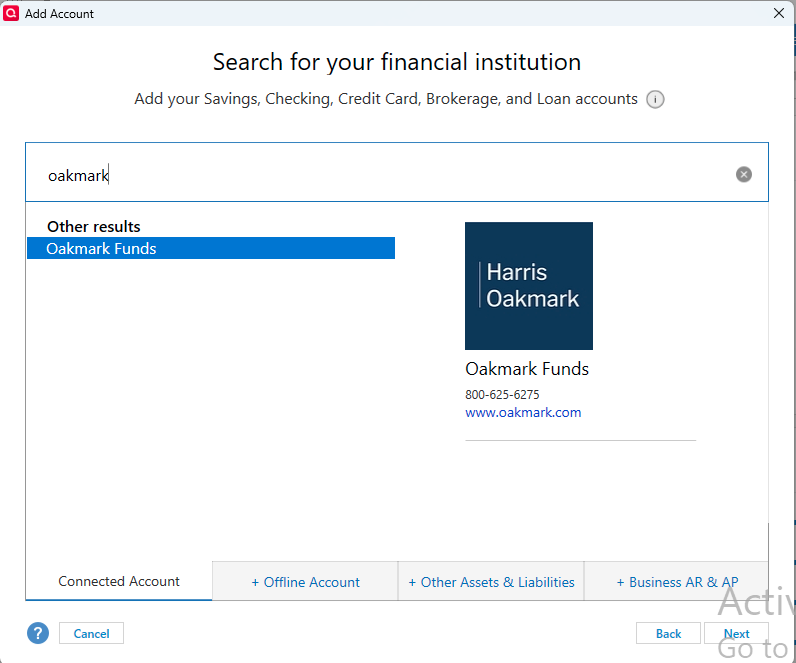
I would suggest deactivating and reactivating so you can reconnect to Oakmark using the instance in the image above.
Let us know how it goes!
Quicken Alyssa
Make sure to sign up for the email digest to see a round up of your top posts.
0 -
After updating to 67.7 three days ago, my Janus Henderson accounts continue to still work with NO password issues as before. Finally fixed!
Rich, with your issues you just need to change it to the following option in Quicken:
0


