Raymond James Account no longer synching

It just stopped synching and it's been several days
Max Miller, Ph.D.
Quicken Mac
Comments
-
Hello @BOTRO,
I reviewed your account and saw that you were initially receiving an FDP-155 error. This is a known issue that has been escalated internally, though there is currently no ETA for a resolution. Please refer to this Community Alert for any available updates and information.
However, at this time, the most recent error I see you’re encountering is FDP-101. This error occurs when Quicken is unable to connect to your bank to retrieve transaction information, which can sometimes happen if something on the bank’s end is blocking the connection.
Here are a few steps you can try:
- Wait 24 hours and then attempt to download your account information again
- If the error persists after 24 hours, please contact Quicken Support so the issue can be further investigated and escalated if necessary
For additional details, you can also refer to the official FDP-101 support article.
Please note that since there is an active alert for this financial institution, the FDP-101 error may be related to the issue outlined in that alert. As a result, Support may advise waiting until the alert is marked as resolved.
Thank you!
-Quicken Anja
Make sure to sign up for the email digest to see a round up of your top posts.0 -
thanks
Max Miller, Ph.D.
Quicken Mac
0 -
Quicken returned this message: We were unable to connect. Message from Raymond James & Associates: The remote server returned an error: (500) Internal Server Error. (2000)
0 -
I'm having this issue as well.
0 -
I'm also having this issue.
0 -
Hi @gusplus, @Chuck56 & @Jaymack,
Thank you for chiming in and sharing the error code you’re encountering. I’m not currently seeing that error on our end.
@Chuck56 & @Jaymack could you please specify the exact error message you are receiving?
When you have a moment, could you please confirm which connection method you’re using: Direct Connect or Express Web Connect/Quicken Connect? This will help us better understand the issue and guide the next steps.
Additionally, it would be very helpful if you could submit your log files by following these steps:
- Open Quicken
- Click Help
- Select Report a Problem
- Click Send to Quicken
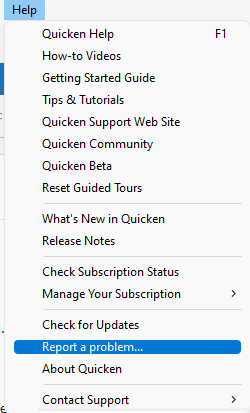
Mac
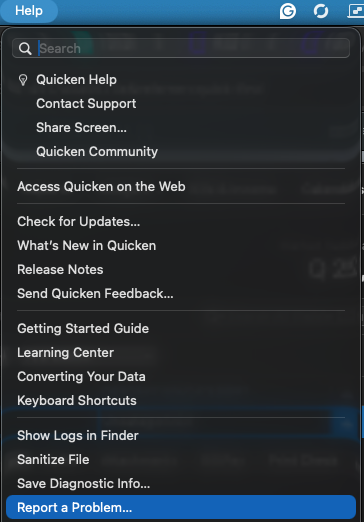
I look forward to your reply!
(CBT-1112)
Quicken Laura
Make sure to sign up for the email digest to see a round up of your top posts.
0 -
Using Direct Connect; log files were submitted.
0 -
I am having the same issue. This is the error I am getting:
We were unable to connect. Message from Raymond James & Associates: The remote server returned an error: (500) Internal Server Error. (2000)
Details -
Channel: OFX
Days in error: 1
Error Code: 2000
Server Message: The remote server returned an error: (500) Internal Server Error.
Type: Direct Connect FI
1 -
Thank you for providing additional information; it’s very helpful. I will forward this to the appropriate team for further investigation.
@Paul_Testing I’d appreciate it if you could also submit your log files.
Thank you for your cooperation.
Quicken Laura
Make sure to sign up for the email digest to see a round up of your top posts.
0 -
several days (4/17/2026 -4/20/26) repeated "remote server returned error: (500) Internal Server error [OL-301-A]". confirmed password correct; reboot does not clear. Online browser connection works fine.
0 -
Same here … days now…
1 -
Thank you for reaching out to the Quicken Community and for bringing this to our attention.
To better understand what’s happening, I have a couple of questions:
- Could you please upload a screenshot of the error message you’re seeing?
This is a general error and should include a unique message provided by the financial institution explaining the action that is required. - Are you attempting to send an online payment, or are you trying to download transactions?
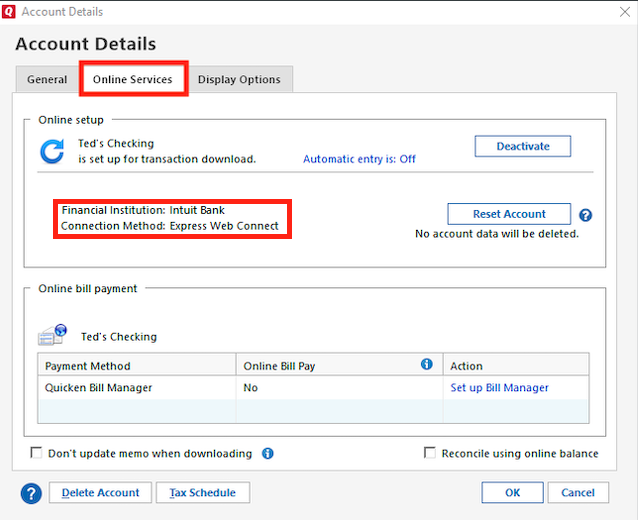
- Could you please confirm if the connection type is Direct Connect?
- To check this, follow these steps:
- Go to Tools > Account List
- Click Edit next to the account in question
- Select the Online Services tab
- There, you will see the connection type.
- To check this, follow these steps:
I look forward to your reply!
Quicken Carlos
Make sure to sign up for the email digest to see a round up of your top posts.
0 - Could you please upload a screenshot of the error message you’re seeing?
-
Same here, 500 error on Mac Classic
0 -
Same here, just submitted logs via Quicken
0 -
Hi @Lazarus Long,
Thank you for joining this thread!
Could you please review and respond to the questions above? This information will help us create an investigation ticket on our end.
Thank you—I look forward to your response.
Quicken Carlos
Make sure to sign up for the email digest to see a round up of your top posts.
0 -
Hi @Lazarus Long,
Thank you for submitting your logs. I’ve attached them to the ticket for the ongoing investigation.
Please feel free to share any updates if you notice any changes or continue to experience the issue.
(CBT-1112)
Quicken Laura
Make sure to sign up for the email digest to see a round up of your top posts.
0 -
Just ran OSU again just now and it returned a 500 Internal Server Error. OL-301-A error
Uses Direct Connect
0 -
Thank you @Chuck56,
I've added you to the ticket.
Quicken Laura
Make sure to sign up for the email digest to see a round up of your top posts.
0 -
Still getting the same error this morning when I try to sync accounts.
We were unable to connect. Message from
Raymond James & Associates: The remote server returned an error: (500) Internal Server Error. (2000)Details -
Channel: OFX
Days in error: 1
Error Code: 2000
Server Message: The remote server returned an error: (500) Internal Server Error.
Type: Direct Connect FI
0 -
Just sent a problem report with screenshot of error messages.
0 -
I'm having similar issues. When downloading from Raymond James I encounter an (error has occurred) message, no other explanation. Direct connect. Has been happening for over a week.
William Hughes
0 -
Hi @bshughes657,
Thank you for answering the questions above. We’ve created an investigation ticket for this issue.
Please submit your logs by going to Help > Report a Problem.
- Windows users:
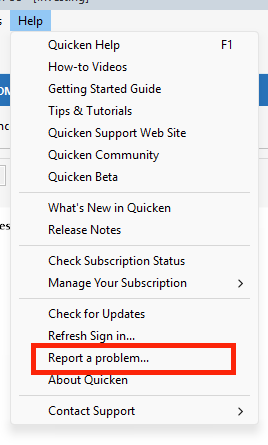
- Mac users:
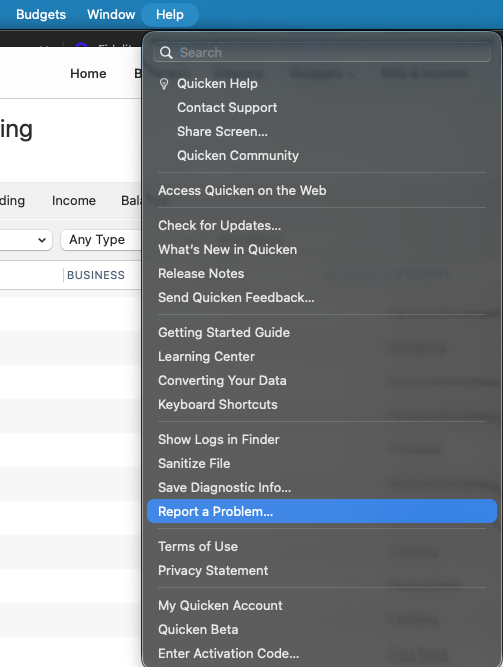
Once you’ve submitted the logs, please let me know so I can attach the information to the investigation ticket and forward it to the appropriate team.
I look forward to your reply!
[CBT-1112]Quicken Carlos
Make sure to sign up for the email digest to see a round up of your top posts.
0 - Windows users:
-
There is another thread about this. "Raymond James Account no longer synching" May want to combine.
I also submitted a problem report about this.
0 -
Ditto for me.
0 -
I'm also having problems connecting to Raymond James, getting the following message: "We were unable to connect. Message from Raymond James & Associates: The remote server returned an error: (500) Internal Server Error. (2000)"
I'm using direct connect.
I emailed the report to your team.
0 -
Hi All,
Thank you for reporting the issue and for sending the logs. I have added the information to the investigation ticket.
(CBT-1112).Quicken Carlos
Make sure to sign up for the email digest to see a round up of your top posts.
0 -
I am having the same issue
0 -
Hi @lshap,
Thank you for joining this thread and for sending the report.
We have added the information to the ticket.
Quicken Carlos
Make sure to sign up for the email digest to see a round up of your top posts.
0 -
Hi all,
Thank you for providing the details and submitting your log files. I’ve attached them to the ticket for further investigation.
Quicken Laura
Make sure to sign up for the email digest to see a round up of your top posts.
0 -
I am having the same issue. I deactivated my accounts then reactivated in Quicken. During the reactivation I was able to connect and validate my RJ credentials and relink my accounts. It then re-downloaded many transactions successfully and updated my sync date stamp to the current time. Great!
Thought I was done but I did another OSU and still got the error message. Tried again 24 hours later and still received the error message.
Hoping this is resolved soon. Month end is coming…
0


