CC-501 Across Multiple Financial Institutions [Edited/Merged Threads]

Answers
-
Today, for the first time I received a CC-501 error message on my Barclay-Jet Blue Master card. I have stil not been able to update this account since 04/03/2026.
The same message appeard on My Costco Citbank Visa Card.
0 -
Same error several accounts
1 -
I download transactions to all my accounts every morning.
Got CC-501 error for Fidelity this morning. To verify, I added my Fidelity accounts to a test datafile. They added okay but when I tried an OSU, I got the CC-501 error again.
I reported the issue.
Deluxe R66.23, Windows 11 Pro
1 -
Receiving CC-501 "unable to update this account due to an unknown error" on
both Charles Schwab and Fidelity Investments during One Step Update as of
this morning (4/21/26). All other accounts in the OSU completed normally.Environment:
- Quicken Classic Premier, Version R66.28, Build 27.1.66.28
- Windows 11
- Connection method: Express Web Connect+ (no password prompt on either)
- Last successful update on both: 04/20/2026
Affected:
- Charles Schwab & Co., Inc. - 1 account
- Fidelity Investments - 3 accounts
Not affected:
- All other connected institutions updated successfully in the same OSU run
- 40 of 57 quotes/headlines updated (normal)
Troubleshooting attempted:
- Clicked "Try Again" from the OSU summary - same CC-501
I have not deactivated/reactivated any accounts and am holding off on that
step given the documented risk of cascading errors across other institutions.Posting to see if others are seeing the same pattern today (Schwab + Fidelity
together), which would suggest a backend EWC+ issue rather than anything
account-specific. No formal Alert posted for either institution as of this
morning.Anyone else?
0 -
Getting 501 with CITI
0 -
Quicken Windows,
Went to do a One Step Update, received CC-501 errors on Capital One and Fidelity. Tried again, received the CC-501 errors and now Cloud Sync error.
I assume this is an issue with Quicken?
0 -
Same.
0 -
I also got this error starting this morning for Fidelity. It appears some transactions did download for some of my Fidelity account but the update timestamp on the accounts is missing in the registers.
Deluxe R66.23, Windows 11 Pro
0 -
Same here for Fidelity:
Deluxe R66.23, Windows 11 Pro
0 -
I am unable to update transactions on all of my Fidelity accounts including Elan credit card. I am using Quicken Premier with Windows 11.
Problem started this morning (April 21, 2026). The error is displayed as "Unknown". A link is provided that refers to a 501 error.
Is anyone else having a similar issue?
0 -
Seeing the same with Fidelity and also with Chase. Same as well on the start date (worked on 4/20 - error started 4/21)
0 -
Todays downloads have significant inaccuracies. Some share prices are erroneous, stock splits have ben added when none have occurred, and several accounts get 501 error messages.
0 -
Thanks for reaching out to the Quicken Community and for bringing this to our attention.
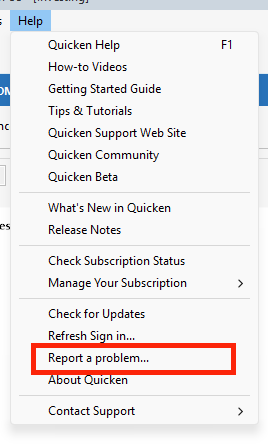
To help us investigate further, please provide a screenshot of the error and submit your logs by going to Help > Report a Problem.
I look forward to your reply!
Quicken Carlos
Make sure to sign up for the email digest to see a round up of your top posts.
0 -
Same with Schwab…started 4/21. I don't have Fidelity and everything else is working OK.
0 -
Several reports of the problem this morning. You are not alone.
Deluxe R66.23, Windows 11 Pro
0 -
Same. Capital One, Chase, Charles Schwab, Amex, Discover. Error started 4/21
0 -
Same with Fidelity and Schwab.
0 -
Same issue with Fidelity. I have no problems with Chase or any accounts at any other institutions, just Fidelity.
Quicken Classic Premier (US): R66.28 on Windows 11 Pro
0 -
Hi @leishirsute ,
Thank you for reaching out to the Quicken Community and for sharing the steps you’ve taken so far.
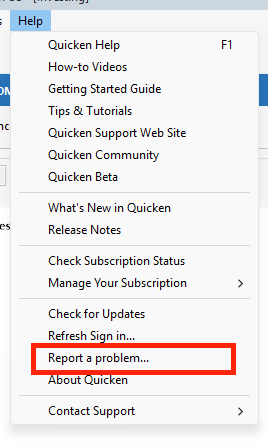
I recommend submitting your log files by navigating to Help > Report a Problem. This will provide additional details that can help with further investigation.
I look forward to your reply!
Quicken Carlos
Make sure to sign up for the email digest to see a round up of your top posts.
-1 -
I have the same issue
0 -
Same issue with Fidelity
0 -
Hello All,
Thank you for taking the time to report this issue!I have merged all your reports together into one thread as we will be forwarding this issue to the proper channels to have this further investigated. However, we request that you please navigate to Help > Report a problem within your Quicken program and submit a problem report with log files and screenshots attached in order to contribute to the investigation.

It would also aid the investigation to include a sanitized file when submitting the problem report. A sanitized file is a data file that removes personally identifiable information so you can comfortably share this file with the Quicken team.
While you will not receive a response through this submission, these reports will help our teams in further investigating the issue. The more problem reports we receive, the better.
Please let us know once you have done so, and we apologize for any inconvenience in the meantime! Thank you.
(CBT-1116)-Quicken Anja
Make sure to sign up for the email digest to see a round up of your top posts.0 -
For me, it's Capital One. Fidelity and 7 other institutions are fine.
0 -
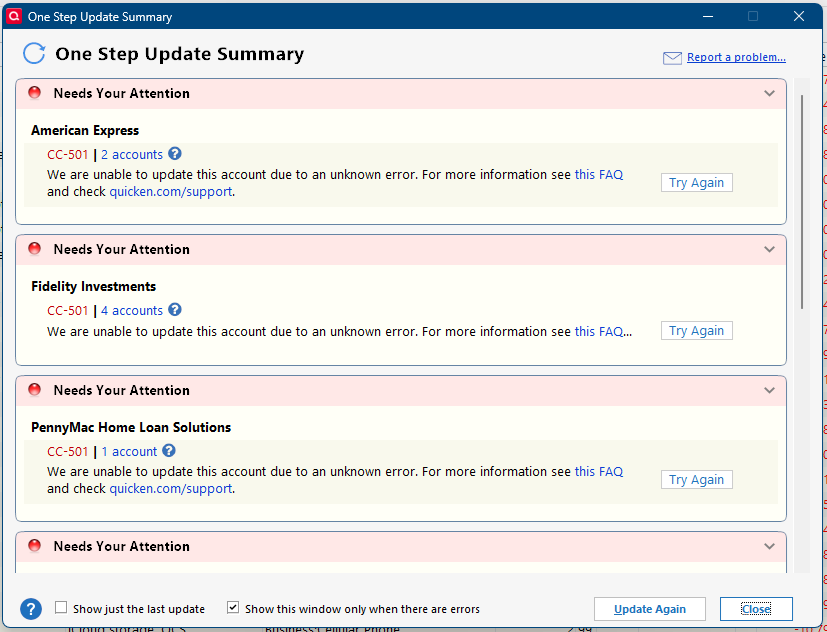
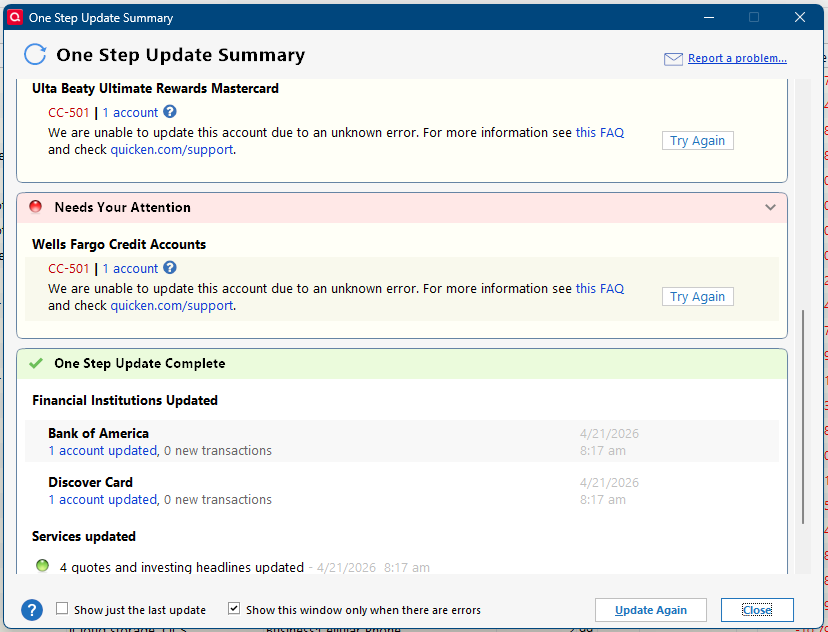
Same. Submitted the following using Report a Problem.
Quicken user since 1991
VP, Ops & Tech in the biometric space
0 -
yes same error with Fidelity and Charles schwab
0 -
@Quicken Carlos Hello. I reported the problem via Quicken this morning. I hope the data helps.
FYI. I created a new datafile and added just the Fidelity accounts.
They added fine and OSU updated without errors. SO maybe some cloud metadata issue for exsiting connections is having problems.
In another test datafile that already had Fidelity accounts connected, I tried deactivating those accounts to reconnect them. Quicken ignored the deactivate request. After selecting Yes to deactivate, it just showed the connected Online tab. So, deactivating doesn't work to try to fix this issue.
Deluxe R66.23, Windows 11 Pro
0 -
I have 2 Chase credit cards, both connected via EWC+, and this morning both are getting CC-501 errors when I try to download.
No other card or account is getting an error.
I went out to Chase's website and had to re-identify myself (via text message and inputting the code provided into the website) but that didn't help with the download although I was able to log into the site. manually.
Since all of my accounts are setup for Scheduled Update at 7am, I'll just wait and report back tomorrow.
Q user since February, 1990. DOS Version 4
Now running Quicken Windows Subscription, Business & Personal
Retired "Certified Information Systems Auditor" & Bank Audit VP0 -
Tried again just now. All accounts updated EXCEPT Amex and Fidelity.
Quicken user since 1991
VP, Ops & Tech in the biometric space
0 -
Hello everyone,
Thank you again for all the reports and for your patience while this was being looked into.
We’ve received an update that there was some server maintenance earlier today which may have caused the CC-501 errors you were seeing. However, the issue should now be resolved. Please go ahead and try updating your accounts again and let us know if you’re still experiencing any issues.
@MSStateDawg Thanks for letting us know it is working for you now!
We appreciate your help in bringing this to our attention!
-Quicken Anja
Make sure to sign up for the email digest to see a round up of your top posts.0 -
Amex and Fidelity still failing just now.
Quicken user since 1991
VP, Ops & Tech in the biometric space
0