Quicken R66.28 Changing Payee Name When Not Told To Do So

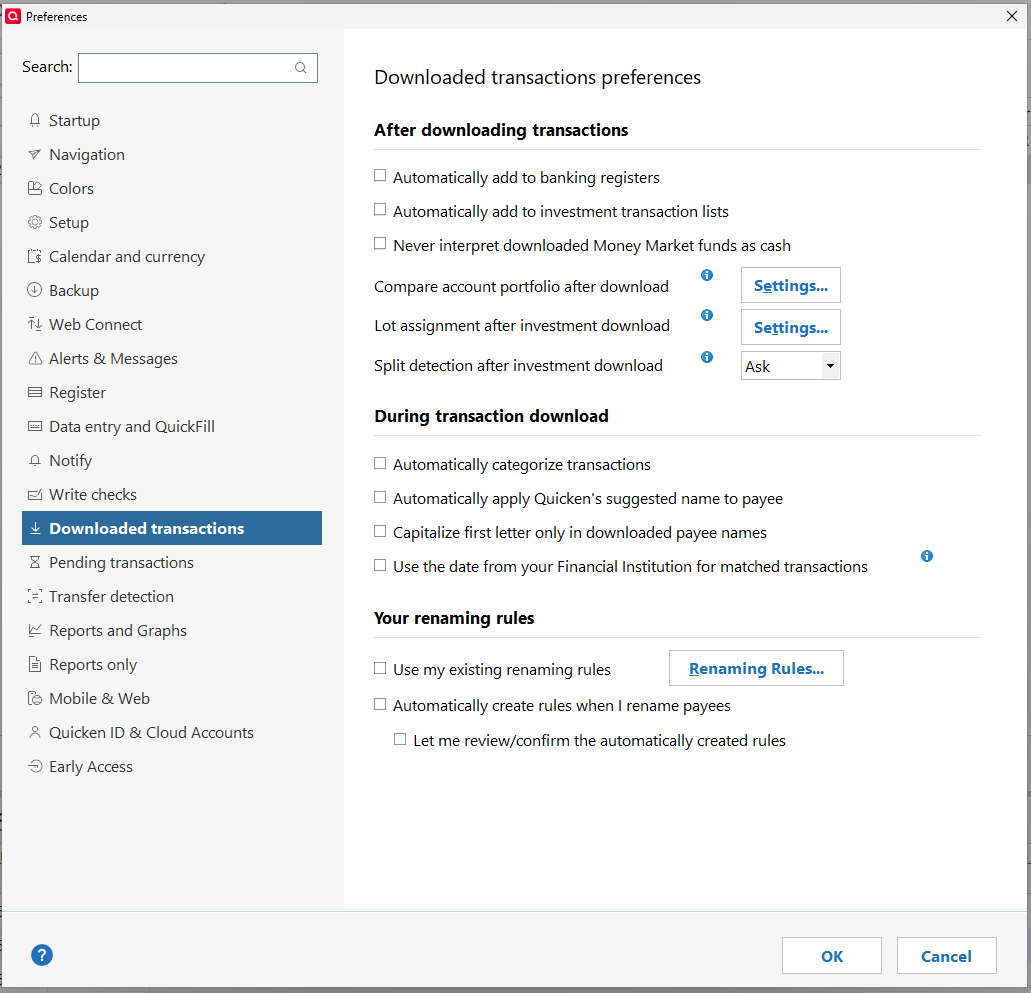
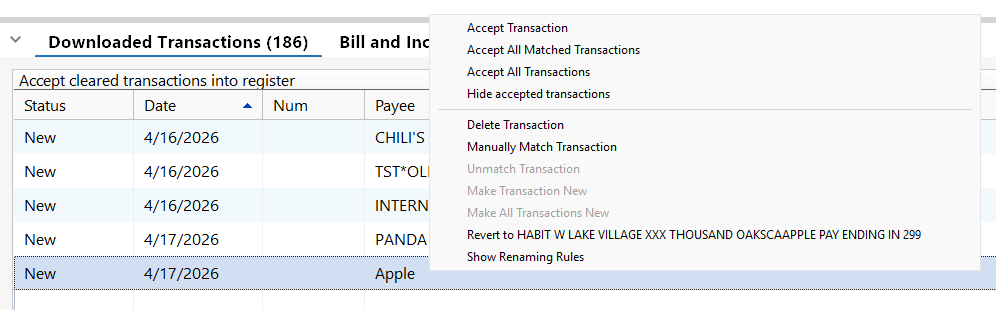
I've discovered that Quicken R66.28 is changing the names of certain Payees (or Merchants) in one of my credit cards (Discover). I have ALL of the Downloaded Transactions Preferences UNCHECKED and there are no Renaming Rules defined either. If I hover over the transaction in the Downloaded Transactions list, a window is opened saying "Renamed from …" the actual merchant name (almost, see next paragraph). If I right-click on the transaction, a window is opened giving me the choice to "Revert to …" the actual merchant name (again almost, see next paragraph).
Quicken is now also changing some Payee (Merchant) names to remove numbers and replace them with X's. Right-clicking on these transactions does not give an option to revert the name to the actual Payee (Merchant) name.
Both of these bugs are very problematic. First, most people will not see the windows that open by either hovering or right-clicking on the transaction to determine the real merchant name and will waste time trying to determine who that merchant was. Second, replacing numbers in the merchant (which is usually the store number) with X's destroys the audit trail by eliminating which merchant location the transaction is from.
Mods, please see that a ticket is opened for this and pass it on to the developers. I have no desire to spend hours on the phone with the first line Quicken Support trying to explain this to them. Escalating an issue to the next level support is just a frustrating (based on personal experience).
Below are screenshots of an example:
Comments
-
Hello @cyberphile,
Thank you for letting us know you're seeing this behavior. The first issue (Payee names being changed even though the settings in Quicken that enable automatic renaming are turned off) was reported earlier under tickets CTP-11778 & CTP-16231. The response we got back is that it's working as intended. These changes are caused by service providers (such as our aggregation partner) who perform their own payee cleanup before sending the data to Quicken.
This is the first time I've heard of store numbers being replaced with Xs. Given that Discover recently changed its connection to Express Web Connect Plus (EWC+), it's possible that a change in how they're sending the data is causing this.
Confirming if that's what is happening requires checking the logs. If you would like us to check, please navigate to Help>Report a Problem, and send a problem report with log files attached. Please include transactions you want us to check (Date/Payee/Amount).
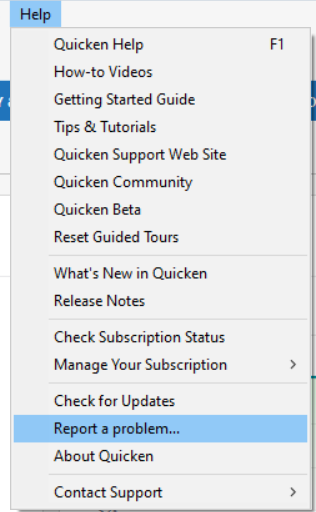
Please let us know if you send logs.
If you prefer to check the logs yourself, you can access them by going to Help>Contact Support>Log files.
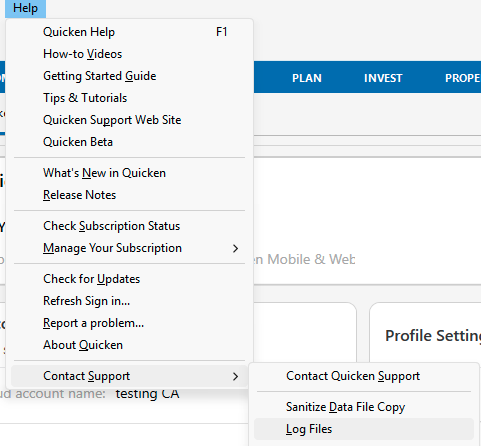
If you're not able to view the logs from that screen, you can also access them by going to Help>Report a Problem.
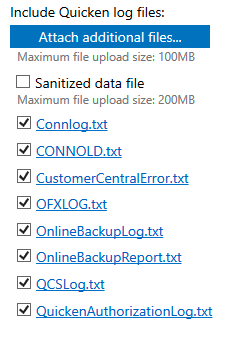
You can click the file you want to view, and it should open in your default text editor.
I look forward to your response!
Quicken Kristina
Make sure to sign up for the email digest to see a round up of your top posts.
0 -
If it was Discover changing the Payee name before sending it, then the Quicken app would have no idea of the correct name when I hover over the transaction in the Download window (which it does in the screenshot). So that implies the issue is happening after Discover sends the transactions.
CTP-11778 does not apply in this case as all renaming settings are turned off and there aren't even any rules configured. BTW, this ticket is a year and a half old!
CTP-16231 was opened against the Mac version of Quicken. I am using the Windows version. And again, there are no renaming rules defined on my system for Quicken to incorrectly apply. That step should be skipped in all cases.
This seems to only apply to Discover credit card transactions so far. It is possible that this is some sort of "special" processing done by the aggregator at the request of Discover card. I know the aggregator does this in some cases based on personal experience dealing with the wrong posting date on transactions from a credit union due to the timestamp they use on the transactions. Their IT tech I worked with told me that they were told not to change the time of day in their timestamps and that the aggregator would take care of it.
0 -
In regards to X's replacing parts of the Payee name, please see this old thread:
This was reported 3 years ago and closed, apparently without resolution.
I looked at my Cloud Sync Log and found this snippet:
{"resources":[{"id":"534980116963437312","createdAt":"2026-04-20T15:49:58Z","modifiedAt":"2026-04-20T15:49:58Z","dbVersion":0,"source":"QCS_REFRESH","accountId":"517339096638270464","postedOn":"2026-04-17","payee":"HABIT W LAKE VILLAGE XXX THOUSAND OAKSCA\nAPPLE PAY ENDING IN 2990","coa":{"type":"UNCATEGORIZED","id":"0"},"amount":-14.3400,"state":"CLEARED","matchState":"NOT_MATCHED","knownCategoryId":"6750525000","mlKnownCategoryId":"6750525000","cpData":{"id":"20260419630393DN","txnType":"PAYMENT","postedOn":"2026-04-17","txnOn":"2026-04-17","payee":"HABIT W LAKE VILLAGE XXX THOUSAND OAKSCA\nAPPLE PAY ENDING IN 2990","amount":-14.3400,"inferredPayee":"Apple","inferredCoa":{"type":"UNCATEGORIZED","id":"0"},"cpCategoryId":"204"},"type":"CASH_FLOW"},
Whatever is determining the "inferredPayee" is the issue. I have examples of this happening with other Payees too. Maybe this will be helpful to the developers in determining the algorithm failure.
0 -
@cyberphile Here are two thoughts on your situation:
- To see the original downloaded payee without hovering, you can set the account's register to show it by enabling the "Downloaded Payee" column in the register.
- The "Inferred payee" name in the Cloud sync log is what Quicken is supposed to use if you have checked the "Automatically apply Quicken's suggested name to payee" box and none of your renaming rules applies. That setting works correctly for me. If that box is not checked and you still see the Inferred payee being applied, I would suspect a problem with your Quicken installation.
QWin Premier subscription0 -
I do have the "Downloaded Payee" column enabled. I still don't want the Payee field to be changed/corrupted without my express consent (e.g via renaming rules). I have examples where Quicken has changed the Payee to a (as of now unexplained) substring of the actual Payee. In one case, "HABIT W LAKE VILLAGE XXX THOUSAND OAKSCA\nAPPLE PAY ENDING IN 2990" gets changed to "Apple" and in another case "SHARKY'S - WOODLAND HILL WOODLAND HILLCA\nAPPLE PAY ENDING IN 6682" is changed to ""Woodland Hills".
I am seeing the same behavior with a new datafile with the same preferences on a different machine. So this is not related to either my datafile nor the Quicken installation.
I see instances where there is an inferredPayee different than the actual Payee in the Cloud Sync Log but it is not replaced in the Downloaded Transaction list. I don't know why some are and some are not.
As of now, though, I am only seeing this with one credit card that uses EWC+. I have other credit cards also using EWC+ where this does not happen.
Also, I'm seeing some of the numbers in the Payee name changed to X's (as described in the link I posted above from 2023). Again, this is only happening with this same credit card. I could see this as something the credit card company may have decided that it was necessary for some InfoSec or CyberSec reason but they don't do it on their statements.
All of this is very frustrating.
0 -
Thank you for your reply,
That snippet from the sync log appears to match the "revert to" option in your earlier post. That may indicate the data is being altered before it reaches Quicken.
Since you've already made it clear you don't want to contact Quicken Support directly, for us to escalate it through the Community, we would need you to provide the following information:
- A problem report with log files attached (Help>Report a Problem)
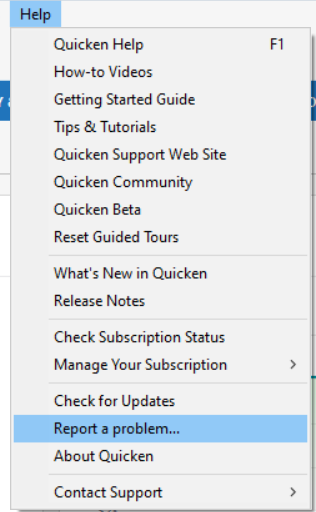
- At least 3 examples of transactions that show XXX instead of the store number
- A screenshot from the financial institution website showing that it displays correctly on their end.
If you're not comfortable providing the transactions and screenshot in this discussion, please include them with the problem report.
Note: Problem reports allow up to 10 attachments. If you need to send more than 10, you can deselect any file with "OLD" in the filename, or send a 2nd problem report with the additional attachments.
Please post to this discussion to let me know once the problem report has been sent.
Thank you!
Quicken Kristina
Make sure to sign up for the email digest to see a round up of your top posts.
0 - A problem report with log files attached (Help>Report a Problem)
-
Also if the problem report fails, you must start over. Be sure to save a copy of whatever text you supply in the Description - you can copy and paste it in Notepad - so you don't have to type it again.
QWin Premier subscription5

