cannot reconcile after update with citi card

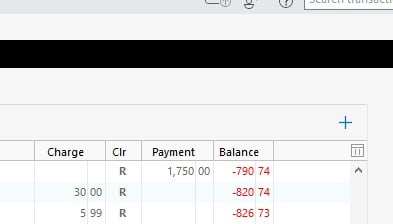
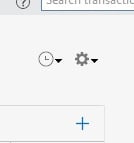
I can update but I have to restart Quicken so I can reconcile. There should be a gear icon above the "+" sign. Second picture is what I should see.
Comments
-
Hello @marysews,
Thank you for reaching out! To help troubleshoot, please provide more information:
- When did this issue start?
- How often does this issue happen?
- Does restarting Quicken reliably correct it?
- Is there anything that triggers this behavior?
I look forward to your response!
Quicken Kristina
Make sure to sign up for the email digest to see a round up of your top posts.
0 -
@marysews it sounds like you are experiencing the same problem described in this recent post:
Quicken user since Q1999. Currently using QW2017.
Questions? Check out the Quicken Windows FAQ list0 -
My problem has disappeared. As I recall the black line was the result of an 'announcement' from Quicken and the problem went away after restarting
0 -
Hello @acs2,
Thank you for letting us know that you also saw this issue and that it was resolved by restarting! To clarify, did you restart the program, your computer, or both?
I look forward to your response!
Quicken Kristina
Make sure to sign up for the email digest to see a round up of your top posts.
0 -
Its been awhile but just the program as I recall
1 -
Thank you for clarifying,
Hopefully, this information will help others encountering this issue!
Thank you!
Quicken Kristina
Make sure to sign up for the email digest to see a round up of your top posts.
0 -
- When did this issue start? March 7 or 14
- How often does this issue happen? Every time I do an "Update Now"
- Does restarting Quicken reliably correct it? The only way it gets fixed is with a restart.
- Is there anything that triggers this behavior? "Update Now"
0 -
Thank you for your reply,
Did the issue start after a program or computer update? Were there any recent changes to your computer's display settings? Are your display/graphics drivers up to date?
To troubleshoot for a possible program issue, I recommend manually reinstalling the most recent update patch. To download and install the patch, please use this article:
Please let me know how it goes!
Quicken Kristina
Make sure to sign up for the email digest to see a round up of your top posts.
0 -
Hello @marysews,
We haven't heard back from you in a while. Do you still need assistance?
Check back and let us know! Thank you.
Quicken Kristina
Make sure to sign up for the email digest to see a round up of your top posts.
0 -
Hello again,
Checking in once more before this thread is closed.
Let us know if you still need assistance.Thank you!
Quicken Kristina
Make sure to sign up for the email digest to see a round up of your top posts.
0 -
yes go ahead and close this
0

