Subscription Value Concern: SSFCU Connectivity Unresolved for Months
Comments
-
ZChefDan indicates that case ID 12333611 was assigned on 4/3/26. What is the next best step to get it elevated to a heat ticket?
0 -
@ZChefDan Problem with the "Master FIDIR" theory is that it gets downloaded to your PC, and it's the version on your PC that Q uses.
Q user since February, 1990. DOS Version 4
Now running Quicken Windows Subscription, Business & Personal
Retired "Certified Information Systems Auditor" & Bank Audit VP0 -
@ZChefDan Try a very slightly different process
1 Login to SSFCU and download the QFX file
2 DON'T use Explorer, but from within Q click FILE, FILE IMPORT, Web Connect (QFX) file, point to the downloaded file and select it to open
3 After your process, above, the particular account should already be set for Web Connect, so you shouldn't need to do that linkage again
4 The file should be imported into Q, with none of your add'l steps needed.
Q user since February, 1990. DOS Version 4
Now running Quicken Windows Subscription, Business & Personal
Retired "Certified Information Systems Auditor" & Bank Audit VP0 -
Hi All,
Thanks for following up.
I have created an investigation ticket for this issue. It would be helpful if you could upload a fresh set of logs so we can include the most recent data in the investigation.
To do this, please go to Help > Report a Problem and submit the logs from there.
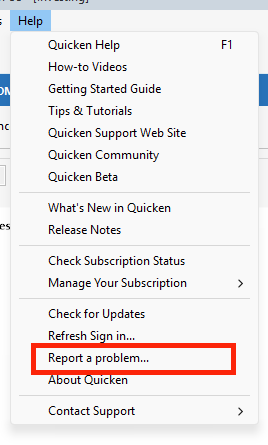
Once you’ve sent them, please let me know so I can attach them to the investigation ticket.
I look forward to your reply.
[CBT-1123]Quicken Carlos
Make sure to sign up for the email digest to see a round up of your top posts.
0 -
Sorry, @jacobs it was @gtgerbo who wrote "it seems to me that Quicken needs to take ownership of this issue and reach out to SSFCU with the goal of isolating the root cause." I agree with that because I am paying Quicken for the service. I am not paying SSFCU or Intuit. Quicken is in the business of providing financial software for a fee, and I can't download transactions without paying their subscription fee. From a customer's perspective, Quicken should own the issue and work with whoever needs to fix it, otherwise I as a customer have no interest in paying Quicken. Of course if SSFCU needs to fix this, Quicken probably can't do it themselves, but Quicken can help SSFCU or whoever is responsible determine what the issue is. I see no difference in Quicken helping SSFCU fix the issue, assuming it is SSFCU's problem, and a company hiring Field Application Engineers to help customers solve problems using their products. It isn't obvious to me that anyone is even working on the issue as it has been ongoing for several months. I would think that someone who understands the issues in detail could easily solve this. They just need to put some energy into it.
0 -
@NotACPA Thanks for your suggestion. I followed your steps 1 through 3 and Quicken imported the transactions. The flag was raised for the account and I accepted them. I then clicked on "Update now" and Quicken again tried to go to https://mybranch.ssfcu.org/, which is a defunct URL. I understand that I can log into SSFCU daily and download transactions and import them into Quicken. The only difference between your steps and mine is I clicked the QFX file in Explorer and Windows has an association to Quicken and opened the file automatically. "Update now" still doesn't work because it points to a defunct URL.
0 -
Hello @Quicken Carlos . Thank you for helping to move this issue forward. I tried to add my accounts at SSFCU this evening and got CC-501 again. I submitted the logs through "Report a problem".
0


