Today we're starting the rollout of Quicken for Mac v5.13. 5.13 is a relatively small release with some key improvements in list windows, reports and import.
Enhanced List WIndowsFirst off, we've added a bunch of small enhancements to the list windows: Payees, Categories, Tags, Action, and Securities.
1) We now pop-up a window to help merge
Payees,
Categories and
Tags. Select the items you want merged and then click on the merge button to display the
Merge window. The
Merge window tells you how many times the item is used to help you decide which one to pick as the final name.

2) You can now use Right-Click or Control-Click to bring up a contextual menu.
3) We now display the count of how many items you have in the list window.
4) And finally, we've added Search to the
Category window.
 Cash Flow, Transfer, Adjustment, Realized and Unrealized Gain added to Reports
Second, we added a bunch of new report capabilities.
1) We changed the way Create New Transaction, Summary and Comparison reports work. Now you'll see all of the options laid out as radio buttons vs drop-downs which make it a little easier to see all of the options available.
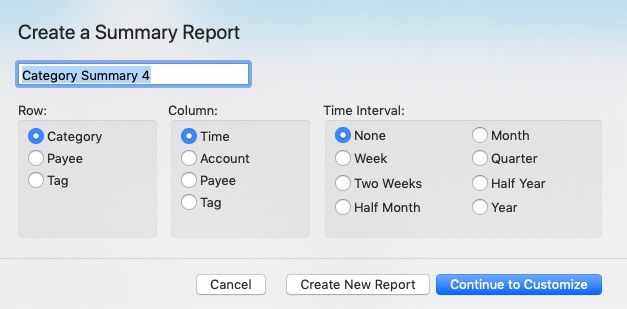
2) We've now added the ability to see reports organized by Cash Flow in addition to Income and Expense. Cash Flow looks at Inflows and Outflows from your accounts and isn't based purely on the category type.
3) Along with this, we now provide better control over how Transfers and Adjustments work in reports. You can decide whether you want to include or exclude them or to just see transfers when they are coming to or from accounts that are external from the selected accounts in the report. Both Cash Flow, Transfers and Adjustments are controlled under a new Advanced Tab in Customize Report.

4) We've improved reports for investors as well. You can now add Realized Gain and Unrealized Gain in summary and comparison reports. These values are now calculated for the range of time designated.
Importing FilesFinally, if you've upgraded to Catalina you may or may not have noticed that importing files stopped working. This is because the local Quicken 2007 and Quicken Windows converters are 32-bit applications that Apple blocks from running on macOS Catalina. We've solved this by building a cloud-based converter.
There are a bunch of other little tweaks and bug fixes throughout the product. Please use this forum post to tell us if you see any issues with the 5.13 release. We'll be monitoring this forum.
UPDATES10/30/2019 - Starting to roll out the 5.13 release. It's in limited distribution.
10/31/2019 - We've paused the rollout, for now, to see how customers are doing and to review any issues that come up.
11/1/2019 - We've started rolling out 5.13.1 which fixes a crash when merging Payees that occurs only on macOS 10.11 El Capitan. If you're on 10.11, please considering upgrading to a new macOS version. We're seeing a spike in 10.11 issues so it's not as stable as the newer releases and we don't officially support it anymore. We are not enforcing this yet but at some point in the future, if you're running macOS 10.11, you won't be allowed to upgrade anymore so please consider moving to a newer macOS.