Community Homepage
Discussions
Categories
Quicken for Mac
Quicken Lifehub
Quicken Mobile
Quicken on the Web
Quicken for Windows
Support
Quicken Classic
Quicken Simplifi
Getting Started
Community Training FAQs
Using and Improving the Community
Connect and Engage
Announcements & Alerts
Announcements
Alerts, Online Banking & Known Product Issues
Product Ideas
Beta
Home
Quicken Classic for Windows
Paying Bills, Online Billers & Reminders (Windows)
Problem with Spire Credit Union as Online Biller
driverjw
I can validate my account and get the bills but quickpay keeps failing saying my account information does not match. Is anyone else having problems with Spire Credit Union?
Find more posts tagged with
Bill Payments
Accepted answers
Quicken_Tyka
Hello
@John Wendt
Thank you for following up and letting us know that you have reached out to support.
This biller is currently listed as "Degraded" this issue may not be escalated for resolution. This issue is occurring on the biller's end.
There is no ETA available on when this will be resolved, In the meantime, this biller will need to be tracked manually. Alternative payment methods will also need to be explored.
I apologize for not having better news.
-Quicken Tyka
All comments
Quicken Anja
Hello
@John Wendt
,
Thank you for taking the time to reach out to the Community and telling us about the issue you are experiencing, though I am sorry to hear that you are having trouble.
First, could you please provide which version release of Quicken you have currently running?
Help > About Quicken
Also, if possible, could you please provide a screenshot of the error message you are receiving? If needed, please review this
Community FAQ post
on how to do so.
Thank you!
driverjw
2020 R28.28 27.1.2828
Error.PNG
Quicken_Tyka
Hello
@John Wendt
Thank you for the response and the additional details.
I have taken the liberty of reviewing the online biller profile and I see that the biller for Spire is listed as "unverified" meaning there is either an issue with the login or two-factor authentication, meaning the code or question when adding the biller.
If you have not done so already, can you please remove the bill and re-add it once more.
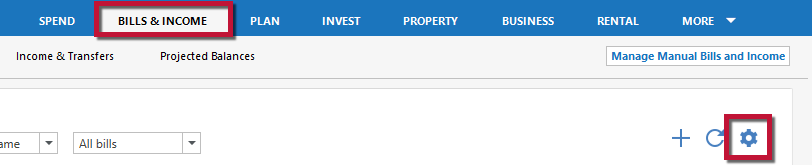
To remove a bill:
Go to the
Bills & Income
tab and click the
gear icon
.
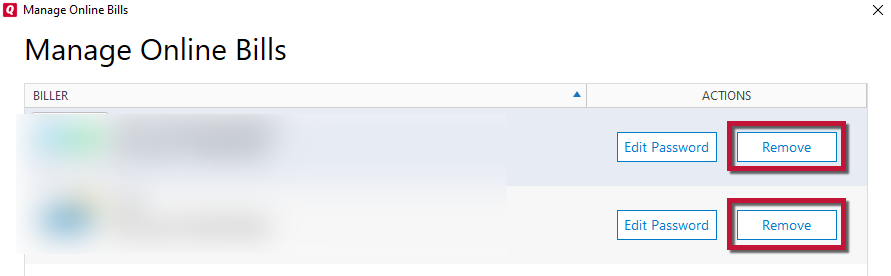
Select
Manage Online billers
.
Click
Remove
on the right side of the dialog.
Confirm you want to remove the biller by clicking
Remove
again.
Please let me know if you receive a prompt to answer a security question or enter a code and are able to successfully add the bill.
Thank you,
-Quicken Tyka
driverjw
I was able to add it but now it keeps saying that the amount due is not yet available from your biller.
Quicken_Tyka
Hello
@John Wendt
Thank you for the response and that you were able to add the bill successfully.
It may take 2-3 business days to see an amount available after adding a bill.
https://www.quicken.com/support/online-bill-center-message-bill-added-waiting-latest-update
I would recommend waiting to see if an amount becomes available prior to performing any additional troubleshooting.
-Quicken Tyka
driverjw
Ok I have waited 5 days now and it still is not working properly.
Quicken Anja
Hello
@John Wendt
,
Thank you for following up on this topic, though I apologize that you have not yet received a response.
I checked the status of the bill which now shows
Pending
with the error message: "
We're working on linking SPIRE Federal Credit Union. We'll let you know if we need anything else.
"
So, I went ahead and reported this biller for escalation. Please, keep the biller added for now and wait at least 48 hours to try again.
If the issue still continues to persist after 48 hours, then I recommend that you call
Quicken Support
directly for further assistance as this may require Tier 2 assistance at that time.
driverjw
Thank you for escalating this
driverjw
I waited 48 hours. Still nothing.
driverjw
Hello is there a status on this issue? I called it into support as well. Is it a on open issue? Is there a case I can bookmark if there are further updates?
Quicken Anja
Thank you for following up, though I apologize for the delay in my response.
Did support provide you with a ticket number? I'd like to take a look at the ticket notes and see what I can find out.
Thank you!
driverjw
I don't remember getting a ticket number but it was premium support. Do I need to call them back?
Quicken Anja
I have sent you a direct message, please navigate to the inbox in the top right-hand corner of the Community page and check your inbox.
driverjw
I have created a ticket an escalated. Is there any update?
Quicken_Tyka
Hello
@John Wendt
Thank you for following up and letting us know that you have reached out to support.
This biller is currently listed as "Degraded" this issue may not be escalated for resolution. This issue is occurring on the biller's end.
There is no ETA available on when this will be resolved, In the meantime, this biller will need to be tracked manually. Alternative payment methods will also need to be explored.
I apologize for not having better news.
-Quicken Tyka
driverjw
I did contact Spire and they are aware of the issue but no ETA
driverjw
Is there any update for Spire? Everytime I contact someone there they have no idea of what i am talking about. What key function is quicken using to connect to spire so I can tell them to look at that.
driverjw
Any update on spire?
Quicken_Tyka
Hello
@driverjw
This biller is still listed as "Degraded" there is no new information available, I apologize.
There is no ETA available on when this will be resolved, In the meantime, this biller will need to be tracked manually.
-Quicken Tyka
Quick Links
All Categories
Recent Discussions
Activity
My Bookmarks
My Discussions
My Drafts
Unanswered
Best Of