[Windows 10 Home, Quicken Classic Deluxe version R60.20]
I use Quicken on my laptop with an external monitor (and keyboard and mouse). Note: not dual monitor setup - laptop screen is not on, display only to external 27" monitor.
I don't display Quicken full screen, but display about upper 2/3 of my 27" monitor. Lower 1/3 screen usually has other app open, e.g. Windows Explorer or VoidTools' Everything or Notepad so I can view, take notes, or drag/drop attachments/receipts.
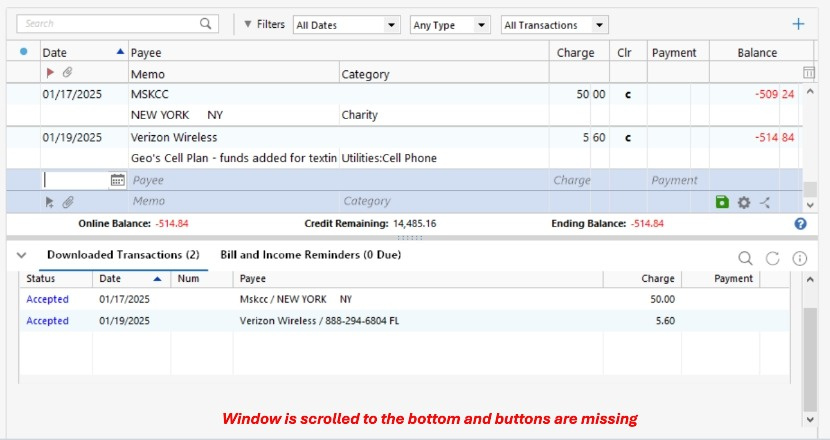
My issue is after performing a "One Step Update". What's often missing on my monitor are the buttons at bottom of the "Downloaded Transactions" popup that display "Accept All/Accept/Delete/Finish Later". Depending on list quantity, sometimes the only way I can see the buttons to respond is to temporarily make Quicken full screen. Then return monitor to non-fullscreen Quicken. (Yes, I've scrolled down as far as possible. No button responses visible)


Am I missing something? Maybe Windows or Quicken settings? Quicken is the only app where this is an issue. Otherwise my monitor is fully mirroring my laptops' screen. Does anyone else experience missing button responses on their screen?