Bank connection issues: Citibank
Comments
-
Yes, I am also setup to download the pending transactions. But everything works and downloads correctly including the pending transactions (and deleted after posting) . So absolutely no issues there. Just a cosmetic message.
The reason I deactivated the account (and also removed the authorized app from Citi's website) is that I am [wishfully] thinking perhaps this action will trigger something, somewhere, and subsequently restart fresh. I will reconnect mid week and will then give it another week to see if resolved or not. Only time will tell and I will report back in about ten days.
- Q Win Deluxe user since 2010, US Subscription
- I don't use Cloud Sync, Mobile & Web, Bill Pay0 -
Hmmmm….. renaming the runtime.dat file, as found in this thread, cleared it up for me. We'll see if it is a permanent fix….
<Bank Name> is reporting connection issues0 -
The "push" method is called Web Connect (WC). WC is where you log into your online account at the financial institution and then manually download transactions using the QFX (also sometimes called "Quicken") format file option. When the file is downloaded you manually import that file by double clicking on it and selecting Quicken to open the file. Then when you are prompted Link the imported data to the correct account in Quicken.
Future manual downloads can be automatically opened by Quicken and linked to the appropriate account in Quicken.Quicken Classic Premier (US) Subscription: R67.7 on Windows 11 Home
0 -
Reporting back: No luck unfortunately. I deactivated Citibank in Quicken and also deleted the authorized Quicken App connections at my online Citibank account. Waited a few days. I did a complete 'clean' uninstall of Quicken (including residual files, temp files, registry etc) and then reinstalled Quicken. I added Citibank to a clean test file. The message remains. I conclude that the cosmetic message issue is not in my data files but on the Quicken/aggregator/Citi side. I have already reported it many times and not in the mood to do so further. I give up.
I think Quicken team should put up an announcement about this like they do with other reported issues.
- Q Win Deluxe user since 2010, US Subscription
- I don't use Cloud Sync, Mobile & Web, Bill Pay1 -
UPDATE: After I deleted all of the Pending transactions that had already posted there have been several new Pending transactions downloaded. When they posted the Pending transactions were properly removed so I do not think this issue was related to this errant connection error message.
Quicken Classic Premier (US) Subscription: R67.7 on Windows 11 Home
0 -
BK
what a heroic effort! Yes, would be nice if Quicken just acknowledged the issue, explained it and told us something. Seems it is clearly not an individual user issue, it's just so hard to get the "corporation" to assume ownership.
Sigh.
0 -
This morning my 3 data files all failed with Citibank reporting connection issues and one with Citi Cards reporting connection issues. All accounts were updated as of yesterday's date. The Citibank failures are again occurring with nearly every update. This is the first Citi Cards failure in a long time.
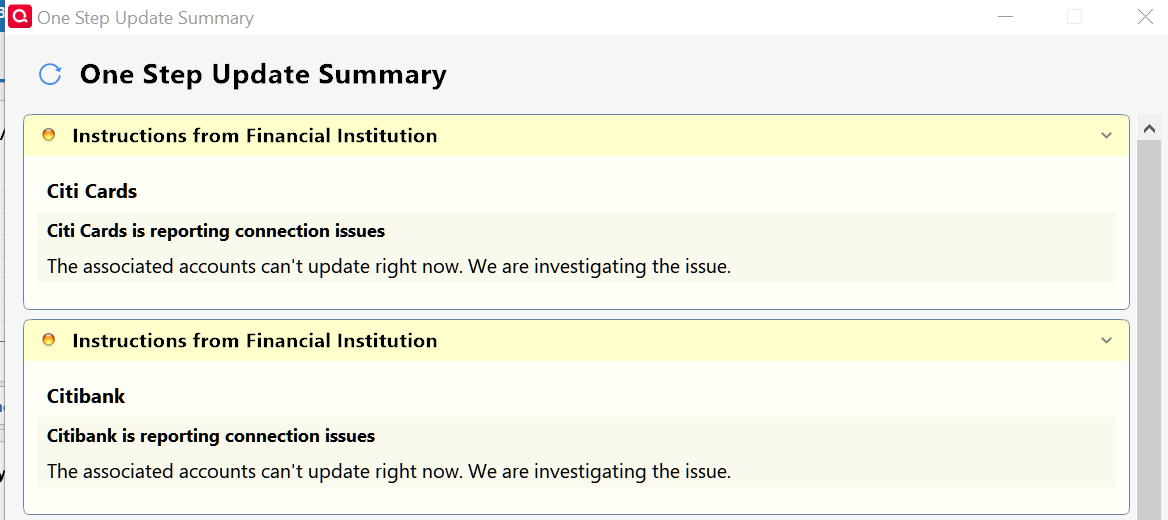
.
0 -
Ray, have you checked your Citi account directly online to see if transactions failed to download? For most of us that have been getting the same message that you posted we have found that the accounts update correctly in spite of the message.
0 -
Still ongoing - When will this be fixed? What are we paying for? This has been going on for months. Reported as usual. Latest subscription version. Windows 24H2 all patches.
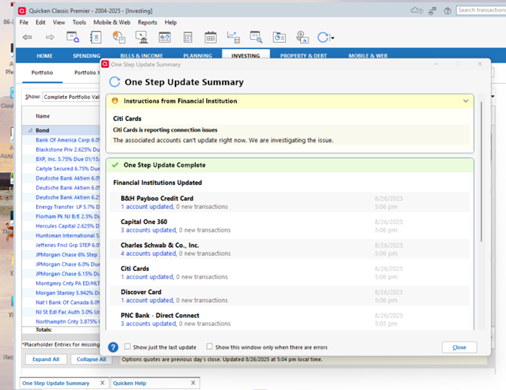 0
0 -
Are your transactions and online balance not downloading? Most everyone posting in this thread are saying the downloads are working just fine and that the only error is the error message, not the downloading.
If you are getting transactions and online balance downloading, then there is no functional error.
Quicken Classic Premier (US) Subscription: R67.7 on Windows 11 Home
0 -
MWBQuicken Windows Subscription Member ✭✭✭August 22Ray, have you checked your Citi account directly online to see if transactions failed to download? For most of us that have been getting the same message that you posted we have found that the accounts update correctly in spite of the message.The Citibank and Citi Card accounts are correctly matching the website in spite of the "connection issues." Quicken needs to investigate why and fix it. I don't need Citibank errors mixed in with real ones. I'm currently dealing with the disastrous Fidelity update from DC to EWC+ that is destroying many users' accounting.
0 -
Today, One Step Update Summary had both a Citibank and a Citi Cards failure with connection issues. This occurred in two data files. The Last Downloaded column in my Accounts List says all accounts were updated today. I don't see any errors or missing data.
0 -
citi cards is reporting connection issues - I've been seeing this during Onestep update for maybe a few months now. But, everything seems to download and work as expected, so it is just a nuisance error message for me.
0 -
I am seeing the same message, but my Citi Card account is downloading as expected.
0 -
I posted that I was having the same problem. My accounts are not being updated. I included a screen shot. I reported a problem and included the log files as requested.
My comment was deleted. Why?
0 -
Is this the other post you made that you are referring to (click on the "Aug 30, 2025" date after "Quicken Kristina" to see the whole thread)? If so, it was not deleted. It was spun off from this thread into another thread although I am not sure why because it does appear to be related to the issue of this thread.
Per the picture in your other post it does show that your Citi cards (2 of them) were updated at 12:51 pm today. Are you saying that new posted transactions are not downloading for you? Have you compared your account register and the Online Balance shown in Quicken to what is shown in your online accounts at Citi to confirm this?
For most people posting here, that error message at the top of the OSU Summary is what is the real issue. Even though it says there is a connection issue most people are still getting transactions downloaded and the Online Balance updated. So for most people there is no functional issue with downloading….just that an incorrect error message sometimes shows up.
Quicken Classic Premier (US) Subscription: R67.7 on Windows 11 Home
1 -
Thank you for your help! Yes, I believe you are correct that Quicken is actually updating those 2 Citi accounts even though I receive the message saying that the download was unsuccessful. If so, this would put me in the category of those that have functionality but just receive an incorrect error message. Also, before writing this reply, I tried the full download again. This time it completed downloading all accounts with no error messages. This was the first error free download in about 1 week. I will follow-up with Kristina on the other thread. Thanks so much for your assistance!
0 -
Thank you for confirming. I have gotten to the point where I do not even pay attention to that error message anymore because I am very confident that it never means anything.
Also, like you, sometimes I get that error message and sometimes I do not. It seems to occur randomly and we don't know why.
Quicken Classic Premier (US) Subscription: R67.7 on Windows 11 Home
0 -
I have gotten to the point where I do not even pay attention to that error message anymore because I am very confident that it never means anything.
@Boatnmaniac , same here but that is a concern, as in what if something does not download someday? This is the boy who cried wolf. I suggested earlier that the Mods should post this under product alerts but that has not happened unfortunately.
- Q Win Deluxe user since 2010, US Subscription
- I don't use Cloud Sync, Mobile & Web, Bill Pay0 -
I agree with your suggestion about the Alert.
For me, I am usually acutely aware of when transactions should be showing up as pending and as posted. So my first heads up about whether there is an actual download issue is when a new transaction does not show up in Pending Transactions below the account register (usually the same day that the transaction actually occurred). If I don't see that then I know that there is a data download issue.
So far, through this whole issue of the last 2-3 wks I have not seen any pending or posted transactions delays at all. Since I run OSU 2X per day 6-7 times a week I will get an early heads up of an issue in the regard and will post about it here if it continues for more than 1-2 days.
Quicken Classic Premier (US) Subscription: R67.7 on Windows 11 Home
0 -
Hello @Boatnmaniac ,
I just noticed something that perhaps you and other SuperUsers can shed some light. When the sporadic Citi yellow message comes up, the runtime.dat file also has the following entry (besides the error message) that I highlighted in bold:
FiSetupInstruction=Citibank is reporting connection issues|The associated accounts can't update right now. We are investigating the issue.
[1009/SyncBillPresentmentRequest]I don't know what this SyncBillPresentmentRequest is but I can guess, and I wonder if the yellow message is related to it?
And when the update completes clean without the yellow message, these entries disappear from the runtime.dat file. FYI, I don't do any online bills of any kind (I have the Deluxe edition), my bill reminders are manual and not linked, and my Sync is disabled.
I am tagging @Chris_QPW , @Tom Young , and @Rocket J Squirrel since they reported and commented on this issue on separate posts.
- Q Win Deluxe user since 2010, US Subscription
- I don't use Cloud Sync, Mobile & Web, Bill Pay0 -
I don't really have any feedback on this since I didn't look for it, it could have been there or not, I have no idea. I also don't use online bills.
As for the message, it isn't really an "error", and as such unless people bring it to my attention like this I don't even see it, because I have the selection to only bring up the One Step Summary message on errors.
0 -
I suppose it is possible that they are related issues but I couldn't say. The generic Citi connection error message issue of this thread started in June but we really don't know when this BIll Presentment error issue first started. Maybe they are related or maybe they are 2 separate events with the Bill Presentment issue first starting with the Aug release of R64.19 or perhaps the Sep release of R64.23 (both of which deal with Quick Pay and eBill changes because of a provider change).
If you have not already done I think it would be a good idea to submit a report of this to Quicken so they can determine if the 2 are related or not. I'm sure they would appreciate getting a report on the Citi connection issues that is different from previously submitted reports.
Quicken Classic Premier (US) Subscription: R67.7 on Windows 11 Home
0 -
I should've mentioned that I am on R62.16. And yes, I have reported this many times. To be clear about my prior comment, my error message issue is not about Bill Presentment and my apologies if I was unclear. What I am saying is that when the Citi's cosmetic message reported in this post appears, I also see the SyncBillPresentmentRequest entry in the runtime.dat file.
- Q Win Deluxe user since 2010, US Subscription
- I don't use Cloud Sync, Mobile & Web, Bill Pay0 -
My Citibank issues started at the beginning of 2021 when I got CC-502 errors about which Citi and Quicken claimed to know nothing about! After 8 months, I gave up… I was using OSU. Then I got numerous health problems that made it impossible to do any computer work. This year, when I finally recovered, I began entering data from my bank statements which had always been done manually, and downloaded my credit card info. Suddenly, I had 9 million dollars added to my total assets! Quicken escalation support was no help at all other than to tell me to go back five years, in which case I would lose the credit card info I'd just downloaded!
-1 -
@b.a.teller , From your description it appears that your issue is not related to this post and therefore may not get the attention it deserves. This post is not about download issues with Citi, rather very specific to a minor cosmetic message.
- Q Win Deluxe user since 2010, US Subscription
- I don't use Cloud Sync, Mobile & Web, Bill Pay0 -
When I update my 3 data files daily, I get at least one with a Citibank connection issue. Today, in one data file I got both a Citibank and a Citi Card issue. The other 2 had just the Citibank. The accounts are always updated.
This thread was created June 28. I'd think they could fix this issue after 2-1/2 months.
0 -
Ah, thanks for clarifying.
Quicken Classic Premier (US) Subscription: R67.7 on Windows 11 Home
0 -
I just checked my runtime.dat file and it does not have the [1009/SyncBillPresentmentRequest] in it. Here is what my runtime.dat file shows.:
FiSetupInstruction=Citi Cards is reporting connection issues|The associated accounts can't update right now. We are investigating the issue.
[-670943910/QWONLINE]I have no idea what these last lines mean or if they are even related to the line immediately preceding them.
Quicken Classic Premier (US) Subscription: R67.7 on Windows 11 Home
0 -
@Boatnmaniac , I cannot remember so I have to ask, out of curiosity, do you use any type of bill pay or linked bill reminder thru Quicken? (I don't)
In the past month, I have saved many iterations of my runtime.dat file. And there only two types: either clear of those two entries (FiSetupInstruction & SyncBillPresentmentRequest) or they contain both, when the yellow message come up - in my case.
I was hoping to have found a common denominator, but guess not.
- Q Win Deluxe user since 2010, US Subscription
- I don't use Cloud Sync, Mobile & Web, Bill Pay0




