What’s Going On Between Fidelity and Quicken?
Comments
-
Since you did the reauthorization your accounts were changed from DC to EWC+ and you will not be able to reestablish DC for them. That is why it has been suggested to not do reauthorization if/when prompted.
What you can try doing is to restore your most recent backup file prior to today. That file should still have DC setup. If you get an error code, do not Deactivate the account which when trying to set up the account for download, again, only provides the EWC+ connection. Instead, try doing Reset Account which for me kept the DC connection intact.
Quicken Classic Premier (US) Subscription: R65.29 on Windows 11 Home
0 -
FYI - Fidelity Connections support number, 800-544-7931, is given under FAQ "Can I export all of my account information? "on the webpage
Interesting to note that the FAQ states:
"In Quicken®, you can export your investment holdings and account balances, along with 90 days of transaction history for your personal accounts. "
Regarding Complete Tracking in for Fidelity accounts:
I called and spoke to a support person in Fidelity that handles getting Quicken logins to work with Fidelity. After reviewing the notifications that Quicken has sent regarding changes to the Fidelity connections, she checked with back office support and was told that they are aware of issues regarding deactivating and reactivating Quicken's connection to Fidelity. She said for some people Complete Tracking remains after reactivating and for others that capability is lost. They have no clue why it happens as it is in Quicken's control for those features. She said the back office said Fidelity has made no changes regarding the data that is presented to Quicken. Fidelity has received several emails from Quicken about this issue. She commented that she has little expertise about Quicken other than helping to get login connections working.
So, it appears Fidelity is not taking ownership of this issue. Rightfully so?
Maybe if enough people call the Fidelity number and complain, it will be recognized as a problem.
Deluxe R65.29, Windows 11 Pro
0 -
@Boatnmaniac When you reset, did it still change the institution name? When I did a "redo" and skipped the reauth (Remind me next time), it change mine to zzz-Fidelity Netbenefits. Subsequent OSUs prompted to reauth.
I suppose one could keep skipping, but I imagine, eventually, Fidelity will close the DC pipe.
edit: OK found the answer in other ongoing threads. Yes, zzz get added.
0 -
No, I'm seeing this for a non-core money market mutual fund which is why it's unusual. In practice, this isn't the end of the world for me— I could just track that as a cash balance like I do with the core fund if needed, but it's definitely a change in behavior.
0 -
I do not have any Netbenefits accounts anymore so I do not know for sure what issues are or will be encountered with these types of accounts being transitioned to EWC+. But in answer to your question, Reset Account did not change my DC connection. It remained with zzz-Fidelity Investments - DC.
Your Netbenefits connecting to zzz-Fidelity Netbenefits is good because the zzz indicates that the connection will soon be changing. But for now it should be the same connection you previously had with Fidelity Netbenefits.
Susequent OSU prompt for reauthorization: That will set up the account(s) to the new EWC+ with Fidelity Investments. This EWC+ connection has several issues, including loss of Complete Tracking of investment transactions as well as some questionable account data. Yes, eventually Fidelity will discontinue support for zzz-Fidelity Netbenefits but IMO I think you should continue to decline doing the reauthorization to EWC+ for as long as you are permitted to…or until Fidelity/Intuit/Quicken fix the current issues with EWC+. Once you make that transition to EWC+ you might not ever be able to go back except maybe by restoring a recent backup file.
Quicken Classic Premier (US) Subscription: R65.29 on Windows 11 Home
0 -
@Boatnmaniac Thanks for your insight. I went ahead and completed the transition. Quite a few bumps along the way but I managed to power through them. So now Netbenefits is Fidelity Investments as the FI.
Oddly, it did preserve Complete Tracking on both of my accounts. Perhaps the next few days will reveal other issues. Meanwhile I have a "special" backup just before jumping into this. If needed, I'll restore it and go from there.
1 -
Retained Complete Tracking? That's great news! Hopefully the non-Netbenefits accounts will now retain Complete Tracking, too. I'll have to test that out, soon.
Quicken Classic Premier (US) Subscription: R65.29 on Windows 11 Home
0 -
Thanks. Still bugs me that even when I delete the accounts completely and try to set them up like they are brand new accounts, it won't work properly. Will all new users of Quicken who set up Fidelity accounts have this problem? We'll see
0 -
All new accounts setup are defaulting to EWC+ via Fidelity Investments with no option to set up DC. When you deleted the accounts and then tried to set them up, again, as far as Quicken is concerned you were setting them up as new accounts so EWC+ is the only option you will get…at least that has been the case these last few days. So, until the issues with EWC+ are resolved then, yes, all new users who are first setting up Fidelity accounts will experience the same issues.
Quicken Classic Premier (US) Subscription: R65.29 on Windows 11 Home
0 -
Yesterday I posted this picture showing the main issues I saw with the Fidelity brokerage account I set up with EWC+ in a test file.
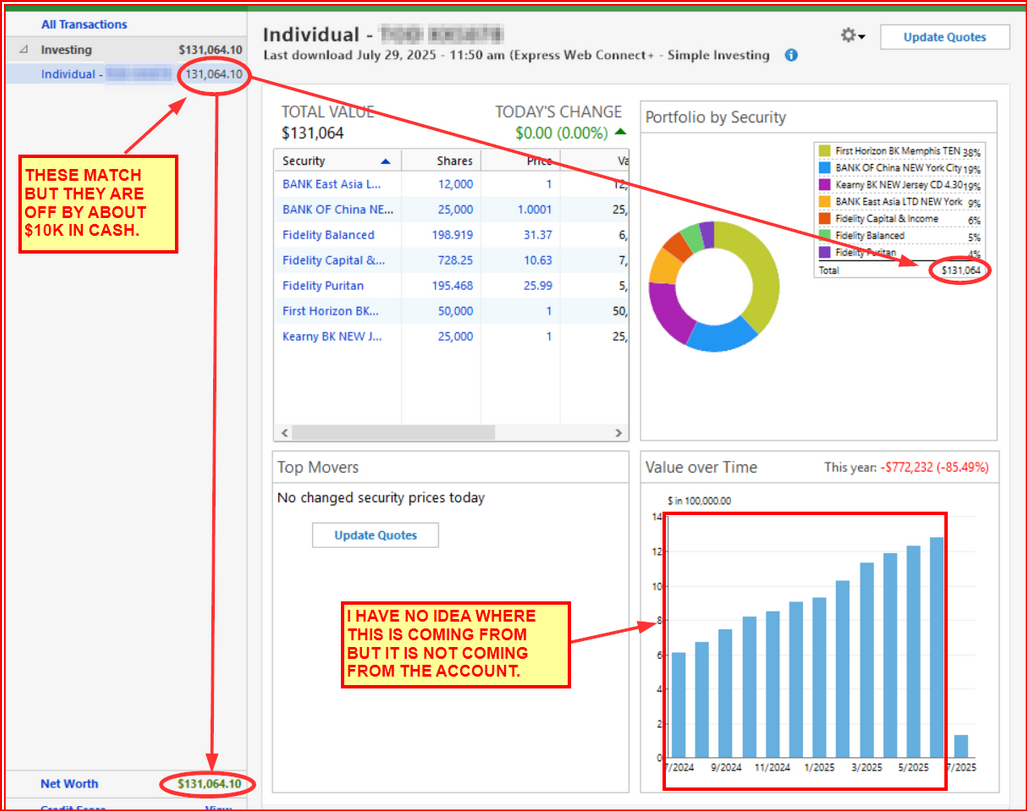
Yesterday, I was not able to change from Simple Tracking to Complete Tracking since the Tracking options on the General tab of Account Details was grayed out.
Today the Tracking option section on Account Details was no longer grayed out so I was able to successfully change the account from Simple Tracking to Complete Tracking.
Regarding the issues identified in the picture now that Complete Tracking is enabled:
- Account Value: It is still off by about $10K because the cash balance is still not shown. Nor is it being shown as Core Fund MMF shares. Therefore, that $10K is unaccounted for.
- The prior 11 months account values being highly inflated: Since I can now see the transactions for the past year, it appears that the EWC+ connection downloaded lots of Buy and Div/Int and contribution transactions but very few Sell and distribution transactions. So the balance was growing because of the lack of transactions that would decrement the value of the account. In July, Quicken entered a bunch of Add and Remove Shares transactions so the account balance was corrected (except for the missing cash balance).
IMO, this is a big improvement but there are still issues to be addressed.
My next test will be to make a copy of a primary data file with years of transactions history to see how well that manages the transition from DC to EWC. But I won't be able to get to this until tonight.
Quicken Classic Premier (US) Subscription: R65.29 on Windows 11 Home
2 -
I went through the new Fidelity Connection update yesterday. What a hassle. It downloaded DUPLICATE updates for some accounts back to May. (This varied by accounts.) The problem: when I tried to delete the downloaded transactions you can only do 1 at a time which took ~1/2 hour. In addition, about 1/3 of my fidelity investment accounts in Quicken now don't match Fidelity's records! It will take hours to resolve.
This has eroded my trust in Quicken. It appears not enough testing was done on this Fidelity connection feature. Not sure if Fidelity deserves some responsibility but it gives them a black eye by agreeing to this roll out.
Running R63.21
5 -
I was forced to do the new methodology of downloading transactions in Quicken from my Fidelity account and what an absolute mess!!
The MySmart Cash Account connected to IRA account now has the ZZZ tag and gave me 2 options when downloading: 1) Create a new account 2) Link to an existing account.
I chose to link to existing SmartCash account. EVERY transaction for the last 2 years was downloaded UNCATEGORIZED and NO ability to match to existing transaction that has been cleared and reconciled. It appears Quicken software made no attempt to match those newly downloaded transactions to preexisting transactions.
I now have 2 options, neither of which is a reasonable expectation from Quicken.
I can download 1000's of UNCATEGORIZED transactions into a new account OR download into the existing account and delete 1000's of duplicates. Both methods will be a lengthy, time-consuming process. This is totally unacceptable!!!
I might as well import a *CVS file into Excel instead of using Quicken as this transition is just sloppy.
I haven't even looked at the investment side yet. I can't imagine the mess this has created in the 401K/IRA accounts.
NOT A HAPPY CUSTOMER FROM THE EARLY DAYS OF QUICKEN FOR WINDOWS
0 -
I've been a Quicken and Fidelity user for many years. This Fidelity change to a "modern, more secure protocol" is a total disaster. From reading previous comments it's not clear who's at fault, Quicken or Fidelity. We shouldn't have to reinvent the wheel to implement this change. After going through the prompts on Quicken my Fidelity accounts reverted to a Dec 2024 amount losing $1,000,000. If this can't get resolved easily Quicken is of no use to me. Please fix it.
2 -
I went through the Fidelity migration this morning. However, there are no transactions before 8/6/23 or a similar date. Quicken created placeholder transaction and now I have to fix them MANUALLY. Why isn't Quicken/Fidelity grabbing all the past transactions? Why do I need to MANUALLY enter everything before 8/6/23 or a date near that timeframe to correct the cost basis? This is creating a lot of work for the member. Quicken needs to FIX this with FIDELITY and beta test it better. Without the correct transactions, my cost basis is not correct and any decision based on capital gains cannot be correctly computed within QUICKEN. To say the least, I'm very unhappy.
0 -
This is similar to what I saw. It re-downloaded transactions back to May and they are all marked as New. I tried playing with it but there doesn't seem to be a way to bulk delete all the 'new' transacitons. I'm going to restore from backup and try again. Wondering if there is a cleaner way to do this.
0 -
Not sure if Fidelity deserves some responsibility but it gives them a black eye by agreeing to this roll out.
Just so everyone is clear on EWC+: Which connection method is used by any financial institution is solely the decision of that financial institution. A moderator once told me that the financial institutions that are transitioning to EWC+ have told them that if they do not cooperate on cutting in this connection change then they will totally drop support for Quicken.
In other words, it is not that Fidelity simply agreed to this roll out, they are actually who demanded it. Intuit/Quicken would not have implemented any of the EWC+ connections we have today if the financial institutions had not demanded it.
EWC+ is Intuit/Quicken's response to a relatively new API security protocol that was developed by the FDX (Financial Data Exchange) Consortium. FDX is comprised of over 200 financial institutions of which Fidelity is not just a member, they are a Sustaining Member.
Off the top of my head I can't think of any EWC+ transition over the last 3 years that did not initially have issues of one kind or another. What the causes of the issues are is something we will probably never know but we can be pretty sure that if the data that is downloaded is wrong or missing the financial institution bears at least some, if not most, of the responsibility for it.
Quicken Classic Premier (US) Subscription: R65.29 on Windows 11 Home
2 -
I had hundreds of transactions I had to manually delete. Quicken, if you're listening, we need an easy way to delete multiple transactions if you can't manage this. Shift-click to select multiple transaction only works for some accounts. Otherwise it is right-click-delete, then yes to a dialog. Every time!!!!.
1 -
I have been maintaining my Fidelity Investment accounts with a minimum of problems for 15+ years. I decided to cutover to the new methodology and have encountered a number of problems and I assume these are Fidelity issues. First, I continue to get 3 months worth of duplicate transactions every time i update my accounts which i have to carefully delete. Also, I have a good number of CDs and the valuation of a CD share changed from $100 to $1, so i have to go to price history and delete all of bad prices and subsequently i decided to turn off price updates for each CD. So 2 days into this transition and it is not very much fun. I hope i am not doing something incorrectly which is causing these problems, but hopefully someone is already aware of these issues and is working on fixing them. Meanwhile, you might want to hold off on making this transition if you are a Fidelity/Quicken user.
1 -
Well, today got worse. OSU ran fine and downloaded all new transactions (yay!!). One transaction came down in one of my Fidelity 401Ks (converted yesterday). This particular fund, sells off shares to pay their fees. Prior to the switch over, these came down as SoldX with the security listed, share, price and transfer to the 401K. This time it came down as a withdraw and added the funds to my cash balance. Fortunately, I have plenty of prior examples for follow to correct this, but I had to logon to Fidelity's website (still named Netbenefits) for the actual values. Glad it was just one transaction. My upcoming dividend distribution may be a nightmare.
0 -
Probably the worst thing Quicken can possibly do is create a "more secure" download system. I was forced to update to the new system for Fidelity this morning. It downloaded but created garbage. Almost every security is inconsistent with what is actually in the account. It tried to cash out one account entirely. Surprisingly that is the only account that is salvageable.
0 -
First QUICKEN really should give us a method to delete multiple (all) downloaded transactions BEFORE they are accepted. Duplicate transactions happen A LOT, especially when you have to reconnect to an account (like was done with Fidelity recently). Having to select DELETE then OK for hundreds of pending transactions is just terrible. Do something similar to the "Accept all Matched transactions", but give us the option to "delete all Unmatched transactions", or something like that.
Dave493, There is a way to "hack" the system and delete all these new transactions in just a few steps. First, before accepting anything make a backup then you will need to reconcile the account and make sure every transaction in the register is marked with an R. Then you can Accept All these hundreds of transactions and allow Quicken to place them in the register. They will be duplicates, but the new ones will be marked with a C (cleared) instead of the R. Then go to gear icon at the top right and select: Edit Multiple Transactions. You will be presented with a new screen and can sort these items by "Clr" (on the right side). All the newly downloaded transactions will be marked with a C and all the previous transactions will be marked with a R. You can select the first C and then scroll down to the last C and press SHIFT-left click which will select all the Cs in the list (make sure only the C entries are selected and none of the R entries). Then you can Delete (bottom right) the selected entries. After this finishes, all your duplicate downloaded entries will be deleted and only the R (previous entries) will be remaining. Make sure you backup before you start in case anything goes wrong.
3 -
In QMac, Fidelity is requesting I change the connection method (Fidelity Investments is transitioning accounts to a new connection method). I tried this and it messed up all my accounts' cash positions. There is something wrong with the way Quicken is handling this transition. I restored the file from a backup, and I am ignoring the update for now until it is fixed.
0 -
@Boatnmaniac Fidelity's Quicken support insists they've made no changes to the data be presented to Quicken. (See my earlier post)
"I called and spoke to a support person in Fidelity that handles getting Quicken logins to work with Fidelity. After reviewing the notifications that Quicken has sent regarding changes to the Fidelity connections, she checked with back office support and was told that they are aware of issues regarding deactivating and reactivating Quicken's connection to Fidelity. She said for some people Complete Tracking remains after reactivating and for others that capability is lost. They have no clue why it happens as it is in Quicken's control for those features. She said the back office said Fidelity has made no changes regarding the data that is presented to Quicken. Fidelity has received several emails from Quicken about this issue. She commented that she has little expertise about Quicken other than helping to get login connections working."
So, it seems we are stuck in a "finger pointing" blame game between Quicken and Fidelity. Hopefully, they work together to resolve such unpredictable and inconsistent behavior during this "improvement" in connection.
I just wonder if those experiencing issues are the exceptions or are they majority of those that have converted to EWC+ .
Deluxe R65.29, Windows 11 Pro
0 -
There are other "problems" that has been caused by the Fidelity "reconnection".
Investment CDs have had their values jumbled up. Now, CDs have always been weird to me in that you buy them in lots of 1000, but they are shown a price of $100 in the Fidelity registry. All my CDs were "converted" to prices of $1 and shown as missing shares since the new connection now showed Fidelity was reporting one share for every $1 of value. For example:
Before reconnection: CD shown in Quicken as 100 shares at $100 / share for a value of $10,000
After reconnection: CD shown in Quicken as 100 shares at $1 / share for a value of $100 and missing 9,900 shares when compared to Fidelity.So, both the value of the investment is now wrong and the number of shares when compared to Fidelity is wrong.
Also, I "lost" the ability to have my Fidelity "sweep" account treated as CASH. Prior to the reconnection, my dividends were shown in Quicken as CASH and reconciled with Fidelity without complaint. Now, I am given a Securities Comparison Mismatch every time because the "cash" is actually held in the Fidelity Government Money Market account which is now being treated as a new security instead of CASH. I have looked for a way to get Quicken to treat this security as CASH again, but have not been able to find any setting that accomplishes this.
1 -
My Fidelity accounts downloaded a bunch of transactions that were already in the register. I deleted them all. However, it now says that my balance is off for Fidelity Government Money Market or something with 0 in Quicken, but $XXXX shown by Fidelity. That amount is what Quicken shows in cash in that account. Quicken doesn't seem to mind constantly breaking data that I carefully maintain. Not the first time things like this have happened. And for this, we pay a subscription.
0 -
@Quicken Kristina Should the Fidelity connection migration problems being reported be acknowledged in the "Alerts, Online Banking & Known Product Issues" section?
Deluxe R65.29, Windows 11 Pro
2 -
If you are a Fidelity customer, I would recommend that you do not re-authorize your Fidelity accounts for download. I did and I am having all the same problems that others are reporting. Now, the market value of CDs is being downloaded differently than before. Because of that, if you bought a $50k CD before the re-authorization, the market value and cost basis used the same logic. However, now, the cost basis is still being reported as the actual amount, the $50k, but now the market value will only show $500 and a loss of $49,500.
I have over 50 CDs with decades of history, and decades to go and this is an untenable situation.
It also downloaded a bunch of random transactions for no reason. . .
What a mess.
Quicken, what is being done about this???
1 -
Have you tried restoring a backup file from before when you reauthorized your Fidelity accounts? That should still have the DC connection and when you do OSU you should have the ability to decline the reauthorization until at least 8/20 when it was announced that we would all be forced to reauthorize if we have not already done so.
Your recommendation is the same as I've been recommending for several days now. Do not reauthorize until you are forced to do it.
I will say that there seems to have been a lot of progress in resolving the issues over the last few days. At first the only option for EWC+ was for Simple Tracking, not Complete Tracking, but now Complete Tracking is available. At first there were major issues with all accounts that were set up for EWC+ but now many (not all) accounts are working correctly. It will be interesting to see how well Fidelity/Intuit/Quicken fix all of the remaining issues over the next 20 days.
BTW, regarding your CD issue: Someone else reported earlier that while the CD quantity remained the same they noticed the buy price was reduced from $100 to $1. Once they corrected the buy price the value error went away. Maybe that is what happened with yours, too?Quicken Classic Premier (US) Subscription: R65.29 on Windows 11 Home
0 -
Forced? It is my understanding that it is optional at this time and it won't be until 8/20 that people will be forced to make this transition. You should have had the opportunity to decline the reauthorization process which would have kept intact the DC connection. You did not get the option to decline the reauthorization?
Also, do you have a recent backup file dated from before today? If, so, try restoring that file which should still have your DC connection intact. Then when you run OSU, make sure you decline the reauthorization prompt.
Quicken Classic Premier (US) Subscription: R65.29 on Windows 11 Home
1 -
Our teams are currently investigating this issue. Once an alert has been made or further information is provided, we will update with this here in the Community.
Thanks!
-Quicken Jasmine
Make sure to sign up for the email digest to see a round-up of your top posts.
1



Categories
- All Categories
- 68 Product Ideas
- 35 Announcements
- 223 Alerts, Online Banking & Known Product Issues
- 21 Product Alerts
- 633 Welcome to the Community!
- 673 Before you Buy
- 1.2K Product Ideas
- 54.1K Quicken Classic for Windows
- 16.4K Quicken Classic for Mac
- 1K Quicken Mobile
- 813 Quicken on the Web
- 115 Quicken LifeHub