New Fidelity Connection - Investment Transactions Rounding Share Count (2 vs 3 decimals)
I converted to the new Fidelity connection and running into a huge reconciliation issue. Share quantities are rounded to 2 decimal places instead of the 3 places it was rounding to previously. My Fidelity statements display to 3 places. This discrepancy creates a HUGE reconciliation for me.
But also, it's rounding the share quantities incorrectly. This will make reconciliation impossible.
This happened across all my Fidelity accounts (Brokerage, 401k, IRAs, Roths). In fact, in my brokerage account, it rounded to the nearest integer, not even to any decimal places.
How do I correct this problem?
Answers
-
I ran into that problem with new transactions downloaded after the changeover, but anything that was three decimals before making the change was unaffected. I just had to manually fix the incorrect transactions before reconciling. I don't think there's anything else you can do, this has to be fixed by either Fidelity or Quicken.
1 -
Thanks Jon. I appreciate your suggestion but this seems like an actionable fix that Quicken should patch. I purchased Quicken to automate my financial management and I don't feel that I should manually correct Quicken's programming errors.
0 -
@Quicken Jasmine can you help me with my issue?
0 -
Even when Fidelity or Quicken fixes this, I wouldn't necessarily expect past transactions that were affected to automatically get corrected for you; I suspect that any rounded off transactions that are already in your register are going to have to be fixed by you.
1 -
this seems like an actionable fix that Quicken should patch. I purchased Quicken to automate my financial management and I don't feel that I should manually correct Quicken's programming errors.
It is most likely something Fidelity needs to fix in their export, rather than a Quicken programing error.
Quicken Mac Subscription • Quicken user since 19932 -
Same problem here. Don't care if it's Fidelity or Quicken's problem, Quicken should take the lead in making sure it gets fixed.
-1 -
Don't care if it's Fidelity or Quicken's problem, Quicken should take the lead in making sure it gets fixed.
@alangowitz I understand your frustration, but what makes you think they haven’t? If it requires Fidelity to make code changes, there’s nothing Quicken can do other than communicate the problem and wait for Fidelity to fix it.
Quicken Mac Subscription • Quicken user since 19931 -
When I do a csv export of account activities from Fidelity, the share quantities have 3 decimal places. I would think Fidelity would export the same amounts to Quicken.
Deluxe R65.17, Windows 11 Pro
0 -
When I do a csv export of account activities from Fidelity, the share quantities have 3 decimal places. I would think Fidelity would export the same amounts to Quicken.
That would indeed be logical… but things don't always work that way. 😉 Many financial institutions have different servers and processes for exporting CSV files to customers on their websites than they do for interfacing with third-party programs like Quicken.
Quicken Mac Subscription • Quicken user since 19930 -
This new Fidelity security connection is just that, “new”. So, why would they roll this out to the public without proper testing? I too converted to the new connection by first deactivating all my Fidelity accounts, then Add Account. I matched them all to their existing accounts. Then, I had to change each of them from Simple to Complex transaction accounting. Annoying, but OK.
It also did not represent the SPAXX sweep cash as cash and created a misexp Balance Adjustment to zero out my cash holdings. Reconcile Positions showed number of SPAXX holdings, but it did not create an Added transaction for it. I deleted the Balance Adjustments.The next day (08/09/25) I ran One Step Update and it downloaded two months’ worth of transactions (including: div, buy, reinv). Only the div transactions matched. All the others were listed as “near match” due to share mismatches. I don’t know why it felt the need to download these historical transactions.
An example: original transaction: 3.452 shares, new download: 3.46 shares with the price per share changed to match dollar amount. I don’t know where any of you went to school, but that is neither rounding nor truncating. That is some bad code writing. This transaction is in a Brokerage account which would impact Gain/Loss calculations. It’s a mess. I gave up and went back to my original file.
No where near ready for prime time!
Please post when these major issues are fixed. Thank you.
1 -
Hello All,
Over the past few years, several large investment firms have moved their connections to EWC+, which, once fully implemented, functions the same as Direct Connect.
Each firm’s transition may include unique challenges, and occasional issues can occur during the process. To ensure a smooth implementation, Fidelity began their migration in phases, starting with an optional migration period in late July.
At this time, Fidelity has paused the migration for additional users while both their team and ours work to resolve the issues that have been identified. Throughout this process, Fidelity has been a strong partner to Quicken and continues to work diligently to address customer concerns as they arise.
Quicken Kristina
Make sure to sign up for the email digest to see a round up of your top posts.
1 -
I'm having a related problem since this botched interface change was implemented. My recent Fidelity/ELAN credit card transactions are visible on the Fidelity and ELAN websites but do not download. Quicken one step process reports a successful connection but no new transactions to download. Having to download the transactions as a csv or qfx file and upload them into Quicken, while it works, is too cumbersome and is not the level of service we've had in the past. Has this been flagged for investigation and fix? If so, please lead me to the right discussion.
0 -
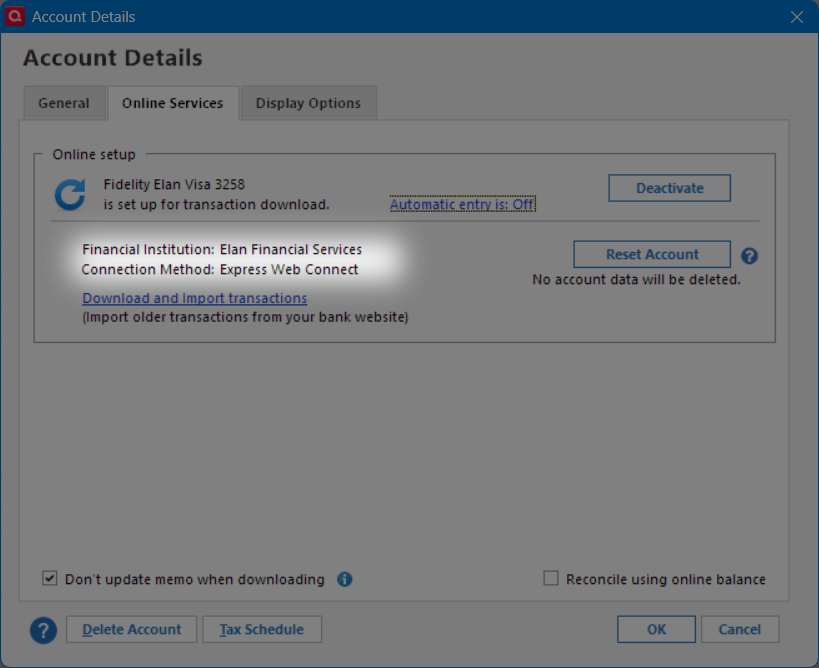
I'm having success downloading the Fidelity Visa credit card transactions from the Elan FI using EWC instead of from Fidelity FI.
I still successfully use DC for Fidelity downloads.
Deluxe R65.17, Windows 11 Pro
0 -
You are far from alone.
I have disconnected my Fidelity accounts from online transaction downloads until this issue gets fixed.
This really doe feel like minimal testing was done, not even some regression testing.
1 -
As of this morning, the issue continues: "Share quantities are rounded to 2 decimal places instead of the 3 places it was rounding to previously."
Like others, I've been editing the accepted transactions in Quicken to reflect share quantities to 3 places.
I've been running EWC+ for Fidelity since first conversion.
Windows 11 Home / Quicken Premier Subscription - Quicken user since the last century0 -
As of last night's download (transactions of Aug 25) decimals continue to be rounded to two places - this is a real headache for active traders..
0 -
@Quicken Janean @Quicken Kristina
With this morning's Fidelity OSU, the number of shares on transactions are now properly three decimal places. 😀
Windows 11 Home / Quicken Premier Subscription - Quicken user since the last century0 -
After a couple weeks' hiatus of having disconnected my Fidelity accounts from automatic download, it looks the issue of bad rounding is resolved now (for me at least). I saved a backup of my quicken data file before trying.
BUT, that's some of my accounts. My 401k transactions are downloading as generic contributions rather than as specific security transactions. Previously, 401k transactions downloaded with security names, descriptions/categories, category as Investments:Buy, share quantities, and investment amounts.
Now, however, ALL transactions download with the security name of "Contribution", descriptions/categories are all "Personal Income", category is always "Personal Income," the dollar amounts are there, but all of the share quantities and investment amounts are blank.
I have 9 securities in my 401k portfolio, so figuring out which security belongs to which transaction will be a time-consuming challenge.
Also, I guess because these are coming in as contributions rather than buys, the there are no offsetting ledger values. This causes the balance to grow incorrectly.
I will disconnect this account from downloads, hoping the issue gets resolved soon. Can't promise I'll submit a problem report this time because it looks like there's info in the log files I don't want to share.
0 -
Not a solution to the problem, unfortunately. But, I have been going to Fidelity website and viewing recent activity for recent pay period.
9 Funds here myself: I delete those erroneous cash "contribution" transactions and type in the buys. Takes 10 minutes to enter, but gets the share & cash correct and removes the placeholders and correct market value.
0 -
Thanks, @John_in_NC I was just about to do the same thing. 9 funds here too.
BUT
Before starting that, I reconnected my Fidelity 401K and ran the auto-update. And, it worked!
Meaning, it downloaded normal transaction records complete with security names, quantities, and investment amounts. It meant that I ended up with pairs of transactions for the same dates, but it was no big deal, quick & easy, to pair up the amounts and delete the placeholder "contribution" records.
The only hitch was a new one. It appended " 2" to the security names of all the new good records. Again, no big deal to fix them. Hoping eventually that issue goes away soon.
0
Categories
- All Categories
- 56 Product Ideas
- 36 Announcements
- 225 Alerts, Online Banking & Known Product Issues
- 22 Product Alerts
- 703 Welcome to the Community!
- 671 Before you Buy
- 1.2K Product Ideas
- 53.7K Quicken Classic for Windows
- 16.3K Quicken Classic for Mac
- 1K Quicken Mobile
- 812 Quicken on the Web
- 111 Quicken LifeHub