Is cash handling in a Fidelity brokerage account part of the Fidelity issues I see posted?
Answers
-
After reading through this thread, it appears that several of us are having the same problem, so it does not initially look like a one-off.
0 -
Hello Kristina,
Hello, I updated to R64.30 today. This fixed my problem of 2 of my accounts not having the option of how to handle MMF in cash or security. All my accounts agree with the brokerage account.
I do still have a small problem with One step Update. When I run OSU, all seems to run as normal. When OSU finishes. I get a pop up screen, telling me there was a connectivity problem with one of my fidelity accounts. it is error code cc-506. there are two buttons one says "update now", but it is greyed out, so can't select. the other button says "fixit" it asks several questions about the particular account, but at the end just says try later. The particular brokerage account in Quicken agrees with Fidelity. So I think it is actually updating despite the error message. I haven't had any transactions activity in the account since 9/19/25. so I will watch and see if it updates with the next downloaded transaction.
Thanks to all who helped with the missing cash option.
1 -
Thank you for the follow-up @deathrs,
I'm glad to hear the update resolved the issue with not having the option of how to handle MMFs in your accounts.
For the CC-506 issue, if the issue persists, I recommend that you backup your Quicken file and follow the troubleshooting steps in this article on CC-506 errors:
Thank you!
Quicken Kristina
Make sure to sign up for the email digest to see a round up of your top posts.
0 -
I called into Quicken Support this afternoon and spoke with a Support Engineer (Anthony). I described the problem that I and several others listed in this thread. Mainly the issue with the newly updated Cash Representation feature, added in R64.30, not working correctly for all customers with Fidelity investment accounts. Anthony acknowledged that there are currently 6 different open issues that Quicken is working on regarding Fidelity and Quicken integration. He said that there is no ETA on when this will be resolved or how the resolution will be communicated once it is resolved.
A bit frustrating but at least it was a confirmation that this is a known issue that is being worked on. Perhaps this will help anyone reading through this thread who is coming to the Quicken Community site to post the same problem.
Clark
0 -
Hello Kristina,
Thank you for your help. I followed your instructions and that seems to have cleared the CC-506 error I was getting with one step update.
When I upgraded to R64.30, that added back the option of how to treat MMF at Fidelity and that fix has stayed. So no problems at the moment.
Thanks Again
0 -
The issue isn't transaction that need to be remove. It is share not in Quicken
1 -
Which security is missing shares? Is it a Money Market Fund that is used by Fidelity to hold cash…also referred to as the Core Account?
If so, does the account Cash Balance in Quicken match the value of your MMF shares in your online account?
Fidelity's migration to EWC+ includes giving us the option to have Core Account MMF shares shown in Quicken as shares or to have the value of those shares shown in Quicken in the Cash Balance instead of as shares. You should have gotten a popup at one point prompting you to decide which option you wanted Quicken to implement.
If your Core Account MMF shares value is shown as Cash Balance in your account in Quicken then it appears you may have selected that option in which case Quicken would have removed all shares transactions of that MMF from your account register in Quicken. If Quicken did not do this the Account total value in Quicken would be overstated because it would being including both the shares and the cash value of those shares when it should be reporting just the Cash Balance and not the shares.
If you instead want the Core Account MMF shares shown in Quicken instead of shown as the Cash Balance, then you could try going to the Online Services tab of Account Details and click on the button that says Reset Money Market securities/cash options ( do NOT click on the Reset Account button). The change will take effect the next time you run OSU. But note if you make this change you will likely need to manually enter an Add Shares transaction to make up for all of the shares transactions that had been previously deleted.
Quicken Classic Premier (US) Subscription: R66.28 on Windows 11 Home
0 -
@Quicken Kristina Hello Kristina. Any further updates on when the Securities Comparison Mismatch problems between Cash Balance (Quicken) and MMF (Fidelity) will be resolved? A couple of my investment accounts correctly show the new 'Cash Representation' option under Cash Balance. However, the majority of my Fidelity investments do not show this option even through all have MMF balances on Fidelity.
0 -
I have now tried all of the recommendations I have seen. I connect to Fidelity with Express Web, and I have chosen the option to show Cash as Cash and not as a security. It worked for a few days and then reverted back. Are you any closer to fixing this issue?
0 -
I also am having this problem, I have tried all the suggestions listed here and still having problems. I have two money market accounts in my main account with automatic sales to the core money market when balance goes negative. The sales at Fidelity are still occurring but are not downloaded to Quicken so I end up seeing a negative cash balance in Quicken. Also no longer receiving pending fidelity credit card transactions that has worked before all these problems. I receive pending credit card transactions on other accounts besides Fidelity.
1 -
I have been following this thread for months. Yesterday Quicken refused to connect with the DC link, telling me I must convert. So I did. Spent 3 hours last night !!!
Most of my accounts don't handle the cash balance properly. I appears the only account that does uses the SPAXX fund as cash. The others using FZFXX and FDRXX don't. Issues like the monthly interest payment showing as a Reinvested Dividend back to the fund instead of a Dividend to the cash balance. Every time I reconcile it shows a warning window with the full fund balance reported by Fidelity and zero $ in Quicken. Quicken does not provide me with either of the two ways to fix this (clicking the blue cash balance on the account register screen or clicking the Online tab in the account setup window) for these accounts but does for my SPAXX account.
It appears that Quicken can only link a fund to the cash balance if the fund is SPAXX. So if I convert my accounts to use SPAXX will this issue be solved? Will Quicken automatically give me those two options to manage my cash account when it sees I am using SPAXX? Will I have to go thru the whole conversion process again?
Thanks You !!!
1 -
Yup. The issue where FZFXX and FDRXX cash sweep accounts are not working correctly apparently is a known issue with Quicken but current information on progress towards a fix has been limited.
Fidelity accounts - I do not see the Cash Representation option — Quicken
2 -
I see the same issue with Fidelity Cash not reporting correctly. It works fine in y regular non tax advantaged account, but the issue comes up in all the tax advantaged accounts (IRA and Roth IRA). Everything I have tried does not provide an opportunity to identify to use FCASH as cash for those tax advantaged accounts.
0 -
Yep, My IRA and ROTHs are reporting Cash correctly and have the "Cash Representation" button. My Brokerage account which uses FZFXX for Cash currently has correct balance in Quicken but show's $0.00 from Fidelity (see Screenshot below) and no "Cash Representation" button.
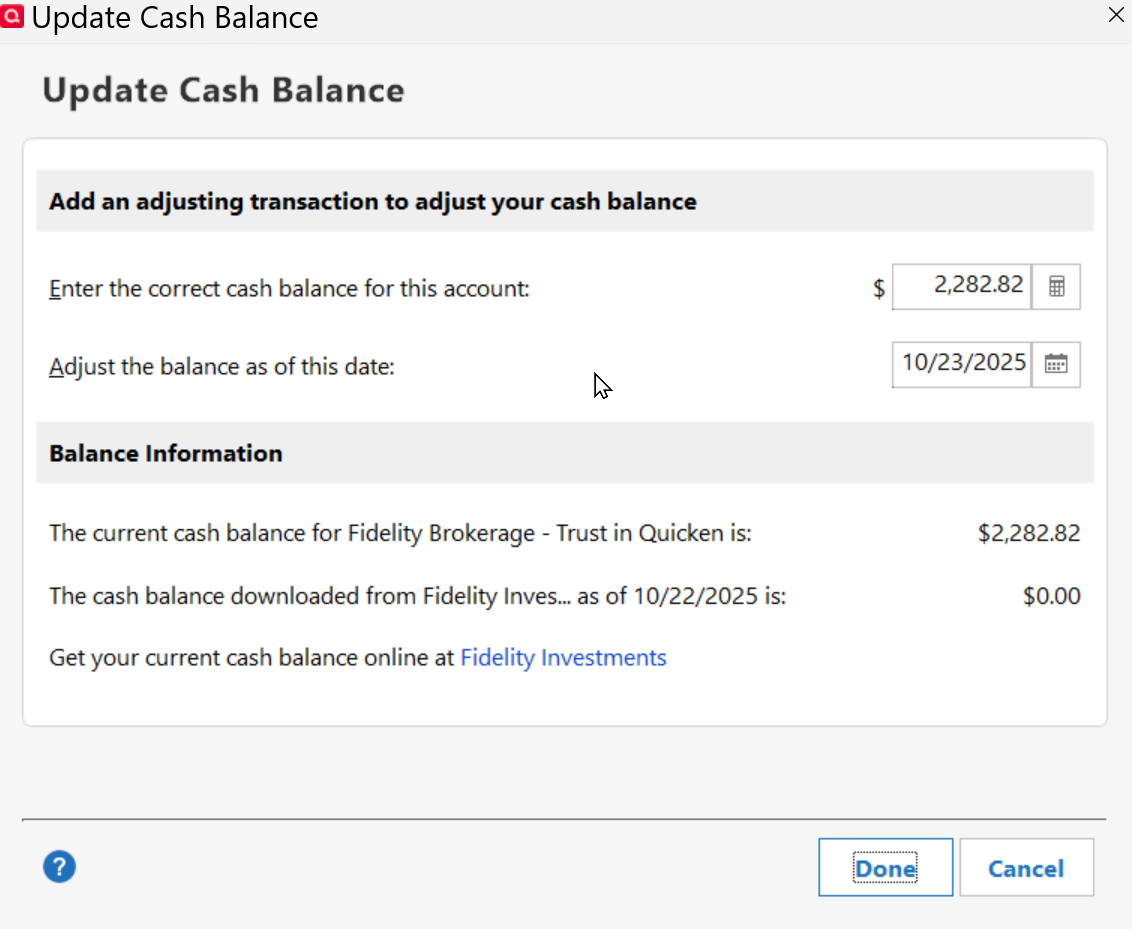
I am also still experiencing the issue of Dividends and Foreign expenses not being recorded correctly on International Stocks:
https://community.quicken.com/discussion/comment/20516816#Comment_20516816
I sent a problem Report via Quicken yesterday on that issue.
"No Matter Where You Go, There You Are"Windows 11 Pro, Quicken SubscriptionIntel Core i7-12700, 32GB Ram0 -
From what can see in my data files:
SPAXX and the Bank Sweep Account are the 2 Core Positions that Quicken is properly managing.
It is FDRXX, FZFXX and FCASH that are still not working as they should be.
Per the following Alert there is a fix for FDRXX that is planned for a "future release". Let's hope that future release will also include fixes for FZFXX and FCASH.:
Quicken Classic Premier (US) Subscription: R66.28 on Windows 11 Home
0 -
Yep, except the workaround listed is not relevant. On my Brokerage account (Edict Account Details-Display Options) there is no "Customize cash display.
 "No Matter Where You Go, There You Are"Windows 11 Pro, Quicken SubscriptionIntel Core i7-12700, 32GB Ram0
 -
IMO that is part of the FDRXX display option issue and it is my expectation that it will also be included in the fix to be included in that future release.
For me FDRXX is downloading as Shares and not as Cash Balance in 2 of my 5 IRA/Roth IRA accounts that have this MMF as the Core Position. So Quicken's calculations and Fidelity's downloaded data match each other. That is the opposite of how I want FDRXX reported in these accounts but it is at least accurate when compared to the Positions tab in the online account and to me that is the most important thing.
In the other 3 accounts FDRXX Shares transactions are not downloaded but the number of Shares held is being reported causing a Shares Reconciliation issue in Quicken. In addition, the Cash Balance is being reported by Fidelity as $0 but Quicken is calculating a Cash Balance based upon the Cash generated from other transactions (div, int, buy/sell of other securities, etc.) that Fidelity downloads causing a Cash Balance reconciliation issue. For me, this is a totally untenable and unacceptable situation.
Fortunately, whenever this issue exists in the account it is easily resolved by manually entering a Buy transaction for FDRXX for the number of Shares @ $1 each that Quicken has calculated as being the Cash Balance. Then the number of Shares held in Quicken will match the number of Shares shown on the Positions tab at Fidelity. And Quicken then recalculates the Cash Balance to $0 so it then matches the Cash Balance that Fidelity reported to Quicken. So everything is in balance, again, which for me is the most important thing because to not do this means that the account value in Quicken will be inaccurate (which will become more inaccurate over time) which is not acceptable.
Unfortunately, there currently is no way to get the Fidelity reported number of FDRXX shares to be 0 and the Fidelity reported Cash Balance to equal the total value of FDRXX. But I can live with that for now as long as I can easily manually enter those FDRXX Buy transactions to get Fidelity and Quicken into agreement with each other.
Quicken Classic Premier (US) Subscription: R66.28 on Windows 11 Home
2 -
Further details: In my case, my 2 Roths and 1 IRA core accounts (cash) are held in "FDIC BANK DEPOSIT SWEEP NOT COVERED BY SIPC" which could be actually in one of several banks. My Roth's are managed by Fisher and they actually parked some money in FDRXX, but so far Fidelity and Quicken have identified that correctly and keep it seperate from Core (just like Fidelity does). Hopefully, when end of month interest is recorded it will post correctly, and hopefully any further changes Quicken makes does not mess this up.
"No Matter Where You Go, There You Are"Windows 11 Pro, Quicken SubscriptionIntel Core i7-12700, 32GB Ram0 -
[Removed - Duplicate Post]
0 -
-
I believe it was R64.30
1 -
Hello @vnolin11,
Thank you for sharing! I moved your post to the discussion on CDs being rounded, since you mentioned that's the only thing that still needs correcting.
Thank you!
Quicken Kristina
Make sure to sign up for the email digest to see a round up of your top posts.
0 -
Classic Premier R 64.35 Windows 11 …
I lost all my Fidelity cash account category history, when Quicken support set up a new Fidelity account as type brokerage with a linked cash account and marked my old cash account "hidden". Quicken support did this as Fidelity does not express web connect a type "checking". Fidelity downloaded 2 years of history to the new link with no category, but I have over 5 years history. Please allow me to link my old cash account to new brokerage.
0 -
Please review my post of a similar situation and the steps I needed to perform to get my history back:
Another possible remedy is to unhide your old account so your historical data is visible and continue with the new accounted created by Quicken support.
Deluxe R66.23, Windows 11 Pro
0 -
[Removed - Duplicate Post]
0




