Chase Self-directed investment account

I am having this issue which also relates to the Quicken Windows version I just converted from.
From my observation, the way Chase Self-directed brokerage account shows how you buy and sell security on their webiste is this. On their website, when you sell something, it will first show you the SELL transaction, and then show another "deposit" transaction so the CASH balance in your account increases by the respective sale. so in a way this adds an additional transaction. (if you buy something, there will be a "withdrawal" entry addded" so your cash balance decreases)
Here is an example: the four Sell from Nov 8 and Nov 11, plus the one interest payment, was "deposited" on Nov 12 for a total of $19,999.42.
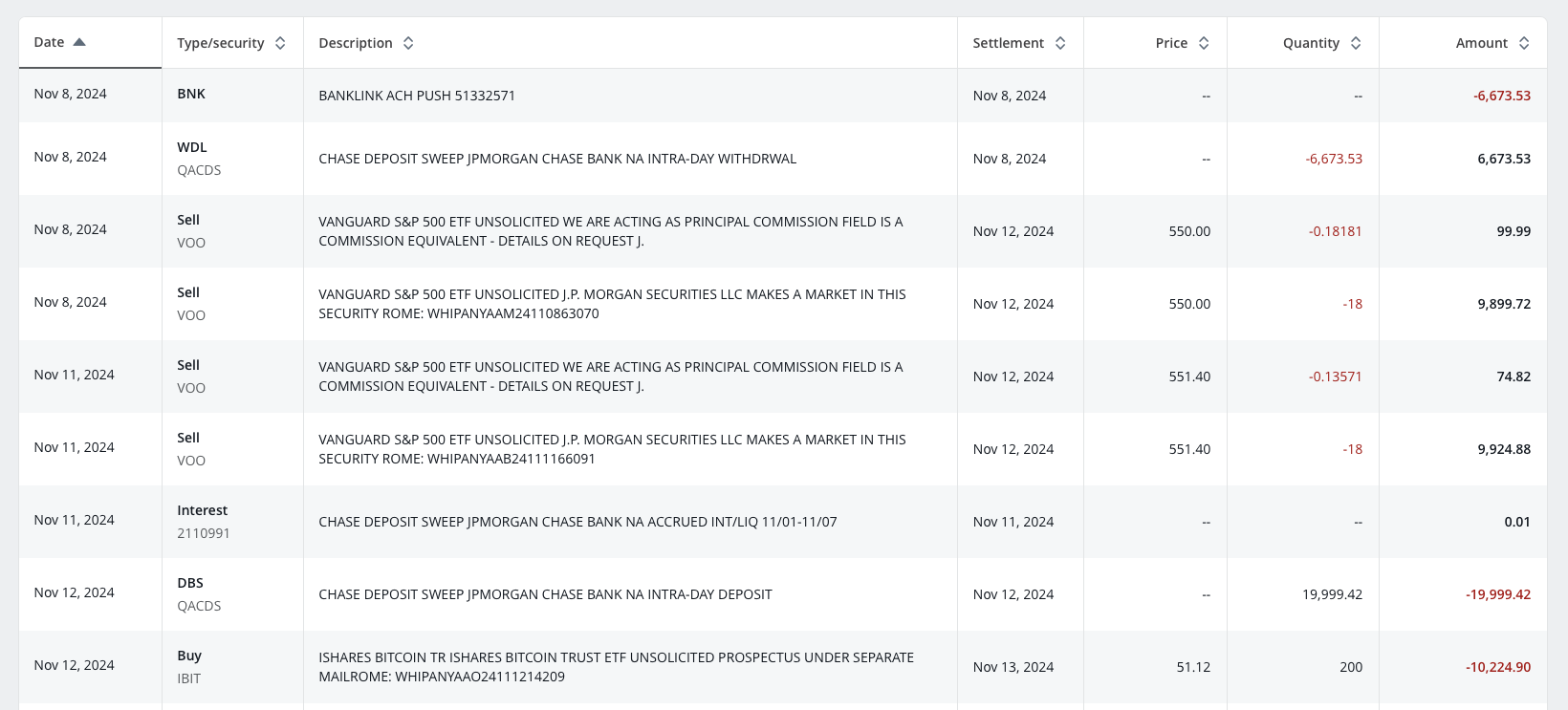
Note the transaction history page on the Chase website doesn't show the ending cash balance after each transaction, which makes reconciliation so much harder…. 💀
The Q windows app mostly skips this "fake" additional deposit or withdrawal, and the ending cash balance will just take into account of the buy / sell transaction however not 100% times. Here is what QWin pulled between Nov 8 and 12th. (sorry I am posting Windows related things but this goes into the Mac part later).
in here, the first 4 "sold" transactions already impacted the last column Cash Bal, but because it also added on 11/12 another $19,999.42 "bought" transaction (the fake one created by Chase), Qwin then added a placeholder entry for me to reduce it by 19,999.42 (the last one in the screenshot).
by the way, what is a good practice here, should I remove both entries as they come up?
All in call, the way QWin does it, at the end, as of today, my cash balance is correct (but having a number of placeholder entries that I never dealt with).
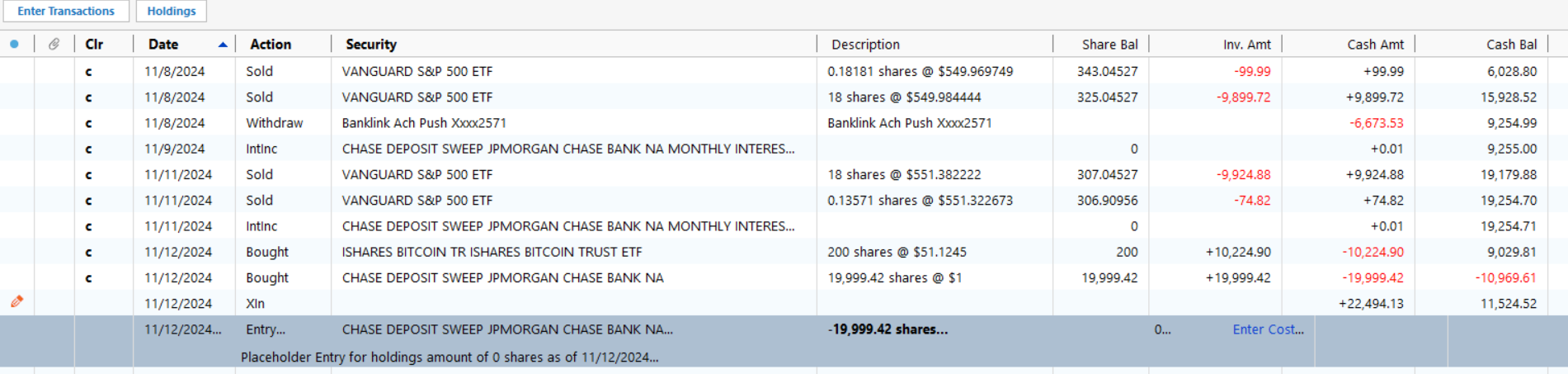
but after migrating to Mac today, here is what I see. I have this weird +22,494.13, I have no idea where it comes from. My total cash balance as of today is 21998.17 over, so I think this entry accounts for the majority of discrepancy. But given I have so many transactions leading today, it's too overwhelming to correct. Is it best if I just do a manual "payment" adjustment to make my cash balance correct?
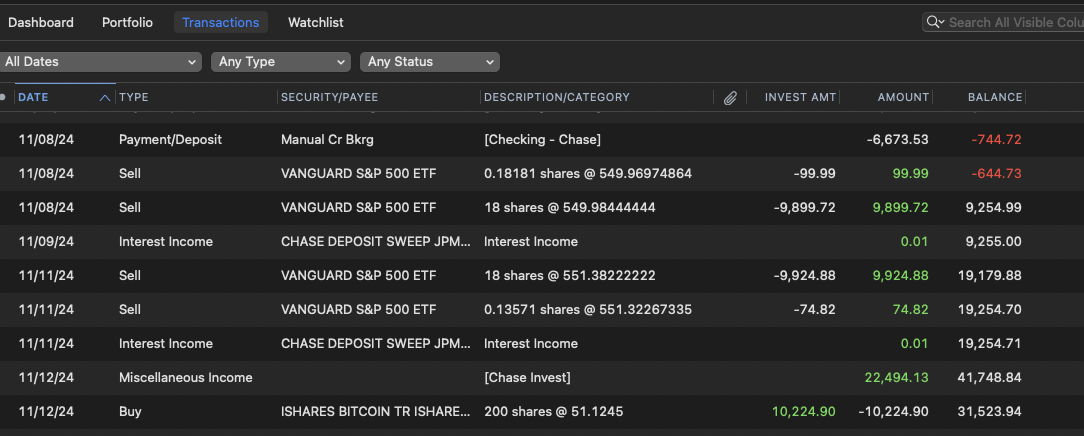
adding @Quicken Jasmine since we were discussing in another post.
Comments
-
Hello @Adience,
Thank you for coming to the Community with this issue. To clarify, this issue started after you converted a Quicken for Windows (QWin) file to a Quicken for Mac (QMac) file? If that is what happened, there's a chance that the discrepancy is the result of an error during the conversion process.
Looking at the screenshots you provided, I suspect the mystery transaction of $22.494.13 you are seeing in QMac comes from your QWin file.
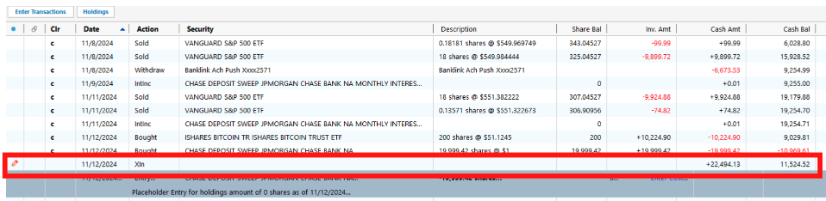
Do you recall where that XIn transaction came from?
To correct the balance discrepancy, since you said there are too many transactions for reviewing everything to be an option, there are a couple choices.
- Check the opening cash balance. If it is incorrect, then correcting it may fix the discrepancy.
- You can try re-converting the file from QWin to QMac. If the discrepancy was caused by an issue during the first conversion, it may be corrected by going through the process again.
- If re-converting the file doesn't correct the issue, or isn't a viable option (for example, you've already put a lot of work into it and don't want to lose that work), you can do a manual adjustment. If you do make an adjustment, it's a good idea to include a memo explaining why the adjustment was made.
I hope this helps!
Quicken Kristina
Make sure to sign up for the email digest to see a round up of your top posts.
0 -
There are so many things to unpack here.
I will start with the fact that Chase is very unusual when dealing with investment accounts. They use multiple "cash accounts" for money that is swept in and out of trades, and for interest and such. And at any given time, some of your cash will be in such temp accounts and not visible/downloadable to Quicken.
Another thing to understand is that transactions that happen on the same day may not be in the order you expect, especially after a conversion from Windows to Mac.
So, lets break this down.


At first glance you might think Quicken Mac did something wrong here, but you will notice the ending balance is correct. This is the "day order problem".
These match:


And so do these:


And given that this isn't a cleared transaction, I think it is pretty clear that this "mystery $22,494.13" is a transfer into your account that has yet to clear/download.
Next looking at these that match:


Note that all of this also lines up with the Chase statement other than the transfer in of $22,494.13 which hasn't cleared Chase yet (note that Chase very slow to clear transfers from another financial institution).
That brings us to this mystery transaction, which doesn't show up in Quicken Mac, but is in Quicken Windows and the Chase statement.


QACDS is the "temp account" for cash for trades that have yet to close. It takes three business days to close security position, and this on was done on last Thursday. It hasn't closed yet.
You will also notice this placeholder in Quicken windows:

The reason Quicken Windows is suggesting a placeholder is because the number of shares in that security in Quicken doesn't line up with what Chase said the number of shares is in the same downloaded transaction data.
Chase has a problem where it doesn't properly update the "summary information, like number of shares, cash balance, …" at times. Eventually it gets it right, but there are times where the downloaded transactions and the balance information is different (where the balance information is wrong and the placeholder should be ignored).
So, there is only one last mystery to resolve. Why doesn't this transaction show up in Quicken Mac?
If you go into that account in Quicken Windows and select the gear icon and then Update Cash Balance, you will get this dialog:
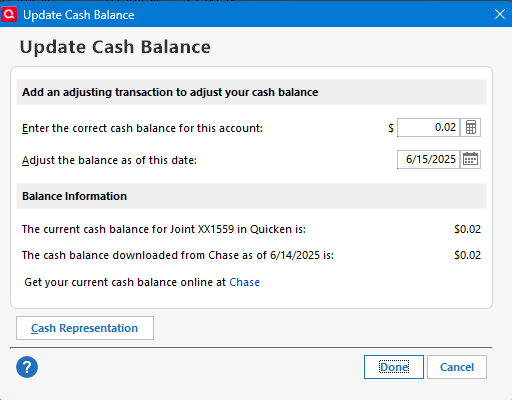
Select Cash Representation.
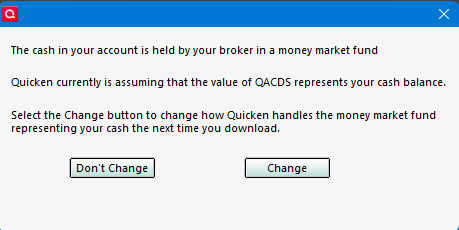
Based on your screenshots you rejected allowing Quicken to treat QACDS as cash like I did, that is why you are getting the buys and sells of this "security (which is really just a temp account)".
Since all of this is just "cash moving around" I don't want to treat it as a security, so that is why I selected this. But because Chase uses multiple temp accounts/securities I can only do this for one security at a time. There is an idea for the idea that you should be able to pick what securities you want to treat as cash. Currently there is some kind of "magic signal" that the financial institution sends to tell Quicken which security (and only one security) as cash.
Note the net result of "QACDS represents your cash balance" is to ignore buys and sells of this security.
That is a long-winded explanation to lead up to my guess of why the transaction doesn't appear in Quicken Mac. I suspect there isn't any such option in Quicken Mac for the user to decide how it is treated. Instead, will bet that Quicken Mac just assumes that you would want this security to be ignored.
I will also mention on the Placeholders. I suspect that none of them are sent in the conversion (well maybe if you have edited for cost or something) because Quicken Mac and easily recalculate them from what shares a missing/added when it gets the share information from the financial institution.
0 -
Thank you @Quicken Kristina and @Chris_QPW, let me reply to both of you together.
I would not want to have to do another conversion to Mac, it took a long time to get all the other accounts in a good shape.
If I can fix my Windows side, is there a way to export the investment account into a file that I can then import on the Mac side?
Now, on to how to fix my Windows side. So a couple other observations:
- I do see all the matching transactions and the matching ending cash balances as Chris pointed out. I specifically showed Nov 12 last year in my screenshots because from that day onwards, Windows and Mac began not matching.
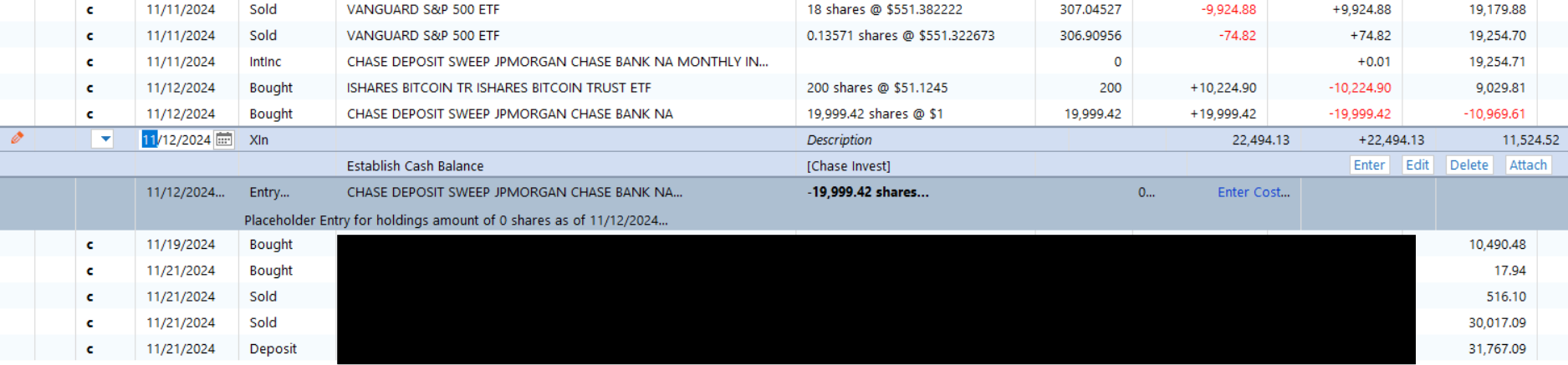
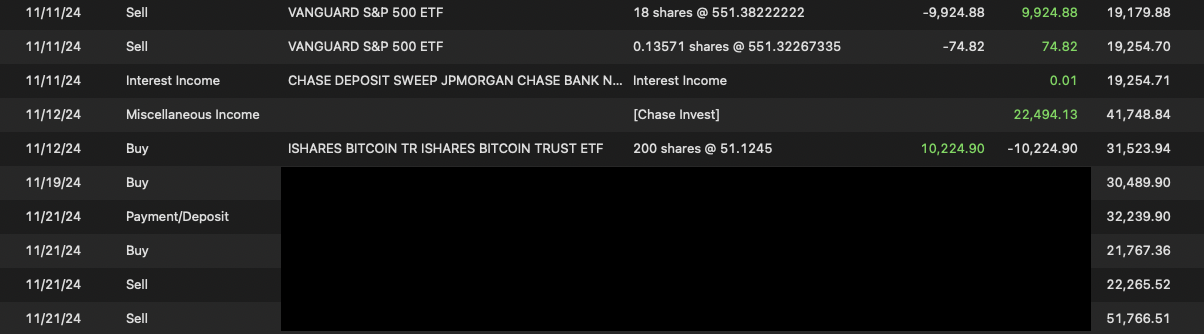
- as you notice, there is a Pen icon on the 22,494.13 entry. does that mean it was manually entered? I might have in the past, out of laziness, "corrected" my cash balance mismatching by entering some adjustments, but I don't recall doing this on specially in such a large amount. I assume Xin means transfer in, and I see some Xout elsewhere in my transaction history.
- does it being a "uncleared" transaction have an effect here?
- the QACDS are all from last year, so they would've cleared, but as @Chris_QPW they are really just cash. How should I deal with this entry and the placeholder 2 rows below. I tried deleting both, that screws up my final cash balance as of today.
- is there a way to correct all the "QACDS"?
- I see I have 7 Placeholders, are the reason causing the conversion dfferences?
- @Chris_QPW I did the cash representation thing. now that button is gone, is that correct?
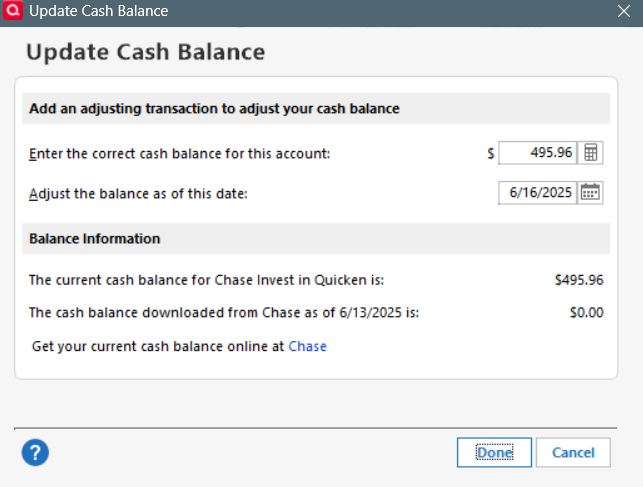
I just don't know how to reconcile this…..
0 -
ok I was able to fix all but 2 placeholders.
this is the first one How to troubleshoot this Placeholder — Quicken
the second one is the 19,999.42 from the discussion above. any advise how to fix that?
 0
0 -
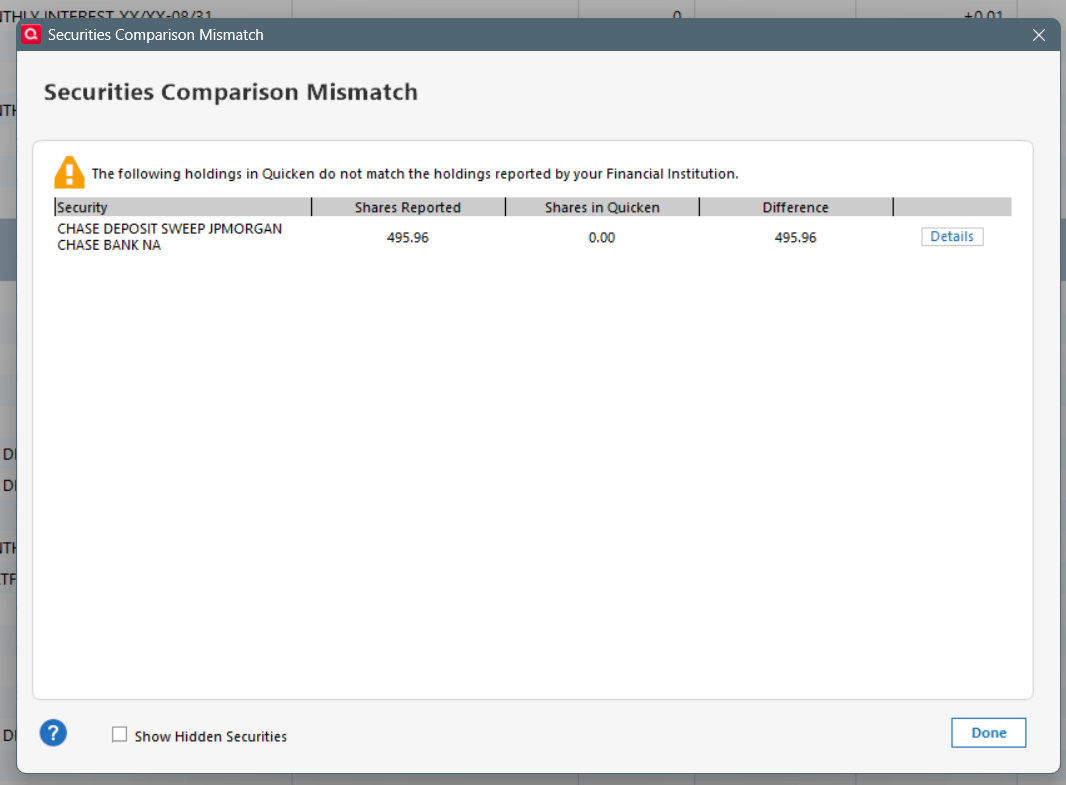
@Chris_QPW since I did that thing with Cash Representation, everytime I log into the software it shows me this, which is essentially the cash balance in the account. I don't know how to deal with this..
 0
0 -
Hi @Chris_QPW , just following up on if you have any suggestion on the above. Since I did the cash representation change you suggested, now every time I go in it's trying to categorize the 495.96 cash in my Chase Invest account as a security. If I go to Update Cash Balances, I no longer have the option to change cash representation. do you happen to know why?
0 -
Thank you for your replies,
The securities comparison mismatch window is coming up because that security shows in your Quicken file as cash, but shows as a security when coming from the financial institution. As long as it's not trying to force you to add an adjustment, you should be able to dismiss it by clicking Done.
I hope this helps!
Quicken Kristina
Make sure to sign up for the email digest to see a round up of your top posts.
0 -
I'm sorry I have been on vacation for a few days and just saw this.
- as you notice, there is a Pen icon on the 22,494.13 entry. does that mean it was manually entered? I might have in the past, out of laziness, "corrected" my cash balance mismatching by entering some adjustments, but I don't recall doing this on specially in such a large amount. I assume Xin means transfer in, and I see some Xout elsewhere in my transaction history.
Yes, the pen icon means that you entered it, it wasn't downloaded. If it isn't supposed to be there then you should remove it.
- does it being a "uncleared" transaction have an effect here?
The "pen icon" and not being cleared are one in the same they both mean a manually entered transaction that has yet to be matched to a downloaded transaction.
- the QACDS are all from last year, so they would've cleared, but as @Chris_QPW they are really just cash. How should I deal with this entry and the placeholder 2 rows below. I tried deleting both, that screws up my final cash balance as of today.
Placeholders for any Chase security like these should just be deleted:

- is there a way to correct all the "QACDS"?
QACDS and the above are "temporary cash accounts", when all cash has settled these become zero. As such you should never maintain any shares in them if you are going to treat them as cash.
- I see I have 7 Placeholders, are the reason causing the conversion differences?
If the placeholders are for "real securities" that might explain any difference between Quicken Windows and Quicken Mac, because I don't think placeholder transfer, but if they are the ones above and causing the differences then deleting them will fix that.
- @Chris_QPW I did the cash representation thing. now that button is gone, is that correct?
Well, not really, but that is something of a mystery. I don't know if @Quicken Kristina has more details on it, but I will explain that part down below the best I can.
The dialog you are seeing is "normal" for Chase.
And @Quicken Kristina suggestion is the correct way to handle it (just select Done to ignore it for the time being).
This problem is exactly why I said in this Idea (which you can vote on) should not only allow the user to select which security should be used as cash, it should allow multiple securities to be treated as cash.
Let users choose how Money Market transactions are treated — Quicken
Most financial institutions use one security as "cash", at least in the way the send that information to Quicken. Chase is different.
Quicken currently has a way to treat a security as cash. What this really does is Quicken removes any buys/sells of that security and won't show it as a Securities Comparison Mismatch. This has the effect of just leaving the cash in the account. The "mystery part" of this is I have no idea what Chase sends that tells Quicken that QACDS can be used as "cash". The user has no control over this. So, why does the button come and go? I don't know. Not all financial institutions do this. And that is why the users in the idea thread want control over it.
But looping back to the differences between Quicken Windows and Quicken Mac, I'm not sure if Quicken Mac treats this as a security or cash. I do know that Quicken Mac doesn't have even the choice that Quicken Windows currently has for some financial institutions with that button on cash representation.
This kind of problem gets amplified with Chase. Since Chase uses various temp accounts/securities for different purpose like money for securities that haven't closed, or for money that is being transferred in or out, at any given time the "summary information" that Quicken uses for the Securities Comparison Match will show "shares" in these securities/accounts, but Chase doesn't actually send buys/sells for some of these accounts, and as such you will be temporary "out of sync". Long explanation to say, I ignore these until the money gest to where it should be.
And there is probably a lesson in that you shouldn't do the conversion to Quicken Mac while you have securities/money moving between these accounts. You should wait until they settle.
And as an added quirk to all of this. At times Chase will change which account it tells Quicken is the "cash security" so you might get a popup message that asks if XXX security should be treated as cash. And I have seen it flip back and forth on these two securities (I forget what XXX actually is).
0 -
@Chris_QPW sorry to bother you on your vacation!
"
0 -
oops, hit post of the previous msg by accident.
"The "pen icon" and not being cleared are one in the same they both mean a manually entered transaction that has yet to be matched to a downloaded transaction."
I think that doesn't apply to all situations. For example, I notice that most of my monthly AMEX auto withdrawal from Chase checking account is marked with the pen icon. It was clearly downloaded as it says "autopay thank you". I would have never written that myself. But it doesn't happen to all AMEX payments, and it also happens to some of my other auto payments. Does it have to do with what I select in the Bill&Income tap, when a bill is due? I think I sometimes use "skip", sometimes "mark as paid"


 0
0 -
Hi Kristina, so what's weird about that is I've clicked "done" many times, but every time it reappears when I open Quicken. but more to that in the next post, which will take me maybe a day to type up. stay tuned.
0 -
Sorry, in my mind "manually entered" concept includes reminders.
But what I was trying to say is that the red pencil and the uncleared status in the CLR column are the same. If you expand the Status/Blue dot column header you will see this:

If you change the CLR column to either c or R this status will go to blank.
1 -
this is a really good point, I used to set up reminder of my automatically transfer from checking to investment (to help me auto save), but once a while I change that manually and the reminder still messes up my account balance
0 -
I know this is from a while ago, but I only had time to do a little bit at a time throughout several weekends. Here is what I ended up doing:
- make sure the "QACDS" created by Chase is treated like cash, this removed many weird duplicate transaction entries.
- correctly all the placeholders in the Windows version. the placeholders were created by Quicken originally because some securities were bought a long time before I started using Quicken.
- Created one time cash balance adjustment. Now the whole portfolio and cash balance match what's online.
- Did a clean conversion from Windows to Mac.
- The mac account sync worked mostly smoothly and the investment account did not have weird placeholder from the start. For investment accounts, sometimes the total share counts would be slightly off (I posted about it in a separate note Share count pulled from brokerage account not always correct — Quicken). I manually add/remove some shares to make them match.
After all that, it seems like both systems are working correctly as of today. I will monitor it for a while to decide if it's worth switching to the Mac version, since I have to decide which OS I want to be my primary personal computer going forward (that's a whole other topic lol)
Thanks to everyone who helped!
1 -
Thank you for the follow-up,
I'm glad to hear you found a resolution, and thank you for coming back to share it here. Hopefully, it will help others with similar issues.
Thank you!
Quicken Kristina
Make sure to sign up for the email digest to see a round up of your top posts.
0

