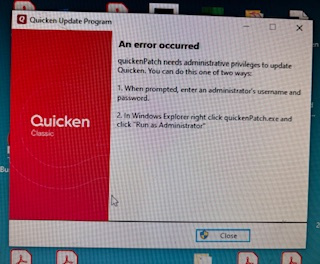
Quickenpatch needs Administrator Privileges

Best Answer
-
This sometimes happens with me, too. I only run my Windows as Administrator. And I only download and save the Manual Patch Update file from for my version updates (I do not allow Quicken to update the software).
Often when I then click on the saved file it will update the software without issue.
But sometimes I will get that Run As Administrator popup so I will then stop the update process, then right click on the saved Manual Patch Update file and then click on Run As Administrator which resolves the issue.
Quicken Classic Premier (US) Subscription: R66.23 on Windows 11 Home
1

Answers
-
Hello @Todd 910N,
Thanks for reaching out.
Are you using the Admin profile on your device or are you in a different /guest account? Most Windows devices have a setting which only allows you make changes or download applications/updates if you are within the Administrator/main account for the device.
If you don’t mind, could you please provide a screenshot of the error message you described receiving? If needed, please refer to this Community FAQ for instructions on how to attach a screenshot. Alternatively, you can also drag and drop screenshots to your response if you are not given the option to add attachments. Please remember to redact any personal information as needed.
Let me know!
-Quicken Jasmine
Make sure to sign up for the email digest to see a round-up of your top posts.
0 -
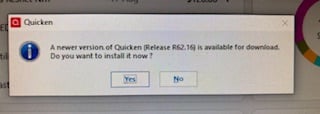
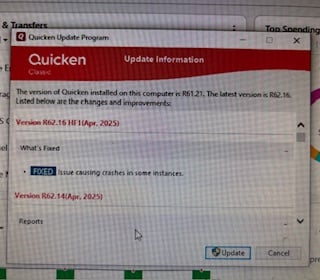
It is my personal computer and I only operate in administrative mode. (There are no other users set up for the computer). Prior to the last update (I think in February) the updates would happen seamlessly, so I don't know what is different now. I gave it some time to see if it would resolve itself, but it hasn't. Here are three screen shots:
 0
0 -
This content has been removed.
-
Hello @Todd 910N,
Thanks for providing more information!
Have you tried uninstalling/reinstalling Quicken? Please refer to the following support articles for instructions on uninstalling here and reinstalling here.
Please let me know how it goes!
-Quicken Jasmine
Make sure to sign up for the email digest to see a round-up of your top posts.
0 -
This sometimes happens with me, too. I only run my Windows as Administrator. And I only download and save the Manual Patch Update file from for my version updates (I do not allow Quicken to update the software).
Often when I then click on the saved file it will update the software without issue.
But sometimes I will get that Run As Administrator popup so I will then stop the update process, then right click on the saved Manual Patch Update file and then click on Run As Administrator which resolves the issue.
Quicken Classic Premier (US) Subscription: R66.23 on Windows 11 Home
1 -
@Todd 910N the other thing to try is to attach administrative privileges to "quickenPatch.exe" - go to the Quicken folder (C:\Program Files (x86)\Quicken) and right click on "quickenPatch.exe" and select "Properties".
In the pop-up box, click on the Compatibility tab and then check "Run this program as an administrator". When done click "OK".
I am not sure this will make a difference but it's worth a try.
0 -
Thank you for all your suggestions. When I downloaded the patch manually, the most recent update was installed. Thank you for that suggestion. I tried changing the property associated with the quickenpatch file to "run as administrator", but gave me a different error. I did not try to re-install, but may try that if I have continued issues. The problem is solved for now. Thank you.
1 -
That is wonderful news! Please reach back out if the issue occurs again or if you run into any other complications.
Thank you!
-Quicken Jasmine
Make sure to sign up for the email digest to see a round-up of your top posts.
0 -
@Todd 910N please take a look at this thread with an issue similar to yours that was resolved by changing the UAC settings in Windows -
Not sure if tried changing or adjusting your UAC settings, but it might help if you have the issue again with a future update.
1
