How does one import Split Transactions into Quicken using CSV [Edited]

Version: Quicken for Windows Subscription loaded locally on a PC
Release: 63.21
Issue:
I need to import Split Transactions into Quicken using CSV.
Goal:
I am able to get downloaded files from various vendors, like Amazon, Walmart, Grocery store etc. of my detailed transactions. I plan to combine them in Excel, add categories and tags, and import them into Quicken in their respective accounts (Credit cards, Checks, etc.).
I understand that I may have to edit the auto-created Categories, as the Import cannot recognize sub categories (an issue that is not a technical challenge, but rather just Quicken deciding to not implement it) .
Background:
1) I setup an Excel Spreadsheet using the COLUMN list in the following order
- Date *
- Payee *
- FI Payee
- Amount *
- Debit/Credit
- Category
- Account *
- Tag
- Memo
- Chknum
2) I filled out the Date,Payee,Amount required fields
Date - all had same date
Payee - All had same Payee
Amount - All had different amounts
Account - All had same Account
(I created a separate TEST account to not affect my real data
I will use a real account once I see the process work
This way, all I have to do is delete this account and and Tags and Categories
auto-created to get back to the start)
3) I filled out the fields
Memo - items that were purchased
4) Tried to see if Import would group items into a Split Transaction by trying two methods
4a) Put the same unique number in the TAG field
4b) Put the same unique number in the CHECKNUM field
5) Exported the file from Excel as a CSV file
6) Imported the file into Quicken as a CSV file
Results:
In both cases, 4a and 4b, I got multiple SINGLE transactions created.
Question:
Since there is no TRANCACTION ID field, there seems to be no direct way to associate multiple lines in Excel to a single SPLIT transaction.
Can someone help with this? Even If I have to go to some other translation S/W to generate a QIF file, I would do it if it worked. Most of the S/W I saw was quite old and outdated. None directly cane out and said that they can do SPLIT transactions.
Caveat:
Yes, I looked through this forum, but found nothing that really explained how to do this.
Yes, I might have missed something.
[Edited - Readability]
Comments
-
Hello @JamesBond_007,
Thank you for reaching out to the Community with this question. Considering the formatting requirements for importing a CSV file, it doesn't look like there's a built in way to import a split transaction.
When I tested it, I either ended up with multiple single transactions or ended up with a file that wouldn't import due to not meeting the formatting requirements.
I recommend creating an Idea post to request this functionality be added. Ideas that receive enough votes may be implemented in the future. For information on creating an Idea post, please view the post below:
I hope this helps!
Quicken Kristina
Make sure to sign up for the email digest to see a round up of your top posts.
1 -
Note that a split transaction is really just a convenient way of showing multiple transactions with the same date, Payee, and check number but potentially different amounts, Categories, Tags, and/or memos. Except for the fact that the split transaction can have its own transaction-level memo, it doesn't matter whether the transaction was entered as a split or separate transactions.
The register would certainly be prettier if you could enter the transactions as a single split transaction, though.
What file layout would you propose to indicate that a series of lines should be recorded as a split transaction? I think it would require an additional field with a sequence number indicating the presence and order of the split lines.
QWin Premier subscription0 -
Note that I believe that Mint never had split transactions, and that is why they didn't pick it up for Quicken when they wanted to get Mint users to convert.
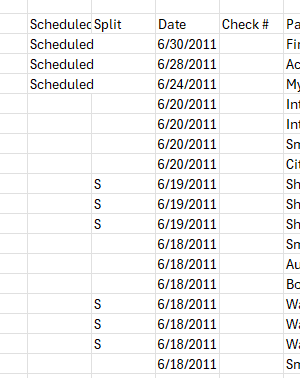
As for what would be a good format for splits, I have seen quite a few different ones, and this is one of the reasons having a generic CSV importing isn't trivial. But what I would suggest for this use case is just to use the one Quicken uses for exporting:
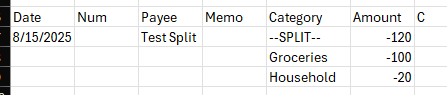
The key being that the Date field is blank on the split lines (I have also seen other exports that have a S in that field…). I'm remembering the Quicken Mac CSV export format, which is like this:
 0
0 -
To me, I'm guessing that there isn't enough demand for something like this otherwise Quicken would have developed it already.
Rather than tossing the burden back on Quicken, Is there any 3rd party S/W that would be able to take Excel or CSV, likely with additional columns that it would require, to pre-process my data and output a QIF or QFX file …I believe both supports splits.
0 -
@JamesBond_007 QFX files do not support split transactions. QIF files do.
If you search the internet for QFX or QIF converters you will find some. Most, if not all, require a subscription purchase.
0 -
@Jim_Harman
While entering each line of a Split transaction separately would achieve the same Account Balance, it looses the sense of a Single Transaction. For example if I bought 3 items + tax from Walmart I would have one total for the transaction as a Split Transaction and I would know which items are associated with said transaction.If I were to enter the items as separate line items, I would have 4 lines and no total listed anywhere for the overall 3 item+tax total.
It would make reconciling to the receipt a nightmare.
Further, if I stopped at Walmart twice in the same day, it would add additional complexity for identifying which items belong to which transaction.
So I believe a key benefit to the Split Transaction is identifying that the group of items belong to the same single transaction and would reconcile easily with the receipt. In addition, a Split Transaction allows one to categorize items in the single transaction to their proper Category. For example if you go to Walmart and by Food for you and Fertilizer for your Rental House, they can be categorized properly. I know too many people that would just have one Walmart total, call it Groceries, and forego tracking the deductible rental expense.In regards to your question regarding format, I would make the following assumptions:
1) The data being imported will always ADD new transactions; it will never UPDATE existing ones
2) The data being imported is self contained. Any additional columns will serve the purpose of helping import split transactions, but will not be recorded anywhere in the transaction.
3) The import is a "blind" import. It knows nothing about any preexisting records, which might be duplicates of the data being imported. So, for example, importing the same file twice would generate duplicate records.
Thus, I would add 1 new column to the existing CSV import fields or repurpose the existing and often unused FI PAYEE field (I read it is for backward compatibility with Mint, but is IGNORED during import):
NAME: TRANSACTION_ID
TYPE: Floating point number
FORMAT: X.Y where X is the Transaction and Y is an Item in that transaction
The TRANSACTION_ID would only be required for Split Transactions. Leaving it blank would identify the transaction as a "regular" 1-line non-split Transaction.
EX.
TRANSACTION_ID PAYEE CATRGORY MEMO AMOUNT etc.
1.1 Walmart Health toothpaste 2.84
1.2 Walmart Groceries apples 3.99
1.3 Walmart Auto gas can 5.99
1.4 Walmart Sales Tax 1.29
Texaco Gas 19.00The first 4 lines build Split Transaction #1 with 4 line items
The last line build a single transaction,
If using Excel and if the source data uniquely identified all items in each transaction, an Excel formula can be used to Auto-Generate the TRANSACTION_ID or leave it blank.0 -
I've already been doing that. I was looking for recommendations of specific products known to handle Split Transactions..
It is difficult, at best, to determine if they handle Split transactions from their websites as most seem to be geared at importing bank statements of one-line entries.0 -
@JamesBond_007 I am somewhat reluctant to promote non-Quicken software in the forum, but ProperSoft can handle converting split transactions from spreadsheets to QIF files.
0 -
A long time contributor here, @Chris_QPW , has created a free QIF import program. His website:
Quicken user since Q1999. Currently using QW2017.
Questions? Check out the Quicken Windows FAQ list0 -
@mshiggins
My review of his programs seems to indicate his program was not really meant as a converter, but rather to work around an issue in an older version of Quicken.
"The most basic purpose of ImportQIF is to add the account name and type to a QIF file to bypass the restriction in Quicken Windows US that only allows importing into asset and liability accounts. Note that Quicken Subscription no longer has this restriction." (https://www.quicknperlwiz.com/)This following also implies it may not be able to assist with my issue.
"What's more there are several restrictions that the QFX mode imposes.
The QFX format doesn't support categories or split transactions"(https://www.quicknperlwiz.com/)
I'm assuming he means the QFX mode of his ImportQIF program, as I've seen code for the QIF and QFX formats that calls out Split Transactions.0 -
@CaliQkn
I think there is a difference between trying to "push/hawk" a product on a forum and providing a reference for someone like me to go check out for myself.
I believe you did the latter, causing no harm.
Thanks, I will look into it.0 -
This is not the proper place to discuss ImportQIF, but I will say that it has grown a lot from its original purpose and does do conversions, but one has to understand the limitations of the QIF and QFX formats.
QIF supports splits, categories, tags, … QFX does not. So, if one wants to convert splits you would certainly want the QIF format not QFX. ImportQIF can output either format.
So, why would one want QFX over QIF?
The main reason is because Quicken Inc (and Intuit before them) doesn’t really want to support it, they only want to support QFX. QFX is well designed for it’s intended use, to import transactions from the financial institution where Quicken takes care of categorization and matching net amounts to splits, but was designed for general export/importing of transactions and other information like the category list.
Quicken Mac won’t even import a QIF file for anything other than creating a new account.
As such, in Quicken Inc gave and took at the same time. They removed the GUI restriction that was put in place in 2004 that blocked imports into various types of accounts, but the removed any processing after the import of QIF transactions, they just go directly into the register. In Quicken 2017 and lower the transactions would go to the Downloaded Transactions tab where the user would be able to do all the same processes as you can do with QFX imports like matching existing transactions and having the Quicken apply memorized payee rules to assign categories.
0 -
Thank you all for sharing,
Since 3rd party tools are not officially supported, if you do choose to use one to import split transactions into Quicken, I recommend that you backup your Quicken file first. That will make sure you have a good restore point, just in case.
Thank you!
Quicken Kristina
Make sure to sign up for the email digest to see a round up of your top posts.
1 -
If this thread isn't the right place, where would be the best place for me to find out more about your ImportQIF program ?
(I don't know if this forum supports Direct Messages. I see an INBOX but nothing inside it to allow me to send you a DM.)
I want to know if it can take an Excel/CSV file, formatted appropriately, and generate a QIF file with your (or any) program, that can be imported into Quicken, using the Quicken Import function and support the generation of Split Transactions added into Credit Card accounts.0 -
My site has pages for the documentation and contact requests.
But yes, Quicken Windows can import QIF files with transactions that have splits and categories.
0 -
@JamesBond_007 you can see for yourself what a QIF with split transactions looks like by exporting to QIF from any of your accounts that have split transactions. The resulting QIF can be opened with a text editor like Windows Notepad.
Quicken user since Q1999. Currently using QW2017.
Questions? Check out the Quicken Windows FAQ list1 -
@mshiggins
Thank you for the suggestion.
I have found the QIF spec and have opened an exported QIF file with Split Transactions.
I'm using the spec as a syntax "dictionary" to help explain the needed headers, tags, formatting, etc.0




Categories
- All Categories
- 3 Product Ideas
- 34 Announcements
- 249 Alerts, Online Banking & Known Product Issues
- 19 Product Alerts
- 266 Welcome to the Community!
- 42 Before you Buy
- 1.4K Product Ideas
- 55.8K Quicken Classic for Windows
- 16.9K Quicken Classic for Mac
- 1K Quicken Mobile
- 834 Quicken on the Web
- 84 Quicken LifeHub