Fidelity Elan credit card download failure

I have been using the download feature from Fidelity Elan for several years successfully. The transaction download has stopped working for my account. Goes through the motions but no new transactions are entered after the download. I have tried the following:
- Reset account from online services - failed to download
- Deactivated account and reestablished link with continued failure to download.
- Created a new account in a new file with appropriate 90 day download successfully.
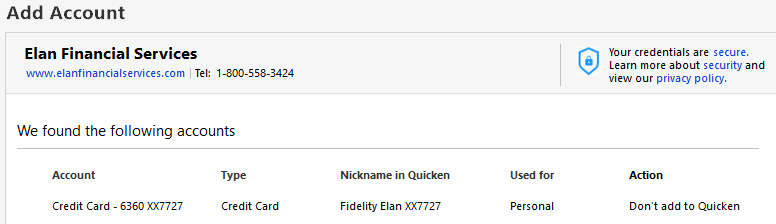
- Tried to establish a "new" account in the original file for Fidelity Elan and it found the accont but the only option available was "Don't add to Quicken".
Looks like things are working OK on the Fidelity Elan end but something is broken between my Quicken file and Express Web Connect as it reports, "Last download August 17, 2025 at 6:23am (Express Web Connect)
Thanks for any guidance or help you have to offer.
Best Answers
-
Hi @tlsher,
Thank you for sharing the details of your experience.
Hi @swcampos , thank you for updating and sharing the solution that worked for you! It’s helpful to see what steps resolved the CC-503 error for another user.
@tlsher, please review this support article regarding CC-503. However, should those steps not resolve the issue, then can you try what @swcampos did and see if that works for you too? Here’s a step-by-step you can follow:
- Back up your Quicken file before making any changes.
- Go to the Accounts List and select your Elan credit card account.
- Click Edit → Online Services → Deactivate.
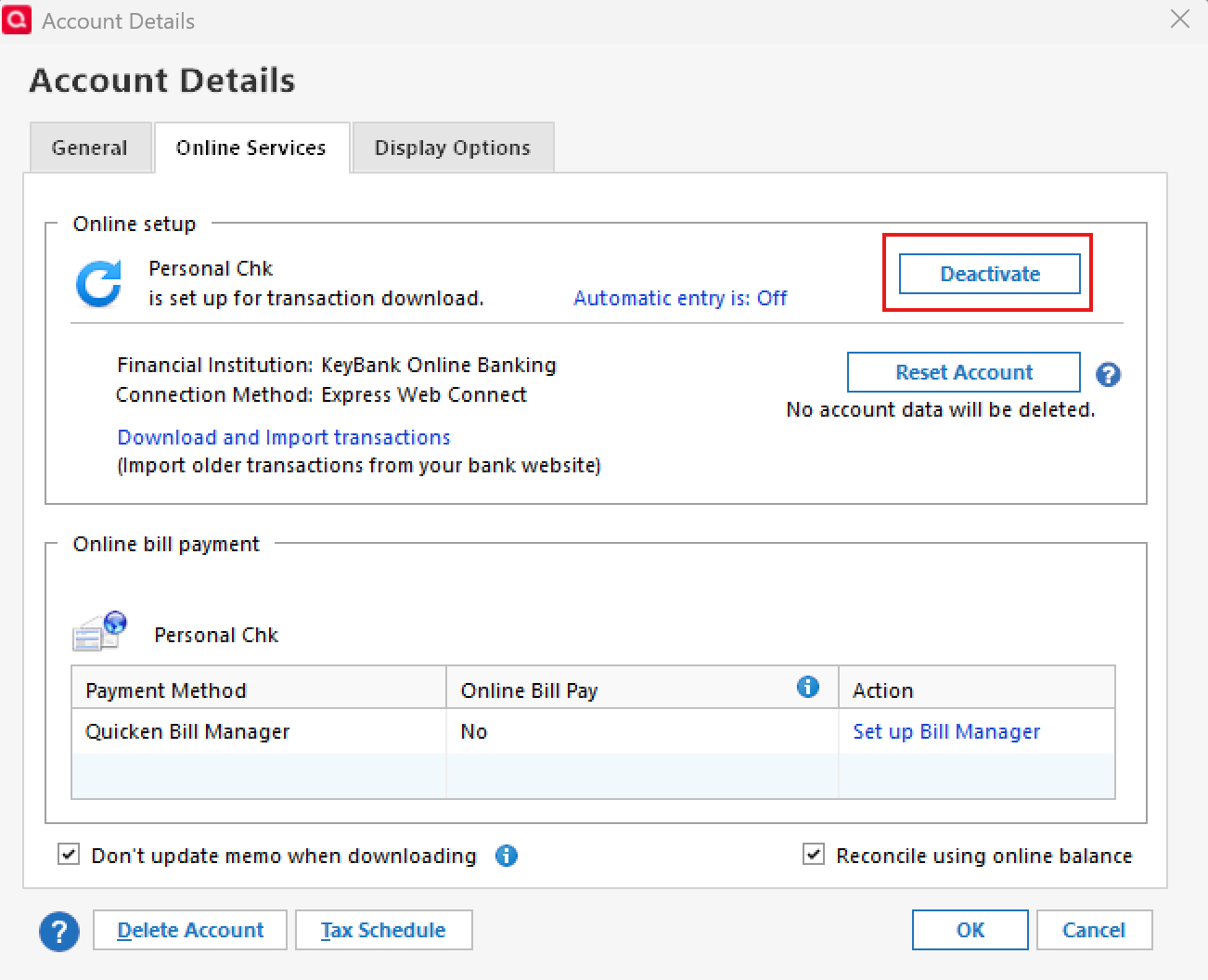
- Once deactivated, go to Tools → Add Account and search for Fidelity Investments.
- Follow the prompts to reconnect your credit card using your existing login credentials.
Let us know how it goes!
[Merged Post]
-Quicken Anja
Make sure to sign up for the email digest to see a round up of your top posts.0 -
Hello All,
We appreciate you taking the time to report this!
For those that are still experiencing this error, this is now considered a known issue that has been escalated internally, though we do not have an ETA at this time. While the investigation remains ongoing, please refer to this Community Alert for any and all available updates.
Thank you!
-Quicken Anja
Make sure to sign up for the email digest to see a round up of your top posts.0 -
There have been several significant download connection issues wrt to the Fidelity credit card over the last 3 years (I think this is the 3rd time in the last 12 months). Sometimes the Elan connection works well and sometimes the Fidelity connections have worked well. I have always valued the ability to easily switch the connection between Elan and Fidelity whenever there are significant connection issues because usually when there is an issue with one the other works well. Eventually the connection issues will be resolved and everything works well, again….until they don't.
For me, I am still getting the CC-503 error code with Elan.
Because of this I can choose to either manually download and import the QFX files from Elan or I can change my downloads connection to Fidelity Investments.
I have opted to switch my downloads to Fidelity Investments and I have experienced no download issues with Fidelity other than there being the very minor <1 day delay in posted transactions downloading. NOTE: This does require that you have an online account with Fidelity. The Elan login will not work with Fidelity Investments nor vice versa unless you have set up the same logins for both.
0


Answers
-
Could it be that Quicken has not disconnected the Elan connection in the original datafile? That's usually when the "Don't add to Quicken" is displayed. One thing I have done in the past, that sometimes works, is use the + in the Account Bar to add an account that is already connected and it gives a link to existing account option for a connected account. The last download date/time stamp seems correct.
Deluxe R66.23, Windows 11 Pro
1 -
@walter bender before you create a new account in item #4, deactivate the existing account first. That "Don't add to Quicken" means there is already an existing connection for the account.
1 -
Hello @walter bender,
Thanks for reaching out.
I agree with @leishirsute and @CaliQkn. Please let us know if the issue is still occurring after deactivating the existing account and then attempting to readd.
We look forward to your response!
-Quicken Jasmine
Make sure to sign up for the email digest to see a round-up of your top posts.
0 -
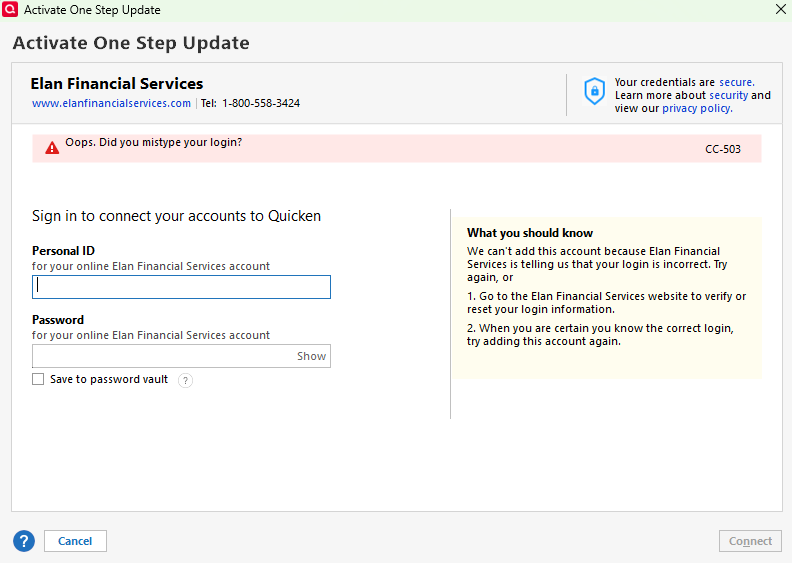
I have not been able to update my credit card account all morning. I get a "CC-503" error. When I tried to reset my connection, Quicken will not take my login information. I have triple-checked that I am typing in the correct information, even going so far as to copy my information from the web browser (that works) to insure there were no issues. Still not working, so I'm not sure what the issue is. Anyone else having this issue with Quicken/Elan Financial? If so, how did you resolve?
 1
1 -
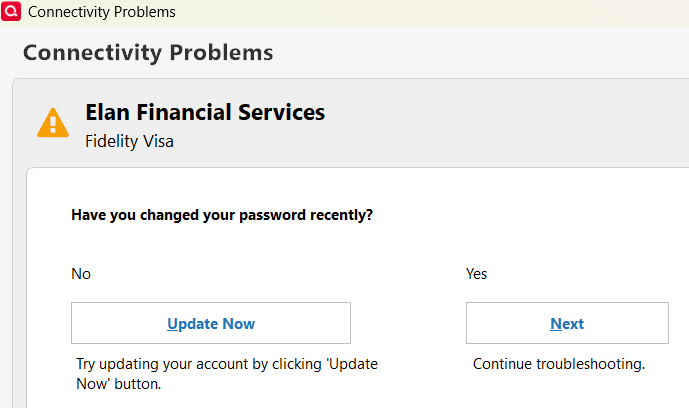
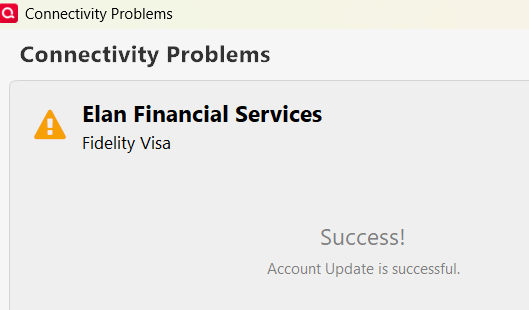
Same here. I did a One Step Update and my account ask if I have changed my password. I responded "No" then after a few seconds I get a "Successful" response but not transactions and the Online Center has a CC-503 error. I even went to the account and did an Update Now and get a green complete but then the Online Center still has the CC-503 error.
I haven't changed my password so it has to be between Quicken and Elan. I can login to Elan using my credentials with no problem.
1 -
Just read another post #20504865 and had to deactivate the Elan and change to Fidelity Investments and all works good now.
1 -
Hi @tlsher,
Thank you for sharing the details of your experience.
Hi @swcampos , thank you for updating and sharing the solution that worked for you! It’s helpful to see what steps resolved the CC-503 error for another user.
@tlsher, please review this support article regarding CC-503. However, should those steps not resolve the issue, then can you try what @swcampos did and see if that works for you too? Here’s a step-by-step you can follow:
- Back up your Quicken file before making any changes.
- Go to the Accounts List and select your Elan credit card account.
- Click Edit → Online Services → Deactivate.
- Once deactivated, go to Tools → Add Account and search for Fidelity Investments.
- Follow the prompts to reconnect your credit card using your existing login credentials.
Let us know how it goes!
[Merged Post]
-Quicken Anja
Make sure to sign up for the email digest to see a round up of your top posts.0 -
Thanks - this worked for me as well. All is good and working now.
0 -
Hello @timmo11,
Thanks for chiming in and letting us know this worked for you as well! Glad to hear all is working now.
-Quicken Anja
Make sure to sign up for the email digest to see a round up of your top posts.0 -
OK, happening for me, but a bit differently.
In Windows I do the fix, enter password and works. I get "Success". Until the next OSU and have to do it again.
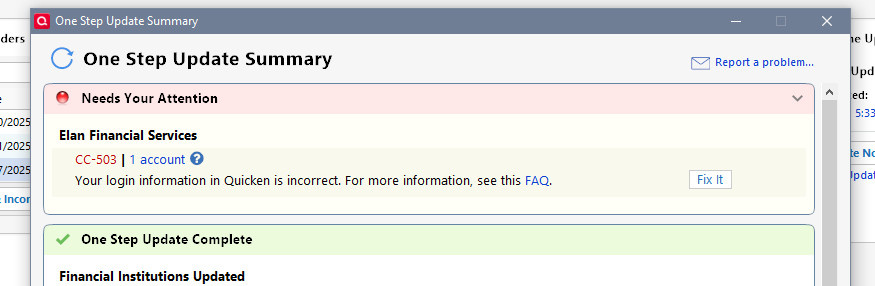
In MAC, it will not take my password at all.
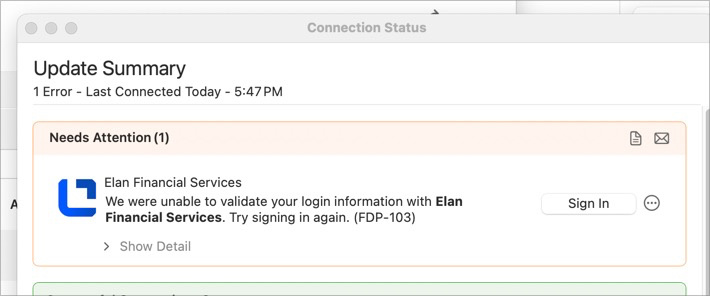
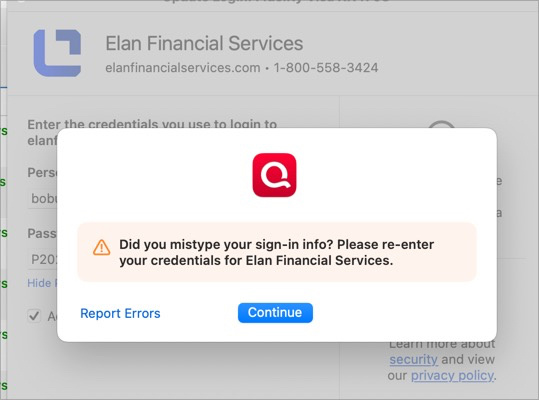
OK. Will try first to change to Fidelity (though that used to have its own set of errors with the credit card) in Windows. Then MAC if that works. If both are not successful, I will report back here.
0 -
@Quicken Anja Let's talk the Windows side.
Deactivated, Added a Fidelity account. Now interesting, in light of ALL the othe Fidelity foo with no need to repeat any of that here.
It asked to reauthorize my Fidelity accounts. Here I had to make a decision as not only was the credit card account there, but my brokerages as well. I checked all. I hope that was not a mistake!
It went through and returned to Quicken. Here it asked to link my Visa to existing, fine, BUT also asked to add my borkerage accounts (not link). I selected DO NOT ADD TO QUICKEN!! Was that right? They still do OSU. I hope I have not broken them further! They are still at ZZZ in Windows.
Please advise on what is proper to do here both in reauthorization and after I made the selections I did.
Thanks!
0 -
Update in Windows:
A new OSU shows BOTH Fidelity Investments now AND Zzz-Fidelity Investments-DC
Now have an OL-294A for Wells Fargo :( Now an OL-393A For Wells.. But fidelity seems OK. Oy.
Changed my broken Elan Visa Online Biller to Fidelity. Still pending.
Fidelity and Zzz-Fidelity both update.
Wells is back.
Now off to Mac :)
0 -
MAC went more smoothly. This time I DID NOT select the brokerage accounts to authorize. JUST the Visa Card. OSU went perfectly with BOTH Fidelity Investments and Fidelity Investments Mac updating.
0 -
I have no Deactivate option for my Fidelity Elan CC account. To setup online services it asks me for my Elan User ID and Password. No chance to change it to Fidelity. When I try to sign in using Elan credentials it said they are wrong and to double check. ARGH…. I hope this goes better than the Schwab fiasco (which still isn't working right).
0 -
Why are we forced to change this without any warning? I hit the Update Now button, and got the below error (?) message that indicated success? It still won't update.
 0
0 -
You should have the option. On my Mac now, but if you right click the account, should be an online services tab. Click deactivate there. From memory, but I should be very close if not right on. This is VERY fixable.
Slippage. This was for @sonomaron
0 -
To comment on this further, I selected 'Fidelity Investments' and when it took me to a web browser, I opted to ONLY select the Visa card (not my other brokerage accounts). Originally I selected ALL accounts but noticed it then wanted to link each one in Quicken - I didn't want to do that! So I started over and ONLY selected the Fidelity Visa account to 'authorize', then linked that to my existing account in Quicken and it worked perfectly.
If I have any issues tomorrow after doing the one step update, will post here. I think it's resolved for me though doing it this way.
1 -
@EvDob @Quicken Anja I agree. There should have been SOMETHING to explain this. I would have never known to deactivate and change to Fidelity if I had not searched here. I'd still be flailing. And Anja, this needs to be better done. If we need to change the FI for a credit card account, the errors (and SUCCESSES) we see do not help lead us to the proper fix.
EVDOB, I had the same. I had the success many times. But was not fixed until I changed from Elan to Fidelity as mentioned above.
2 -
And one more aside: With ALL the recent errors with Fidelity changing from DC and Elan not connecting as an Online Biller, etc, I'd have a hard time believing Quicken was not aware that this was required before we stumbled on the errors. The app itself should have had instructions for the proper fix.
1 -
My Elan Financial username and password do not work on the Fidelity Investments log in.
Any other ideas?1 -
Did you read the fine print on the Fidelity authorization page? It looks like Fidelity no longer wants to deal with all our individual log-ins, but dump all (y)our data on Quicken, where you are supposed to get it in the future. I think that is a major privacy issue and do NOT want Quicken to hold my account data in their cloud.
0 -
Elan download gave error today and it worked this morning. Hopefully a temporary issue.
Deluxe R66.23, Windows 11 Pro
0 -
Which login credentials should I use for Fidelity Investments access to Elan credit card, Elan's login credentials or Fidelity's? Please clarify.
Deluxe R66.23, Windows 11 Pro
1 -
For me, the credit card is a Fidelity Visa Rewards Card. Ever since its inception, even though issued by Elan, The logins were identical for Fidelity investments and the Visa Card. The fact yours are different makes me think something else is going on.
0 -
@leishirsute If I were you, I'd start with Fidelity. Once you reauthorize, it will ask which accounts you want to make available to Quicken - see if the credit card it listed. If it is not, should be no harm. Exit out then try Elan.
Make a backup first! :)
0 -
I used to have the same login credentials for Fidelity and Elan but Elan made me change the userid to be different from Fidelity's years ago.
Deluxe R66.23, Windows 11 Pro
0 -
@leishirsute Now you have me curious.
Do you have the Fidelity app on your phone? If yes, when you login do you see the credit card there along with your brokerage accounts? I do. If so, the Fidelity login should work, imho.
0 -
Yes, the credit shows in the phone app. I'm going to wait to see if this resolves. Elan services more credit cards than just Fidelity's. It seems like this is a login issue into Elan.
Deluxe R66.23, Windows 11 Pro
0 -
You might be right. I know there were always two ways to reach this card and recommended by who I consider the Fidelity guru around here, @Boatnmaniac was to use Elan for a reason I have long forgotten.
@Boatnmaniac, do you have an opinion on this current issue? As you will see, I "corrected" the problem by changing to Fidelity for the card login rather than Elan. But @leishirsute might be right that this is an Elan issue. OR….maybe they want to login to the card now through Fidelity with all the other Fidelity issues going on.
0 -
For those struggling with how to change the online account from Elan to Fidelity Investments even after deactivating the online sevices, just go into one of your other Fidelity accounts within Quicken, and click the "Reset Account" option under online services. That'll trigger re-authentication with Fidelity, and allow you to pick up the Fidelity Rewards Visa Card as part of it, and link it to the account in Quicken.
0