shares of mutual fund incorrect after quicken update with schwab

after updating the shares in a specific mutual fund in Quicken are off by a factor of 10, I have 5,584.95 shares in my account but after updating Quicken only shows 558.95. I check quicken daily and there hasn't been a problem until now. But now it shows the error started 5 days ago n the 11th.
I'll assume this will get corrected but has anyone else found similar errors with Schwab updates?
Best Answer
-
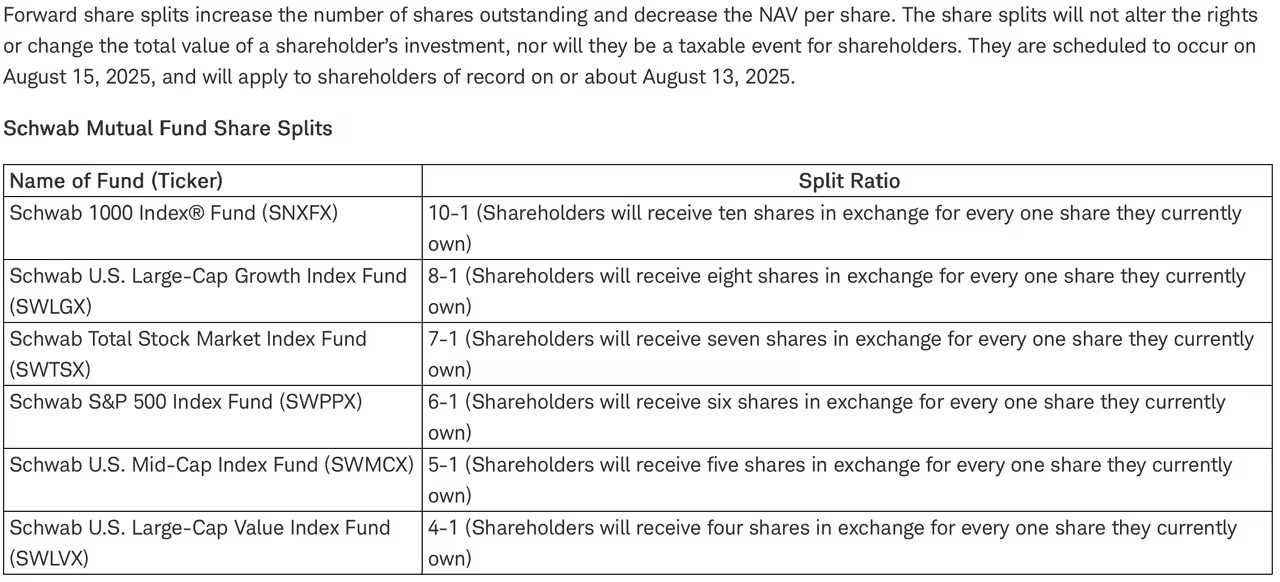
I believe these are the 6 mutual funds that were impacted as per boglehead.org
5

Answers
-
Same here, just noticed after downloading a few minutes ago. Don't have any solution as yet.
0 -
Hello @dave hulett & @bps42,
Thanks for sharing your experiences. To help us better understand the issue, could you please provide the following:
- Screenshots of the mutual fund account showing the incorrect shares after the update.
If needed, please refer to this Community FAQ for instructions on how to attach a screenshot. Alternatively, you can also drag and drop screenshots to your response if you are not given the option to add attachments. - Any troubleshooting steps you’ve already tried (for example, deactivating/reactivating the account, resetting the account, or restoring a backup).
Additionally, we will be forwarding this issue to the proper channels to have this further investigated. However, we request that you please navigate to Help > Report a problem within your Quicken program and submit a problem report with log files and screenshots attached in order to contribute to the investigation.

It would also aid the investigation to include a sanitized file when submitting the problem report. A sanitized file is a data file that removes personally identifiable information so you can comfortably share this file with the Quicken team.
While you will not receive a response through this submission, these reports will help our teams in further investigating the issue.
We apologize for any inconvenience in the meantime! Thank you.
(CBT-771)-Quicken Anja
Make sure to sign up for the email digest to see a round up of your top posts.0 - Screenshots of the mutual fund account showing the incorrect shares after the update.
-
I have the same issue, I just noticed it when I did an account update yesterday. It freaked me out at first wondering what I had missed in the news until I realized it was an error dropping my shares by a factor of 10.
0 -
Thanks for joining this thread and sharing.
Please follow @Quicken Anja's previous instructions to submit a problem report.
Let us know once you have done so!
-Quicken Jasmine
Make sure to sign up for the email digest to see a round-up of your top posts.
0 -
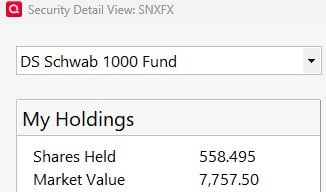
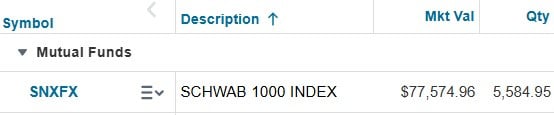
attached are screen shots. one from my schwab account and the other from quicken. I also submitted a problem report but although the check box for screen shot was checked there was no ability to add a screenshot to the report. drag and drop did not work and there no other options
 0
0 -
I have two funds where this happened (SWLVX and SWMCX). There was a split on 8/15, but the downloaded prices showed the "after" split prices starting around 8/11. The details downloaded from Vanguard for the Schwab funds in the portfolio didn't have the fund split details. It only added the new number of shares. I found the correct prices from 8/11 - 8/15 on Yahoo finance and entered those in the price history. I also changed the downloaded transactions from "Added" to "StkSplit" and used the details from Yahoo Finance to fill in the missing information.
I have no idea why Quicken used the after-split prices starting on 8/11, but after correcting the prices from Yahoo finance and changing the downloaded transaction from "Added" to "StkSplit" my holdings are correct for the 8/11 - 8/15 time period.
That took two hours to decipher and then fix. What a waste of time.
Win 11 Pro - Quicken Windows Classic Premier - v65.29
1 -
My problem is similar to ,@Dave hulett, @bps42, @st farris; but a little different.
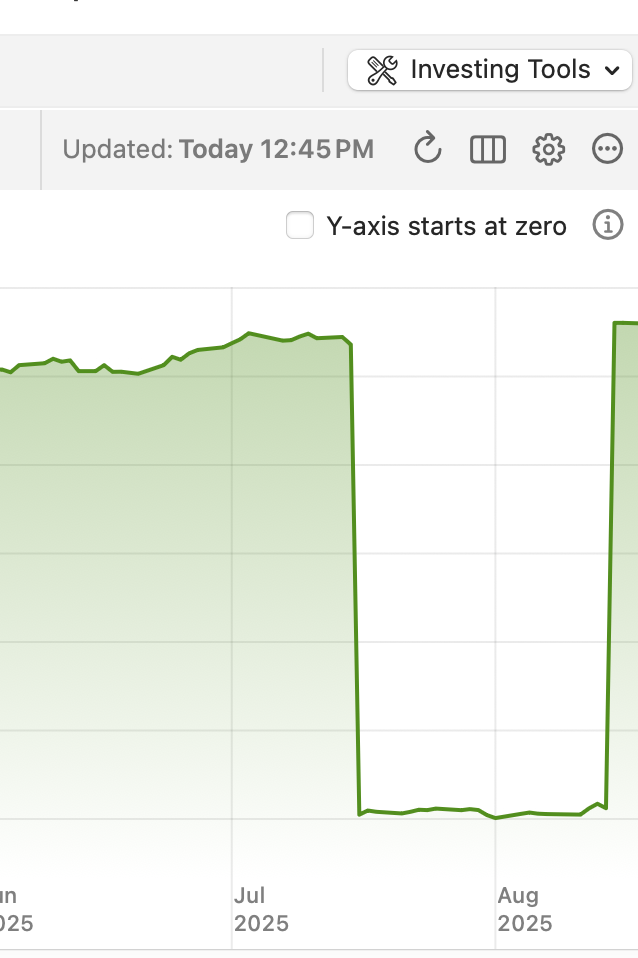
On July 16, my share price for SNXFX (Schwab 1000 index) dropped by a factor of 10. I didn't notice a problem until 8/15. I check my portfolio total for Schwab on the sidebar daily, but only occasionally the portfolio details. I had not noticed any changes in the portfolio value.
Today, starting with 7/16, I manually corrected the share prices by moving the decimal. I periodically checked the up to date screen and all was fine. Then when I corrected the share price for 8/14, my total shares jumped by a factor of 10 (and I became wealthy in Quicken 🙄).
I reverted to my 8/16 backup and SNFX shows in the anomaly depicted. Again, the anomalous drop in value did not appear in the sidebar total for the previous month. So the problem manifested on or around 8/14.
 0
0 -
Also experiencing this problem with the Schwab mutual funds (SNXFX and SWLGX). As per Schwab website (the correct value) I should have 8,263.64 shares of SNXFX. But Quicken on PC Windows shows 826.364 shares. So, I now have 1/10 the shares showing in Quicken.
Schwab website shows I have 14,890.744 shares of SWLGX. But Quicken shows 1,861.343 shares. So, I now have 1/8 the shares showing in Quicken.
Please provide an update as to when this will be resolved.
1 -
I'm having the same exact problem - only with Schwab mutual funds. And I'm not spending 2 hours trying to fix this with you. Nothing has changed on my end. I know you are thinking that this is a user issue, but it is not. I haven't traded for months. Also, multiple people are reporting the same thing, at the same time. Just imagine how I felt after doing a Quicken update yesterday and it appeared that I had lost a good chunk of my retirement savings! I was seriously stressed before confirming that all was well by logging directly into Schwab. That's not acceptable. Please fix this ASAP.
2 -
Hello All,
Thank you, everyone, for chiming in and sharing your experiences.
This has already been escalated internally, and we’re actively tracking it. If you haven’t done so yet, please go to Help > Report a problem in Quicken and submit log files (screenshots are helpful as well). These reports will help our teams add your examples to the existing ticket and assist with the investigation.
At this time, we don’t have an ETA for resolution, but your submissions are greatly appreciated.
Thank you for your patience while we work on this!
-Quicken Anja
Make sure to sign up for the email digest to see a round up of your top posts.0 -
I reported the problem and submitted a screenshot. Please give me directions for log files.
0 -
After further sleuthing, I have figured out that this is exactly what happened. There was a stock split, but Quicken only reports the adjusted price, not the new number of shares. I have not gone through the work of fixing it manually but I guess that is what I need to do. I'm concerned that if I make adjustments, Quicken will at some point fix the issue and create an error in the other direction.
1 -
@wrgrimes Log files can be submitted via Help > Report a problem. When looking at your account internally, I can see you have already submitted them—thank you!
@St Farris Thank you for sharing this information!
-Quicken Anja
Make sure to sign up for the email digest to see a round up of your top posts.0 -
I believe these are the 6 mutual funds that were impacted as per boglehead.org
5 -
It would be good to know if Quicken/Schwab will be fixing this bug. If yes, I will NOT try to manually fix on my end. If no (or not within the next 2 weeks) I will likely manually update the share values. I've been using Quicken for decades and never experienced this problem so hopefully Quicken will get this fixed in the next week or two. If you are not going to fix it, please provide detailed description of how to fix it so I only have to do this once. We need some feedback on this topic.
0 -
The only "bug" that occurred here is that Schwab did not feed the mutual fund price split into the feed that Quicken downloads during a one step update. There's nothing that Quicken can do about this I believe . The price post split was correct (from the One Step Update) but the split itself was not recorded (as mentioned, it wasn't part of any OSU). To fix this, simply manually enter a stock split using the appropriate "X for one" split amount depending on which mutual fund you had as you saw in crissnyder's post earlier. Once you do that, your holdings ( number of shares, price per share, total value) should be correct. Verify this on your Schwab online positions.
By the way, for those that are 'freaking out' (or upset, or whatever) about this, Schwab announced this was going to happen months ago. https://pressroom.aboutschwab.com/press-releases/press-release/2025/Schwab-Asset-Management-Reduces-Fees-on-Four-Equity-Index-ETFs-and-Announces-Mutual-Fund-Share-Splits/default.aspx
3 -
My wording could have been better (posted the original late last night after coming back from vacation and also being 'surprized' by this). When I said "Schwab did not feed the mutual fund price split", I really mean the number of shares (Eg: 10 for 1, 6 for 1, etc.) split wasn't sent, not the price per share. The downloaded price was correct (both pre- and post- shares split) which is what caused all the issues in the total value. Sorry about that inaccurate wording.
2 -
SNXFX did a 10 for 1 split in July. PERHAPS, did you input it backwards?
Q user since February, 1990. DOS Version 4
Now running Quicken Windows Subscription, Business & Personal
Retired "Certified Information Systems Auditor" & Bank Audit VP0 -
After starting this thread and getting a reply from Schwab I reported it through quicken with screenshots…etc. Have been out of town for a bit and just forgot about it. I see it hasn't been fixed but the info several of you posted explains the issue perfectly. In Schwab under transaction history I can see the split recorded on 8/15 giving me the exact number of shares awarded so I have manually added the 10 for 1 stksplit for that date. All's well now!
I'm sure quicken/schwab will get it resolved in time.
Thanks to all who replied.
1 -
re/"I'm sure quicken/schwab will get it resolved in time."
I doubt it. As I mentioned earlier, this is not a Quicken issue, they only can process the information from the FIs that are received and Schwab didn't send the split transaction yet. Perhaps they will, but it's been many days, so I wouldn't expect anything else.
As you said, you entered the split and all is well. That's the 'fix'.
0 -
I'm lost. For me the math doesn't work.
Schwab shows an 8/16/25 SWPPX split 6:1 share quantity of 340.345. Is that the pre or post share quantity?
If I multiply today's share price of roughly $16.72 the new market value would be $2042.07 which doesn't match the account market value
0 -
How many shares did you have prior to the split? According to my Quicken d/l, the price went 6 for 1 between 8/8 ($98.80) and 8/11 ($16.4283). So see if entering a 6 for 1 split on 8/11 helps.
0 -
It took me a while (thanks AndrewQ) to sort out the numbers but I'm pretty sure I have the basics figured out.
When I try to enter the split in Quicken it asked me to create a new fund! What's that all about?
0 -
It appears I have fixed the issues. They shouldn't make a 78 year old man have to do this. I spent hours trying to sort it out.
1 -
When you enter a Stock Split transaction from the dialog drop down, a security name is one of the fields that should be there to select the name of the fund in a drop down list . In my case, it is "Schwab S&P 500 Index Fund" which I can't remember if I manually entered that, or it became the assigned name when I entered the original transaction of BUY from the security name (SWPPX).
0 -
OK, I got it fixed for my two affected Schwab funds. It would have been nice for someone from Quicken Support to at least send a URL on how to do a stock split within Quicken as I have not done one recently (and perhaps never did one). I incorrectly changed share values to the new number of shares (after split), but this caused my net worth history to be way off. After reading some of the later posts I realized I should not have updated the share values, but rather do the stock split function. Luckily, I kept good records and manually put in the share values before the split (brought it back to where it was). And then used the Stock Split function within Quicken. I am good now, but again it would have been nice for Quicken Support to give some specific recommendations on how to handle this situation. I'm with jdonalds, "They shouldn't make a 78 year old man have to do this. I spent hours trying to sort it out".
1 -
Criss, I'd give Quicken Support a little slack here on this one. I've been using Quicken for 40 years from the original DOS day, and I've owned mutual funds for over 40 years and to be honest, I can't remember if I've ever seen a "mutual fund" split. Their support staff probably hasn't either. A mutual fund split is a VERY rare event.
1 -
Plus, even Schwab had it incorrect on their website the day of the split. I have to wonder if the split information was even made available to Quicken.
1 -
Yes, that's what I also was surmising on 8/23 when I said "The only "bug" that occurred here is that Schwab did not feed the mutual fund price split into the feed that Quicken downloads during a one step update. ".
1