R 64.19: improved portfolio x-ray not working

R64.19 updated today and now the improved Portfolio X-Ray doesn't work at all. It returns a blank report. This happens for all account combinations.
Has anyone else seen this problem?
Answers
-
Hello @tanapoli,
Thanks for reaching out!
A few things I’m wondering that might help pinpoint the issue with Portfolio X-Ray:
- Did the improved Portfolio X-Ray work correctly before the R64.19 update, or were there already occasional issues?
- When you run the report, does it ever show partial data before going blank, or is it always completely empty?
- Are all investment types affected equally, or do some accounts (like IRAs vs taxable) behave differently?
- Have you noticed any error messages, warnings, or unusual activity when generating the report?
- Does the blank report happen only with certain account groupings, or truly every possible combination?
I look forward to your response.
-Quicken Jasmine
Make sure to sign up for the email digest to see a round-up of your top posts.
0 -
FWIW, I saw that(blank report)when testing if the early access version affected the benchmark options. Closing and reopening Quicken gave a normal report.
Quicken Business & Personal Subscription, Windows 11 Pro
0 -
Similar issue since R64.19 update. X-Ray Interpreter works in that is displays the information BUT it no longer offers suggestions or comments about the type of portfolio (i.e., CORE) or whether there is heavy concentration in a particular region or info regarding risk level of the portfolio. Prior to this update, it was working fine and it provided this additional insight. Thoughts?
4 -
The previous version of Portfolio X-Ray did work. The updated version only displays a blank template. All the sections appear to be there but without any of my data. Closing and restarting the program and my system (Win 10) doesn't help.
The investment account data all appear to OK in the other Investing sections of Portfolio, Performance, Asset Allocation, and Dashboard. It's only the new X-Ray section that doesn't work.
0 -
- The scaling on the display is incorrectly large. Makes the screen very difficult to read:
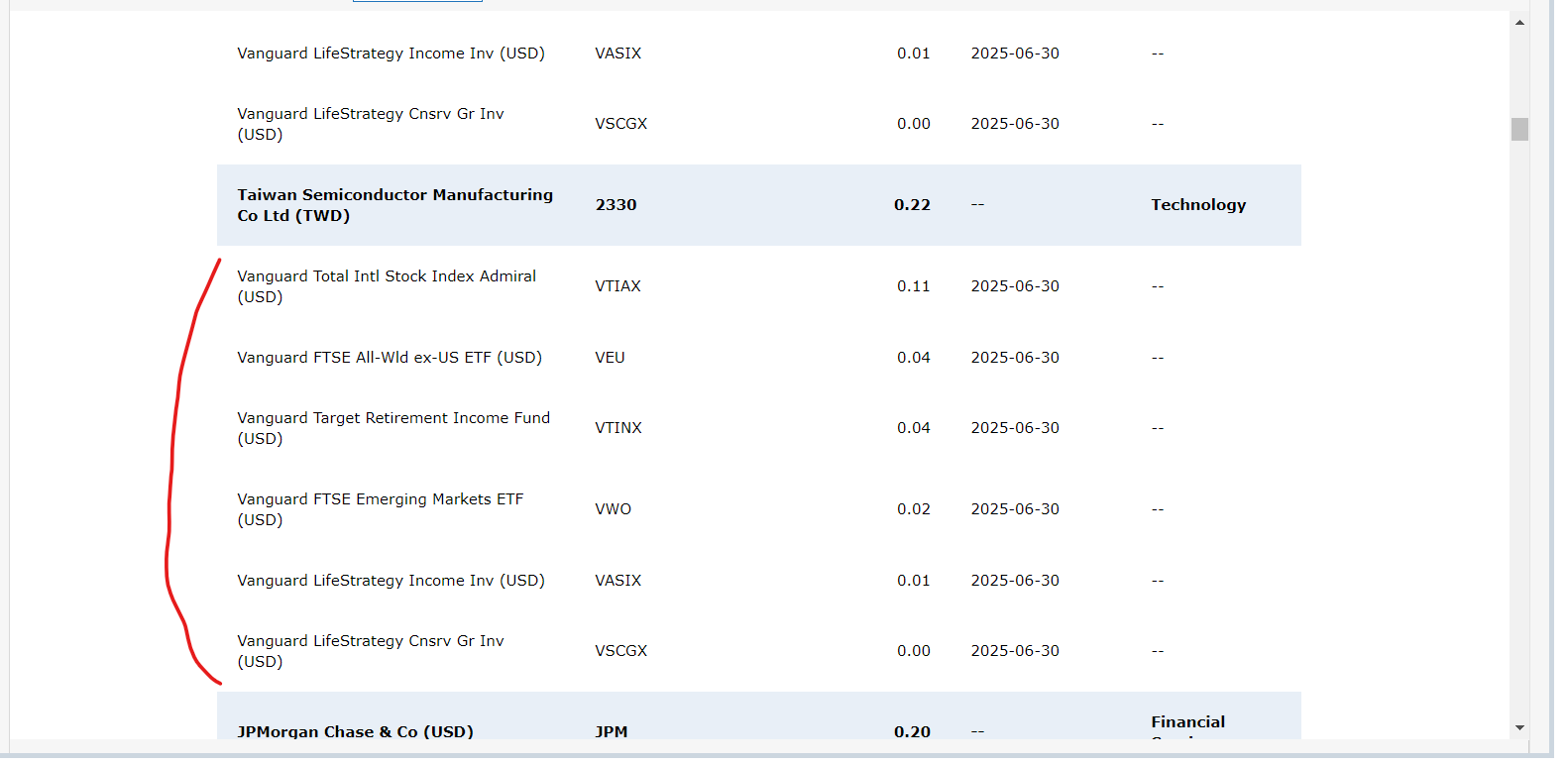
- Several features/information that was in the previous version is now missing:
- Portfolio recommendations
- Bond duration
- Concentration risks
I noticed other scaling issues within the Quicken Preferences pages. Some text is sized well, some is sized much too large.
1 - The scaling on the display is incorrectly large. Makes the screen very difficult to read:
-
An issue I am seeing is that if I select just one large cap stock where I have a small holding in one account, it says that my portfolio is 92.86% in Cash.
The percentage does not change if I select or de-select "No security (includes Cash)" but does change if I select different accounts to include. Apparently the analysis includes the cash in the selected accounts even if it is not selected.
This error does not depend on whether the old or new customization interface is selected. R63.21 does not have this issue.
Also you still can't print the results.
QWin Premier subscription0 -
Having the same problem as @tanapoli
0 -
Hello @Jim_Harman,
Thank you for letting us know about this issue. I just tested in my Quicken and see the same issue. I forwarded this to the proper channels for further investigation and resolution. If you would like to contribute to the investigation, then please navigate to Help>Report a Problem and send a problem report with log files attached.
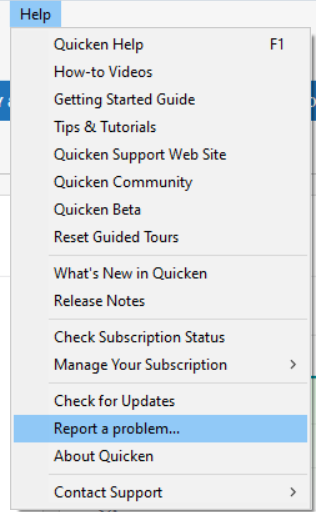
Thank you!
(CTP-14261)
Hello @Larry Woodbridge,
To help troubleshoot, please answer these questions:
- Did the improved Portfolio X-Ray work correctly before the R64.19 update, or were there already occasional issues?
- When you run it, does it ever show partial data before going blank, or is it always completely empty?
- Have you noticed any error messages, warnings, or unusual activity?
- Is the screen completely blank, or is the header that lets you choose accounts and securities still visible?
I look forward to your response!
Quicken Kristina
Make sure to sign up for the email digest to see a round up of your top posts.
0 -
Problem report sent, along with a sanitized test file that demonstrates the problem.
Problem description:
In this file there is one account with $10,000 of Cash and another account with about $10,000 of the large cap US stock GE. In the X-Ray setup, only the GE is selected, not No Security (includes cash). The Asset Allocation chart should show 100% US stocks but it shows about 50%. Same problem with old style setup dialog. This problem is new with R64.19.
[update 9/10/25] This is still present in R64.23. In earlier versions through R63.21, Cash in the selected accounts is never included in the asset allocation chart. It appears that Quicken tried to improve the analysis by including the cash, but neglected to allow the No Security (includes Cash) selection to control whether the Cash is included.
Also there is still no way to print the X-Ray, File > Print Portfolio X-Ray is grayed out. (This is a longstanding problem)
QWin Premier subscription1 -
Two additional problems:
- Saved custom settings are sort of lost when you restart Quicken. If you make custom selections and then restart Quicken and return to the X-Ray, the dropdowns say Custom and the saved settings are used, but if you click on Custom to see what the settings are, it reverts to All Securities or All accounts.
- After selecting Custom, the first click, which would normally select or de-select something, is ignored. It acts as if the selection dialog does not have the focus.
You can see both of these issues in the test file I sent last night.
QWin Premier subscription1 -
Thank you for your replies,
I was able to replicate both of the additional problems you reported, and have forwarded them both to the proper channels for further investigation and resolution. Thank you also for sending the logs and sanitized test file. It will help our teams investigate the issues.
Thank you!
(CBT-784 for custom settings being partially lost/CBT-785 for first click not registering in Customize window)
Quicken Kristina
Make sure to sign up for the email digest to see a round up of your top posts.
0 -
Hello @Quicken Kristina
Here are my answers to your questions:
- Did the improved Portfolio X-Ray work correctly before the R64.19 update, or were there already occasional issues? It worked.
- When you run it, does it ever show partial data before going blank, or is it always completely empty? Yes it sometimes shows partial data for a second or two and then goes blank
- Have you noticed any error messages, warnings, or unusual activity? No
- Is the screen completely blank, or is the header that lets you choose accounts and securities still visible? I get only the headers e.g. I see Stock Style but nothing underneath.
Also, it seems to depend on which accounts I choose sometimes. For example, it can't handle my Fidelity managed accounts which have substantial numbers of stocks, but it can handle my individual Fidelity retirement accounts which are not managed. This was not a problem before.
0 -
Thank you for your reply @Larry Woodbridge,
If you haven't already done so, please try closing and reopening your Quicken to see if that corrects the issue.
If the issue persists after that, then please try restoring a backup from before the issue started, and test to see if the issue is resolved in the newly restored backup.
If the issue is not resolved in the restored backup, please return to your main file, and contact Quicken Support directly for further assistance, since they have access to tools that we can't access on the Community and they are able to escalate the issue as needed. The Quicken Support phone number can be found through this link here. Phone support is available from 5:00 am PT to 5:00 pm PT, Monday through Friday.
Please let me know how it goes!
Quicken Kristina
Make sure to sign up for the email digest to see a round up of your top posts.
0 -
I am having the same issues. In my case it appears to the the number of holdings combined with the number of accounts. If I limit the number of accounts analyized the report populates. If I try to do all accounts I get a blank report. I have tried differnt combinations and it appears there is a limit to the number of accounts and investments being tracked. I am now wondering if MorningStar is limiting the numbers coming from Quicken during the analysis.
0 -
That is interesting, @jefflock.
Do you have a rough idea of what the limits of securities and accounts are, so that we can try to replicate what you are seeing?
QWin Premier subscription0 -
I just ran a test. I have 10 accounts with a total of 276 securities. When I include all accounts, the report comes up blank. If I exclude one account with 52 securities, the report populates without issue. However, if I exclude a different account with only 5 securities, the report is still blank. When I exclude three accounts totaling 26 securities, the report populates correctly. Based on this, it appears (I am going to say) that 250 securities and over prevent the report from generating.
0 -
One more piece of information: I tested running the report by excluding individual securities instead of entire accounts. I have a total of 276 securities. When I exclude 35 (analyzing 241), the report populates correctly. However, if I exclude only 34 (analyzing 242), the report is blank. Therefore, my earlier statement was incorrect — the threshold is 242 securities or more, which prevents the report from generating.
1 -
Thanks @jefflock that is a good analysis.
[edit to correct the criteria] To further pin it down, could you please try including just the 35 securities that were excluded when it worked, to make sure it is not certain securities that are causing the failure?
Thanks.
QWin Premier subscription0 -
@Jim_Harman.
I just re-included the 34 securities I had originally excluded and excluded the rest instead. The report populated without any issues. I am certain it is not the securities that are making it fail. To me, this makes it clear that there’s some sort of limit in place—whether intentional or not. I am hoping it is not intentional since this is a big feature for me. I look at it on a regular basis. If they are going to impose a limit going forward I may have to find a new alternative.
As a side note, in the last day I tried subscribing directly to Morningstar directly. I imported all my securities. I discovered on their system within the X-ray tool, they have a hard limit of 150 securities. I inquired on that issue, and they said it is a system and design-imposed limit so that the system can respond quickly.
0 -
Thanks for that update. Morningstar certainly does impose some limitations on the X-Ray, but I was not aware of that one. The analysis also does not include any securities in Quicken that are not publicly traded, i.e. do not have valid ticker symbols, even if you have assigned them asset classes in Quicken. It also does not include CDs or individual bonds.
If there is a limit of XXX securities in Morningstar's analysis, I think it would be better if Quicken included that limit in its documentation and only sent your XXX largest holdings that have ticker symbols to Morningstar, rather than failing with a blank report.
Note also that in the Stock Intersection analysis, the Quicken version only lists your top 50 holdings overall, while in the paid version of the X-Ray they include the top 50 holdings in each fund or ETF, which makes a much longer list.
QWin Premier subscription0 -
I agree with @Skyler. There is so much information missing now. In addition, the information that is given on allocation information, stock sectors, world regions, etc. is inconsistent (and in my opinion) inaccurate compared with what it gave me before the update. The bond style box is missing. Classifying my portfolio as core vs small cap etc., is missing. Aggressive vs cautious is missing.
2 -
Hello All,
Thank you for providing your feedback on these changes to the Portfolio X Ray. This feedback has been forwarded to the proper channels for review.
Thank you!
(CTP-14535)
Quicken Kristina
Make sure to sign up for the email digest to see a round up of your top posts.
0 -
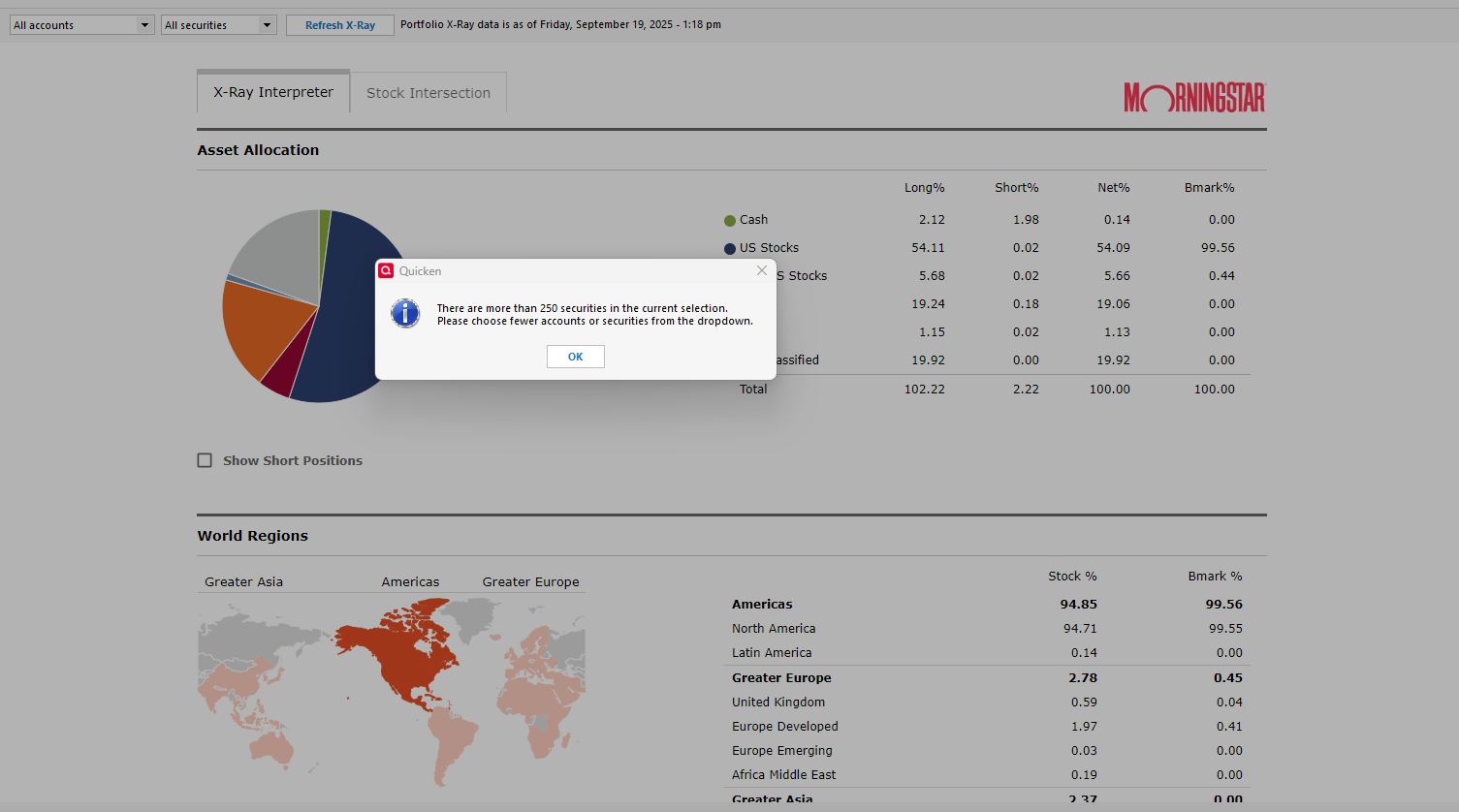
After updating today to Version R64.29 Build 27.1.64.29, I now receive the following message when trying to run all securities across all accounts:
"There are more than 250 securities in the current selection. Please choose fewer accounts from the dropdown."
I’ve attached a screenshot for reference. I’m surprised that Quicken has implemented a security limit in this update, as no such restriction existed in the version before R64.
0 -
I’m curious, I suspect that this limit is for active securities (non hidden one) correct?
0 -
Thank you for your reply @jefflock,
I added the additional information and screenshot you provided to the ticket.
Thank you!
Quicken Kristina
Make sure to sign up for the email digest to see a round up of your top posts.
0 -
Any limit should be for selected accounts and securities with ticker symbols and nonzero share balances, which should be the only ones that Quicken sends to Morningstar.
I think if the user selects more than the limit, only the largest holdings should be sent, with a message like "Only your largest XXX holdings will be included in the analysis."
QWin Premier subscription1 -
I have an additional issue: Portfolio X-Ray classifies my US Treasury TIPS as US Stocks, not bonds or cash. Looking at the Account Holdings detail view they are classified as Bonds and specifically Corporate Bonds. That makes the Asset Allocation Graph unreliable.
0 -
Have you assigned a Ticker symbol to the TIPS bonds? If that matches the ticker for a stock, that would explain why the X-Ray is incorrect.
QWin Premier subscription0 -
Hello @jefflock,
I heard back from our team on the issue with going over 250 securities. There is a limit to the number of securities shown, and we are looking into increasing it. In the meantime, our team recommends applying the filters at the top to keep the number of securities shown below that limit.
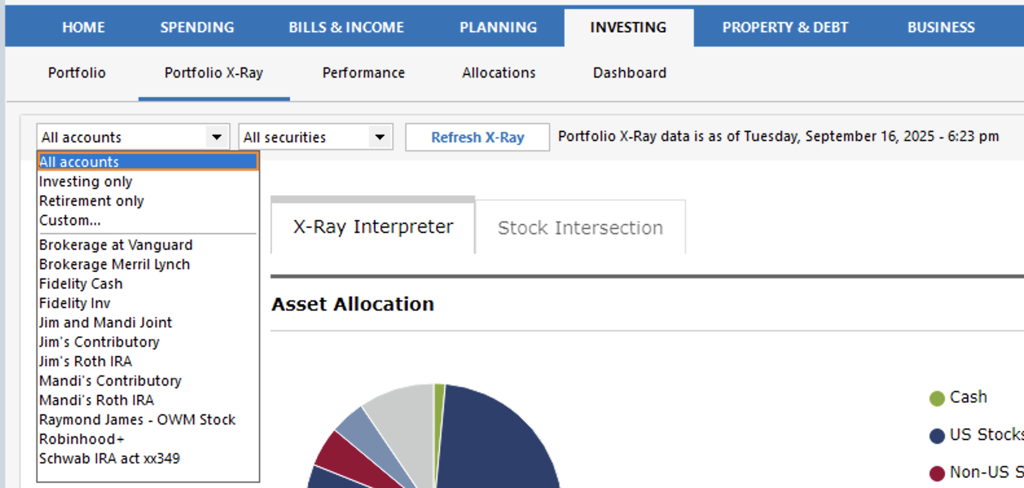
I hope this helps!
Quicken Kristina
Make sure to sign up for the email digest to see a round up of your top posts.
0 -
Thank you for the update. I am hoping that they can get that limit up to at least 300 securities.
1





