Paycheck transaction shows as payment after Onestep Update

This started in Quicken Premier ver R64.23.
I have a paycheck recurring transaction created using the Paycheck Wizard. The splits of the transaction includes entries for Earnings, Taxes, After-Tax deductions, and deposits into 2 accounts. Following a OneStep update (OSU) of my accounts, ALL future deposits for the paycheck transaction, change to a payment in the amount of the non-primary account deposit. So for example, say my primary account deposit is $500.00 and deposit to the other account is $10 in the paycheck transaction. Before OSU, the paycheck transaction shows a deposit of $500, after it shows a payment of $10.
To correct the transactions I "edit this and all future instances of reminder" and simply select "Done". This reverts all futures back to the correct amount of the deposit.
C'Mon Quicken, don't you test these basic transactions that have been working for years?
Comments
-
Hello @ljb1493,
Thanks for providing the details about your Paycheck Wizard transaction issue. To help us better understand what’s happening and guide you with the next steps, could you please provide screenshots showing:
- The paycheck transaction before running One Step Update.
- The same transaction after the One Step Update showing the incorrect payment amount.
- The splits detail for the transaction if possible.
If needed, please refer to this Community FAQ for instructions on how to attach screenshots. Alternatively, you can also drag and drop screenshots to your response if you are not given the option to add attachments.
These will help us pinpoint exactly where the discrepancy is occurring.
Thank you!
-Quicken Anja
Make sure to sign up for the email digest to see a round up of your top posts.0 -
here are the screenshots. I've blacked out sensitive information such as dollar amounts and names. I highlighted the paycheck future trans in green in the account register.
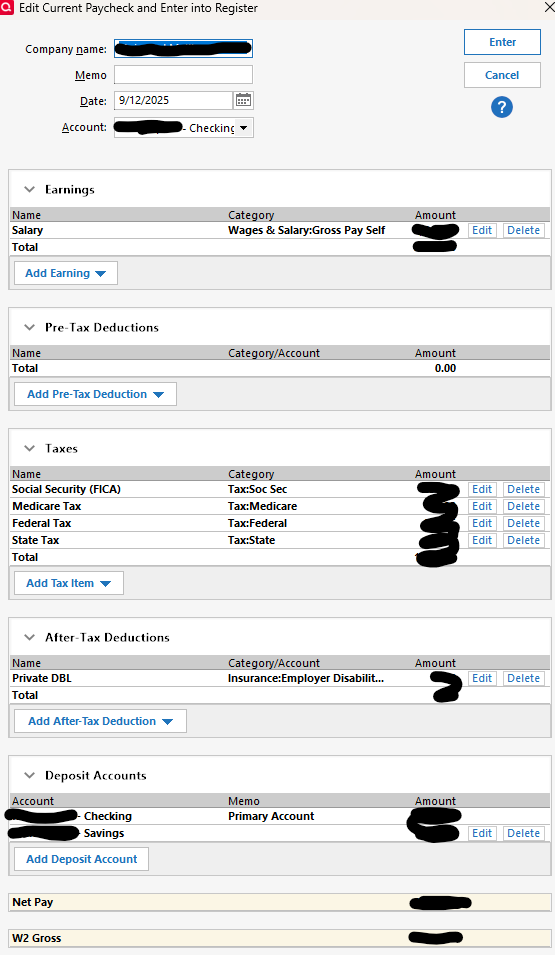
Before OSU…
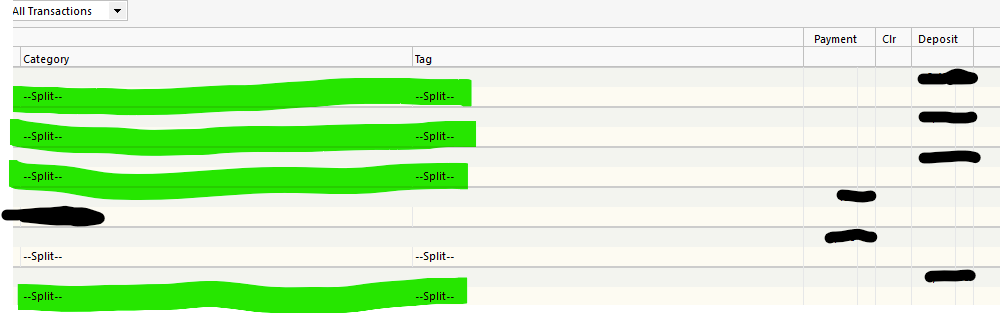
AFter OSU…

Hope this helps
0 -
Syncing to the Quicken cloud has been correlated with reminder corruption including paycheck reminders. Here is one discussion:
Quicken user since Q1999. Currently using QW2017.
Questions? Check out the Quicken Windows FAQ list0 -
Sorry, this is not related to specific and corrupt reminders.
To provide a bit better detail of the paycheck transaction and observation details I created a completely new test paycheck reminder as follows -
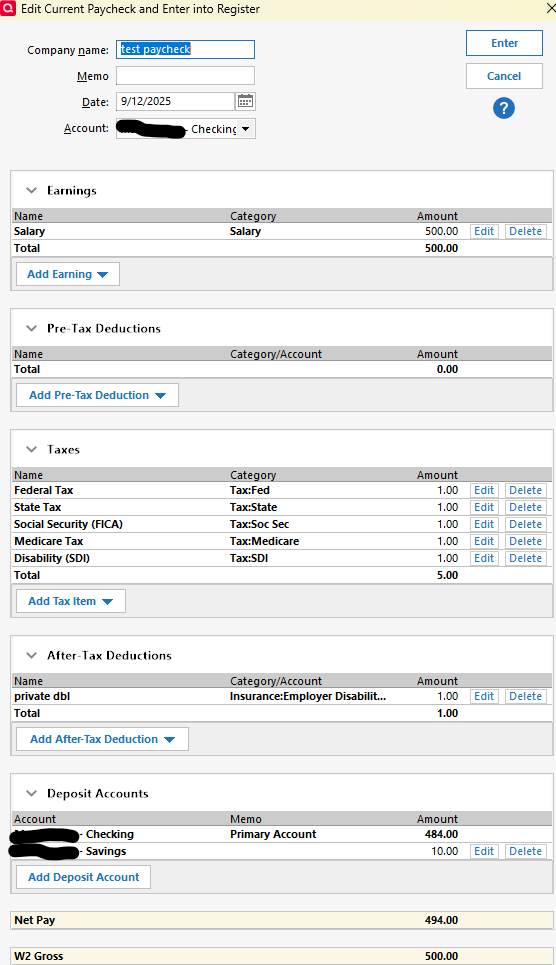
Here is the account register before OneStep Update -
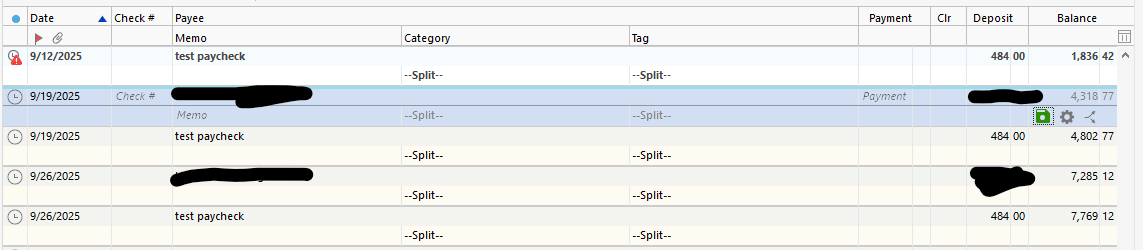
Here is the account register after OneStep Update -

The blacked out transactions above are my live paycheck transactions. You can see the activity of my "test" paycheck. This is a bug.
Please noticed yet another issue above. The "past due" test paycheck transaction in the before OSU screenshot. It disappears after OSU. That is another bug.
Some other things I tried and observed proving this is a but related to OSU and multiple deposit paycheck transactions -
- This was done after "Validate and Repair" of my quicken file
- Updating transactions for this single account only (gear → update now), the paycheck transactions do NOT change.
- Note - even after removing the secondary deposit the past due transaction still disappears following OSU
To summarize, the issues are with multiple deposit paycheck transactions and caused by OSU across all accounts. The issues are 1) future multiple deposit paycheck transactions in account registers that account's deposit changes to a payment in the amount of the secondary deposit. 2) Past due paycheck transactions disappear.
The above should give you enough detail to do your own testing and issue recreation.
These are NEW bugs in the release R64.23 that have otherwise worked correctly for as long as I've been using Quicken (well over 15 years). Now all of a sudden….
C'mon Quicken fix these issues. Do you perform any regression testing?
1 -
I'm seeing the same here and it is extremely frustrating!
0 -
After initially posting this 10 days ago and no formal response from Quicken, please advise they best way to report these bugs.
0 -
In the Classic version under the Help menu there's an option to Report a problem. Unfortunately it says they won't respond to the report directly and so it appears to be pretty useless. If does suggest going to quicken.com/support or contact Quicken Customer Care at 650 250 1900. I haven't tried those options yet but might have to soon since not tracking paychecks correctly is not a good thing. Good luck!
0 -
Hello All,
Thank you for taking the time to report this issue!
We have forwarded this issue to the proper channels to have this further investigated. However, we request that you please navigate to Help > Report a problem within your Quicken program and submit a problem report with log files and screenshots attached in order to contribute to the investigation.
It would also aid the investigation to include a sanitized file when submitting the problem report. A sanitized file is a data file that removes personally identifiable information so you can comfortably share this file with the Quicken team.
While you will not receive a response through this submission, these reports will help our teams in further investigating the issue. The more problem reports we receive, the better.
We apologize for any inconvenience in the meantime! Thank you.
(CTP-15666)-Quicken Anja
Make sure to sign up for the email digest to see a round up of your top posts.0 -
@ljb1493 look at this thread I started last week. We have had success with fixing this issue as it seems to be somehow related to Web synch (even if you don't use it).
Latest update broke all future paycheck reminders - somehow web synch messed things up — Quicken
1 -
Michael, Thanks for the reference to the link. I have never used Web Sync and confirmed it is "off". Honestly, I give Quicken as little information as possible. Further, Quicken's troubleshooting steps for this issue are ridiculous for several reasons. Starting with a backup prior to the issue, really? It was weeks ago and is not practical because 1) i don't remember exactly when it started, I'm not searching and 2) I have hours of manual changes per week to fix symptoms of their other bugs as they occur.
If Quicken feels this issue started with a bad/incomplete patch install, then they must have an idea of the "data" that is affected. They should apply a fix in the next patch and update the "validate and repair" function to correct the data. Since the reporting of this issue my version has gone from R64.23 to R64.29. Why don't their patches ensure previous patches were completely and correctly installed???? I am a software engineer for over 35 years and these expectations are not a stretch for software companies like Quicken.
0 -
Quicken Anja, With all due respect on your "how to report a problem". Submitting issues through "Help→Report a problem" is a blackhole. My experience is you never get a response. At least through community reporting Quicken will get a sense of how impactful their bugs are by user response.
0 -
I agree, but lots of people over there (myself included) who don't use web synch either. What I learned is you should not trust what the toggle says. Take a backup of your file and try it on the backup. Toggle the synch on and see what the page says. What I found was that things were set to synch (even if the global toggle was off) and only after removing them manually and THEN toggling it back off did my register go back to not being messed up.
Granted, I caught it before I went a while with it and was able to use the file from a few days before. I don't know if you try to do it on an already 'messed' up file if it will fix itself after.
Anyhow, only 10-15 minutes of your time likely to try and see if that fixes it.
I too work in technology and have been using Quicken in various forms since DOS. :)
1 -
I am seeing the same problem, and this is very frustrating.
Its even worse, since in the projections, the paychecks show up as a -ve value, that throws everything off.0 -
@ljb1493 I do want to clarify—while you don’t receive a direct response from the Help > Report a problem submissions, it isn’t a black hole. Those reports don’t disappear. In fact, they allow me personally to retrieve the log files and sanitized data you submit so I can attach them directly to the escalation ticket I’ve already created for this issue.
That way, your report contributes to the investigation and ensures the right details are in front of the development team.
Thank you for helping us move this forward!
@Michael Jones & @krishna Thank you both for joining the conversation! If you are also experiencing this issue, please refer to my previous response and submit your log files so we can get your details added to the ticket.
Thank you!-Quicken Anja
Make sure to sign up for the email digest to see a round up of your top posts.1 -
Anja, now you (Quicken) are starting to get a sense of the impact, inconvenience and frustration of this issue for your users, that you would otherwise not if each of us used the "blackhole" method of submitting issues.
0 -
@Quicken Anja I resolved mine by turning off cloud sync, so I no longer have the file with the errors in it. Wish I had saved it to send to you.
0 -
Thanks for sharing your experience! I’m glad to hear you were able to resolve the issue by turning off Cloud Sync, though I understand it’s unfortunate you no longer have the file with the errors.
I also wanted to clarify that even if you no longer have the exact file with the issues, submitting log files via Help → Report a problem is still valuable. The log files Quicken generates record backdated information about errors and issues that occurred previously in your file, so they can still contribute to our investigation and help the development team understand what happened.
If you’re willing, submitting those would still be helpful.
Thank you!
-Quicken Anja
Make sure to sign up for the email digest to see a round up of your top posts.0 -
This looks like the same issue I have, also from 64.xx, so I rolled back to v 63
I don't have any Billers, I don't use Bill Pay, so I didn't authorize any billers, I don't have mobile sync ether.
Those are my PayCheck reminders that get corrupted from 64.xx, the total Gross Pay is shown and used as negative value in the Reminders and as result forecast is very wrong.The Paycheck is expected to be positive value, no matter what, but Quicken shows it as large negative number for each PayCheck Reminder. So I lose money on every PayCheck by Quicken big time.
Yes, I reported via Quicken the issue.
my related thread
Best Regards0

