Fidelity Cutover recognizes the wrong money market fund as cash balance

There are so many posts about the problematic Fidelity cutover that I don't know if this was covered before. I have two different money market mutual funds in my non-retirement Fidelity brokerage account, and after downloading transactions, "The cash balance downloaded from Fidelity Investments" counts the wrong fund as my cash balance rather than my true "core" fund. The correct cash balance was displayed prior to the cutover. Deactivating and reactivating or resetting the account doesn't correct the error. Any suggestions for Quicken recognizing the correct core fund as cash?
I'm using Quicken Business & Personal R64.29, build 27.1.64.29 on Windows 11.
Comments
-
Hello @Waitingtoretire,
Thank you for reaching out! There have been some posts about the cash balance still being represented incorrectly when transitioning to the new connection method, however, those issues have been reported and many have been fixed. To help troubleshoot this issue, please provide more information. Which fund is being incorrectly interpreted as cash? Which fund should Quicken be seeing as cash? Does resetting the money market securities/cash options correct the issue?
To reset the money market securities/cash options, if the option is supported for the problem accounts, you should be able to navigate to Tools>Account List, click the Edit button next to the problem account, and in the Account Details window, Online Services tab, you should see a button that will let you reset money market securities/cash options.
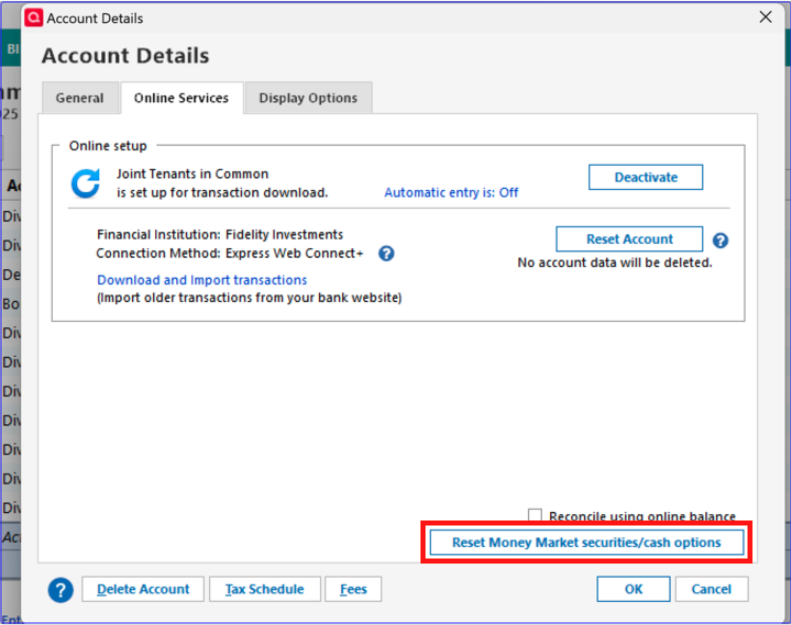
You may also see the option if you click on the blue cash balance near the lower right of the problem investment account register.
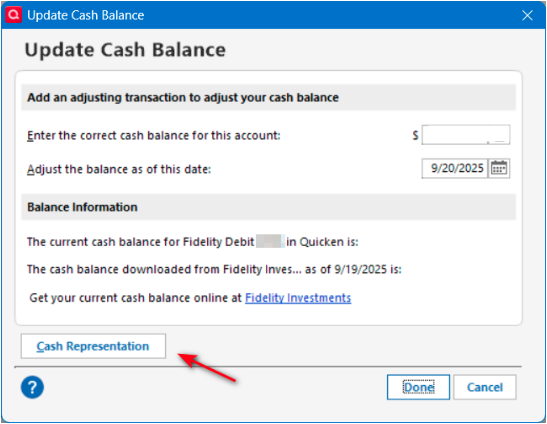
I look forward to your response!
Quicken Kristina
Make sure to sign up for the email digest to see a round up of your top posts.
0 -
Hi Kristina,
The fund being incorrectly interpreted as cash is Fidelity NY Muni Money Market (FSNXX)
The "core account" fund that SHOULD be counted as cash is Fidelity Government Money Market (SPAXX).
The buttons for resetting money market/cash options are not available in either of the options you suggest.
0 -
By the way, the money market fund that is the true core cash account ((SPAXX) is not listed in the account's "holdings" window, I assume because it was previously set as being tracked as cash. The other fund (FSNXX) does display in "holdings".
Not to further confuse things, but I keep my two Fidelity tax-deferred retirement accounts in a separate Quicken file, and in that file, the two brokerage accounts do track the core fund as cash correctly. I suppose it's because these accounts only hold one money market fund each. But that file isn't without its problems, either— every time I do a one-step update, I get a "Connectivity problems" (CC506) error message, prompting me to re-authorize my Fidelity accounts. This just started with the cutover.
0 -
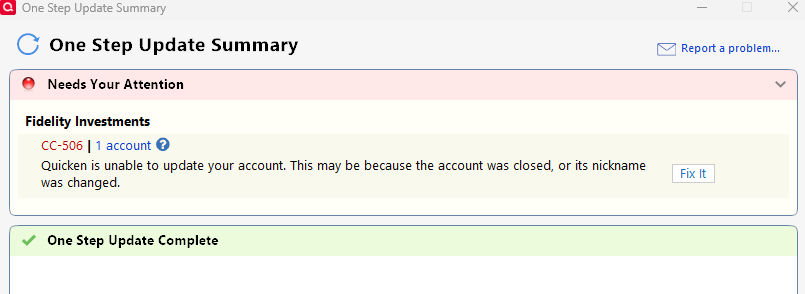
I am having the exact same problem with FMPXX and FDRXX. After transitioning to EWC+ the cash balances are wrong. When I try to do a one step update i get a CC-506 error. If I reauthorize, I'm back into and endless loop. This migration is not ready for prime time. It should just be a seamless cut over and I'm so frustrated I want to pull my hair out (if I had any).
 0
0 -
Thank you for your replies,
To troubleshoot the CC-506 errors, please follow the troubleshooting steps in the article linked below:
The issue with cash not being represented correctly is already being worked on by our teams (CTP-14526). So that I can add you to the ticket, please navigate to Help>Report a Problem and send a problem report with log files attached.
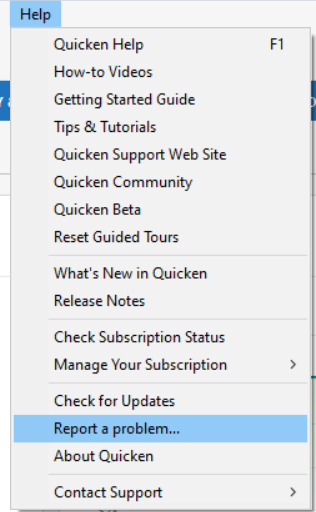
Please let me know once you've sent the problem report.
Thank you!
Quicken Kristina
Make sure to sign up for the email digest to see a round up of your top posts.
0 -
I have sent the problem report. As for the CC506 error, it was fixed using the suggested instruction of de-activating and re-activating the Fidelity accounts. Thanks!
1 -
Thank you for the follow-up,
I'm glad to hear the CC-506 error is resolved!
Thank you for sending logs. I added you to the ticket for the known issue (CTP-14526).
Thank you!
Quicken Kristina
Make sure to sign up for the email digest to see a round up of your top posts.
0 -
Perhaps I spoke too soon. This morning I updated Quicken to R64.30, build 27.1.64.30, which was supposed to improve money market handling. One step update was very slow, and ended with a CC-501. A second update ended with a CC506 again. I deactivated and re-activated, which allowed a connection to Fidelity. However, my accounts are now showing that the cash balances downloaded from Fidelity are zero for all accounts. There is no available option for resetting money market security/cash options.
0 -
Addendum: the problem is in my qfx file that contains three accounts; a separate qfx file with just one brokerage account is now displaying the correct cash balance downloaded from Fidelity. However, there are still intermittent CC501 errors, and I have to deactivate and reactivate the connection to get it working. There clearly are some remaining connection issues with Fidelity.
0 -
R64.30 seems to have solved the Money Market as Cash problems for my accounts where SPAXX is my cash balance. In other accounts where my cash balance is in FDRXX, the problem still exists. I do not see a "reset the money market securities/cash options" button.
Fidelity offers several different money market options for cash balances. I believe SPAXX is the default for taxable accounts and FDRXX is the default for retirement accounts.
The other problem I continue to see is the first time I switch from Direct Connect to Express Web Connect, the initial download includes previously downloaded (and cleared) transactions for approximately the past month. For me this is over 100 transactions that I must manually delete. I have tried migrating to Express Web Connect five different times over the past few weeks. It is very frustrating.
1 -
Thank you for your replies @Waitingtoretire,
If the issue is specifically happening in a QFX file that you're downloading directly from Fidelity's website, then you would need to contact Fidelity about the problem, since they are the ones creating the file.
The CC-501 issue was a known problem for a couple days, but should now be resolved. Are you still seeing the issue?
Hello @jersey42,
Thank you for sharing your experience. The issue you list with about a month's worth of duplicate transactions is expected behavior. The change in connection method makes it harder for Quicken to tell which transactions are already in the register, which is why you get duplicates.
For your accounts that use FDRXX, is it showing as cash in those accounts, or showing as a security? Based on this recent Community Alert (linked below), government money market funds should reflect as cash:
Thank you!
Quicken Kristina
Make sure to sign up for the email digest to see a round up of your top posts.
0 -
@jersey42 is quite correct: my brokerage accounts that use SPAXX are displaying the correct cash amount (and are not tracking SPAXX as a security). My retirement accounts are in a separate Quicken file, and the core money market fund, FDRXX, is not recognized as cash (the cash downloaded from Fidelity is "0"). Furthermore, FDRXX is not displayed as a security in my "holdings", so it's not recognized as cash or security shares, and there's no option available to reset how this fund is tracked as cash vs. security.
0 -
deleted while I gather more info
0 -
Kristina:
Once everything works, I can deal with the duplicate transaction download. So, no worries.
The good news is I believe things are getting closer to working, and I partially misspoke on my prior post.
The accounts that use FDRXX for the cash may now be better than I thought. FDRXX is definitely not showing up as a security in the portfolio view. I now believe the cash balance is correct – both in the register and in the portfolio view. The only definite problem I still see is a pop-up window after downloading and accepting new transactions. The Quicken popup tells me there is a discrepancy between the FDRXX balance in Quicken vs what is reported by the financial institution. Quicken is $0.00 and the other is a few hundred dollars different from the actual cash balance. If I close the window, things seem to be fine.
For the SPAXX accounts, I get no pop up and the cash balance remains correct.
One more thing - the accounts that use SPAXX have a separate linked cash account in Quicken. The ones that use FDRXX do not have a linked cash account. Not sure if this makes any difference.
This morning, I downloaded transactions on one QDF file using Direct Connect and in another using Express Web Connect. The Direct Connect continues to work flawlessly.
I will try again tomorrow morning and see what happens. I will also take a few screenshots in case they might help.
1 -
Thank you for the follow-up,
Please let me know what happens tomorrow!
Quicken Kristina
Make sure to sign up for the email digest to see a round up of your top posts.
0 -
In the accounts with FDRXX as a core money market account, the cash downloaded from Fidelity is still showing as "0", no shares of this fund are displaying in "holdings", and there is no available option to reset cash/shares as cash. When I use the "compare to portfolio" function in the online center, it shows that fidelity is reporting the share discrepancy, and is prompting me to make a placeholder entry to bring my share number in Quicken into agreement with the shares reported by Quicken. Question: perhaps if I enter the placeholder entry so that my portfolio displays my shares, the option to reset shares as cash will become available and maybe I can then delete the placeholder entry?
1 -
As I said before, for the past 2 days I have kept two different QDF files. One uses Direct Connect and the other uses Express Web Connect. I attempted to download all accounts this morning using Express Web Connect. The GOOD news is the cash balances in all accounts are correct. The BAD news it took me almost three hours to get to this point and I ran into too many issues. I will stay with Direct Connect until all of the bugs are worked out. I have spent more than FIFTEEN hours over the past few weeks to make Express Web Connect work and it is not worth it anymore.
Here are some details. I have also attached a bunch of screenshots.
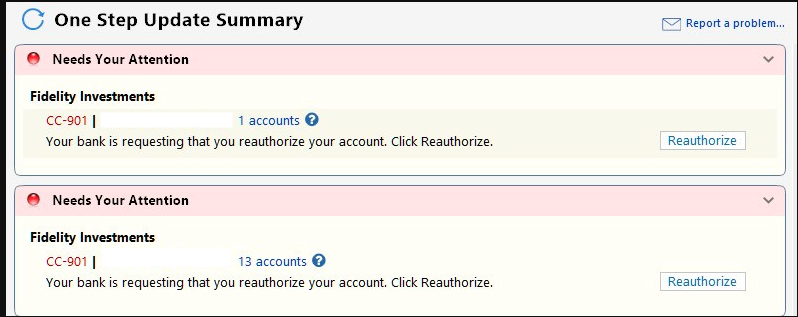
Initially I tried to download all accounts (screenshot 1). Quicken told me I needed to reauthorize all 14 of my Fidelity accounts (screenshot 2). Initially I decided not to reauthorize. I knew one of my other accounts (Chase) had a transaction yesterday, and that did not download and there was no error message. I returned to the download screen and the checkmarks next to all of my non fidelity accounts were gone (screenshot 3).
Next I attempted to download only the Chase account and that was successful. I then tried to download all of the non Fidelity accounts. There were no new transactions in those accounts, but everything worked normally.
Next I went back to try to download just the Fidelity accounts. Before I get into the details, the first 3 screenshots show two entries for Fidelity. The first contains one account. The second contains the remaining 13 accounts. This happened the other day when at the advice of Quicken Support I attempted to deactivate and reactivate the single account. While that process worked, the one account now appears separate from the rest.
Now for the rest of what happened.
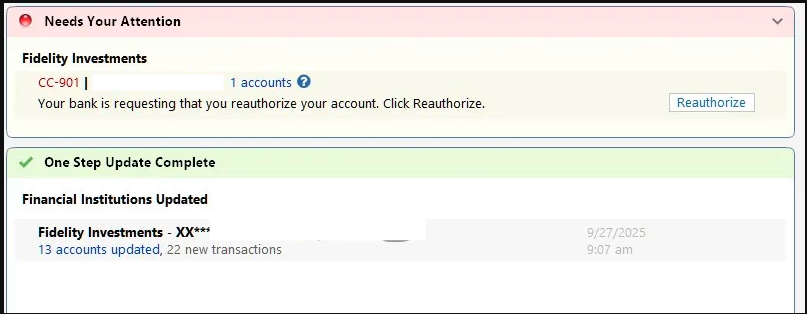
When I attempted to download just the Fidelity accounts I was once again told I needed to reauthorize (screenshot 4). I clicked on the button, went through all of the Fidelity authorization process (even though all of the accounts were marked as authorized on the Fidelity site) and eventually I got a successful authorization message from Fidelity (screenshot 5). I closed that browser window as I have never been automatically redirected to Quicken. I then needed to wait for almost 10 minutes (screenshot 6). Finally success (screenshot 7). Quicken then told me that the 13 accounts were successfully updated, but I still needed to reauthorize the single account (screenshot 8). I had to do this even though I authorized that account in the previous step. This is one downside of having two separate Fidelity entries that I described above. I would love to fix this.
I the went through the exact same reauthorization process again. The first time when I returned to Quicken I received an error message (screenshot 8), indicating the sign in failed. I did not understand the message because I successfully signed it, navigated through the Fidelity web pages, made sure the accounts were checked and received the same success message (screenshot 5) that I did before. So I went through the process again and this time it worked. Now all my Fidelity accounts were authorized, but no transactions had been downloaded yet.
I once again attempted to download the Fidelity accounts. This time it worked with a couple of issues.
- Once again a lot of old transactions were downloaded. But the transactions were different than before. For the two accounts with the largest number of transactions, only yesterday's transactions were downloaded. For other accounts, old transactions went back as far as June 30. In previous attempts, I never saw transactions older than a month. I manually deleted almost all of the 121 transactions. This time I had to be careful because there were a valid transactions from yesterday.
- For all of the accounts with cash in FDRXX I continue to get a securities comparison mismatch screen see screenshot 10 for an example. the "Shares Reported" amount matches the cash balance in quicken. See screenshots 11 for an example of what you see if you click on details. I believe @Waitingtoretire and I are seeing the same behavior.
I get that this is very long winded but maybe the details with the screenshots will help.
[Edited - Removed partial account numbers]
0 -
One more update. In a prior post I said all of my accounts using SPAXX for the cash balance have a separate linked cash account in Quicken. I actually have an account that uses SPAXX as the cash balance without a separate linked cash account. This account works fine. So it still seems to be SPAXX works and FDRXX does not.
Fidelity offers other money market funds for cash balances. Others I am aware of are: FZFXX, FCASH, and an FDIC-Insured Deposit Sweep. I suspect there are others depending on your state. I use the FDIC sweep fund in one account and that does not work (it behaves like FDRXX). I do not use any of the other funds.
1 -
Thank you for your replies,
The CC-901/reauthorization loop issue was trending on Saturday, but has become a lot less common since then. Are you still encountering this issue?
The most recent update, R64.30, should have made the reset cash representation option available in more Fidelity accounts. If you haven't already done so, please try following this process from the Community Alert on the change to how Money Market Funds/Cash are represented with Fidelity:
Quicken Windows users may need to change the Money Market representation if they are not prompted. You can do this by clicking the Cash link in the account or in the Account Details>Online Services Tab, the “Reset Money market securities/cash options to trigger the choice of cash or security again. The cash balance will still be the same that Fidelity reported for the one or more money market securities they have.
Please let me know how it goes!
Quicken Kristina
Make sure to sign up for the email digest to see a round up of your top posts.
0 -
Nope! Although the connection is Express Web Connect +, the accounts with FDRXX as the core money market is still not representing it as cash, and the option for resetting money market securities / cash is not available.
3 -
Thank you for your reply,
Since the instructions in the alert did not resolve the issue, I recommend that you contact Quicken Support directly for further assistance, as they have access to tools we can't access on the Community and they're able to escalate the issue as needed. The Quicken Support phone number can be found through this link here. Phone support is available from 5:00 am PT to 5:00 pm PT, Monday through Friday.
I apologize that I could not be of more assistance!
Quicken Kristina
Make sure to sign up for the email digest to see a round up of your top posts.
0 -
I tried Express Web Connect today and no change. I still see exactly what @Waitingtoretire reports. When I called Support last week they told me everything looks fine to them, they did not understand what I was complaining about and unless I could offer further proof they could not offer any assistance. I tried the chat support and they were more sympathetic, but they could offer no help.
Also, the Express Web Connect was much slower than Direct Connect. 2 minutes vs 10 minutes. I am still trying to figure out the benefits of "upgrading".
Edit: Express Web Connect did not require any new reauthorizations today. So that hopefully was just a Saturday issue.
When I use Direct Connect, it still keeps telling me to upgrade.
@Quicken Kristina - I appreciate that you at least understand the issues much better than the support people. But if Quicken wants people to migrate, they really need to make this work. I have used Quicken for at least 35 years starting with the DOS version. I have been a Fidelity customer for longer than that. So I don't want to leave either one. Hopefully it gets straightened out.
Edit: I have attached two screenshots to show my online services tab and the window I get if I click on the cash balance at the bottom right of the register for the same account.
0 -
Ditto for me. As of 10/1/2025, FDRXX is no longer recognized as the core MMF account. It was working properly as the core MMF with EWC+ every day for a week prior to today. To see if it would resolve the issue, I upgraded from R64.25 to R64.30. It did not fix the issue. Also, there are no reset selections for CASH REPRESENTATION or Money Market.
I have one IRA account that uses FDRXX as a core MMF and 4 other ROTH and Regular accounts using SPAXX as the core MMF.
The one account using FDRXX is the only one in which the cash balance is not represented correctly.
That is not to indicate that the accounts with SPAXX as the core are not having issues. Dividends are being downloaded with incorrect ACTIONS of Div instead or ReinvDiv or BoughtX instead of ReinvDiv for linked cash acccounts.
The EWC+ connection is not ready for production.
Deluxe R66.23, Windows 11 Pro
0 -
I have a question: Fidelity downloads dividends from the FDRXX core account as a "reinvest dividend" transaction, rather than just a dividend distribution. This adds FDRXX shares, rather than contributing to the cash balance as was the case previously. So, Quicken is now representing the newly downloaded dividends as shares, and the previously downloaded dividends as cash. This makes tracking the true core account balance more complicated. So— when Quicken eventually re-enables the option to reset the money market securities/cash options, will that automatically convert that "reinvest dividend" transaction to a "dividend" transaction so both pools of core account "shares" are comingled in a single cash balance? Or should I preemptively edit the reinvest dividend transaction to a dividend transaction?
0 -
@Waitingtoretire Good question. I can't predict how Quicken/Fidelity will remedy this issue. For now, I changed the Reindiv to Div to make the Quicken cash balance correct and to make it match the prior treatment of the dividends for the core MMF in the account, even though it makes the holdings comparison of shares wrong for the core MMF. It is frustrating because this was all working without issues for me prior to today's download. FDRXX was treated as the account cash balance. Today's download changed it to a separate security - again.
Deluxe R66.23, Windows 11 Pro
0 -
@Waitingtoretire I am in the same boat as you and @leishirsute. I am running R64.30 with an EWC+ connection to Fidelity. My problem account is a Fidelity HSA account which is set up as a Roth IRA in Quicken.
Under Direct Connect and with EWC+ before updating to R64.30, the account had zero shares of FDRXX and my Core account balance was shown as Cash in the Quicken account. FDRXX transactions downloaded as Divs and added to the account's Cash balance.
I updated to R64.30 on 9/26. Starting then, Quicken showed a Securities Comparison Mismatch, with zero shares of FDRXX in Quicken and my cash balance in FDRXX shares at Fidelity. If I clicked on the gear menu and selected Adjust Cash Balance, it showed the downloaded cash balance as zero and the Core account balance as Quicken's Cash balance. In other words, the downloads from Fidelity were showing the Core account balance as shares of FDRXX and the cash balance as zero. There is no option to change the cash representation.
I corrected these mismatches by manually entering a Bought transaction for FDRXX equal to the account's cash balance. This reduced the account's cash balance to zero and made the FDRXX balance equal to the balance reported by Fidelity. Of course that is not the way it has been shown historically, but I will live with that until there is an option to change the cash representation.
QWin Premier subscription0 -
I sort of went the other direction and made the Quicken cash balance match the core MMF shares, but the discrepancy for me is in an IRA and I might do a similar bought action. It's just that I like to see the cash balance on the Fidelity website match the cash balance in Quicken. Just a matter of preference. Glad to know we are not alone on this issue. I submitted a problem report.
Deluxe R66.23, Windows 11 Pro
0 -
@Jim_Harman Did any of your accounts have end of month DIV's. DIV's for linked cashed investment account downloaded as deposits with a "DIVIDEND RECEIVED…" in the memo. No correct tax handling at all.
Deluxe R66.23, Windows 11 Pro
0 -
@Jim_Harman Did any of your accounts have end of month DIV's. DIV's for linked cashed investment account downloaded as deposits with a "DIVIDEND RECEIVED…" in the memo. No correct tax handling at all.
The only new transaction I have received since all this happened is ReinvDiv for FDRXX dated 9/30 with no memo. It was received in this morning's OSU. I do not have a linked checking account, but that should not have been affected by a Reinvest.
My experience with Vanguard accounts, which always show the account's cash in a money market fund, is that linked checking accounts are not very useful with that setup because Divs download as a DivX followed by a BoughtX of the MMF, reducing the linked account's balance to zero.
QWin Premier subscription0 -
Looking at this, I think I can see where the problem comes from (Fidelity) and Quicken Inc's attempt to work around Fidelity not coding things right. And I might add my misunderstand on how this can get complicated depending on what the financial institution is actually coding their transactions as and how the user has things setup.
The R64.30 code change was stated as if the money market fund has a price of $1.00 it will be treated as a cash, and not really stated at the time, but has shown that actually means it will turn on its "cash representation" option.
So, what does this option really do?
It removes the buys and sells, which results in the cash staying in the account balance.
But what about dividends/interest?
If that was coded by the financial institution as a regular dividend that goes to the cash balance and then a buy of the money market fund, it would work fine (the buy would be removed). But what if it is coded as a dividend where you get more shares? Notice that this not only isn't a buy or a sell it also can't just be removed, you need to get that amount into the cash balance.
And I have also been glossing over something else even though I have noticed it in the past and that is how the comparison for the number of shares is done.
Watch this in my Chase account (which is working properly):
I put in this transaction:

So, one would expect if I did the share comparison I would get an imbalance.
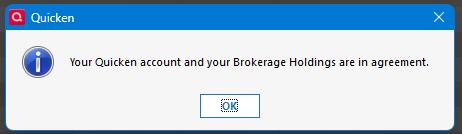
Doesn't happen, because Quicken knows to ignore this security in the comparison.
And that goes for this one too:

Another one Chase uses is US DOLLAR. Looking at all of these the Asset class is Cash (Cash or Other is used for the type).


Looking through the Cloud Sync log it is interest to see how these are coded. The security type is "OTHER" for the QDERQ security (which is in fact an internal account that Chase never shows on their website except as a memo in the transferring of money around). But what is surprising is the CUSIP (the "name" part).
{"resources":[{"id":"[Removed]","createdAt":"2025-09-15T21:00:18Z","modifiedAt":"2025-09-18T06:22:41Z","dbVersion":8,"ownerId":"[Removed]","securityId":"A000CU7","securityIdType":"CUSIP","name":"CHASE IRA DEPOSIT SWEEP JPMORGAN CHASE BANK NA","symbol":"QDERQ","securityType":"OTHER","currentUnitPrice":1.00000000,"currentUnitPriceDate":"2025-09-16T12:00:00Z"}
Here what an actual security looks like:
{"resources":[{"id":"[Removed]","createdAt":"2025-09-17T19:03:41Z","modifiedAt":"2025-09-17T19:03:41Z","dbVersion":0,"accountId":"[Removed]","symbol":"VUSXX","securityName":"VANGUARD TREASURY MONEY MARKET FUND INVESTOR SHARES","quantity":12.300000000000000000,"marketValue":12.3000,"currentPrice":1.000000000000000000,"currentPriceAt":"2025-09-16T12:00:00Z","securityId":"921932109","securityIdType":"CUSIP","localSecurityId":"503556088385856513"}
The bottom line is that Chase isn't doing what Fidelity is doing. It isn't sweeping the cash in and out of a security, it is sweeping it in and out of different internal accounts.
And Fidelity isn't doing the same thing it did with Direct Connect. What it clearly did before is understand which fund was being used as "cash" and not sending any transactions for it except to add to the cash amount when dividends where being paid (a dividend transaction paid in cash not more shares).
1




