R64.25 broke Projected Balances

After I got R64.25 update all my Paycheck reminders show large negative amount.
I tried to restore from older backup and upon restore those in the Projected Balances show correct and expected amount, but right after "Update Accounts" online download new transactions all those are set to negative numbers.
The Edit 1st reminder shows diff, also negative number, but it doesn't allow to edit the Split
The Edit this and future shows correct original Split
As result the Projected Balances are way wrong and distorted.
Anyone else got this side effect?
How to fix this major for me issue as I can't see correct for the next 30 days Projected Balances?
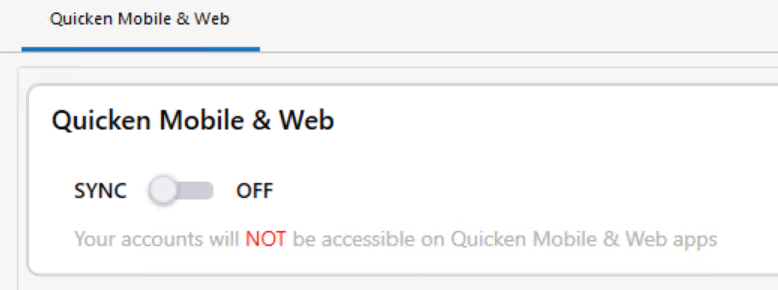
I don't use Mobile and Web Sync for over 3 years due to many related issues, so its Off
Comments
-
I see something incorrect also but not exactly the same. I have an online bill for a credit card and a reminder for the CC (set to an average amount) also so it shows in the projected balances. When I linked the online bill to the reminder it updated the correct amount on the projected balances. But now for each subsequent month it shows the same amount as the next payment but shows it as a credit to the projected balance bank account. This makes the projected balance go up each subsequent month.
I think I see part of the issue. When I unlinked the online bill, it changed the bill reminder to an income reminder (and left the new online bill amount instead of reverting to the amount that was on the manually created bill reminder)
1 -
I re installed Quicken and patched to R63.21
Projected balances look ok for now in that old version
I had to re activate all accounts, took me time
Best Regards0 -
When you link a reminder Quicken ignores all of the estimate settings (this one of the reasons I never liked this feature).
Past that the behavior that it picks for next payment is let us say “unpredictable”. Note, I have only used the old payment system so this part of this might be different.
Depending on the biller I have seen it keep the last bill amount or zero. I don’t think I ever saw it do any kind of averaging of past transactions. Note I’m talking about the period between when you make the payment and when the next statement comes in.
0 -
I didn't mean that Quicken would create an average amount. I created the bill reminder manually with just a flat amount that equaled the usual amount of my credit card bill. I'm not sure if the projected balances used to use the amount I put in the billing reminder, in the months after the current bill, or it would use the current bill for each of the subsequent months, but it at least used a bill amount. Now when I link the bill, quicken changes the reminder to an income reminder which looks like my next credit card bill will pay my bank account (I wish credit cards actually worked that way. I would be charging huge amounts.)
The only way to fix the changed reminder is to delete it and re-create it as a bill reminder (editing it to a negative amount is not possible as quicken tells you a minus sign is not needed and removes it. I suppose I could reverse the accounts in the income reminder, but it seems wrong to have a Credit Card bill set up as an income reminder and it never had to be that way before.)
0 -
In that case I don't know what is going on. I got curious enough to try it on my two Chase credit cards. For me it didn't change them into income reminders, but it used my fixed values instead of the statement balances it clearly stated. So, I have no idea what is going on. I'm just glad I don't depend on this feature.
0 -
Yes, this is broken.
Income Reminder: I have a "split" (more than one earnings category). On is the large "regular salary" amount, the other is a small offset for an employer benefit.No matter what order I put them in or what categories I give them, the Income Reminder picks the smaller number, making it look like my estimated pay is nearly zero. It should be totaling all of the entries.
Aside from the change in behavior, for paychecks in general the whole approach seems incorrect: It shouldn't be using the gross income at all, and instead using the estimated deposit accounts values, which is the more accurate estimate for a paycheck.
2 -
BTW - loading data file from v.64.25 to v.63 shows bad negative pay deposits
so the 64.25 made the change to those reminders
I had to re connect all my accounts in v.63 and backup data of v.63 file and download all from that v.63 time transactions.
I need more time to accept and reconcile those transactionsthis rollback is very time consuming for me
I wish Quicken properly test before new release
looks like that v.65 broke so many things that 3 fix releases already were made in so short time
Best Regards0 -
I reported via Quicken Windows to the Support as well.
Best Regards0 -
Thank you for reporting this issue and describing what you have done to try to remedy it. I've tried a couple of things, like taking all the income reminders out of the register, which helped for a three-month projection, but not a two-year projection. Hope Quicken folks identify the glitch quickly and remove it in the next update - it really is the feature that keeps me with Quicken.
0 -
Hopefully this stays fixed. With the update 27.1.64.29, my projected balance for credit cards seems correct again. I linked the CC to the reminder again and it looks correct for the next bill (actual amount) and future projected amounts show the flat amount estimate that I created on the reminder and it shows as a bill and not an income reminder. I hope the rest of you get your issues resolved.
0 -
Well, I spoke too soon. While it worked when I linked it at first, i'm not sure when but most likely after a OSU, the reminder is still a bill reminder for the current CC bill but all the future projected balances now show a positive with the same amount as the current negative bill. This results in my future projected balance as going up instead of down because of the CC bill. At least it is better that quicken did not change the bill reminder to an income reminder, but it still is not correct.
0 -
From my experience since the new Billers, linked reminders do NOT work correctly with Credit Card bills at all.
I think it may be better to just wait to use linked reminders until they improve the Billers.
The only way I got my manual reminders to not constantly change dates and amounts was to Delete all Connected Account Credit Cards.
Then deleted any old reminder for that biller.
Then use the Gear Icon on Billers tab to : "Bills from Connected Accounts" to quickly re-add all credit cards.
Recreate the manual reminder and leave it as manual and not linked. (I could NEVER get the linked reminders to work on many attempts)
Not ideal BUT at least the manual reminder is still there to avoid surprises of missed bills etc..
0 -
Similar issue here. Paycheck reminders started appearing too high so my checking account balance projections are too high. If I open the reminder to edit this instance and all future reminders, everything appears correct. I click save and the issue is gone, but only for this session. The next time I open the file, it returns. I have run Validate and Super Validate, but that did not correct it.
This happened about a year ago, and the only solution that worked was to delete and manually rebuild the reminder - a pain. I reported it then and will submit a report again. PLEASE FIX THIS!!
1 -
Glad to see i'm not the only one having this type of issue.
Everytime I open Quicken on Windows, it shows all of my future paychecks as negative deposit in my checking account register, where it's basically only keeping the Fed Tax, Medicare, and Social Security deductions and nothing else.
But then if I go into a future paycheck in my register and click "Edit this instance and Future Instances," to go into the Paycheck Tracker it shows all of the correct pay and deductions line items with the correct paycheck amount. Then when I click Done in the Paycheck Tracker, you can tell Quicken is churning/calculating for a few seconds where the screen is flashing, and then the splits/amounts show up correctly for future paychecks in the register and in the Tax Planner. But then if I close Quicken and open it back up I have to do that again.
I've tried deleting the tracked Paycheck completely and re-entering it, but the issue persists. I'm thankful that just going through those few clicks fixes it for me so I don't have to go through restoring an old backup.
1 -
I had this as well, about the same time as the Paycheck issue.
0 -
Same issue here. Hopefully they will fix this soon.
0 -
take a look what I went through to get it fixed at the
Thanks to @markus1957 for the steps, I documented as I can.
I'll know tomorrow if the fix sticks
Best Regards0 -
Today, after OSU, I got the same negative forecasted transactions for Scheduled Paychecks.
The balance forecast is unusable again.
Best Regards0 -
I seriously hope this gets resolved soon… this is the feature I use the most on Quicken, and there are virtually zero other financial management tools that offer this..
I tried temporarily switching to Quicken Simplifi, but that product just does not suit my needs at this time…
0 -
Come on Quicken. Projected balances continue to be problematic. Planned future deposits don't get added. This has been an issue for months. Please advise when this will get fixed. For me, an important component.
1 -
I just noticed my Checking balance was off. found it was for a prior Paycheck entry put in on 8 Oct 2025. Entry was there but not adding to the balance. I copied another paycheck and pasted to edit. Ended up deleting them both and checking balance kept going lower. Something is messed up with the "Paycheck" entry.
0 -
I see my discussion was closed -
This is Quickens very sad responsiveness to customers. Several "paying" customers reporting the same issue, but the moderators offer nothing other than suggesting to report the the bug. I reported the bug using conventional means and… nothing, crickets, dev is a black hole!
1 -
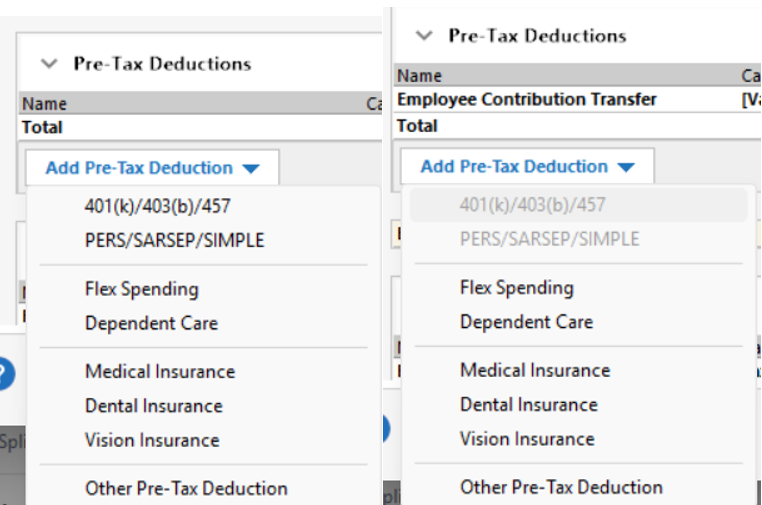
I noticed that my gross detailed Paycheck starting behaving oddly, a few months ago. The amount displayed as Income Reminder would change day to day until i entered it. Sometimes a Validate & Repair, or Super V&R, would resolve it. But eventually, it get so messed up (feel like one time it did convert into a payment/not a paycheck) So, i would delete it and set it up again, so time consuming. it would last for afew more weeks and then poof, just starts creating its own deposit amounts. I've noticed when setting it up via Paycheck Setup Wizard again, that the 401k selection during setup acts differently than I remember. Like it greys out the selection for retirement account. Only noticed because I had to edit again for the memo line. I didnt like how that behaved, so i tried again and chose Other Pre-Tax Deduction & manually selected my retirement account as the transfer, which i think is how the historical paycheck was originally setup.
Seems like quite a few people have reported issue in support/community. hopefully something gets posted before yearend to resolve this issue.
 1
1 -
@DMFT , don't get your hopes up about something getting done. A quick workaround I found is in your bank account register, right-click a paycheck reminder transaction, "Edit this and all future…", then simply click "done".
Sadly, thru moderator posts in a recent discussion i started it appears Quicken Development does not necessarily monitor forums for bug fix opportunities and supporting info. Rather the bugs need to be reported directly using Help → Report a Problem. IMO, reporting a bug that way is a "black hole". I've reported several over the years, including one similar to/same as this one here, and have NEVER received a response. Not even a automated "thank you" or "information received". Nor have I ever received a request for further information from Quicken Dev or Prod Management.
It would be an enormous customer service step forward if Quicken would start highlighting/flagging discussions as "Bug Reported", "Under further investigation", "Bug fixed" etc. Then identifying which release contains the bug fix.
C'Mon Quicken get your dev group more in touch with your subscriber community…
2 -
I have reported this through the Report a Problem selection in the software twice, once over a year ago (see my Oct 4 reply above). For me, the cash balance forecast is just about most important feature and A CORE FUNCTION of Quicken. We need the core functions to work, not enhancements around the edges.
0 -
@ljb1493 I agree that it is often harder than than we would like to get Quicken to accept and resolve problems.
This is primarily a user to user forum. Forum Moderators (users whose names begin with "Quicken") sometimes review issues discussed here. Everyone else here is a user like you. If the Moderator can confirm the issue with their own testing, they will refer it to Development and post in the discussion with a reference number. For widespread issues, they will create an Alert that they periodically update at the link below.
If you want Quicken to work on a problem, you should contact Support via phone. Be sure the support agent understands the problem and gives you a ticket number for future reference. Please post the ticket number here. Even if you are sure it is a software problem, Support will run you through a screening process to make sure it is not a problem with your data or installation. Development only works on problems that have been referred by a Moderator or confirmed by a Support contact.
You should also use the Help > Report a Problem menu in Quicken to submit the issue online. In your submission, be as clear and thorough as possible. Reference the ticket number and provide a link to this discussion. Provide step by step instructions to reproduce the problem and note any error messages you receive. They will not pay much attention to a problem unless they can replicate it in house or see it in a support session.
You will not get a response to an electronic submission, but apparently they review and prioritize the submissions and use the data to help resolve problems they decide to work on. The more reports they receive the better.
Updates on problems that Quicken has acknowledged are posted here
QWin Premier subscription1 -
@Jim_Harman, I appreciate your thoughts on the forum and it's use. I've held positions in all levels of IT management and been a software engineer for 40+ years. IMO, there is a serious disconnect between Quicken Development and the user community. Admittedly, I've not called support to report an issue due to fear of phone system IVR circles or long queue wait times. After which, you speak with (my assumption) a front line rep that is only there to capture information.
So, by your statement as a Superuser, "Development only works on problems that have been referred by a Moderator or confirmed by a Support contact.", are you saying submitting a problem by "Help - Report a problem" is useless. It sure seems that way with no reply or acknowledgement.
Thank you for pointing out the "Alerts" forum for acknowledged issues. Sadly, it's functionality is not good for the purposes of managing issues. With only basic "string" search, you cannot even do a search for something like "exclude resolved", that allow someone to see if their issue is still open. Interestingly, in Sept I reported, using help → report a problem, the issue this conversation is about and cannot find any evidence of it in the "Alerts" forum….
I think we can all agree Quicken's responsiveness to and resolution of issues can certainly be improved.
1 -
Help > Report a problem is not useless. When they decide to work on a problem, they use the data and logs submitted to help diagnose it. Also I think they gather stats on submissions to help see how widespread problems are.
I can imagine that it takes some time to review the submissions and determine whether they are for a known problem and if so which one. That is why it is important to be crystal clear in your submission, using the exact Quicken terminology, and include error codes and tracking numbers if you have them. Remember that Quicken is a small company, with only about 200 employees total.
Two improvements I would like to see are some sort of acknowledgement that your report was received and the ability to include basic text formatting, esp. paragraph breaks, in the body of the report.
But I think the primary way they prioritize problems is by how many Support calls they get. Probably a single two hour call costs them more than the revenue for that user's subscription for the year, and it shows that the user cares enough about the problem to invest some time into helping explain and resolve it.
QWin Premier subscription1 -
There is no feedback loop from Quicken Support or Development.
There is no open JIRA to track any issue and related progress.
After an hour via phone and screen share with Support the best you get would be - yes I understand the issue, after that its black hole IMHO.
Yes, I get the most help from Users then from Support, thanks to the forum and Quicken allowed community.
Best Regards0


