Fidelity download issues

30+ year user here. I am currently on Windows Classic R64.30. Everything was fine until about September 5. Since then, I have been through a few software upgrades and deactivate/re-verify my Fidelity and some other accounts. The other accounts work fine, but most Fidelity accounts are not downloading transactions.
I have 9 Fidelity investment accounts in Quicken. 6 are in my name and use my online id. 3 are in my wife's name and use her online id. It appears that my wife's accounts are working fine.
But my 6 are not downloading transactions. The update runs to successful conclusion, and the summary page indicates a number of transactions were downloaded for the 6 accounts. But when I look at each account, they are not there. It appears that price history has been downloaded and uploaded correctly. I have tried deactivating in Quicken, terminating 3rd party access in Fidelity, and re-authorizing in Fidelity several times to no avail.
I see this is a common issue out there, with no resolution. When will Quicken work this out with Fidelity?
Answers
-
For a couple of days now, I've had recurring OL-232-A errors with my 6 Fidelity accounts.
Following the procedure described has resolved the matter, at least for that day and allowed me to download.
[Edited - Enabled Link]
Q user since February, 1990. DOS Version 4
Now running Quicken Windows Subscription, Business & Personal
Retired "Certified Information Systems Auditor" & Bank Audit VP0 -
Got OL-295-A issue for Fidelity DC connection this morning. Hopefully, it is temporary.
https://www.quicken.com/support/error-when-using-online-services-ol-231-ol-232-or-ol-235/
Did not fix it.
Deluxe R66.23, Windows 11 Pro
-1 -
Thanks for the idea. I'm not getting any errors, but I tried it anyway. Did not work. Online update still proceeds without error, the summary says there are 16 transactions downloaded, but they never appear.
I did notice that when I look at the list of FI's in the list in the Contact Info window, there is a Fidelity Investments and xxx-Fidelity Investments. Should I delete the xxx?
0 -
@Quicken Anja @Quicken Janean Any thoughts on my Fidelity download issue? Is it related to having two Fidelity financial institutions?
TIA
0 -
The conversion to "Express Web Connect +" for Fidelity Investments has been a disaster. For a couple of weeks I could still download from "xxx-Fidelity Investments" using the old method. Two days ago that stopped working. I converted all of my Fidelity accounts to the new method and that totally destroyed my account history - many placeholder transactions and duplicate transactions.
The "new" method appears to no longer support a linked cash account for a brokerage account. Everything appears in one Quicken account which is a significant change that was not disclosed.
I give up! I'm shutting off all downloads to Fidelity and will start doing manual updates like I did 30 years ago! Thanks for nothing Quicken (and Fidelity). 🤬
0 -
After a couple of days when I could resolve the OL-232, via the process I referenced above, today it resulted in an OL-295.
I'm waiting to see what happens later today and tomorrow morning … but this might be the forced action that I've been trying to avoid.
Q user since February, 1990. DOS Version 4
Now running Quicken Windows Subscription, Business & Personal
Retired "Certified Information Systems Auditor" & Bank Audit VP0 -
@leishirsute I wouldn't have expected that process, designed for OL-232, to resolve a OL-295. Entirely different error.
Q user since February, 1990. DOS Version 4
Now running Quicken Windows Subscription, Business & Personal
Retired "Certified Information Systems Auditor" & Bank Audit VP0 -
Just wishful thinking since that procedure resolved OL-297-A which isn't mentioned in the procedure's description.
Deluxe R66.23, Windows 11 Pro
0 -
LONG time user. I also can no longer connect to either "Fidelity NetBenefits" (2 accounts) or "Fidelity Investments - DC" (2 accounts) , both updates show OL-295-A. I have four separate accounts and all are failing. I have tried refreshing many times. For one of the four acccounts, I deleted the connection and tried to connect new and now it won't even let me add that one back in, so it is now only failing for 3 out of 4 and no longer even trying for the one I deleted. (I did try the refresh instruction noted below also) Arghhhh. (Premier, R53.32, build 27-1.53.32)
0 -
This morning the DC connection gave an OL-295-A error. This afternoon, it gives:
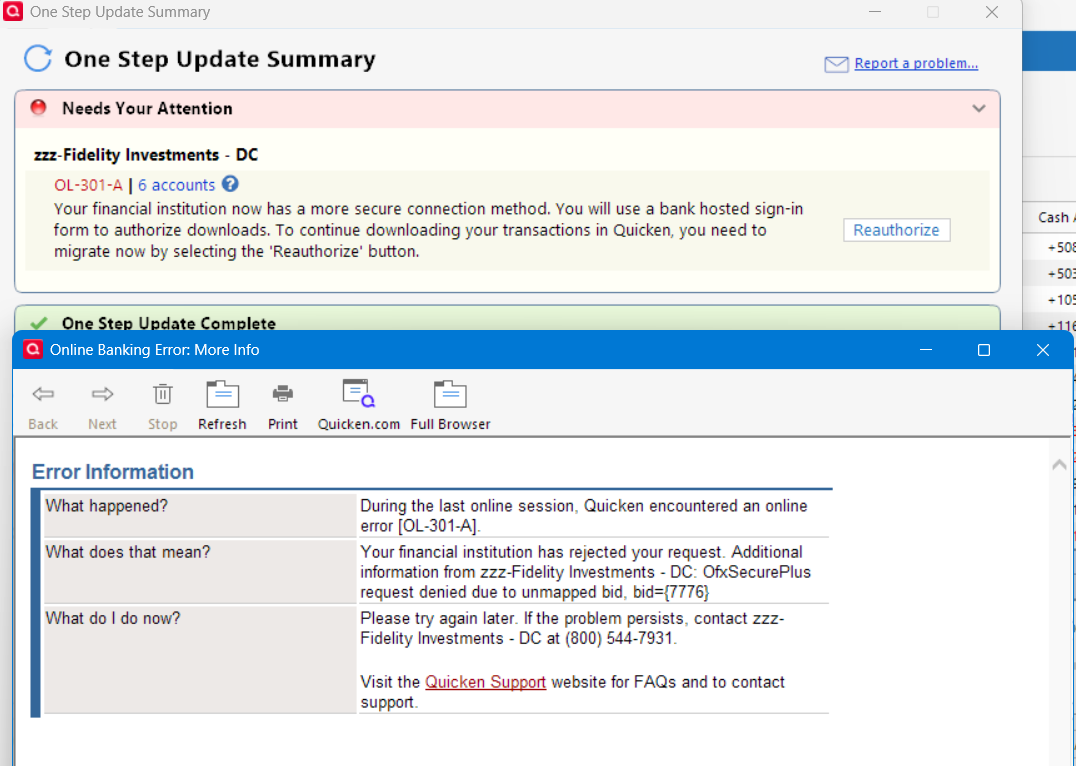
It reads as if DC connection is no longer available for me. Quicken experts: is that the correct meaning of "OfxSecurePlus request denied due to unmapped bid, bid={7776}"?
Deluxe R66.23, Windows 11 Pro
0 -
Hello @gog8trz,
Thank you for reaching out! To clarify, in the One Step Update Summary window, it is showing that transactions downloaded, and when you click on the blue link, it is showing there are transactions that downloaded into those 6 accounts?

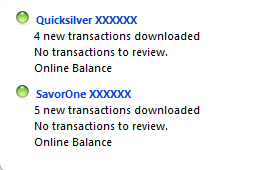
If that is what is happening, then I recommend following the steps in the article linked below:
Hello @NotACPA & @leishirsute,
There is a Community Alert for the OL-295 error. You can correct the issue by migrating the accounts from Direct Connect to Express Web Connect+.
Hello @mgredmond,
There is a Community Alert for the OL-295 error. For the issue with being unable to reconnect your Fidelity NetBenefits account(s), I recommend that you start a new discussion and provide more details exactly what is happening.
Hello @Thirty_Year_User,
Thank you for sharing your experience. The change in connection method does greatly increase the odds of duplicate transactions, however, there should not be more than 30-60 days worth. For the issue with linked cash accounts, are you seeing the same problem that another user reported in the thread linked below?
If you are, then please try turning off the linked cash account and see if that lets you successfully migrate the problem account(s).
Thank you!
Quicken Kristina
Make sure to sign up for the email digest to see a round up of your top posts.
0 -
@Quicken Kristina Thank you for your response.
I just tried again and got the same result. The One Step Update Summary window shows transactions downloaded, zero to review, for some of the accounts. Similar details when I click on the blue link. But no flags on my Home page list of accounts and certainly nothing in the download list for each account. I followed the article link that you provided "Quicken Says There Are Transactions to Accept But I Do Not See Any", but it did not resolve.
I misspoke re: the number of accounts. To clarify:
6 are in my name, accessed with my online id
3 are joint accounts, accessed using my online id
3 are in my wife's name, accessed using her online id. These are working correctly.
I still have a xxx-Fidelity Investments FI. Should I delete that and start over?
What is the correct procedure to re-do the migration?
TIA
0 -
Thank you for your reply,
If you want to try re-migrating the accounts, first, backup your Quicken file. Next, deactivate all the accounts under the specific login that you want to migrate. Once the accounts are deactivated, navigate to Tools>Add Account and follow the prompts. Once you get to the Add/Link screen in Quicken, make sure to carefully link the accounts to the correct nickname in Quicken.
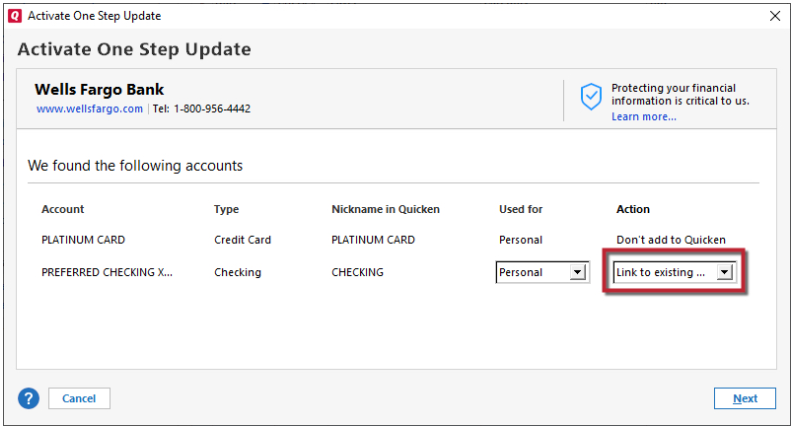
Note - If any of the accounts under the other login show up on the Add/Link screen, make sure they are set to Don't add to Quicken. Doing this will ensure that they do not get switched to being connected under the wrong login (which can cause them to fail to update or throw errors, since most financial institutions do not allow authorized users to connect accounts in 3rd party apps).
Once you have completed this process for one login, you can follow the same process for the other login.
Please let me know how it goes!
Quicken Kristina
Make sure to sign up for the email digest to see a round up of your top posts.
0 -
@Quicken Kristina Thank you. I followed that procedure carefully. But I am having the same results. The OSU Summary 8 accounts updated and 25 new transactions. Looking at the detail, I see the counts of downloaded transactions for 4 accounts. But the Holdings Information Updated is as of 9/9/2025, not a more recent date. Still no flags on the Home page list of accounts indicated transactions downloaded. And looking at each account, there is nothing in the Downloaded Transactions window.
So, still broken.
Any other suggestions?
0 -
Thank you for your reply,
Since you are seeing a summary that claims transactions are downloading, check the account names it's showing. Do those account names match exactly with the accounts you're expecting to see the transactions in? If they don't match exactly, there's a chance that the transactions are downloading into duplicate accounts.
If they do match exactly, and there are no duplicate accounts, then I recommend that you contact Quicken Support directly for further assistance, since they have access to tools we can't access on the Community and they're able to escalate issues as appropriate. The Quicken Support phone number can be found through this link here. Phone support is available from 5:00 am PT to 5:00 pm PT, Monday through Friday.
Thank you!
Quicken Kristina
Make sure to sign up for the email digest to see a round up of your top posts.
0 -
So here's an update. My wife's 3 accounts appear to be working. I disconnected 2 of my employer accounts since they don't change very often. I spent a few hours MANUALLY typing in transactions for my remaining 6 accounts. Same results, download summary showing many transactions downloaded for the accounts, but they do not appear.
Then I waited a few days until today, and the downloads worked! Not sure what the reason is. Maybe Quicken or Fidelity changed something. Or maybe waiting until 10/31 when new transactions appeared, or maybe waiting until after the new month began.
Now just the pesky cash account imbalance persists.
0 -
Thank you for the update,
I'm glad to hear things are mostly working. For the cash imbalance, are you able to see what is causing it? For example, duplicate/missing transactions or a money market fund being tracked as cash instead of as a security (or vice versa if it should show as cash, but isn't)?
Thank you!
Quicken Kristina
Make sure to sign up for the email digest to see a round up of your top posts.
0

