PNC bank upgrade affecting Quicken downloads?

PNC bank did a major upgrade over the weekend, and now no transactions are coming into Quicken. I can see new transactions on the PNC site, but 0 transactions have been downloaded from PNC into Quicken since Friday. I've added a few manually, and they remain uncleared but show as no longer pending on pncbank.com. Using Windows R64.35. Any ideas?
Best Answer
-
Hello All,
We now have an open Alert for this issue and our teams continue to work to resolve this, though we do not have an ETA on resolution at this time. While the investigation remains ongoing, please refer to this Community Alert for any and all available updates and information.
We apologize for any inconvenience in the meantime! Thank you.
-Quicken Anja
Make sure to sign up for the email digest to see a round up of your top posts.1

Answers
-
Same here.
0 -
Same for me. Web connect forced me to relink my accounts. Direct connect did not. I don't have any new transactions to verify web connect. Direct connect is definitely not downloading new transactions. I tried resetting the account under online services but that didn't help.
0 -
Same here for Direct Connect.
1 -
Same here. Is PNC aware of the issue ?
0 -
Hello All,
Thank you for taking the time to report this issue.
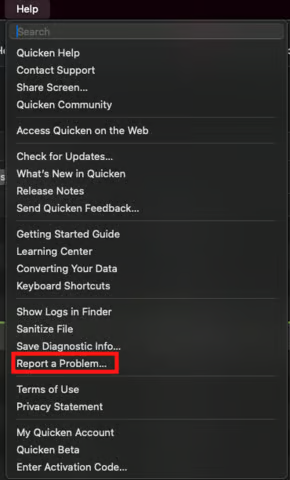
We will be forwarding this issue to the proper channels to have this further investigated. However, we request that you please navigate to Help > Report a problem within your Quicken program and submit a problem report with log files and screenshots attached in order to contribute to the investigation.
It would also aid the investigation to include a sanitized file when submitting the problem report. A sanitized file is a data file that removes personally identifiable information so you can comfortably share this file with the Quicken team.
While you will not receive a response through this submission, these reports will help our teams in further investigating the issue. The more problem reports we receive, the better.
We apologize for any inconvenience in the meantime! Thank you.
(CBT-896)-Quicken Anja
Make sure to sign up for the email digest to see a round up of your top posts.0 -
Logs and sanitized file submitted.
0 -
Thank you for submitting! They have been added to the ticket.
-Quicken Anja
Make sure to sign up for the email digest to see a round up of your top posts.1 -
Same issue with Quicken Classic Premier for Mac, version 8.3.2
0 -
Hello @Velvil,
Thanks for chiming in!
Please refer to my earlier response as we have forwarded this issue for further investigation and submit your log files, screenshots and a sanitized data file via Help > Report a problem so they can be added to the ticket.
Thank you!
-Quicken Anja
Make sure to sign up for the email digest to see a round up of your top posts.0 -
Same here. PNC phone app confirms transactions have cleared since Friday, but nothing in Quicken since before PNC did their big updates over the weekend. My online account balance in Quicken is still showing Friday's number as well.
0 -
Hello @Jeff_C,
Thanks for chiming in!
Please refer to my earlier comment and submit the requested files via Help > Report a problem.
Thank you!
-Quicken Anja
Make sure to sign up for the email digest to see a round up of your top posts.0 -
Just so you know, you can work around the problem by logging into PNC, go to your transactions, and export QFX file. I had to link it to the appropriate account in Quicken. It downloaded transactions from Aug 1 to today, so I had to delete everything prior to this past weekend. Awkward, but manually exporting worked. Hope we don't have to do this for long.
0 -
I have the same problem. After a 40 min i was able to speak to a PNC person. She said this is a known issue and that they will call me in +/- 3 days with an update. I was able to download by changing my connection to PNC bank web connect, I was using direct connect. I also posted a message on X, Pnc bank help.
0 -
I have the same problem. I talked to PNC tech support for over two hours and I ended up with 8 checking accounts and 8 money market accounts. Every time she had me disconnect, then reconnect my accounts doubled. I gave up and restored from a backup.
1 -
UPDATE today Quicken cannot establish a connection with PNC. Hopefully that means PNC is working on something on their end.
0 -
Hello everyone,
Thank you all for chiming in and sharing your experiences!
Just to reiterate my previous message—this issue has been forwarded for further investigation. To assist our teams, please navigate to Help > Report a problem within your Quicken program and submit a problem report including log files, screenshots, and a sanitized data file (which removes personal information).
These reports are crucial in helping our teams identify and resolve the issue as quickly as possible.
Thank you again for your patience and cooperation!
-Quicken Anja
Make sure to sign up for the email digest to see a round up of your top posts.0 -
I would really appreciate any comments or help on this. This last weekend, PNC Bank updated/changed their web page. After this change, I have not been able to download any PNC transactions (had to enter them manually). Also, after completing the One Step Update, the screen says that all accounts "updated successfully", but there are no new transactions (even though there are). I tried re-setting the account - no change. I also tried de-activating and re-adding my PNC accounts. That worked (sort of) but downloaded transactions dating only back to August. I have years worth of data in the existing account on Quicken, and I don't want to lose this history. I contacted PNC, and they said to contact Quicken. I contacted Quicken support and they said to contact PNC. LOL. I would really appreciate help on this one. The connect method currently is "Direct Connect". When I de-activated and added the accounts again using "Express Web Connect", this caused the last issue. Luckily I had a current backup that I was able to restore. Anyway, if anyone had this same thing happen, or has a workable fix it would be much appreciated! I guess I can continue to do this manually, but it's a real hassle. Thanks so much in advance for any help.
2 -
Same issue here but with QuickBooks Desktop. I can see my latest transactions on the website but none will download to my quickbooks. I spent an hour or so on the phone with support yesterday but no help. They created a ticket and said someone would call within the next three days.
1 -
I am seeing the same issue with my DC-connected bank accounts. OSU Summary shows OSU completed today with no error codes but it also shows the last data download was on 10/25. And the data in my accounts in Quicken shows the Online Balance and the last downloaded transactions are from 10/23 which is the night before they shut down online access the evening of 10/24 for the system upgrade.
Reset Account did not resolve the issue.
Deactivating/reactivating all 3 of the accounts did not resolve the issue.
I will be submitting a report via Help > Report a Problem. I encourage everyone experiencing this issue to do the same.
I will also be contacting PNC to report the issue to make sure they hear the "squeaky wheel" because that will help them to prioritize fixing this issue.
Quicken Classic Premier (US) Subscription: R66.23 on Windows 11 Home
0 -
Hello @daltsdad,
Thanks for chiming in and sharing this info. However, you've reached the Quicken Classic Community.
If you're using QuickBooks, it would be better suited to share your concerns in the QuickBooks Community forum directly.
Thank you!
-Quicken Anja
Make sure to sign up for the email digest to see a round up of your top posts.0 -
As an FYI, PNC is acting like I was the first person to tell them that direct connect to PNC is not transferring data since PNC "upgraded" this past weekend. I was directed to their Tier 3 consultant and I am on hold without any estimated time.'ll
Finally got through. No real help except asking if willing to download with express web connect. Not happening. She did admit that I'm not the only one complaining. Promised a callback from an even higher tech within a couple of days.We'll see.Edit:I uploaded sanitized data file, Log files AND screenshot of the un-updated transactions at the same time to Quicken1 -
Hello @JimTheo,
Thank you so much for the update and for taking the time to reach out to PNC directly — we really appreciate you sharing this information with the Community! 🙏
Please keep us posted on anything else you find out from their Tier 3 consultant. In the meantime, if you haven’t already, please go to Help > Report a problem within your Quicken program and submit your log files, screenshots, and a sanitized data file (which removes personal info) so we can add your details to the active investigation ticket.
Thank you again for helping us gather more insight as our teams work with PNC on this issue!
-Quicken Anja
Make sure to sign up for the email digest to see a round up of your top posts.0 -
Hello All,
Thank you all for continuing to share your updates and for submitting your problem reports—we appreciate your help as our teams investigate this issue with PNC.
Our teams have requested if you could please reply here with a few examples of some of the transactions (include the date, payee, and amount) that are not downloading. This information will help our teams compare the data being sent by PNC and better pinpoint where things are breaking down in the feed.
Thank you again for your patience and cooperation while this issue is being worked on!
-Quicken Anja
Make sure to sign up for the email digest to see a round up of your top posts.0 -
I just successfully downloaded my PNC transactions from Monday & Tuesday, I didnt have to do anything different, they came through Quicken Classic and PNC Direct Connect - Hooray
Lets see if it works tomorrow!!
0 -
I echo @glarson001 's post. I had the same problem with Direct Connect not downloading PNC transactions. The last update was showing as 10/25 despite downloading several times a day since then. As of 4:30 PM today, all pending transactions were downloaded successfully. Since I use Bank Pay through PNC, I wasn't going to switch to an alternate connection method. Fingers crossed that the updates continue and the checks that had been uploaded and given a check number are actually paid.
0 -
Yes, users in another thread confirmed this morning that they were downloading transactions with EWC+.
@RichCNJ2 said:
Since I use Bank Pay through PNC, I wasn't going to switch to an alternate connection method. Fingers crossed that the updates continue and the checks that had been uploaded and given a check number are actually paid
In the past when I had switched from DC to EWC+ without first canceling the open Bill Pay transactions, the payments were still properly processed and completed by the bank. But making the connection change broke the connection between Quicken and the bank so changes to the Bill Pay transaction made in Quicken would not be communicated to the bank. Then when the posted transaction downloads it will be matched with the original Bill Pay transaction in Quicken.
The bad part about this is that unlike scheduling Bill Payments directly with PNC from inside the online account, which allows you to see the status of scheduled Bill Payments, scheduling Bill Payments in Quicken and communicating it via DC to PNC does not create a visible Bill Payment record in the online account. And neither PNC Customer Service nor Tech Support will have visibility to them, as well. So, you just need to trust that the payments will continue to be processed as originally scheduled. That can sometimes be a rather unsettling feeling in the stomach until the download of the posted transaction occurs.
Quicken Classic Premier (US) Subscription: R66.23 on Windows 11 Home
0 -
I know PNC did a big update this past weekend, so I figured OK it broke. Indeed I was finding missing transactions this week, but I really didn't want to go and reset my account or unregister any of my stuff. Obviously, since I came to this forum, I see that there are billions (well, you know how that goes for every person who reports a problem, there are a billion who do not) of people having same problem.
In response to someone here who downloaded a transaction file into Quicken, I did the same thing and just to say that if you click on the filters option, you can specify an exact date range so you don't get a pile of duplicate transactions.
Hopefully the brain trusts of both immense corporations will have this fixed speedily.
1 -
I just had a successful One Step Update that included PNC transactions. I guess it is fixed.
1 -
Did you download with EWC+ or DC? EWC+ has been working for most of the day but DC has not.
I just tried downloading via DC, again, just now and got the same results….no Online Balance update, no new transactions downloaded. So, at least for me, DC downloading from PNC is still not working.
Quicken Classic Premier (US) Subscription: R66.23 on Windows 11 Home
2 -
Mine is setup for DC. I never tried any other method.
0
