OSU Issues/Error CC-501
Answers
-
I'm having that problem today, Friday, 10/31/2025. Two of my three financial companies are having "connection" problems. And I'm trying to sign out right now and I'm hanging in the Cloud Sync, which has nothing to do with financial connections. After several attempts, I still have no updated data from those two accounts.
0 -
Also having update stalling this morning.
1 -
I got that CC-501 error code this morning for Fidelity when I did OSU this morning, too.
But, like I always do after getting this error code, I then did
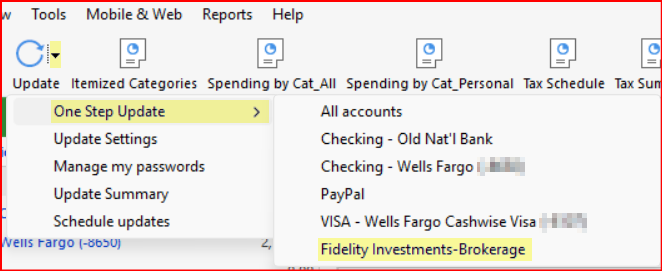
Update NowUpdate Transactions and Fidelity then updated properly.Update NowUpdate Transactions updates only that one specific financial institution and it will often (not always) resolve CC-501 error codes (and some other CC-5XX error codes) that are received during OSU.EDIT…Correction: Update Now is what it is called for Spending Accouts. For Investment Accounts it is called Update Transactions. It can also be accessed as shown in the following picture.
Quicken Classic Premier (US) Subscription: R66.23 on Windows 11 Home
0 -
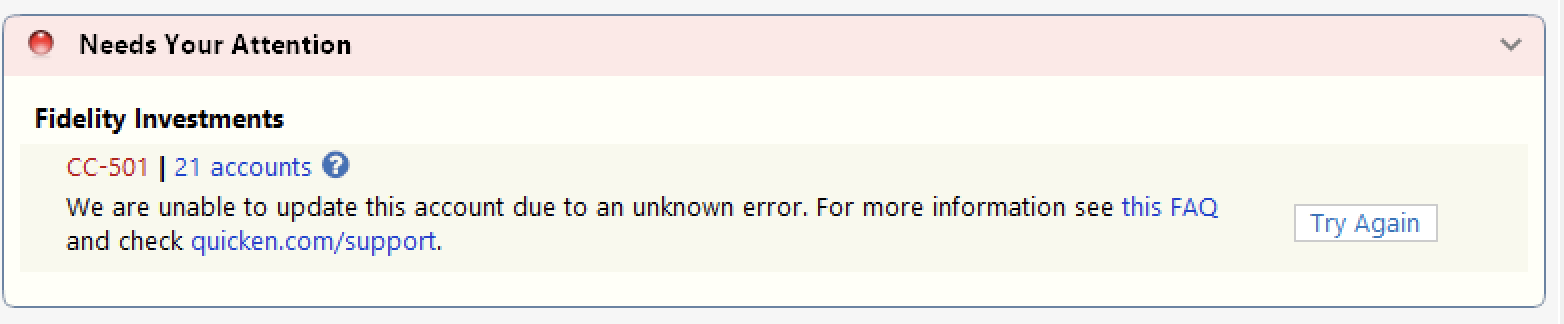
This unknown CC-501 error started for me yesterday - and I waited 24 hours as advised - then went to update this morning, and is still not working. I've attempted it a few times over the past hour - but with no luck. This is the error message I am receiving. I've sent an error report with log files as of this morning. This is just an issue with my Fidelity accounts - no other accounts seem to have the same issue.
 0
0 -
I'm receiving the same CC-501 error regarding Fidelity everyone else describes. I have four Fidelity accounts, two brokerage, two IRA. Banking institution accounts update successfully. My last successful OSU with Fidelity was October 30.
0 -
Hello All,
This is a known issue that has been escalated internally, though we do not have an ETA on resolution at this time. While the investigation remains ongoing, please refer to this Community Alert for any and all available updates and information.
We apologize for any inconvenience in the meantime! Thank you.
-Quicken Anja
Make sure to sign up for the email digest to see a round up of your top posts.0 -
Where is the Quicken Update Now option located? Is this the same as "Update Transactions" for an individual account instead of OSU? I updated the individual transaction and the CC-501 error still displayed but some transactions downloaded for Fidelity and the Last Download time stamp updated on all the Fidelity account.
Nevermind. I see that "Update Now" shows for cash accounts and "Update Transactions" shows for investment accounts. Menu inconsistency.
Deluxe R66.23, Windows 11 Pro
0 -
This content has been removed.
-
Sent a problem report, its Halloween, 7:34AM MST.
 Windows 11 Home / Quicken Premier Subscription - Quicken user since the last century0
 -
Quicken Classic for windows 11. All latest versions. I use this everyday and yesterday it started hanging and never completing. I can update each account seperately with no problem but OSU will not work. Any ideas what this problem is? Thanks
1 -
Update Now can be accessed from the Account Register > upper right Gear icon > Update Now. It is the same as OSU but it updates only that specific financial institution.
EDIT: But as you noted Update Now is for Spending Accounts whereas Update Transactions is for Investment Accounts.
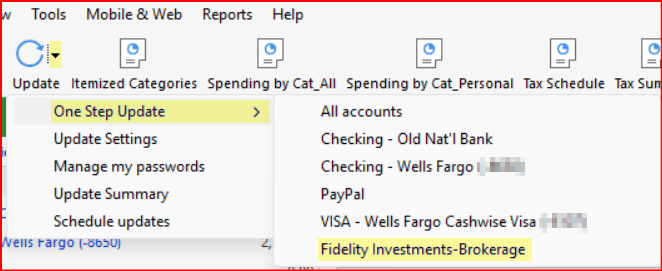
Update Now can also be accessed by clicking on the OSU icon drop-down as shown in the following picture:
I do not know if it is exactly like Update Transactions but it does seem like they might be the same.
Quicken Classic Premier (US) Subscription: R66.23 on Windows 11 Home
0 -
"One Step Update Summary" getting CC-501 errors trying to update Fidelity accounts the last 2 days. Logged into Fidelity with no issues but cannot get updates.
1 -
Hello All,
Thanks for taking the time to report this!
This is a known issue that has been escalated internally and our teams are working to resolve this as quickly as possible, though we do not have an ETA on resolution at this time. While the issue remains ongoing, please refer to this Community Alert for any and all available updates and information.
We apologize for any inconvenience in the meantime! Thank you.
-Quicken Anja
Make sure to sign up for the email digest to see a round up of your top posts.0 -
Same issue for two days with Schwab and Fidelity accounts. I deactivated and reactivated Schwab accounts, but the CC-501 error persists.
0 -
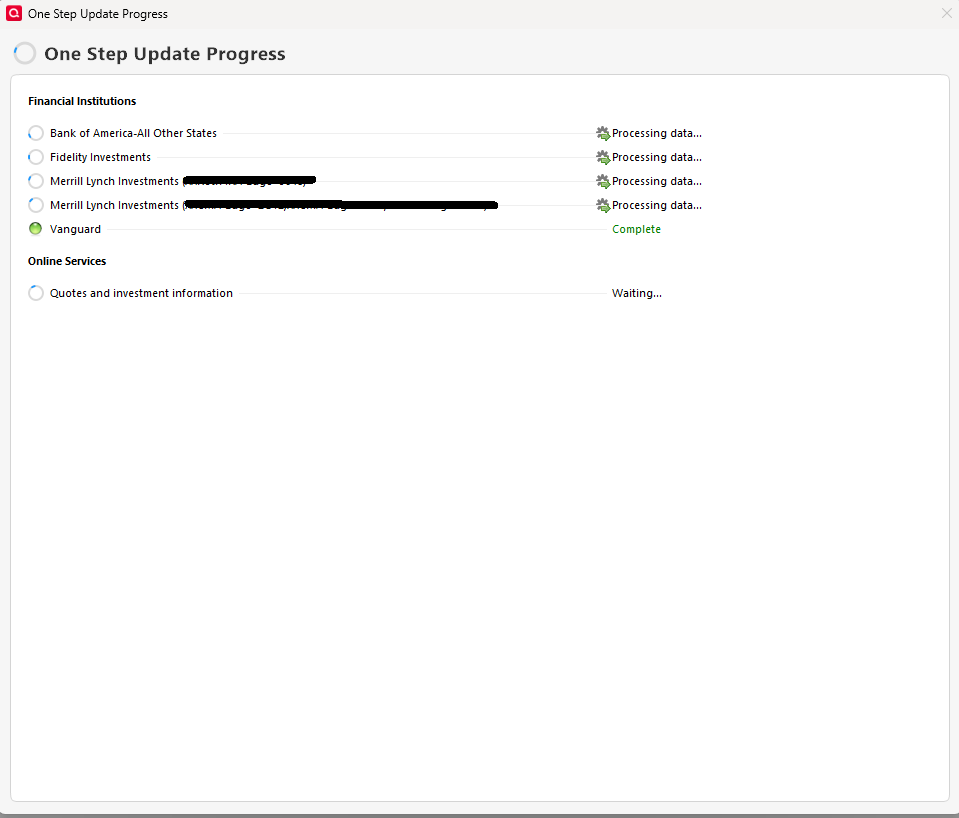
I am having the same issue with BofA, Merrill and Fidelity accounts (Vanguard ok). Renders Quicken unusable, requiring a forced shutdown.

Quicken Windows User since 1992
1 -
Same problem here.
It appears the problem in my case lies with Two Factor Authentication. After several minutes of the update hanging a popup window appears asking me how I prefer to authenticate, either text message or notification to trusted device.
While waiting for the 2FA popup I receive several pings on my trusted device. When I immediately click to authenticate on my device I receive a timeout message.
0 -
I am also having the same issue as well with an added bonus of Fidelity transactions not loading. I tried calling support but they were unhelpful as they aren't allowed original thought.
1 -
Turn off Animations in your Preferences-Settings. Worked for me - This happened long time ago and that was the fix then. Note to Moderator - You may want to elevate this fix to those working on it.
0 -
Lengthy delays here too at 11:30 AM 10/31. Hangs "Processing data" on EWC+ accounts. DC completed OK.
Eventually Fidelity reports a CC-501 error and the other EWC+ accounts complete OK, except for Citi Cards, which always reports an issue even though it downloads OK.
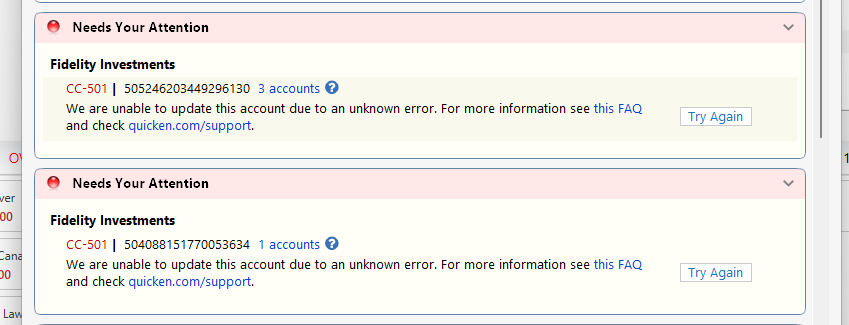
If I go to a Fidelity account and select Update Transactions, I also get the CC-501 but without the long delay.
[Update:] Turning off Animations did NOT resolve the CC-501 problem for me, but I did not have the long delay. Perhaps it only times out once but still shows the error.
QWin Premier subscription1 -
turning off animation worked for me! Thanks very much.
0 -
@nad493 Thanks for sharing! I went ahead and passed this along internally.
-Quicken Anja
Make sure to sign up for the email digest to see a round up of your top posts.0 -
Thanks nad493. Turning off animations worked. I have no idea what animations does anyway 😂.
0 -
Not sure why it causes the hang but animations gives the rotating circle while updating.
0 -
Worked for me also. It's interesting though…. I have had animations turned off for a long time, but somehow it was re-enabled.
0 -
When I ran OSU today, Fidelity and Merrill both reported errors. None of the related accounts updated. I tried resetting it but that reset it only for the one account I started with, not other accounts from the same bank. Those other accounts were presented as "Don't add" and were still broken after completing that process. To get it to work I had to deactivate online services in all affected accounts, then set it up as new.
The OSU summary shows the banks that were updated and a link on the bank shows the specific accounts. From that I conclude it's updating again but, having reset the connections, the OSU summary is truncated at the most recent. I'll have to wait until tomorrow to see if transactions actually download.
The wierd part now is that the recreated connections no longer show the last download date/time below the account name at the top.
Has anyone else experienced similar problems today?
0 -
Same problem, this is rediculous!
0 -
Maybe turned back on by update.
0 -
When I ran OSU today, Fidelity and Merrill both reported errors. None of the related accounts updated. I tried resetting it but that reset it only for the one account I started with, not other accounts from the same bank. Those other accounts were presented as "Don't add" and were still broken after completing that process. To get it to work I had to deactivate online services in all affected accounts, then set it up as new.
The OSU summary shows the banks that were updated and a link on the bank shows the specific accounts. From that I conclude it's updating again but, having reset the connections, the OSU summary is truncated at the most recent. I'll have to wait until tomorrow to see if transactions actually download.
The wierd part now is that the recreated connections no longer show the last download date/time below the account name at the top.
Has anyone else experienced similar problems today?
0 -
Hello again,
Even though the previously linked Alert has been marked as resolved, we’ve created a new Community Alert to track this ongoing issue. Please refer to the new Alert instead for the most recent information and any future updates.
Our teams are aware and actively working to resolve this matter; however, we do not have an estimated timeframe (ETA) for a resolution at this time.
We truly appreciate your continued patience and understanding while this issue is being worked on.
Thank you!
-Quicken Anja
Make sure to sign up for the email digest to see a round up of your top posts.0 -
I was able to resolve this (so far) by resetting one account from each of Fidelity & Schwab.
0




