PNC bank upgrade affecting Quicken downloads?
Answers
-
Well, that certainly is encouraging. I will try OSU, again, in the morning and maybe it will download my transactions then for me, too.
Quicken Classic Premier (US) Subscription: R66.23 on Windows 11 Home
0 -
I had to deactivate and reactivate my accounts to get it working. It kept wanting a password but wouldn't let me add a password. Strange behavior I've never seen before. Reactivating the accounts fixed it.
1 -
Worked for me this morning! yippee!
0 -
Thanks to all users who have chimed in here—I feel less alone! My Quicken for Mac connects to PNC via DC, and the last successful downloaded transactions are from 10/24/25. It looks like Anja from Quicken was seeking examples with date, payee, and amount; I'm happy to provide the several transactions that are showing up on the PNC side (including end of month interest) but would prefer not to post that publicly here. Is there a way to share that in an email or private message?
0 -
PNC Direct Connect (DC) hasn't worked since Oct, 22nd. My transaction include ACH payments, transfers, and debits from/to Business Checking and MM accounts. Do you really need samples? No connection - No transactions.
1 -
PNC DC is still not working for me this morning and the error details are still the same.:
- OSU shows that it completed today. DO NOT RELY ON THE OSU SUMMARY SHOWING THIS.
- The Online Balance reflects the 10/23 cleared balance even though the OSU Summary accounts details says it is from the 10/25 download…and today is 10/31. THIS IS A SURE INDICATOR THAT OSU IS NOT UPDATING QUICKEN.
- Transactions that posted on 10/24 and 10/30 were not downloaded. THIS IS ANOTHER INDICATOR THAT OSU DID NOT WORK CORRECTLY.
- There was no error code nor error message provided.
- Reset Account: Did not resolve the issue…even though it said Reset was successful.
- Deactivate/Reactivate: Did not resolve the issue…but there was no issue in reconnecting the accounts.
- Refreshing PNC's FI Branding and Profile: Did not resolve the issue.
I tried setting up PNC with DC in a test file and was prompted to change my PW. I cancelled the setup up, instead, because the last time I got that prompt I ended up needing to contact PNC's Tier 3 downloading tech support and they needed to reset my DC setup in their system to what it originally was which took more than an hour of my time.
Quicken Classic Premier (US) Subscription: R66.23 on Windows 11 Home
2 -
My Quicken Direct Connect for PNC Bank is not able to download transactions, upload payments or cancel payments. I tried moneydance, it will allow to make payments and cancel, but gives error when trying to download transactions like quicken does. I wonder if PNC made a structure change to their data stream. Quicken gives the error that "unexpected information was received"
1 -
As of 9:55 am on Oct 31, this problem is still occurring. Quicken Windows Subscription R64.35, , PNC Bank Direct Connect. I have tried resetting account and that did not fix the issue. It connects to PNC, but doesn't update cleared transactions or update new transactions.
3 -
As of 10-31-25 at 10am, DC to Quicken from PNC still appears to be ineffective as I just tried to update with a "Success" flag after the connection was complete but alas, no data actually updated.
2 -
So far, I'm still not having any luck with PNC data downloads via Direct Connect. Last transaction download for me was 10/24/25. I've tried twice today (10/31/2025). Nothing.
1 -
Hello Everyone,
Thank you to those who’ve shared that things are now working again—we really appreciate the updates! It’s always helpful to hear when connections begin to improve.
For those who are still experiencing issues, our teams are continuing to investigate. As mentioned in yesterday’s update, they’ve requested a few examples of transactions that are not downloading (please include the date, payee, and amount). This information helps our teams compare the data being sent from PNC and narrow down where things may still be breaking down in the feed.
Thank you again for your continued patience and cooperation as our teams work to resolve this issue!
@RipplesGuy I will send you a direct message for you to share this privately. Please keep an eye on your inbox for my message.

For anyone else who would prefer to share this privately as well, please let me know (tag my name directly @Quicken Anja) and I can send you a private message for you to respond to as well.
Thank you!
-Quicken Anja
Make sure to sign up for the email digest to see a round up of your top posts.1 -
Using Direct I've gotten NO transactions after Oct 24 from either PNC account. Here they are scraped from PNC:
From Business Checking Plus
10/30/2025 ONLINE TRANSFER FROM XXXXX7xx5 +$11,000.00 $x,717.77
10/29/2025 PAYPAL INST XFER ACH WEBHSEGxx81-$40.00 $x, 717.77
10/27/2025 SANITATION DISTR BILLPAY ACHDEBIT SD1-$59.33 $9x757.77
From Business Premium Money Mkt
10/30/2025 ONLINE TRANSFER TO XXXXX89xx -$x,000.00 $x,847.87
10/29/2025 xxxEC PAYMENTS ACH CREDIT CLIN + $x,x33.33 $x,847.871
0/27/2025 MOBILE DEPOSIT xxxxx7xx5 +$11,724.00 $1xxx
The small 'x' are my redactions. I'm happy to re-send without redactions to somewhere not public.
NOTE: To anyone having trouble highlighting a copying from PNC, click on VIEW ALL TRANSACTIONS then PRINT to PDF, then scrape (Cut and paste)
Thanks to all helping to fix this!!!
1 -
How do you switch from Direct Connect to Express Web Connect?
0 -
@ChetOrSteve Thank you for providing this information! Please also be sure to submit your log files via Help > Report a problem, as the examples will be used to compare what is being shown in your log files.
@pcl to switch from Direct Connect to Express Web Connect, please follow the instructions below:
- Deactivate the account to disconnect from Direct Connect
- Navigate to Tools > Add Account
- Search PNC Bank, and you can either select PNC Bank - Web Connect or PNC Bank - Direct Connect
- If you choose PNC Bank - Direct Connect—click Advanced Options (PNC Bank - Web Connect will default to connecting via Express Web Connect)
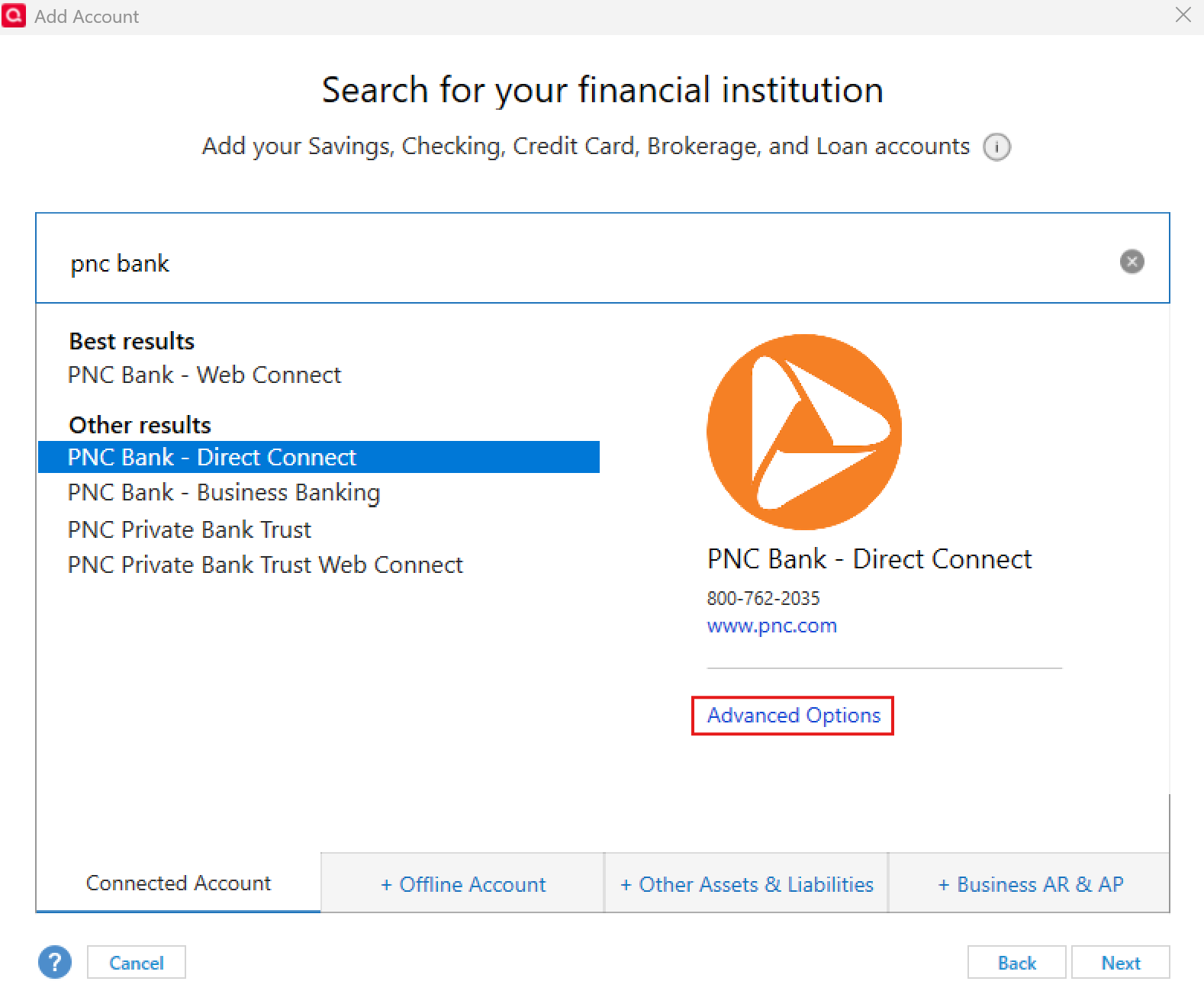
- Select Express Web Connect
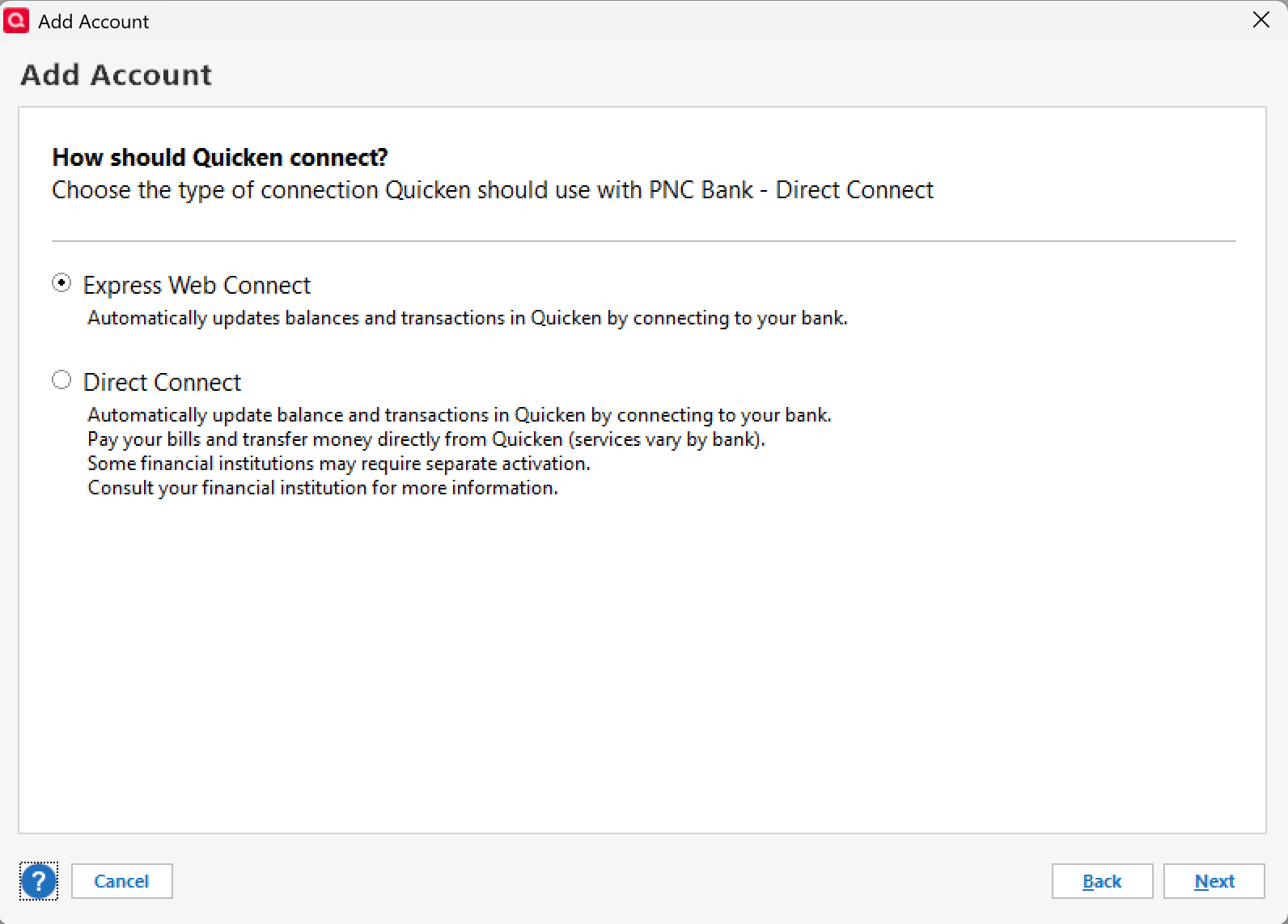
- Follow the prompts to sign in
- Once your account(s) has been found, choose Link to existing.
Thank you!
-Quicken Anja
Make sure to sign up for the email digest to see a round up of your top posts.0 -
Well, I thought I was in the clear as DC transactions downloaded yesterday, however, today its back to nothing coming over from PNC checking. I have several payments made through Quicken that are coming up that show as "Scheduled" in the Payment summary!! I hope they get made. any progress without switching to Express Web Connect???
0 -
Anyone know if this is a issue with PNC, Quicken or both, seen other post of Quicken not connecting with other institutions also or at least slowness with other banks
0 -
PNC DC is not working for me, again, this morning. (It has not worked for me since 10/24.)
I don't think PNC's EWC+ has been an issue previously but perhaps with the CC-501 error code issue having expanded to include multiple FIs now PNC's EWC+ has been caught up in that, too? (This would not be an issue that affects PNC's DC connection…totally different connection methods and download protocols.)
Quicken Classic Premier (US) Subscription: R66.23 on Windows 11 Home
1 -
PNC Direct Connect does not work since upgrade. My last successful PNC DC download was on 10/23 just before the upgrade. Nothing is currently downloading. I tried a account reset and still nothing. Had to manually enter all of my transactions today over the past week and that is very painful. Help resolving would be much appreciated! This issue has not been resolved. Also reported issue as requested earlier in the chain.
0 -
Same problem with no downloads for me running Quicken Classic Premier on Mac, version 8.3.2. No downloads from PNC Bank using direct connect after they did their update. I did notice that after I tried changing the download date from 10/23/2025 to another date, or even changing to Download all available transactions, and doing an update, the date reverts back to 10/23/2025 every time.
0 -
Same problem here, Quicken for Windows.
Just realized today that nothing is syncing. Tried to change one of my savings accounts from DC to EWC and Quicken seems to freeze at "Updating Your Accounts." The progress bar is circling, but it's been 5 minutes so far.
What a mess this is.
Is this PNC's attempt to make us use their bill pay service or their "Virtual Wallet" nonsense?
0 -
The problem recurred today, using the latest version of Quicken on a Mac M1 iMac. Annoying but also good to know that we are not alone.
0 -
DC is not working for me as well. I am unwilling to switch to EWC as I pay all of my bills through Quicken with DC. Waiting on a solution
0 -
Still no Online Balance update for me, no new transactions downloaded. When will this issue be resolved?
0 -
Just trying to read through this thread. I have been having trouble with transactions updating for the past week (PNC + direct connect). I decided to disconnect and then re-connect the account in question and it will not allow me to reconnect. I search for PNC (direct connect). It asks for my SSN and Quicken PIN which I provide. It then says "this institution requires that you update your PIN" which I do. I then get an error message that says "did you mistype your credentials? Re-enter your credentials." My credentials are correct. I called PNC, they confirmed the credentials (I had to use them to get to a support person). They tell me the issue is with quicken, not PNC….
1 -
That Quicken Add Account login information prompt for PNC has always been wrong and it causes problems when trying to reconnect.
For people who have never set up a PNC Bank - Direct Connect connection before they will need to first get DC set up in their online accounts. For new requests they will need to enter their SSN as their UserID.
But in the past PNC Bank would mail (snail mail) a unique UserID that was not the SSN. If your UserID was one of these, you need to enter that, not your SSN.
Also, if you change your PW in Quicken it will not match what PNC has in their system. So now you get an error message.
Entering the incorrect information that Quicken prompts you for will lock you out of being able to set up a new DC connection for the one that was broken.
I've run into this issue 2X in the past myself. In both cases fixing the issue required assistance from PNC's Tier 3 tech support. In both cases they needed to reset their system to the ORIGINAL PW that they had initially mailed me. The worst thing about having to go through this process is that it can sometimes take quite some time to be connected to a Tier 3 tech.
FYI, PNC's 1st Tier Customer Service folks are mostly involved with and knowledgeable about business and basic online account matters but most do not know much about Quicken and are not techies. If they can't help you or they start telling you that you need to contact Quicken Support because it is their problem, don't accept that answer. Instead ask to speak with someone in PNC's Tech Support team regarding downloading data. You might get bumped around a bit until you finally get to talk with someone who can help you.
Quicken Classic Premier (US) Subscription: R66.23 on Windows 11 Home
0 -
I am happy to see I am not alone with this. PNC's site was overhauled, and my guess is that is in an issue on their end. The day the site was updated is when the connection via quicken stopped communicating with each other. I guess I am writing checks, and envelopes this week, and using stamps.
Please keep updating here folks!
0 -
Neither my PNC Checking nor Savings accounts will download transactions with DC since 10/25. That includes several attempts this AM, plus resetting the accounts.
I'm not changing connections methods at this time.
Quicken Deluxe for Windows 11 Pro. Latest subscription version. I've been a user for decades.
- Jim S.
0 -
Since PNC's upgrade, when downloading via web Web Connect, the payee starts with "DEBIT CARD PURCHASE xxxxxxxxxxxxxxxx####" (#### = last 4 digits of debit card). Due to this adding to the length of the Payee, it results in part of the payee name being cutoff when importing into Quicken. Is there a way to prevent "DEBIT CARD PURCHASE xxxxxxxxxxxxxxxx####" from being included in the Payee field?
Like others, the Direct Connect for PNC accounts isn't working for me.
0 -
If you don't want to write checks out, why not log into your online PNC account and use Bill Pay there? You'll save on the cost of the envelopes and stamps. In addition, it's generally more reliable than the USPS.
Or log into the online billers' websites and schedule the payments from there? This is by far the safest and most reliable method for ensuring your accounts will be paid on-time. This is the method I've used for years for all but 2-3 payments each month. I set up auto-pay there, set up bill reminders in Quicken and generally don't need to worry about it anymore…except for variable dollar amount or date bills for which I need to edit the bill reminders some.
Quicken Classic Premier (US) Subscription: R66.23 on Windows 11 Home
0 -
This is an issue caused by PNC when they upgraded their system. It affects the DC connection only. Since it is something in their system that needs to be fixed, this is not something Quicken can fix. Your best bet is to contact PNC and request to talk with there tech support (prefereably someone who is involved with downloading/exporting data or with Quicken). They are already aware of the issue and are working on it but the more people who report it the more likely it will get the priority attention that it needs.
Quicken Classic Premier (US) Subscription: R66.23 on Windows 11 Home
0


