Fidelity Updates Still Broken after Update
Comments
-
@Mark Torpey That is what I am migrating to on accounts that don't have bills paid out of them or don't have many trades, especially the IRA's. SPAXX will be the core but the value of the holding Core Cash is zero. On my main account which pays most bills; I would rather have fewer transactions to record in Quicken versus a an extra 1/4% interest (with FZDXX) on a few thousand $.
You probably know this; but it is nice that the Minimum purchase requirements for the Premium MM's are only for the initial purchase. Later you can reduce the holding to below $100 and there is not any forced sell of FZDXX or a nasty message from Fidelity.
1 -
@allen_car Have you downloaded any FZDXX redemption transactions recently? These are not when you manually sell shares but automatic sales of enough FZDXX to cover the deficit from the trade or withdrawal as you put it.
Quicken is tracking the redemption bug with ticket CBT-884.
0 -
@EvDob The automatic redemptions ocurred on 10-28-25, 10-20-25, 10-13-25, & 10-7-25 all in one taxable account. Those automatic redemptions were when FZFXX was the core cash. I only switched to SPAXX on 11-6-25 in that account. When did the bug start?
My trading in all accounts is virtually nil since the beginning of the year because I got very defensive for the 1st time since 2008.
0 -
@allen_car Mine were around the same time. Could be account type dependent, as mine was an IRA.
0 -
@EvDob I read through your complete post and the single post from @mrzookie (which you linked) about the automatic redemptions from a premium MM like FZDXX/FIGXX to cover a negative balance in the Core Cash position. I can't provide any information on past transactions in an IRA since the switch to EWC+ . I have no experience with FIGXX but based on your post it must act like FZDXX except FIGXX has a different min. investment and holdings.
But I am willing to make 2 test trades. One IRA account still has FDRXX and the other IRA has SPAXX for the Core Cash MM; both have FZDXX. I will purchase enough additional shares of ISCH in one act. and QMNNX in the other account to have the Core Cash go negative and cause an automatic redemption of FZDXX. I will take screenshots of the results of Fidelity webpages and Quicken; then report back with the results.
I should have already made these trades but I took a 25 day trip to Norway/Finland and since my return I have been editing the photos and learning a new photo editing program after 10 years of not editing photos. Wow, the programs have gotten so much more powerful.
1 -
I'm left wondering why we're seeing different behavior with different account types. (HSA transactions not downloading, 401(k) transactions with amounts having the wrong sign, etc.) It seems to me that the basic transactions should work the same no matter the account. I fear Fidelity has some engineers who are not top-notch.
0 -
SUCCESS!! Finally. After 2 months of dealing with this download issue and manually entering transactions in Quicken, I was finally able to get everything to work. I was able to successfully download October transactions for 14 Fidelity accts., which includes Brokerage, IRA, Roth & 401k type accounts. I also have trans. downloading from 3 different credit card companies. It took a long time, but I was able to validate all accounts with their latest Oct. statements.
How I fixed the problem. Before going the ImportQIF route as rec. by @bmbass (which I read in detail and appears to be a good option), I instead decided to try the new template option as rec. by @BJB. You can read recommendations from both individuals posted previously in this thread.
When creating a new template, the existing download connections previously setup are not carried to the template. You have to reconfigure the connections from scratch, which I believe is what did the trick. I first linked all the Fidelity accounts, confirmed everything worked, then I later established download connections for the credit card and a Fidelity 401k account.
The download process from the new template appears different from the old one. The template UI showing the download process looks a lot different from the previous one. It appears the code for the download process is different (new and improved) compared to regular version (R64.35). Not sure why there would be two separate sets of code, but things do look different. Maybe someone from Quicken Support can confirm.
btw, I did check for latest updates many times when I was trying to fix the problem by activating/deactivating download connections. I only saw the new changes after using the new template.
Lastly, the only issue I ran into was related to Vanguard. Two accounts that I manage in Quicken are no longer supported to download detail transactions from Vanguard. This was something new that popped up after converting to the new template. A message appears in Quicken indicating detailed trans. data are not allowed to be downloaded. Not sure when this change was rolled out. Luckily, both accounts have very little activity (1-2 trans. month) which makes it easy to update manually.
Currently, I've been running One Step Update daily and I see new transactions downloading for all accounts and no errors appear in One Step Update Summary report. Woo-Hoo! I'll keep at it and I'll let you know if anything changes.
Thanks to everyone on this thread who helped provide detail on the various options to fix the problem. Hopefully, I'm back in business and others can benefit from this post.
Take care.
2 -
@MannyC - Can you give a link to "the new template option" or give us a step by step procedure. Not sure what you did but if it worked I would like to try it. Tried searching for @BJB and "new template" but didn't come up with anything I could follow.
Thanks
How I fixed the problem. Before going the ImportQIF route as rec. by @bmbass (which I read in detail and appears to be a good option), I instead decided to try the new template option as rec. by @BJB . You can read recommendations from both individuals posted previously in this thread.0 -
@joecoolfiftyfive - my bad, the post was from leishirsute on November 8
The option to create a template can be found within Quicken under "File" then "Copy or Backup File"
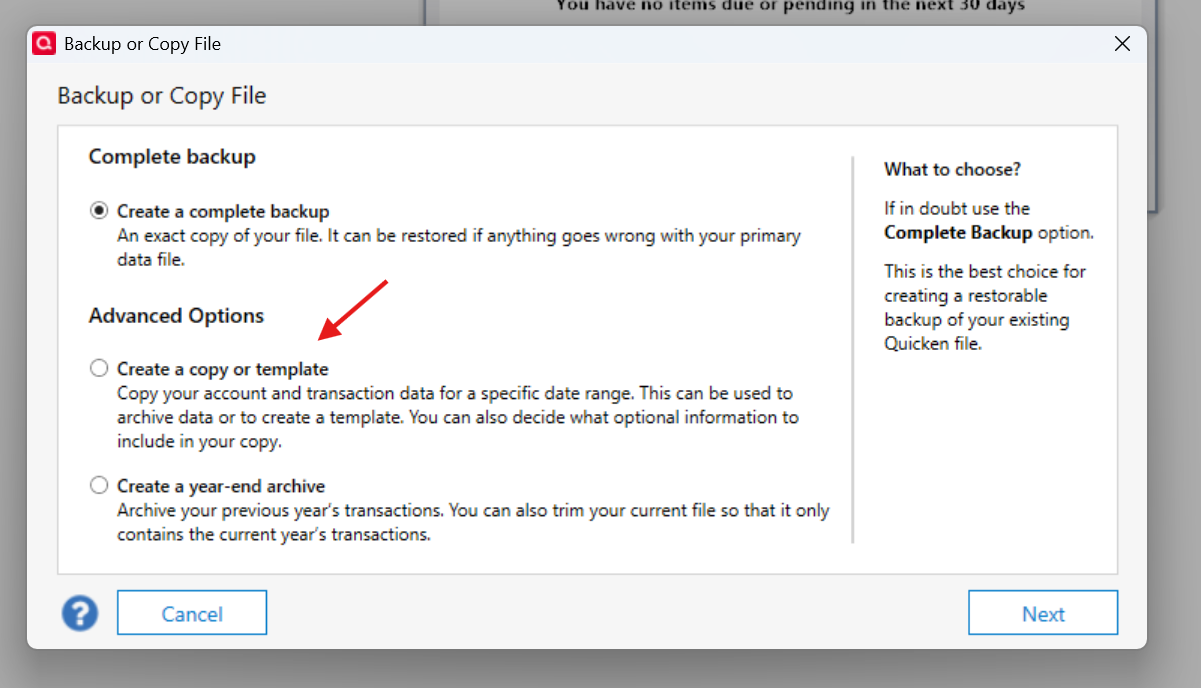
Be sure to backup your existing Quicken data prior to doing anything, just in case you need to fall back. I kept the new Quicken data file generated from the template option isolated until I knew everything was working correctly. This included making sure all my history data was available, saved reports, categories, accounts, etc. I ran a thorough QA of the new template file before I started using it as my main file. It was the first time I've used the template option, so I was unsure if there was anything missing other than the download connections.
Hope this helps
0 -
I defer all credit to @leishirsute . I just happened to be on the thread 😀
0 -
@MannyC - Thank You that helped me understand your process. I did it but unfortunately it still didn't connect to Fidelity.com.
0 -
@joecoolfiftyfive Regrets that the connection to Fidelity is not working. A suggestion. Have you tried starting a new Quicken datafile and adding just Fidelity to it to see if it connects?
Deluxe R66.23, Windows 11 Pro
0 -
Hi @joecoolfiftyfive, can you be little more specific. Did it not connect at all, or did it actually connect and indicate data was downloaded but the data does not appear in Quicken? My issue was, the connection to Fidelity was established and the Summary report indicated data was downloaded but the data was not visible in Quicken.
I also experienced an issue where some of my Fidelity accounts did download data but others did not. This was pretty consistent no matter how many times I activated/deactivated all Fidelity accounts. Finally, all Fidelity connection issues were resolved when I switched to using the template version.
Do you have more than one account in Fidelity? Are you having the same issue for all accounts?
Lastly, are you positive, you are using the new template file and not your original? When I first created a template, I assigned the template file a different password compared to my original file, that way I knew which file I was using when I launched Quicken.
0 -
This may have been posted before, but I have not been reading all of the posts. Over the past week I have had several foreign dividends as well as buys and sells of foreign stocks. All downloaded correctly! It looks like that problem has ben fixed.
0 -
I agree that using the Create a COPY or Template operation is important to getting the downloads straighten out; as described in the above posts. On 11-9-25 I made a COPY of 4 Quicken files with a new file-name; since then I have not had to ReSet any of my accounts in Quicken until today. EWC+ has worked perfectly at USAA and Schwab for the whole year; except when a Quicken update broke everything.
Before making the COPY, on 11-8-25 I noticed a very weird Intermingling of Fidelity accounts when I Re-Activated a Fidelity account. The Reset re-linking tried to link a Fidelity Trust account that was not even in the Quicken File I had open. That Fidelity Trust account which Quicken offered to link ONLY exists in a Quicken file dedicated to the Trust. That information had to come from when I Re-Activated that account a few minutes earlier in its own Quicken file. That should not happen!. The problem is REPEATABLE if I follow the same steps; this last time I have screenshots of each step. The details are in another post. The details can be found here in the link below.
I am also running some test transactions in multiple accounts and Quicken files to document how Quicken/Fidelity downloads automatic settlements from FZDXX to cover a negative balance in my CoreCash holdings. So far this week, the Premium MM transactions are missing and I had to enter them manually. They did download OK in October.
I also agree with other members that transactions should NOT be automatically accepted from the download. I manually decide to Accept, Match, or Delete every downloaded transaction. It makes it much easier to manually match the download to previous entries and decide if they can be deleted or accepted. I have been lucky to not have any corruption of my Quicken account ledgers.0 -
I got the same message I have gotten all along about the web page not available and come back later. I have two accounts and both give me the same issue. FYI, I have tried creating an entirely new data file and get the same message after logging into Fidelity. Yes, it was definitely the new template file I tried.
0 -
Yep, tried that also. Get the web pge not available after logging into Fidelity.
0 -
I am so grateful for all of the users here testing and figuring things out. Been using Quicken forever and really hoping at some point soon I can do a straightforward migration to the new method.
I almost did the template copy approach but decided I won't have the time to debug any issues thag might crop up for another month or so. So just using other methods to track for now.
0 -
@bjb, I'm grateful as well. I've also been a long time Quicken user. I've been tracking my income, expenses and investments in Quicken for +30yrs. I've experienced challenges with Quicken in the past but I've never experienced a problem as bad as the current download issues. I'm not sure how Quicken was able to release the changes without passing a thorough QA process. For those of us that are long time users and who track +95% of all their financial transactions in Quicken we are undertaking a huge burden to enter transactions manually. I did it for two months and it was extremely painful. Not entering the data and waiting months for the Quicken Dev. team to fix the problem is also not an option. I've come to depend on running reports from Quicken on a weekly basis. Thank God, for the Community. Not sure what I would've done if I had to go another month entering data manually.
1 -
@joecoolfiftyfive , it appears you are having a different problem than what I was experiencing and what others were experiencing. I was able to establish a connection to Fidelity, no message like the one you received, and Quicken indicated it downloaded data to all my Fidelity accounts but in reality, only a few showed to have new transactions. I tried deactivating/reactivating (many times) all my Fidelity accounts but to no avail. Going the template route was the solution that fixed my problem.
Are you able to login to fidelity.com outside of Quicken with the same machine and with the same user id and password you have setup in Quicken for your Fidelity accounts?
0 -
@joecoolfiftyfive Whenever I have a website problem, I try clearing all the browser cookies for it. Works a lot of the time.
0 -
@EvDob - one reason I tried 3 different browsers - two of which I only use when troubleshooting. But you make a good point. I'll clear all the quicken and fidelity cookies and try once more.
1 -
Yes, no issues logging into fidelity no matter the browser or machine
0 -
Hi all - My fidelity updates were "stuck" since late October. Tried disconnecting / reconnecting accounts - nada. The template approach above appears to have worked! Looks like I have some transaction discrepancies to figure out - but downloads appear to be back. A big Thank You to all of you!
1 -
0
-
The Template approach worked for me. Thank You!!
0 -
For me all of the issues with the Fidelity conversion to EWC+ have been resolved except for 2 remaining issues:
1 - Fidelity HSA account not dl'ing transactions.
2 - 401k share sale transactions still dl'ing as generic withdrawals.
What is the status for these two remaining issues?
Quicken Classic Premier (US): R66.28 on Windows 11 Pro
0 -
Hello @Mark Wagner,
Thank you for the update. The Fidelity HSA account issue is caused by a data formatting issue on Fidelity's end. To track the status of the issue, I recommend bookmarking this announcement:
For the issue with 401k sales downloading as withdrawals, I recommend that you contact Quicken Support directly for further assistance, as they have access to tools we can't access on the Community and they're able to escalate the issue as needed. The Quicken Support phone number can be found through this link here. Phone support is available from 5:00 am PT to 5:00 pm PT, Monday through Friday.
I apologize that I could not be of more assistance!
Quicken Kristina
Make sure to sign up for the email digest to see a round up of your top posts.
0 -
As of R65.17, the renaming rules for Fidelity accounts still do not work after the EWC+ cutover.
Deluxe R66.23, Windows 11 Pro
1 -
Since all of the Fidelity HSA Update problem discussions that I am following were closed I'm reporting this here.
This morning when I did my daily OSU all the December transactions for my Fidelity HSA downloaded as normal.
Quicken Classic Premier (US): R66.28 on Windows 11 Pro
4