How do I activate Page Scaling in Print Preview when running Various Reports

I am trying to activate Page Scaling in Print Preview. The option is grayed out, (see attached).
I would like to resize my budget document to avoid printing an extra page for 1,2,3,4, or 5 lines of data on a Budget Report and for various other document printing requirements. I have tried adjusting the top and bottom margins and cannot go less than the default of .50". This issue has existed for the many years (forever) I have been using Quicken. My annoyance level on this minor issue has reached the point where I need to flag it to bring to someone's attention to get some help.
I am using MS Windows 11, Quicken Classic Deluxe version R64.35, Build 27.1.64.35. I am current on my subscription, OS updates, firmware updates, printer drivers and checked all the printer property settings. This issue happens when trying to print any Quicken report on an HP or Epson printer. I do not have the same issue when printing Microsoft or other application documents. It appears to me to be a Quicken Application issue. Please advise if I need to initiate a service ticket. I am open to any and all suggestions the Moderator or Community Members may have. Thank you in advance for your help.
Answers
-
Hello @ErikaRU,
Thanks for providing all the details. The behavior you’re seeing is often caused by lingering printer settings saved in Quicken that don’t fully reset when changing printers or system updates. Resetting Quicken’s printer settings can often resolve this, as it can clear out old internal settings that may be causing the Page Scaling option to stay grayed out (even if the printer hasn’t changed).
If you haven’t already, please follow the steps provided below:
- Open the File menu in Quicken.
- Select Validate and Repair File…
- At the bottom of the window, check the box for Reset all Quicken printer settings and click OK
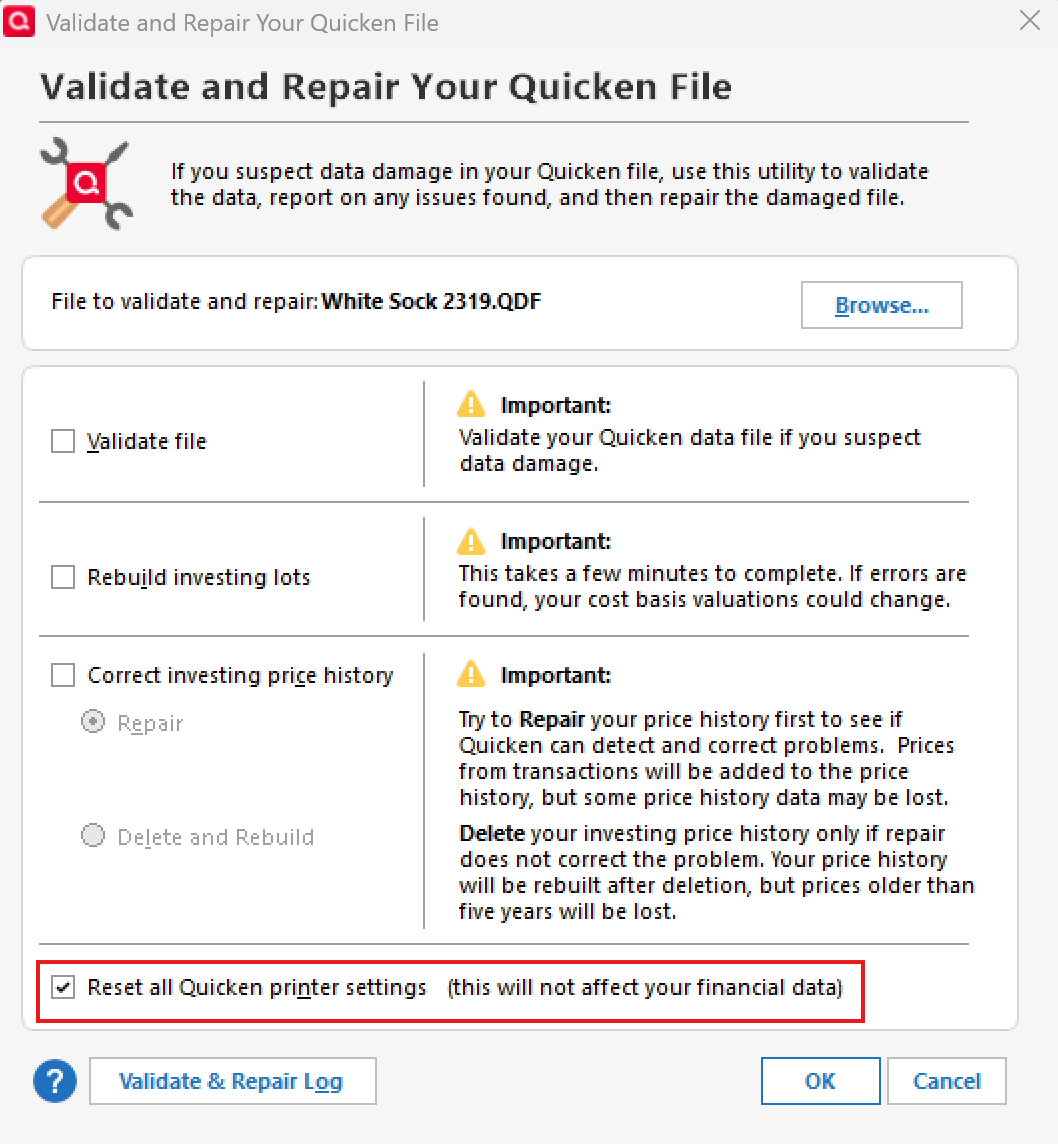
- Close the Data Log when it opens.
- Close Quicken completely—keep it closed for at least 30 seconds to make sure settings fully clear.
- Reopen Quicken and try again.
If the issue persists after this, you may want to contact Quicken Support so our support team can investigate further.
Thank you!
-Quicken Anja
Make sure to sign up for the email digest to see a round up of your top posts.0 -
This has been a longstanding issue for me as well. I tried resetting the printer settings as you describe above and the Page Scaling options are still greyed out.
The only way I have been able to get the Page scaling options to work is to select the Quicken PDF printer as my printer and print the report to a PDF file.
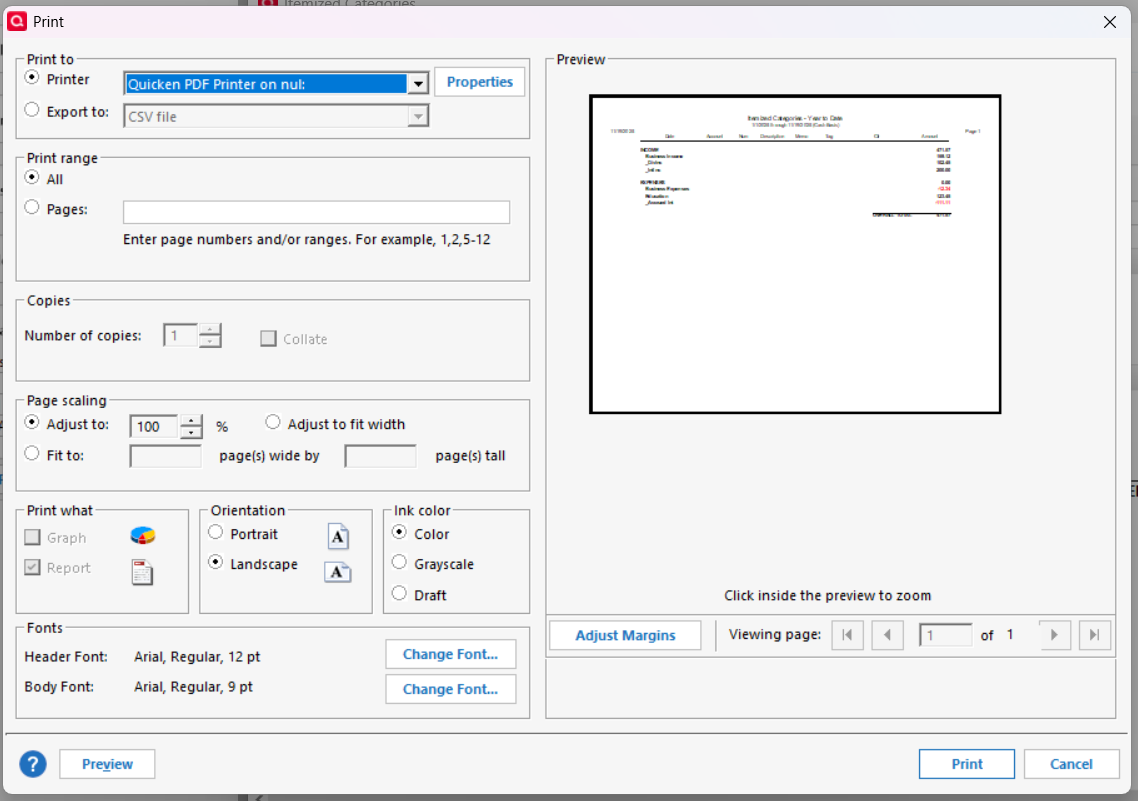
This issue has been reported many times and was supposedly fixed a couple of years ago, but it is still broken.
Also the Quicken PDF driver may not be included with the Quicken Canada distribution, but the page scaling has been reported to work with the Adobe PDF driver. See this discussion and many others
QWin Premier subscription0 -
@Jim_Harman Thanks for pointing this out!I was able to replicate this as well, so we'll go ahead and forward this issue to the proper channels to have this further investigated. If you could both please navigate to Help > Report a problem within your Quicken program and submit a problem report with log files and screenshots attached in order to contribute to the investigation.

It would also aid the investigation to include a sanitized file when submitting the problem report. A sanitized file is a data file that removes personally identifiable information so you can comfortably share this file with the Quicken team.
While you will not receive a response through this submission, these reports will help our teams in further investigating the issue.
We apologize for any inconvenience in the meantime! Thank you.
(CBT-930/CTP-15302)-Quicken Anja
Make sure to sign up for the email digest to see a round up of your top posts.0 -
As far as I know this has never worked for anyone.
0 -
I agree with Chris. I do not ever recall page scaling working from within Quicken.
0 -
Report sent
QWin Premier subscription0 -
@Chris_QPW & @q_lurker Thanks for the insight!
@Jim_Harman Thanks for submitting. I will get your files attached to the ticket!
-Quicken Anja
Make sure to sign up for the email digest to see a round up of your top posts.0 -
The earlier version where this was supposedly fixed or at least changes made was R59.6, but as far as I know this has never worked.
There was a discussion about this from September of 2024 in the Superuser area with the title
"What has changed with printer page scaling in R59.6?"QWin Premier subscription0 -
Thanks for the additional info! I will include these details in the ticket as well.
-Quicken Anja
Make sure to sign up for the email digest to see a round up of your top posts.0



Categories
- All Categories
- 6 Product Ideas
- 34 Announcements
- 253 Alerts, Online Banking & Known Product Issues
- 19 Product Alerts
- 265 Welcome to the Community!
- 301 Before you Buy
- 1.5K Product Ideas
- 55.8K Quicken Classic for Windows
- 16.9K Quicken Classic for Mac
- 1K Quicken Mobile
- 834 Quicken on the Web
- 129 Quicken LifeHub