OL-293-A error with PNC

This discussion was created from comments split from:
PNC bank upgrade affecting Quicken downloads?
.
Comments
-
DECEMBER 2nd 10:40AM
New Issue with PNC Direct Connect:
OL-293-A Quicken is unable to update your account because unexpected information was received from your financial institution
My Direct Connect has worked perfectly for three weeks since PNC fixed their mapping. Last download was Saturday. The error pops up pretty quickly.
Is anyone else seeing this error today? @Boatnmaniac are you seeing anything similar?
0 -
Hello @charlieo.Hemlock,
Thank you for letting us know you're seeing this error when attempting to update your account(s). If you haven't already done so, I recommend that you troubleshoot by backing up your Quicken file and following these instructions from our article on OL-293 errors:
First, verify your account services in Quicken
If you have not yet signed up for the bill payment service provided by your financial institution, but have enabled that service in Quicken, you will get this error. Make sure that your account settings in Quicken match the services currently provided by your financial institution. To do so:
- Choose Tools menu > Account List.
- Click the Edit button of the account you want to verify.
- In the Account Details dialog, verify that the account settings in Quicken match the services currently provided by your financial institution and make changes, as necessary, so the information matches.
- If you make changes, try to connect to your financial institution again (Choose Tools menu > One Step Update).
- If everything looks correct or if the problem persists, continue with the next procedure.
Second, verify your password
With the convenience of the Password Vault in Quicken comes the opportunity to forget to change your password in Quicken when it has been changed at the financial institution. To update your password in Quicken:
- Choose Tools menu > One Step Update.
- Uncheck all options except for the financial institution that is reporting the error.
- Click the key icon to the right of the financial institution name.
- Enter your password.
- Click Update Now.
Third, refresh your online account information
- From your account register, select the Actions gear icon at the very top of your register (Ctrl + Shift + N).
- Select Update Now.
- Follow the on-screen instructions to complete the update.
- Repeat these steps for each financial institution experiencing this error.
If the issue persists
If the issue is not resolved after following the steps above, you will need to contact your financial institution to resolve this issue. Quicken does not have access to the financial institution's servers to correct the problem. This may require you ask to speak with an online services specialist that handles transaction download issues at the financial institution. If your financial institution states they can't assist, an escalation with the financial institution may be necessary.
I hope this helps!
Quicken Kristina
Make sure to sign up for the email digest to see a round up of your top posts.
1 -
I read the article before I posted. Nothing has changed and password is correct. I spoke with PNC Tier 3 and they are not aware of any issues with my account or their access to DC servers. PNC says that OL-293-A is a Quicken problem.
0 -
@charlieo.Hemlock - No, I have not had any issues running OSU and getting updates from PNC today. In fact 3 transactions in 2 different accounts downloaded this morning. Later this afternoon I successfully sent 2 bill pays to PNC. And just now in my regular evening OSU PNC did not download anything new but there were no error codes or messages so I'm assuming all is well.
I sometimes (not often) get OL-293-A error codes with my DC accounts. Generally, I will run Update Now right after that and the download then usually completes without error. Once in a while it will not be resolved until the following morning's OSU before the issue is resolved. Did you try running Update Now?
Quicken Classic Premier (US) Subscription: R66.23 on Windows 11 Home
0 -
Thank you @Boatnmaniac.
I have been running it all day … and just now. Solid red ball … always OL-293-A as Quicken attempts the “error recovery.”. No connection…. so no downloads and no BillPay.
I spoke to PNC Tier 3 and they saw no issues with my account and were not seeing reports of problems. Quicken support just read from the support article and were of little help.
This seems like something completely different than 3 weeks ago. At this point I will wait for tomorrow’s OSU to see what happens. I am not optimistic though. Never seen this before for a full day. Like you, in the past, I only saw intermittent problems with connections. This time the error happens pretty quickly too … within a second of clicking on the OSU. I thought it was an issue connecting to the DC servers, but since it’s just me, I guess not.
Question. In your opinion could this be a PIN issue? Meaning, could changing my PIN help? Could disconnecting-reconnecting help? The OL-293 says it got unexpected information from my bank (PNC). Since I never got this error when my password wasn’t in the vault (3 weeks ago), I am thinking it isn’t a PIN / authentication issue.I am perplexed at this point and not happy to think this is just my account. Any and all advice is appreciated.
0 -
I rather doubt this is a PIN issue since you have been having successful OSUs with PNC for the last couple of weeks. PINs don't just suddenly go bad. But, does your PW Vault still look OK?
Yes, try OSU, again, tomorrow. If that doesn't work, try Update Now. If that doesn't work, try Reset Account.
Quicken Classic Premier (US) Subscription: R66.23 on Windows 11 Home
0 -
Thank you @Boatnmaniac !!
First thing I checked was the PW Vault. Looks perfect with the correct PIN. This problem feels different than the migration issue from last month
Can you tell me what “Reset account” will do? What will I lose? What gets reset?
I am crossing my fingers that the new OSU later this morning has good data.Thanks again.
0 -
Reset Account resets the connection with the financial institution without going through the manual deactivate/reactivate process.
Sometimes it will break the connection if the connection for some reason has been corrupted. If that happens you will need to do Add Account for it to get the connection reestablished. But if you need to do this, make sure all accounts with that financial institution are first deactivated.
BTW, PNC worked well during OSU this morning. I got 2 more transactions downloaded in 2 of my 3 accounts and reconciling to the online balance worked well, too.
Quicken Classic Premier (US) Subscription: R66.23 on Windows 11 Home
0 -
I am so jealous! …and upset.
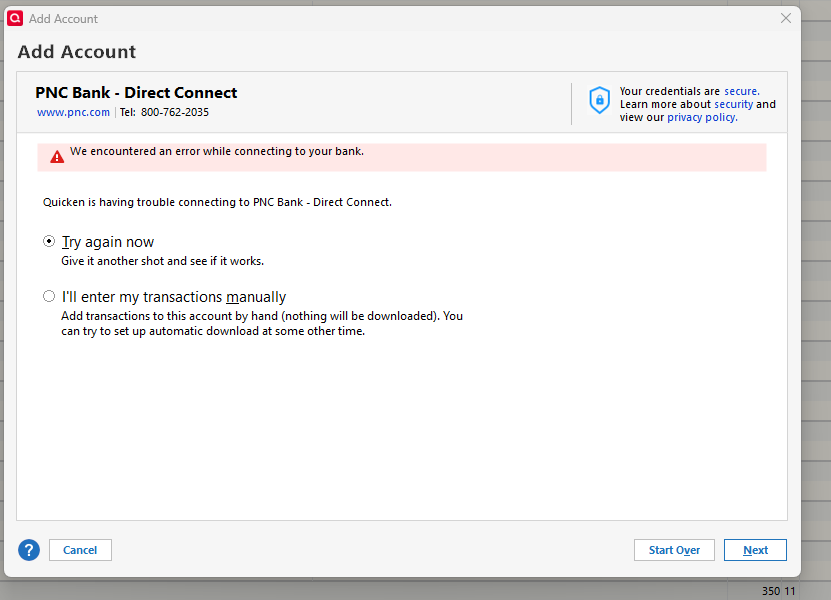
My connection is still broken. I deactivated and tried to reactivate all accounts with DC. It gets 90% done and then gives this error. Any thoughts? Quicken support says its a PNC problem. Accounts show as activated in the account list with Bill Pay … but still doesnt work. Password is in the vault.
 0
0 -
@Boatnmaniac , when it rains it pours!
I spent 45 minutes on the phone with Quicken and then an hour with PNC Tier 3. Quicken just blamed the error on PNC. So I called them. The PNC Tier 3 rep had me create a simple test file and try to connect via Direct Connect. We got the same error that I screen shot above when trying to "DC" reconnect my accounts. So much for it being my data file in Quicken…. since the test file failed too … it was something else.
At this point the rep had me delete the vault password thinking there might be a password PIN issue….. (She thought it was OK to delete the PIN because I told her I had the "original" PIN to enter manually)… OR SO I THOUGHT. I forgot that on first use, Quicken has you enter a new PIN. The "new" PIN evidently is NOT a replacement for the original PIN that PNC mails out. Once you delete the vault password…. you need the original MAILED out PNC PIN…. I assume Quicken just maps the "new" easily remembered PIN to the PNC "mailed out" PIN in the vault and hides it. That was probably 20 years ago at least… and I do not have it. The PNC mailing probably predated cell phone cameras, PDF's and online storage for me.
I tried loading a backup file from yesterday thinking that would have a complete vault with the correct mapping from "mailed PIN to changed PIN", but it evidently doesn't. Now, everytime I try to reconnect to DC it tells me my PIN is wrong….. because all I have is the new PIN "alias" that no longer works.
So, all my troubleshooting is on hold until I get the new PIN from PNC .. via snail mail. My bad.
0 -
At this point the rep had me delete the vault password thinking there might be a password PIN issue….. (She thought it was OK to delete the PIN because I told her I had the "original" PIN to enter manually)… OR SO I THOUGHT. I forgot that on first use, Quicken has you enter a new PIN. The "new" PIN evidently is NOT a replacement for the original PIN that PNC mails out. Once you delete the vault password…. you need the original MAILED out PNC PIN…. I assume Quicken just maps the "new" easily remembered PIN to the PNC "mailed out" PIN in the vault and hides it. That was probably 20 years ago at least… and I do not have it. The PNC mailing probably predated cell phone cameras, PDF's and online storage for me.
Yeah, that is an issue that I've posted about several times in this thread warning people to never enter a new DC PW if/when Quicken prompts it. It will take PNC Tier 3 to either reset their system (assuming you still have your original PIN) or to mail you a new PIN.
I've also reported this issue to Quicken in the past and it still is not resolved. I even mentioned it to the Quicken Dev team leader that I had communication with regarding these PNC connection issues starting in Oct and he said he knew about it. Not sure why this issue has not been fixed so that we are not prompted by Quicken to reset the PIN because will most certainly break it. There's only so many times I will raise the flag on something before I give up on it and move on.
I've been a PNC customer for only 4 years (when they acquired and merged BBVA USA into PNC). Fortunately I still have my original PNC DC PIN so when I called in to get the issue fixed it was able to be done while I was talking with the tech on the phone. PNC should really have a more "friendly" means of resetting PIN issues.
Quicken Classic Premier (US) Subscription: R66.23 on Windows 11 Home
0 -
@Boatnmaniac I know you have been preaching the need for the original PIN. You are correct! I honestly didn’t understand the difference between the original PNC PIN and the vault PIN used by Quicken for DC. The Quicken PIN is more or less an alias to the PNC Direct Connect PIN….. if you delete what Quicken is using to connect, you better have what PNC mailed you as the PIN. I did not about 20 plus years later.
I can say after spending two hours on the phone with PNC, my issue with OL-293 is not unique. They readily admit that there are some accounts that are having connection issues they don’t yet understand. Once again…. I should have just waited a few more days and not started disconnecting-reconnecting…. Which I did at least 10 times today. Each time I tried to reconnect I got the same error at the very end of the process. It’s the error I screen shot earlier….. having trouble connecting to PNC. PNC could see every attempt to reconnect…. but it looks to them like I am connected each time and all is good. When their test file threw the same “having trouble reaching PNC error” … they were perplexed and that’s when she told me that on Monday they started seeing calls about OL-293 errors from customers. I suspect the forum will start to reflect that too. I’ll update you after I get my new PIN and try to connect again. Thanks for all the help and support with this.
1 -
Since the PNC web site update fiasco was resolved a few weeks ago, I have successfully used Direct Connect with PNC through early yesterday. Today, however, I have received the OLA-293 error for each of several attempts. I will try again later today or tomorrow, and if the error persists, will report back.
Greg
Quicken Classic Deluxe - Windows
Quicken User Since 2004
0 -
@swift this OL-293-A error started for me on Monday after 3 solid weeks of PNC having fixed Direct Connect. I spent 5 hours on the phone yesterday with both Quicken and Tier 3 PNC. I tried to disconnect-reconnect probably 10 times yesterday. Each time it would get mostly done and then Quicken would throw the error I posted above "we encountered an error while connecting to PNC - Direct Connect". Then the process never completes properly. One of the diag steps PNC had me perform was with a clean test file in Quicken (so they could try and blame Quicken I assume). When it threw the same error, they had me delete my password in the Quicken vault. Stupid me. I did that not realizing … now you can't just re-enter the Quicken PIN ….. you need the original PIN from PNC (yea, I got that like 20 years ago and no longer have record of it). So my testing is on hold awaiting a new PIN from PNC that MUST be USPS mailed.
We are not alone! PNC did explain to me that on Monday they started getting OL-293 error phone calls for Direct Connect. The support person told me they are aware they have a problem and not sure why everyone isn't affected. So, is the PNC migration completely fixed? At this point I'd say no! I suspect we will see more people reporting the same error here.
I would just wait….. it might take PNC some time to figure this all out. The more folks that call PNC and ask for Tier 3 support, the better.
1 -
If memory serves, the sentence that accompanies the OL-293-A error, which states it was "because unexpected information was received", is different than what I was seeing with the problem 3-4 weeks back. I suspect the problem is at PNC's end do intend to wait a while to see if they get it fixed.
Greg
Quicken Classic Deluxe - Windows
Quicken User Since 2004
0 -
I agree with you that this is a new problem for PNC Direct Connect. Not everyone is affected….. so far.
0 -
i’ve been having the same situation with direct connect since the end of October and it’s just one huge circle of information and I still can’t use the program…
I have a question if I have a way of seeing my online banking information can I just use the quicken program as a register alone? With no regard for online activities ,and still generate reports, etc. or am I compounding the problem by adding information that hasn’t been downloaded, even though it’s accurate…
0 -
This PNC/Quicken direct connect issue is a disgrace. There are very few updates. More and more users not only report problems but report various types of problems. I even changed to Web Express which worked once. I am setting up PNC's bill pay. But if even Web Express doesn't work I have no ongoing record of the status of my bills. DISGRACEFUL!
0 -
@Michael D'Amore - Have you tried taking the steps spelled out in my 11/15/2025 post? Most of the people posting in that thread afterward who have tried doing that have reported the DC connection issue has been resolved. Maybe it will work for you, as well.
Click on the "Nov 15, 2025" date to be taken to the original post where you can easily see the pictures and posts that follow it. If you decide to try taking these steps make sure you follow them exactly or you risk getting undesirable results.:
Also, if you decide to use PNC's online Bill Pay, instead: That is a viable alternative. PNC will not download the transactions until after they have posted. So, the only way to keep track of the bill pays in Quicken is to manually enter the transactions into the account register in Quicken once you have set up the payments on PNC's website.
For recurring payments, you can set up recurring Bill Reminders in Quicken and either have them automatically entered on the schedule that you want or you can manually enter them when you want. Your account register can be set up to show future Reminders in the register if you wish which can give you visibility to them for out as little as 7 days or out as far a 12 months.
It's a little more work but it does give you future visibility to them. And if you get DC set up and working correctly, again, with Bank Bill Pay then that solves the visibility concern entirely.
Quicken Classic Premier (US) Subscription: R66.23 on Windows 11 Home
0 -
I was still getting the OLA-293-A error this morning so decided to try deactivating/reactivating my accounts before calling PNC. But unfortunately, the reactivation would not fully complete — I encountered the exact same error for PNC Bank - Direct Connect that you posted above (Dec 3), stating "We encountered an error while connecting to your bank".
I then called PNC bank. The Tier 3 support rep wanted to try resetting DC (i.e., deactivating and reactivating it) on their end, which has apparently fixed the problem for at least some users experiencing this OLA-293 error. However, the reset will require I use the "original" mailed PIN to then reconnect the accounts, which like you, I do not have as it was sent to me about 20 years ago (by a bank later bought by PNC). So, I am being mailed a new PIN (which she called the "Master PIN"), after which I will call them back to get the PNC reset executed.
Afterward, I started wondering why I saw the same reactivation error you did, despite the fact I have never deleted the vault password (including by accident, which I think can occur if one does not follow deactivate/reactivate instructions to the letter). Did the third-party Quicken uses for DC perhaps "lose" the original PIN to which the vault PIN is "mapped", while preparing for their own update (which I saw elsewhere is being implemented today)? Or, might PNC have inadvertently reset my DC in the process of their continuing cleanup of the recent problem related to the web site redesign?
With this in mind, I have decided to try account reactivation in Quicken using the mailed PIN once received, in case that alone will resolve the issue; if not, then I will call support for the PNC reset. Either way, I will report back on anything that may be interesting or useful to you or anyone else monitoring this thread.
Greg
Quicken Classic Deluxe - Windows
Quicken User Since 2004
0 -
Well…… I got the OL-293-A error BEFORE I deleted my password in the vault for several days straight. After PIN deletion I could not even attempt to reconnect my accounts to DC. At that point the activation just threw an error that my PIN did not match ….. and guess what …. it wanted to switch me to EWC+. The Tier 3 rep said … "no, no. no don't do that!". That is when I /she realized deleting the PIN was not such a good idea if I didnt have the "ancient" document. Still waiting on USPS for the new PIN. LETS KEEP OUR FINGERS CROSSED!!!!
0 -
Folks have wondered how much I have done before entering my doom and gloom comments. I've done everything. From hours on the phone with both PNC and Quicken tech support, to deactivate/reactivate at least 15 times, to feeling content the Express Web Connect was working to getting errors the very next time I used it. I started using Quicken in 1997 and was a PNC customer way before that. Basically PNC views direct connect as a legacy product that only applies to a niche market. I suspect they are not giving the resources to it to solve the problem. I was in computing my entire career that spanned 40 years. I was a director of IT in pharma. I was a consultant for an international firm. I understand what it takes to cause a problem and to solve it.
0 -
My problem connecting with direct connect has been resolved after nearly 6 weeks of many back and forth discussions. They had sent me the Quicken PIN 3 weeks ago but then told me afterward, the pin they sent was incorrect (for some reason) so I continued to get the same error messages. I received a new PIN this past Wednesday and viola! Finally - back to normal. Good luck to everyone else out there still having issues.
0


