PNC bank upgrade affecting Quicken downloads?
Answers
-
in my case it was my main checked account with BillPay that has the DC connection issues.
0 -
Well, thank you sir! I was a bit afraid to try resetting because I saw messages from others suggesting that maybe you needed something from the deep dark past to reconnect. But my existing PIN did work, and in fact downloaded my recent transactions. I assume bill pay, which is what was really troubling me, will also work now that the OL-293 error went away.
But this still should not be happening ….
0 -
The PIN you have been using should continue to work to reconnect. However, if you delete the vault (as I did) you might end up needing the original PNC PIN (the one that was mailed to you).
0 -
Another question. A side effect of resetting it is that it is no longer enabled for bill pay. I haven't done that in a great many years. Am I selecting the "enable for bill pay" option and adding all my routing info back in? The PNC page for quicken isn't very informative about that (it basically says ask quicken).
What a pain.0 -
In my case, whenever I have disconnected and reconnected DC, the BillPay always was enabled. Please make sure that when you reconnected, you did so with Direct Connect and not EWC+. You can look under tools “account list”.
0 -
Make sure you select the Bank Bill Pay option to be enabled. That is the one that will work directly with PNC.
The Quicken Bill Manager one is for Quicken's 3rd party premium bill pay service which is entirely different.
Once Quicken shows "Yes" in the Online Bill Pay column there is nothing more you need to do. You should then be able to start paying bills with the online payees you had previously set up.
Quicken Classic Premier (US) Subscription: R66.23 on Windows 11 Home
0 -
I'm exceedingly confused by their interface. It says it would be connecting to "direct connect" yet at the top of the register says it was last downloaded with express web connect. I don't see a place to switch that nor to specify "bank bill pay"…. can you please be more specific?
I disconnected and reconnected and saw where it said in the reconnection that it was connecting to direct connect. But that's not what the account list says.0 -
BTW I found the place for advanced options for PNC but it offers either "express web connect" or "web connect". Is the latter what I have to select to get "direct connect"?
0 -
I guess the question is were you using Direct Connect with your PNC accounts prior to having the OL-293 issue? If so, then it appears you haven't "reconnected" using Direct Connect. Instead you connected using EWC+….. which doesn't use BillPay. During the reconnection process there is a an "advanced" button. Click that button and make sure you select "Direct Connect".
Yesterday Quicken Support told me that there is no way to reconnect an account using Direct Connect and NOT have BillPay activated (if it is already used on the account). I asuume they are correct but @Boatnmaniac is the expert.
0 -
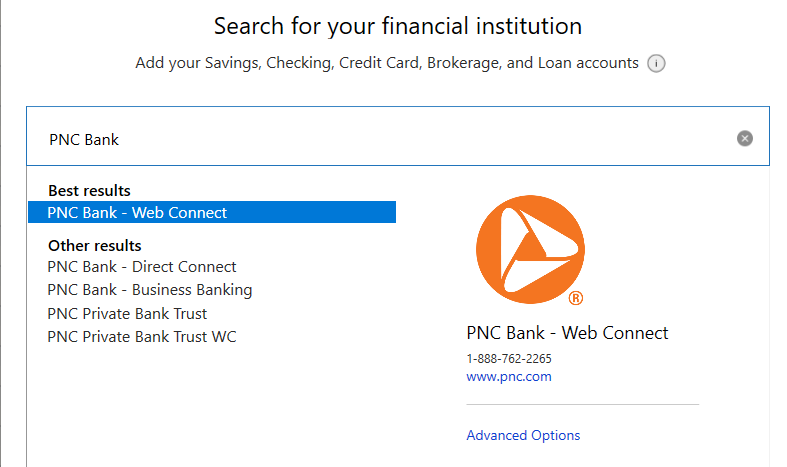
I think you might have selected the "wrong" bank. You need to seacrh for "PNC BANK - DIRECT CONNECT". If you select that as the bank, then Direct Connect will be an option under "advanced".
0 -
I looked for that already but didn’t see it as an option…
0 -
Trust me, it is there. It's under "other results" In the search box type "PNC Bank" .. You need the word "bank"
 0
0 -
OMG. Who would think that saying "PNC" would list a bunch of things, none of which is direct connect, but saying "PNC Bank" would include it. WHAT ARE THEY THINKING??
Thank you so much for the help.
0 -
Actually I should have tried actually doing bill payment before declaring success. Yes, I connected explicitly to direct connect, per your instructions. But no, in the account list, it still shows web connect, and it didn't reconnect my billpay.
0 -
if it still says web connect then you did something wrong. if you look at the online tab for the account …. Did you deactivate EWC there before attempting to reactivate using Direct Connect? The best place to activate DC is using “add account” and make sure you “link” your PNC account the process finds to whichever account is correct in. Quicken.
The easiest thing for you might be to call Quicken support. That is what I did the first few times I needed to reconnect an account using DC. They will be able to share your screen and walk you through the process. The wait times are short and the reps are pretty darn good.0 -
Okay @charlieo.Hemlock , here's the result of my testing the reactivation of one account at a time:
- If I accept the Savings account ("Link to Existing") and "Don't Add" the Checking account, the process completes normally and I can then run an "Update Now" on the Savings account with no errors.
- If I leave the Savings activated and then try to setup the Checking account, the process does not complete normally (ends with "We encountered an error while connecting to your bank"). This also breaks the ability to download from the Savings (OL.
- If I deactivate both, then try to reactivate the Checking only (select "Link to Existing" for Checking, and "Don't Add" for Savings), it fails with the "We encountered an error connecting…" message.
Sure wish we could find a common denominator between any of us with this OL-293-A error. It can't be that its simply because it's a checking account with bill pay — if I correctly understand what you said in your previous message, in your case it's only one of several checking accounts with bill pay that's giving you a problem. As to your wondering if "too much stuff" going on with your account might be the problem, that would not seem to apply in my case — I typically have just 30-35 checking transactions a month, with about 10 of them being bill pay transactions (none of which are set up as recurring, FWIW).
I'll keep you posted if I hear anything useful from PNC or learn anything else by trial and error. Good luck!
Greg
Quicken Classic Deluxe - Windows
Quicken User Since 2004
0 -
You found it!!! We both have a single checking account that is somehow corrupted as far as Direct Connect is concerned. It’s not our PNC profile …. it’s just a single account. That information should be helpful to the PNC issue resolution team. I even had the issue with a blank Quicken profile and setting the checking account up as new.
I think the bottom line is that the suspect checking accounts don’t really set up correctly in DC and that is the root cause of the OL-293.
I think you should report your findings to PNC.0 -
In my case I eventually got to the "PNC Bank" plus the extra advanced option to actually use Direct …. and then it wanted a PIN which apparently I didn't have or it didn't like. so the bank has to reset it.
0 -
If you don’t have the original PIN that was mailed to you by PNC, then PNC will need to mail you a new PIN. Mine took a week to arrive.
1 -
despite previous admonitions, try a database verify. You have nothing to lose as it is already corrupted. I had cross linked files earlier this year that wouldn’t download properly and multiple verify did fix it as each time it processed another “layer” corrected that uncovered another issue that the subsequent verify fixed.
You have nothing to lose at this point.
0 -
can you describe exactly how this is done? I’m not sure how this could be a Quicken “database” issue if it occurs with a “clean” and empty Quicken test file.
0 -
After having problems with direct connect I switched to PNC Bill Pay and started entering the transactions into Quicken manually. I finally decided to switch to EWC+ so I could download transactions until the direct connect method was completely resolved. The activation for EWC+ worked smoothly, the only problem being it changed my beginning balance in Quicken from 23 years ago but that was easy to fix. I received an email from PNC saying that my accounts had been linked to Quicken and also said the following"
Intuit will have access to your account(s) for one year. We do this to ensure your account information is not being collected if you are no longer using the app.
It appears the EWC+ method will have to be reactivated every year. Does anyone know if this is also going to be true with direct connect?
0 -
Direct Connect is different. The connection between PNC and Quicken is not a direct link like EWC. It is through a third party company called Direct Connect (that is owned by Intuit). Direct Connect acts as an OFX (Open Financial Exchange) provider. Direct Connect maps participating bank’s data (i.e. PNC) so that Quicken can use it. Unlike EWC+, you are authenticated every time you “connect”. That is why there is no 1 year limit. I had no “connection” issues with DC and PNC for over 15 years.
0 -
Just an alternative action. Don't do it if you feel it will destroy your situation, but here are the screenshots of the choices if you decide to try it. Make a copy and validate/repair that one instead. The PNC debacle at least for me and many others seems to have been mostly resolved but it appears like your situation has additional issues. If it was me, I'd try anything including voodoo dolls if it has the remote possibility of help.
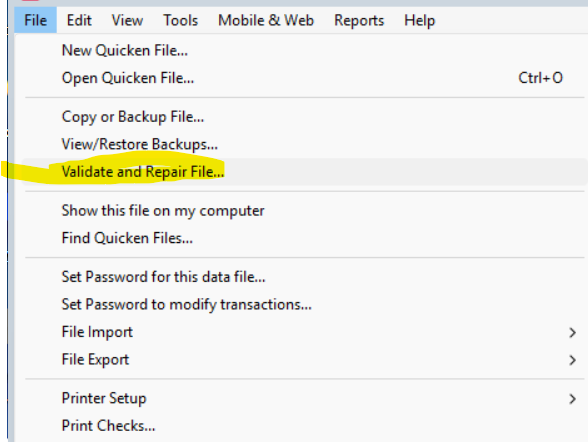
Then choose:
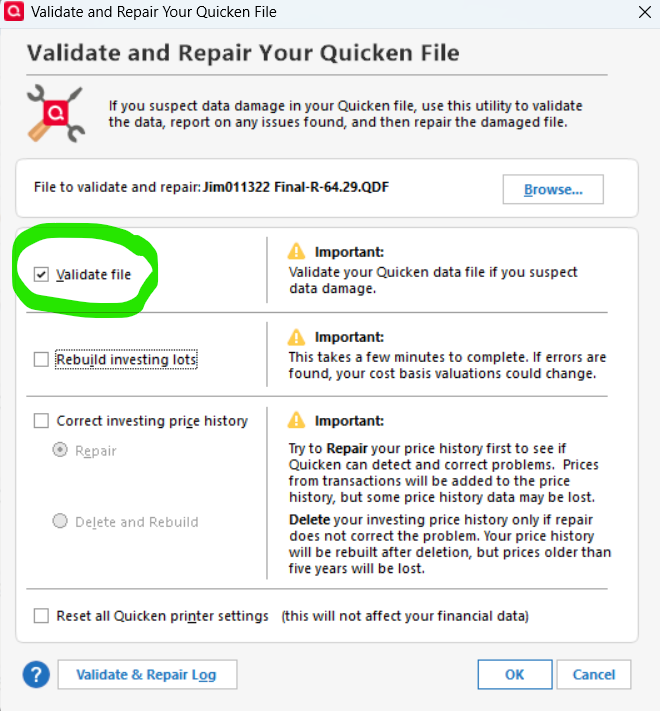 0
0 -
So, you are describing a Quicken “validate and repair”.
I do them on a regular basis. First thing I try when something doesn’t look or work right in a register. Quicken support uses it as a support tool too.
In my case and in other cases being discussed here, where Direct Connect is the issue, I’m not sure a validate and repair is relevant, but it might be. My problem with DC is with just a single account out of 8. Since I tested connecting to DC with a blank test profile, I think the problem is either at PNC or Direct Connect.0 -
Validate and repair should not be done unless you are having a real problem, and only then. This process removes bits of info that it thinks is not useful or can't connect to part of the program it thinks it should be connected with. It can often make mistakes leading to degrading of your database over time. This can cause issues later on. My database is over 20 years old and performs perfectly. I have done a validate and repair about 8 times. Use sparingly. I have talked to several database programmers, all of which confirm. Good luck!
0 -
While I appreciate your warning, could you elaborate on what exactly what one should be on the lookout for "a real problem"? Additionally, I have been a user of Quicken since 1998 (~27 years).
Thanks!!
0 -
JimTheo, When the issue has not resolved in 1-2 days by Quicken, and I have not figured out a fix, or found a fix through the community, or Quicken Tec Support (within 5 days), I will try validate and if that does not work super validate. If neither fixes the problem, I do not do either again until another fix is found from the above options. Good luck. I think we all need it. I have also been using Quicken since 1987 (5.25" floppy disks!) and have never seen it this bad, except maybe the Schwab move from Direct Connect 2 summers ago. It took about 4 months for all the bugs to be worked out. Good luck.
0 -
That makes much more sense. However, I never heard of "super validate" and it is not listed on Quicken help site. What is that and my guess it's a command line action?
0 -
To run Super Validate:
Prior to running the Super Validate, please backup your Quicken file. Once your file is backed up, follow these steps:
Super Validate:
- File
- Hold CTRL + Shift and click Validate and Repair File...
- Super Validate File
- Click OK
- Close the Data Log
- Close Quicken (leave it closed for at least 5 secs)
- Reopen Quicken and see if the issue persists.
1

