A step closer to treating sweep account as cash for Vanguard?

I'm now seeing the "Treat this money market as cash" option under the 'Online Services' tab of 'Account Details' for my Vanguard accounts. I don't remember that showing up for Vanguard accounts in the past so it makes me thing we may finally be getting the choice to choose how we want to treat money market sweep accounts at Vanguard (like we've been able to do with Fidelity forever).
While I can see the option and the ability to set/edit and customize the option, I'm not able to choose VMFXX from the drop-down window and can't see how I would be able to add something to that drop-down list or just type VMFXX as the 'Money Market Fund used in this account'.
If anyone knows how to get VMFXX onto that drop-down list let me know. Maybe it can't be done yet. This may just be the first step to being able to choose for ourselves how the sweep funds are treated. It may require Vanguard to do something on their end, but it seems that this is something Quicken can do on their own.
Can't wait for the day where I no longer have to convert Money Market ReinvDiv transactions to Div transactions.
Comments
-
Hello @Geobrick,
Thank you for reaching out! I am not aware of any way to manually add securities to that dropdown. Based on the information icon, it should show securities with a $1 per share price and a positive value, as reported online.

Does VMFXX meet those criteria?
I look forward to your reply!
Quicken Kristina
Make sure to sign up for the email digest to see a round up of your top posts.
0 -
Yes, VMFXX has a fixed NAV of $1. So, by the criteria given it should show up on the list. I might say that though there seems to be more going on behind the scenes that the developers aren’t mentioning.
One thing that comes to mind is how do they know a given security has a NAV of $1? And also do they require it to reported as a mutual fund? I would think the answer to those questions are in the “summary” part of the Downloaded transactions/security information.
2 -
Hello @Chris_QPW,
Thank you for confirming that VMFXX should meet the criteria. I forwarded this to the proper channels for further investigation.
Thank you!
(CTP-15632)
Quicken Kristina
Make sure to sign up for the email digest to see a round up of your top posts.
1 -
Curious. Why are you having to change reinvdiv transactions to divs?
Quicken Business & Personal Subscription, Windows 11 Pro
0 -
I've been hoping for a solution to this for a long time. Every transfer out requires manually selecting "average cost". I hoped when the new "treat as cash" feature showed up that it would fix the issue, but as the OP says it doesn't display VMFXX as an option and doesn't automatically identify it as the cash sweep account either.
It's not like Vanguard is a bit player either.
0 -
Because I prefer to see money market funds as cash and have them show up in the linked cash account in Quicken. Manually changing the ReInvDiv to just Div and deleting any Buy or Sell transactions of the Money Market Sweep funds accomplishes that.
It's something we've been able to do with Fidelity for years and I've been requesting Quicken offer this option for other brokerages as well. The small change I noticed leads me to believe they might be on the path to offering us this option.
0 -
While it seems that quicken developers are on the path to letting us choose how to treat money market funds, it wouldn't hurt to cast your vote on my suggestion from two years ago.
1 -
Has anyone else seen the "Treat this money market as cash" option under the 'Online Services' tab of 'Account Details' for their Vanguard accounts?
It's still not letting me choose VMFXX from the drop-down list the same way SPAXX is listed when looking at the same settings under Fidelity accounts.
I've discovered a few more things related to this new feature, and I'll put it in my next comment on this thread.
0 -
What I've discovered so far related to this topic.
It's a new feature shown under the release notes for Version R65.15 (US Versions, November 2025).
"Investments: NEW - A new customization option that allows you to specify how Quicken handles Money Market Funds (MMF) in a brokerage account. You can now override the default behavior and specify whether to treat the MMF as Cash or a Position, and also adjust the way the associated Cash Balance is calculated"[Edited by JH 12/23 to replace SPAXX with VMFXX for Vanguard accounts]
While still not able to select VMFXX in my Vanguard accounts, I can choose 'FDRXX' in my Fidelity 401k accounts.
Here's some screenshots showing how the new feature looks and a comparison of the look between a Vanguard and Fidelity account.First, when you open the 'Online Services' tab of 'Account Details' of your investment account, you'll see the "Treat this money market as cash" option.
Here's what it looks like when you click "Set/Edit" on a Fidelity 401k account, and you click on "see list of funds". (I don't know how to shrink the image).
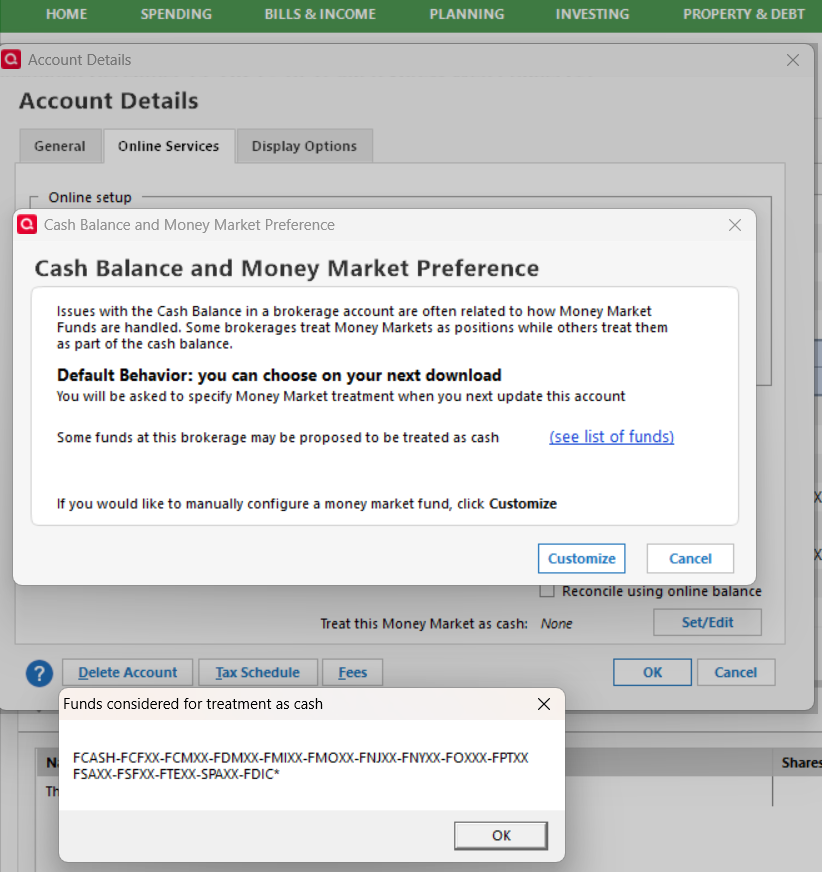
Note at the bottom where it lists the funds considered for treatment as cash. It doesn't include FDRXX (though for some reason includes SPAXX and this is a Fidelity account).
When you then click "Customize", it looks like this:
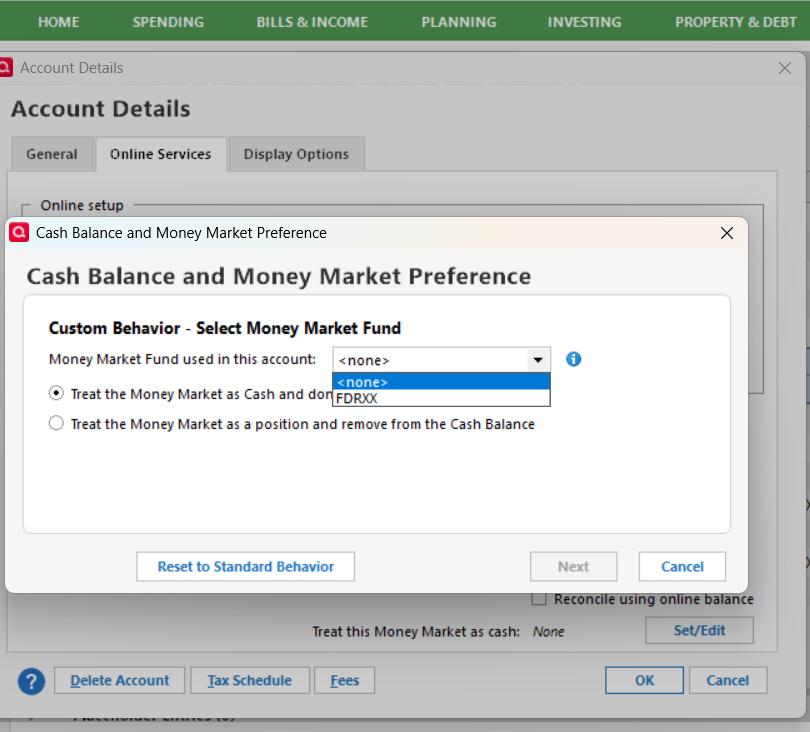
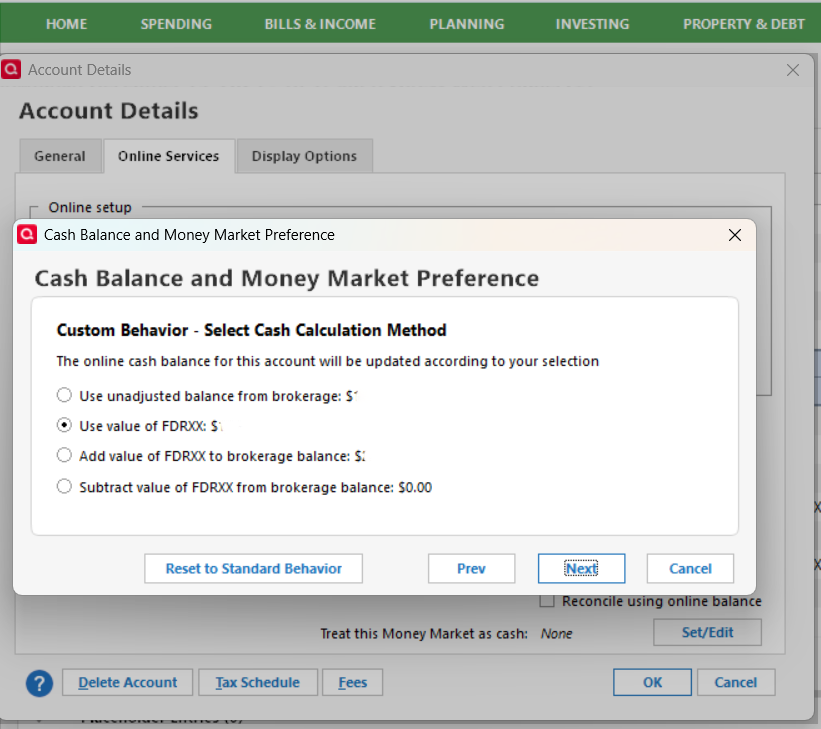
And you can see FDRXX in the drop-down list. The following screen shots shows what happens after you select a Fund (I've erased the amounts from the image).
For my Vanguard account, I'm not seeing the exact content in the dialog box. It's missing the sentence about proposed funds to be treated as cash and there's no link to list them. It looks like this:
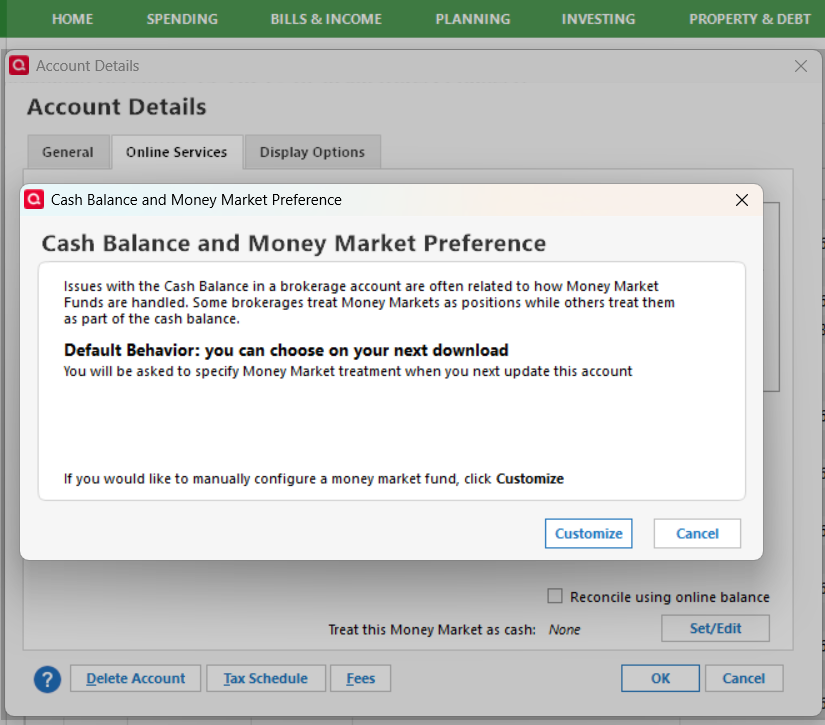
Clicking customize for this account doesn't allow selecting VMFXX or any other fund.
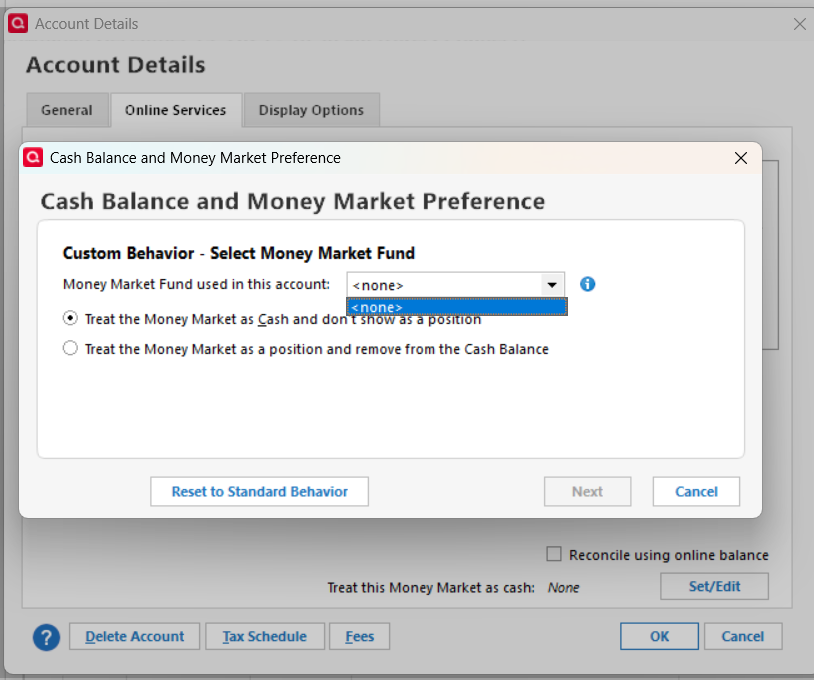
I'm sure this will eventually be fixed in a future update. This will make using quicken much easier for me.
0 -
Deleted the content of this post after getting help to edit the post above (thank you Jim_Harman).
0 -
I updated to R65.29 today and I'm still not able to select VMFXX as the fund to treat as cash in my vanguard account. I was hopeful because the release notes say, "Fixed issues in the wizard used to set cash treatment for money market funds in downloaded investment accounts. If you see a cash balance mismatch, re-run the wizard from Edit Account/Online Services." but whatever that fix was, didn't help with being able to choose VMFXX from the dropdown list.
1 -
Thank you for the follow-up,
I checked the CTP to verify if they expected this update to resolve the issue. The CTP is still open and ongoing. No new updates are available yet.
Thank you!
Quicken Kristina
Make sure to sign up for the email digest to see a round up of your top posts.
0 -
Is there a way to re-enable the edit option for my Dec 19th post? I'd like to replace "SPAXX" with "VMFXX" so it makes sense.
0 -
@Geobrick I corrected your SPAXX references for Vanguard accounts to VMFXX.
QWin Premier subscription1 -
My first reaction to this discussion was 'if its not broken don't fix it.' As a Vanguard customer I do not want to go through any of the Fidelity problems that has lead to the introduction options in Quicken to handle money market funds.
On the other hand I realized that I had a Schwab brokerage and checking account which I setup in Quicken with the "show cash in a checking account" feature that worked quite well. Dividends were downloaded in the brokerage account and transferred to the checking account and interest payments were downloaded in the checking account. Subsequently I used that feature with my Vanguard accounts to manage cash in a virtual checking account that basically mirrored a money market fund in my Vanguard account. Looking back I think this may have created unnecessary complexity although I don't remember how much manual editing was required to manage downloaded transactions. For the most part I think it worked without much effort. When I converted to the Vanguard brokerage platform which provided a settlement fund I did not see any need to carry forward the linked checking account.
I admit to being slightly annoyed by having to select the cost method every time I make a transfer to my actual checking account, but in the realm of Quicken annoyances this is minor. If Vanguard had the option to set up the settlement funds as checking accounts that would have been nice. As it is Vanguard reports the earnings as dividend on their 1099B so I am content with the status quo. Efforts to introduce new features and improvements in Quicken have typically not gone well.
1 -
Quicken Inc doesn't have a choice in this matter. It is the financial institution that decides what connection methods they want to support.
0 -
And I am dreading the day when Vanguard switches to EWC+. Quicken may not control this but I hope they do a better job reacting to it than they have done with Fidelity.
0 -
I’ll be glad if they will fix cash plus! My rep is working to see if someone will fix it.
Quicken Business & Personal Subscription, Windows 11 Pro
0 -
I have been wondering about cash plus. It would be interesting to me if you could share some specifics about how it is working (or not) in Quicken. Maybe it already is a discussion in the investing section.
0 -
Unusable now. Tell your rep you refuse to get it until it works…. Doesn’t even give name of payees.
Quicken Business & Personal Subscription, Windows 11 Pro
0 -
While no one wants new features to break things, that's just how it works (or doesn't work) with software development. Something, internally or externally, is going to eventually change that breaks something else that was working fine so I understand your resistance to any non-mandatory changes.
I've been wanting this new capability since I opened a Vanguard account in 2019. I want to see the sweep funds in my accounts represented as cash. It's more intuitive to me and lets me know at a glance in quicken my total cash (cash plus cash equivalent) balance. The brokerages themselves represent them as cash equivalents (and includes them in buying power amounts) on their websites and in statements. I'm happy Quicken is finally rolling out this feature.
As a follow up to the status of the new feature, I noticed that in addition to it working with Fidelity 401K accounts (post EWC+ transition) for FDRXX, it's also working for Schwab accounts and letting us select SNVXX to be treated as cash. I tried it in my sisters account, and it worked perfectly. It deleted all the buys and turned the ReInv_Div transactions to plain Div transactions. (I figured out how to make the images smaller)
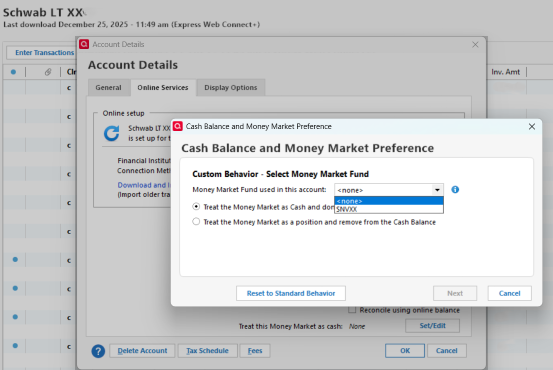


I did this for all four of her Schwab accounts and it worked great.
For Vanguard, it could be that Quicken is waiting for the transition to EWC+ before implementing this. I'm looking forward to the day when I barely need to manually override any quicken transaction. This is a big step towards that day. Can't wait!
0 -
I understand your point, and I give credit to quicken for be willing to accommodate folks who apparently want this capability. My only issue, though, is what's wrong with just doing it as Vanguard does it, I.e. using a settlement fund. That is in fact what is happening in the "real world" isn't it?
I have gotten used to the settlement transactions and have no problem working with what is in fact the reality at Vanguard.Quicken Business & Personal Subscription, Windows 11 Pro
0 -
The 'real world' way may be fine for a lot of people. I'd rather see all the cash and cash equivalent holdings summed up at the top of the banking section in quicken and not have to go into each account to find out how much cash equivalent funds I have (then manually add that to the actual cash or come up with a custom report that sums it up for me at the same time it shows me where it's being held). Giving us the choice is a good thing. Plus, all those extra buy/sell transactions take up too much room in the register.
0



