Oakmark Funds & Janus Transaction Download - Issues with Password [Edited]
Comments
-
I just wanted to add my voice to others. I too am running version R65.17 Quicken Classic and am facing the same problem expressed by other re: the Oakmark password problem. To Quicken support - please get on this ASAP and year transactions are many. My thanks to others for the suggestion to roll back to R64.30.
0 -
Thank you for reaching out,
I added you to the ticket, so that our teams know you're also impacted by this issue.
Thank you!
Quicken Kristina
Make sure to sign up for the email digest to see a round up of your top posts.
0 -
Hi @Quicken Kristina , please also add me to the ticket, thanks
Marc
1 -
I am running Quicken Classic Premier version 27.1.65.17 on Windows 10 Pro version 22H2 Build 19045.6691 64 bit and am facing the same problem with Janus Henderson.
Quicken user since Quicken for DOS
1 -
Hello @marcaronson408 & @rich,
Thank you for letting me know you're also impacted by this. I've added you to the ticket also.
Thank you!
(CTP-15582)
Quicken Kristina
Make sure to sign up for the email digest to see a round up of your top posts.
0 -
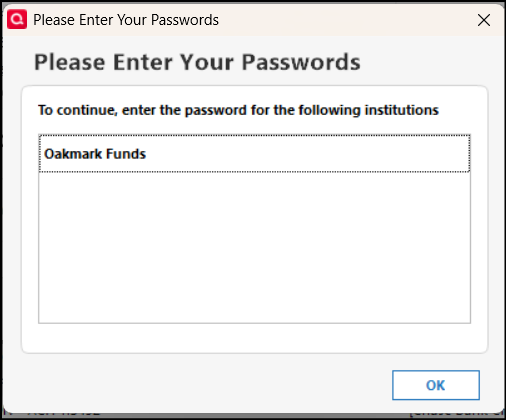
Having same issue with Oakmark download. When I attempt to download from the Oakmark menu I am asked to input the Oakmark password. When I add the password, I get the below message. I am using Quicken Classic release 65.17 build 27.1.65.17 with the data file on my local machine.
 0
0 -
I'm having the same problem with Quicken Premier R65.17 Build 27.1.65.17. Please add to ticket.
1 -
Please add me to the ticket. Same issue
R65.17 Build 27.1.65.17
Did two patches take helped for a couple of tines.
Resetting one of the accounts does make it work for one or two times. Reset before doing the update. Does not fix in the long term.
1 -
Hello @Robin Davidman & @StevenC,
Thank you for letting me know you're also impacted by this issue. I added you to the ticket.
Thank you!
Quicken Kristina
Make sure to sign up for the email digest to see a round up of your top posts.
0 -
Please add me to the ticket. Same issue with Janus accounts and inability to enter password.
R65.17 Build 27.1.65.17
0 -
Same issue here with Janus. I do nut use the vault, but cannot get past the password screen to execute the update.
R65.17 Build 27.1.65.17
@Quicken Kristina Can you open up an official alert?
0 -
Upgraded to version 65.29 this morning. I had already run the one step update for the day using version 64.30 and typically, once it works with no password issues at Oakmark, it keeps working for the day. I'll report back tomorrow if it works using the password vault.
1 -
Hello @Steve Finance,
Thank you for letting us know you're also impacted by this issue. I added you to the ticket.
Thank you for the update @algee99,
Please let us know how it goes tomorrow!
Quicken Kristina
Make sure to sign up for the email digest to see a round up of your top posts.
0 -
Quicken Deluxe for Windows - just installed new update today 12/22 but the problem hasn't been erased
I've had a Janus account for decades. Never had a problem with one step update until the past couple of weeks. I've deleted and re-added my password in the vault, and when I try to update I get a popup that says you need to add the password for Janus, but there's no window to add the password, and I delete and re-add my password and still no dice.
0 -
I'm not able to add an Oakmark password in the password vault or in updating Oakmark directly from the Oakmark "Update Transactions" button in any release later than release R64.30. Release R64.30 allows me to add an Oakmark password, although it warns that Oakmark requires no more than eight characters (Oakmark requires between 10 and 20 characters). Any later release will not take the Oakmark password. If I try to add the password, I receive a request to enter the Oakmark password, even though I have just entered it. Is anything being done to resolve this issue? this has been an issue for weeks now. It's the end of the financial year, and accurate financial information is critical at this time of year.
[Merged Post]
1 -
Update to my upgrade yesterday to version 65.29. No joy, same password errors as the previous release. Downgrading back to 64.30, where I know things work fine.
0 -
Neither Q, nor you, can fix this. Oakmark has provided incorrect info ("max 8 characters") to Intuit and Oakmark needs to correct the info that Q/Intuit has.
You can try contacting Q Support, via the link at the top of this page and see if they'll forward the issue to Oakmark, but you'll probably need to contact Oakmark also.
[Merged Post]
Q user since February, 1990. DOS Version 4
Now running Quicken Windows Subscription, Business & Personal
Retired "Certified Information Systems Auditor" & Bank Audit VP0 -
Hello @HS32806,
Thank you for the detailed explanation, and I understand how disruptive this is—especially with year-end financial reporting underway.
I’ve gone ahead and merged your post into this existing thread since it describes the same issue. This is a known issue that has already been escalated internally, but at this time we do not have an ETA for a fix.
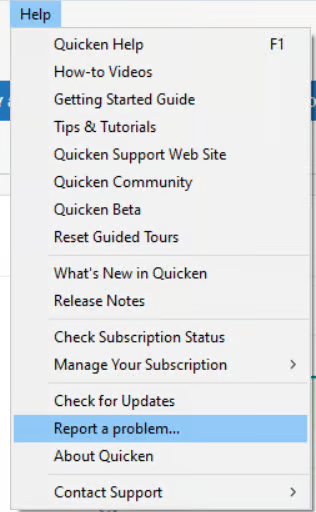
To help support the ongoing investigation, please submit your log files by going to Help > Report a Problem.
Once submitted, those logs can be added to the active ticket (CTP-15582), which helps our teams gather additional data and prioritize resolution.
We appreciate your patience and understand how critical accurate data access is right now. Updates will be shared as soon as more information becomes available.
Thank you!
-Quicken Anja
Make sure to sign up for the email digest to see a round up of your top posts.0 -
Same issue lately with Oakmark
0 -
Hello @PR06074ATT,
Thank you for letting us know you're also encountering this issue. I added you to the ticket.
Thank you!
Quicken Kristina
Make sure to sign up for the email digest to see a round up of your top posts.
0 -
just updated to Quicken Classic Premier version 27.1.65.29 on Windows 10 Pro version 22H2 Build 19045.6691 64 bit. Deactivated \ reactivated Janus Henderson (Growth & Income) - no more password issue because now the Online Services Connection Method is Express web connect which does not allow transaction downloads because the Tracking Method is Simple. Still need this fixed.
Quicken user since Quicken for DOS
0 -
Thank you for your reply @rich,
Janus and Janus Henderson are two different connection options in Quicken. The password issue is happening with Janus, not Janus Henderson.
When I check the FIDIR (list of supported financial institutions), Direct Connect is not a supported connection method for Janus Henderson.

Since it is the financial institution that decides what connection methods they will support, I recommend that you contact them directly to let them know that you want Direct Connect.
Thank you!
Quicken Kristina
Make sure to sign up for the email digest to see a round up of your top posts.
0 -
Earlier you stated:
Janus and Janus Henderson are two different connection options in Quicken. The password issue is happening with Janus, not Janus Henderson
Janus and Janus Henderson actually merged back in 2017. If you browse to "www.janus.com", it takes you to Janus Henderson.
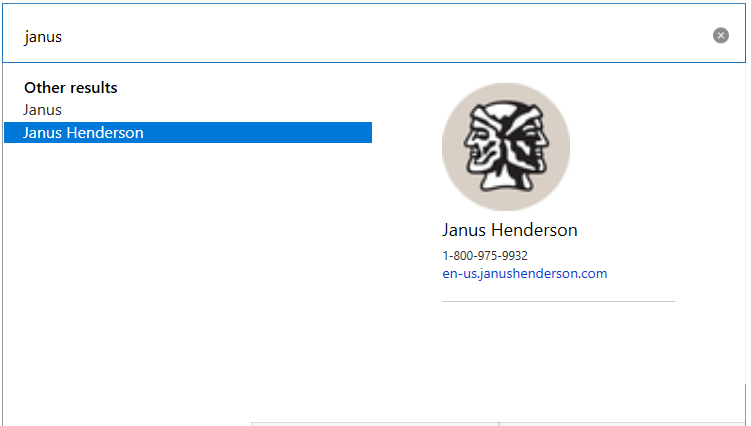
I do see both options if I attempt to add an account to Quicken. When I browsed to the website listed under "Janus Henderson" ("en-us.janushenderson.com"), I got the error that it does not exist. The website listed under "Janus" works. While "Janus" and "Janus Henderson" have different phone numbers listed, they both connect to a VRU that starts with "Welcome to Janus Henderson". (I called them both)
I am connected using "Janus", which as you stated, uses direct connect.
I am not sure why Quicken has both "Janus" and "Janus Henderson" listed — perhaps for some sort of legacy support? I wonder if they are both still needed…
You might want to try connecting Quicken to the financial institution named "Janus". It might work for you.
Marc
 0
0 -
Thank you for your reply @marcaronson408,
Janus and Janus Henderson actually merged back in 2017. If you browse to "www.janus.com", it takes you to Janus Henderson.
Good to know.
I am not sure why Quicken has both "Janus" and "Janus Henderson" listed — perhaps for some sort of legacy support? I wonder if they are both still needed…
It sounds like after merging, they either decided to keep both connections active or they never sent the updated information to the aggregation service provider.
Thank you!
Quicken Kristina
Make sure to sign up for the email digest to see a round up of your top posts.
0 -
Can you Please add me to the list of people having this Janus Password problem? The Tracking Method Simple - Positions Only is not adequate and The Janus with Complete - Positions and Transactions will only work for 12 hours and then back to the screen like Oakmont above but with Janus asking to please enter password when the password has already been provided. I have called into support many times and also called Janus. Each keeps pointing the finger at each other and Quicken phone in support will not acknowledge this password problem and it seems well documented here in this thread. I have also sent messages within the Quicken Desktop Version to report a problem but never get any type of reply back to me. Please Help us ALL here.
1 -
How many pages of complaints does it take for Quicken to open an alert?
0 -
Hello @vpaul,
Thank you for letting us know you're also seeing this issue. I added you to the ticket.
When you send a problem report, you will not receive a direct response. While you do not receive a response, these submissions do go directly to a database that is accessible by members of our Product and Development teams, escalation teams, and other internal support channels.
Thank you!
Quicken Kristina
Make sure to sign up for the email digest to see a round up of your top posts.
0 -
December 2025 release Version 65.29 (Build 27.1.65.29) still has the problem.
Back to Version 64.30.
1 -
I still have Quicken Premier Windows 51.12 installed on another PC - see attached "QuickenVersion.jpg".
I have been using Janus and Quicken for years. The above PC is using Direct Connect method for Janus, not Janus Henderson - see attached JanusConnection.jpg.
I changed my Janus web site password since I last updated Quicken on that PC, so now when I run One Step Update on it, Quicken asks if i have changed the password. When i try to change the password in the Quicken Vault, Quicken gives an error message saying the password can be no longer that 8 characters now - see PasswordLength.jpg. My old password was 20 characters which worked fine since July 2015, my new one is also 20 characters - see attached JanusPasswordRequirements.jpg.
I sent an online support request to JanusHenderson:
"I am using Quicken Classic Premier version 27.1.65.29 on Windows 10 Pro version 22H2 Build 19045.6691 64 bit to manage my Janus Henderson Growth & Income Account.
Does Janus support Express Web Connect (EWC) + or Direct Connect methods ? If so, how do i set it up ? I have deactivated \ reactivated at least twice but EWC is being automatically applied.
if no, what is the status of changing that ? And since EWC does not download transactions, is there a way i can download a Quicken Web Connect File from Janus ?"
Their answer is:
"While Direct Connect through Quicken is supported by the Janus Henderson website, Express Web Connect (EWC) is not. There are no current plans to change this.
For technical assistance using Quicken, please use the link below. Janus Henderson cannot provide technical support for this software program.
For additional assistance, please contact a Janus Henderson Representative Monday through Friday from 9 am to 6 pm Eastern Time at 800.525.3713."
Their above QUICKEN link goes to
Please get this escalated, however that process works, to the correct team so this can be fixed - very, very frustrating !
Happy Holidays
.
Quicken user since Quicken for DOS
1 -
Quicken Kristina, please add me to the Janus ticket for notification of issue resolution.
For everyone else, I've been through this before, at least twice, with Vanguard and with my local CU. Both had been technology rock stars and early adopters. My CU changed something and I can no longer download transactions from them. With Vanguard, there was a bit of an uproar and "tickets" were filed, and it was actually eventually restored to functionality.
But there is something everyone needs to understand about all this. "Kristina" seems to mention it and talk past it without actually explaining it. Not sure Kristina even really knows. There are several "connection" types, explained at this Quicken link:
"Web Connect" is just logging in to the bank web site and following some transaction export/download process, hopefully to a quicken QFX file and then importing those transactions with a "File→Import" process. This is where I finally landed with my CU. The download file is very detailed and imports cleanly and was easier than I feared it would be, but you have to pick start/end dates for the download, and transactions on day-boundaries are easy to miss. (Each of my CU accounts had a missing transaction or two when it came time to reconcile this month.) The QFX file contains the bank account number, which matches up with quicken account information so that it knows where to import transactions to. Banks that only support other "download" generics like a CSV file will give you transactions, but getting them uploaded into a complex quicken file is problematic.
The "Direct Connect" option is a 2-way protocol that requires hardware/servers/software on the bank side to communicate directly with Quicken, and once they support this, they can authenticate with your Quicken and download transactions to specific accounts. The "2-way" nature of this is also what allows Quicken to generate changes to the bank, like bill pay, for example. Personally I've never used the "2-way" features to push changes from quicken to create bank transactions. I wouldn't care if that went away. But I really want the full transaction download capabilities. I believe that's what everyone in this thread has referred to and has enjoyed for decades and expects to have supported forever.
The downside of "Direct Connect" is that it requires willful partnership between two independent companies for it to work. And while it's cool for Quicken customers to get this ability to download details, I can see that this ability doesn't offer the BANK any direct benefits, except the indirect goodwill of it's customers. The BANK actually wants to be in control and curate this information to its customer/investors. They invest in their own web infrastructure to provide an online experience. And all they change and improve gets dragged down on by also having to maintain these older servers/protocols, which are probably being used by a smaller and smaller percentage of their customers.
When a BANK says "Enough!" and ends support for Direct Connect, that doesn't automatically imply they will supply the same capability via a "newer" protocol. And there is very little Quicken can do about it to provide you/us the the same experience.
There are newer supported communication methods, that I believe are designed to give improved TRANSACTION downloading, called "Express Web Connect" and "Express Web Connect +". I suspect that these are quicken's response, saying, "Hey Banks, if you don't like Direct Connect any more, how about EWC+? It's one-way communication instead of two, so that's simpler." I don't know the details under the hood, but it probably involves an API that lets Quicken query for transaction information in a formal way, rather than just by web-scraping. And maybe it's generic and open, and Quicken hopes to establish a new method that will entice bank-support. And if customers stomp and screen loud enough at the BANKS, they will either consider accellerating EWC+ support before dropping DirectConnect support.
But this is why both companies point at the other and say "it's their problem". Quicken points to the bank and provides generic "Kristina" responses that "the bank says they don't support Direct Connect" any more…talk to them". The BANK says "who's software is failing to perform their function? Quicken? talk to them…"
We Quicken customers have enjoyed seamless integration for so long and so broadly that we feel it to be a "right" for us to have it continue indefinitely. We don't pay the banks to support a secondary data access method, and we are annoyed at yearly Quicken subscription fee to pay them to keep the lights on. I get it. There hasn't been a "new" quicken feature that I've cared about in 20 years, besides transaction detail download. Dump the rest of the tool bloat-ware and let me download and balance my transactions in peace. Quicken realized that. I'll never pay for new features, but I'll pay to keep the lights on, so there's the subscription. But that's not nothing. What we are asking for is not trivial and it's not entirely in Quicken's control. But it is disappointing that within the last year, I've lost 3 of my financial services, and I suspect the writing is on the wall.
Here's what I would like:
- Quicken, keep working urgently with bank partners to maintain transaction download, either by getting banks to continue supporting DirectConnect or to begin supporting EWC+.
- Quicken, be honest and transparent about your challenges. This can't be a mystery to you, so why keep your loyal customers in the dark.
- Quicken, if all else fails, encourage banks to support QFX download.
- Quicken, please stop "allowing connection" to a bank that converts my account to "Simple Investing" mode. No one with existing transactions wants them to get auto-hidden. Auto-FAIL that process or allow the person to opt-in knowingly.
- Quicken, clearly document on your official support pages what is happening now. Create a "wall of shame" for banks backing out of their current capabilities. Advertise proactively to us through the tool when changes happen. Don't let me spend hours trying to figure out if it's a network glitch or a bank change.
- Customers: Complain to your banks. Report your deep-seated frustration at their changes and your willingness to leave.
- Customers: Temper your "give me back what I want" attitude and understand the issues (helped by Quicken and Banks being more open and forthcoming).
- Banks: Do what's right to support advanced external banking features. Work with Industry to help power users. Don't leave them in a lurch and point fingers like you don't know what happened.
Vanguard fixed their issues for now.
My CU, at least they support QFX download.
Janus, I hope we can create another uproar and get them to dial back their ambitions and restore capabilities. Janus has transaction download to CSV files….sigh.
Quicken, please don't make it a USER problem to discover these issues. My yearly subscription comes due in June, and if you can't stem the tide of banks dropping support for your tools, then there will be NO REASON for me to continue to pay you. It's literally the ONLY reason I pay you money, so that my downloads from ALL my financial companies continues to work. Figure it out.
3






