Missing Button in Investment pop-up window

RELEASE R64.30 (09/25/2025)
When entering multiple transactions in an investment account (in my case, SELL), there used to be 2 buttons in the lower right side of the pop-up window — ENTER/NEW and ENTER/DONE. When I would enter the data for a transaction, I could hit the ENTER/NEW button and the transaction would be entered and the investment data (investment, # shares, etc.) would be erased, but the pop-up screen would remain for the next transaction in that account. For the last transaction for the account, I would hit the ENTER/DONE button to complete the transaction entry and the pop-up window would close.
RELEASE R65.15 (11/20/2025)
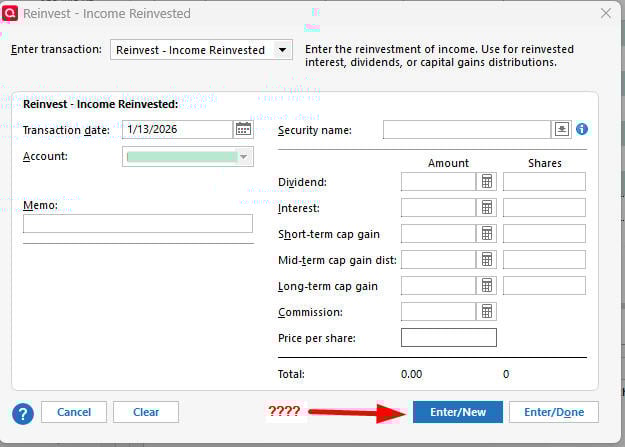
Under the same scenario, there is only 1 button in the lower right corner of the pop-up window — (ENTER/DONE). For each transaction in the same investment account, I have to open a new pop-up window and set the date for the transaction.
See attached photos.
Comments
-
Hello @psobilo,
Thank you for reaching out! To clarify, is the button still missing when you update to R65.29?
I look forward to your response!
Quicken Kristina
Make sure to sign up for the email digest to see a round up of your top posts.
0 -
Yes. I have the latest release R65.29 installed, but the button is still missing. I was able to verify when the issue occurred by using my laptop and reinstalling Quicken, then stepping through the release updates until the button disappeared.
0 -
I have the exact same issue - same release R65.29. The ENTER/NEW button is missing. It was there in early December, the last time that I did multiple investment transactions.
0 -
Update:
I have discovered that if you follow this sequence of steps, the "Enter/New" button suddenly reappears.
- On a new transaction line, enter the date of the transaction and press <Tab> button to move to next column.
- In the Transaction "Action" column enter "ReinvInt" or "ReinvDiv" or you can pick them from the drop-down list - then press <Tab> button.
- The Enter Transaction dialog box appears - with the "Enter/New:" button back where it was.
 1
1 -
While that works and I can change to SELL after the pop-up window appears, it's a work-around for a function that should be (and was ) available by default. I hope the next release returns the function; I can't be the only user that misses this function.
0 -
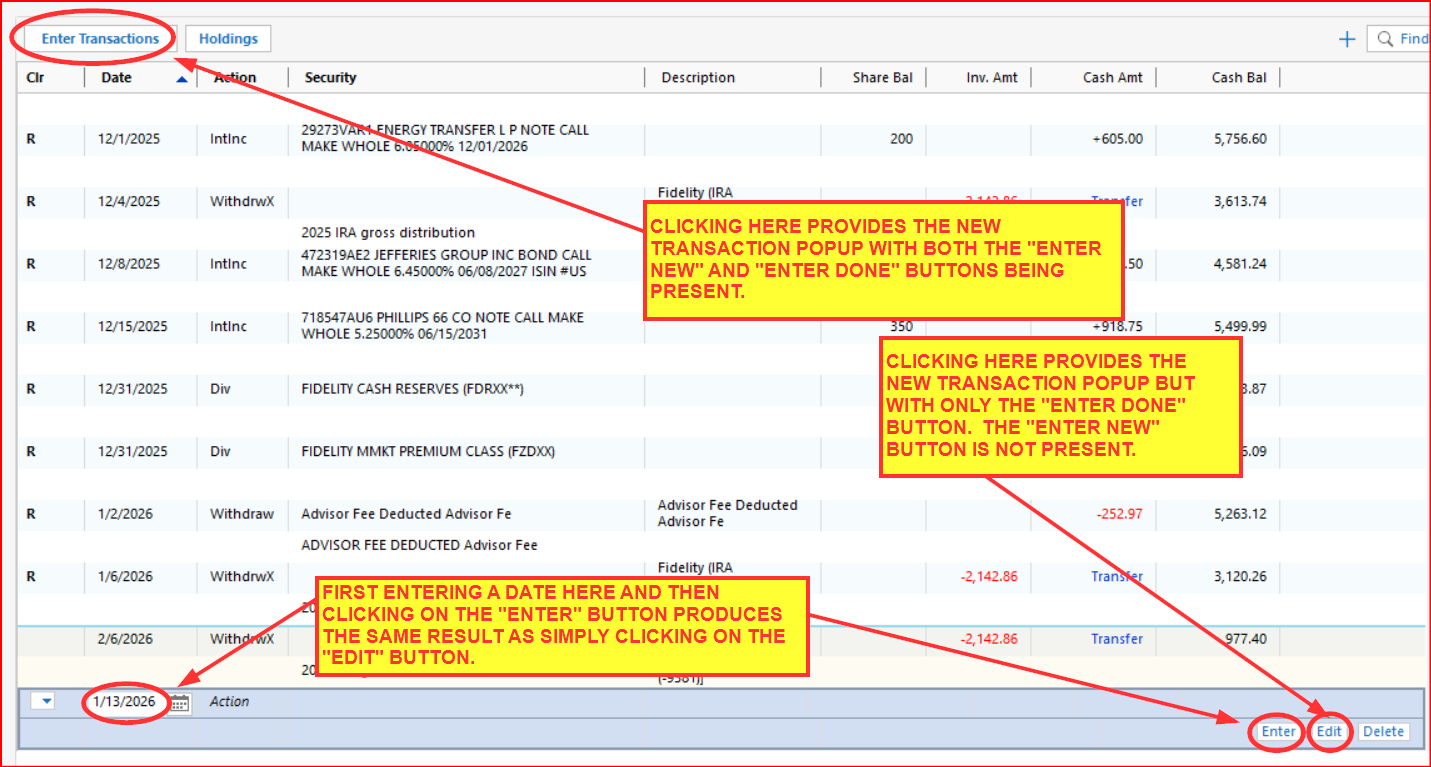
I found that clicking on "Enter Transactions" provides the popup with both the "Enter New" and "Enter Done" buttons being present.
But clicking on the "Edit" button of a new transaction line or first entering a date in the new transaction line followed by clicking on the "Enter" button produced the popup without the "Enter New" button.
I don't know if it has always been this way or if something has changed because I only use the "Enter Transactions" button to add new transactions.
Quicken Classic Premier (US) Subscription: R66.23 on Windows 11 Home
1 -
I'll have to remember that going forward. It would be nice if they documented this in the Release Notes, but I also realize they would have to write a book to document every feature/change every time they came out with a new Release. : )
0 -
Yeah, it would be nice to have everything documented but I'm not sure there is anyone alive who knows everything about all of the features and functionality in Quicken. Help and Quicken Support have a lot of good information but even they are lacking. That's what I find to be really valuable about this Community. There are many, many users who read and post here and everyone has at least a slightly different experience and understanding of the product. There is more product knowledge and information that can be gleaned from this Community than can be found anywhere else.
Quicken Classic Premier (US) Subscription: R66.23 on Windows 11 Home
0 -
Boatnmaniac - thanks for the information. Have lots of transactions to enter and not having the "Enter/New" was causing a lot of extra clicking.
2 -
Definitely a help when there are multiple transactions within an investment account. 👍️
0 -
This is sort of interest discussion. It would have never occurred to me that the Edit button on that new transaction should do something different than what it does on the existing transactions.
Then again, I got "trained" very early on that it wasn't a good idea to try to enter transactions from the register. So many quirks and problems trying to use it instead of using the Enter Transactions button.
If you think of the edit existing transaction use case it is easy to see why the Edit button dialog doesn't have New Transaction on it. You have selected a given transaction to change. The ironic part of this is that it takes more code to have this distinction. If you look closely, you will see that they are both the same dialogs, but in the case of the Edit button they have hidden some of the controls.
0 -
I think it sort of makes sense that hitting Edit on a transaction would bring up just the "Enter/Done" dialog because that is for editing an existing transaction.
If you want to enter a new transaction from the transaction list you would start by entering or tabbing over the date.
If you want to enter one or a series of transactions you can click on Enter Transactions to get started and it gives you the Enter/new option. Enter/New defaults to the same date and Action you used previously.
QWin Premier subscription0 -
Instead of using the buttons to open the pop-up window, I used to just double-click on an empty transaction line. Going forward, I'll have to remember to use the "Enter Transactions" button.
0





![20260106_142509[1].jpg](https://community.quicken.com/api/v2/media/download-by-url?url=https%3A%2F%2Fus.v-cdn.net%2F6031128%2Fuploads%2FGYQU04YC977F%2F20260106-142509-5b1-5d.jpg)
![20260106_142659[1].jpg](https://community.quicken.com/api/v2/media/download-by-url?url=https%3A%2F%2Fus.v-cdn.net%2F6031128%2Fuploads%2F4OAAWUWLVN9S%2F20260106-142659-5b1-5d.jpg)