Investment accounts are loading very slowly

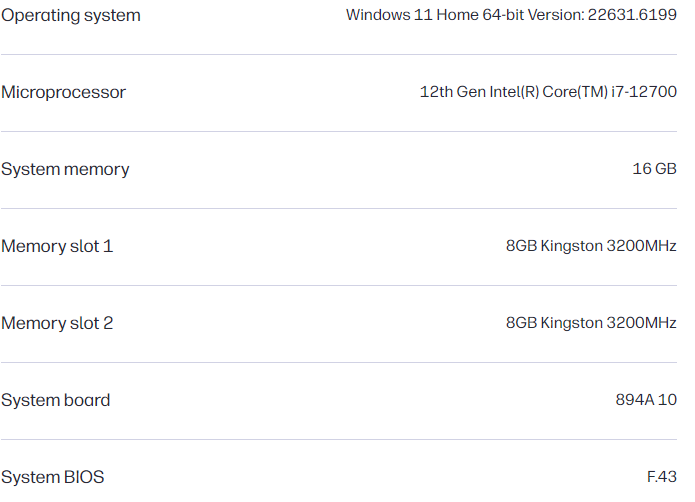
Windows 11, Quicken R65.29, Build 27.1.65.29 More system details below.
I run Quicken off of the Solid state Drive.
This has been ongoing for months, but seems worse recently. It takes 10 to 15 seconds for an investment account to load. I have 7 accounts to update and reconcile. It's frustrating to take this much time. If I load one and later come back to it, it is better, but still takes 5+ seconds to load. I have performed all of the recommended fixes without success. I have validated and supervalidated the file. I have archived the investment accounts. I tried archiving the entire file from 11 years to 5 years without any change in the speed. I rebuilt investing lots and deleted and rebuilt the pricing history. I examined hidden files and made sure that none were updating. I reset the cloud data. I turned off all other software except Norton antivirus. VPN is not running. Appreciate any other recommendations or fixes to try.
The investment accounts open about the same speed on my Surface Pro 7, running a 10th generation processor with 8 of Ram.
More system details.
Comments
-
Hello @fmashby,
Thank you for sharing your experience! Since I see you listed a 12 generation microprocessor, the situation described in this Idea post may apply:
I can see you already followed some of the troubleshooting recommended in our article on troubleshooting performance issues, but there are some which may still be helpful:
Try the following
If your computer meets the system requirements, here are several tips to improve performance:
- Exit all open programs that you are not using.
- Restart your computer, especially if it has been used for a long period of time since it was last restarted.
- Remove items from the Microsoft® Windows® Startup group.
- Run the ScanDisk utility, followed by Disk Defragmenter utility. Consult Windows Help for complete information.
- Disk Defragmenter should not be used with Solid State Drives (SSDs).
- Turn off backup programs that may be running in the background (ex: OneDrive, Dropbox, Carbonite etc.).
- Ensure your Quicken file is not saved in a compressed drive. We have observed performance issues (such as slowness) when Quicken files are saved on a compressed drive.
- Check if other programs are running slowly. This could indicate an issue with your system instead of Quicken.
- Whenever you you complete a One Step Update, ensure you resolve any errors listed in the One Step Update Summary.
Third, try Copying and Validating your file
If the suggestions above do not improve performance, or if Quicken runs slowly in only certain areas of the program, follow the Copy your file and Validate steps below.
To Copy your file and Validate
Always make a backup before performing complex procedures. This ensures that you have a "fall-back" file you can use to get back to where you were when you started.
- Go to File > Copy or Backup File (do not choose Year End Copy for this procedure).
- Select Create a copy or template and click Next. Leave all the settings, including file name and checkboxes, at their default (change nothing on this screen). Simply click Save Copy.
- After the Copy is complete, choose to Open New Copy.
- In the New Copy, go to File > Validate & Repair File, check the Validate file box, and click OK. This will ensure there are no lingering issues with the data in this file.
- If your issue was with Investment account(s) slowness or other data issues with an investment account, be sure to also select Rebuild Lots and Correct investing price history: Repair during this procedure.
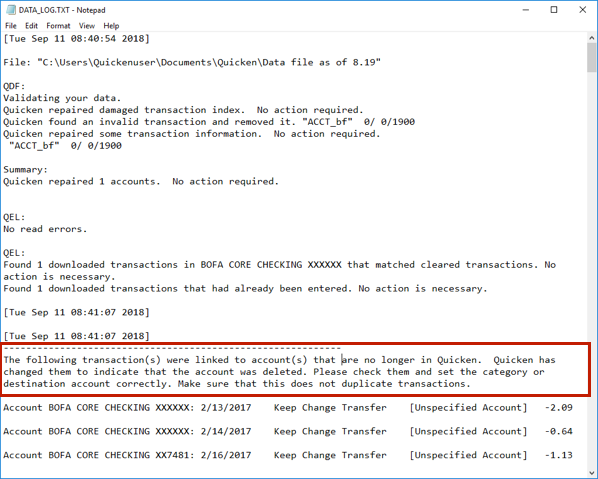
- After the Validation process is finished, you will see the Data_Log appear in a Notepad window. This file is a summary of the Validation results.
- Review the Data_Log.txt for messages pertaining to the quality of your data and resolve any that are advised with instructions you should follow.
Example of Data Integrity Issues in Data Log
Another thing which can sometimes help is doing a clean uninstall and reinstall of Quicken. For instructions, see the post below:
I hope this helps!
Quicken Kristina
Make sure to sign up for the email digest to see a round up of your top posts.
0 -
Quicken Kristina
Make sure to sign up for the email digest to see a round up of your top posts.
0 -
I'm still having slowness issues in my investing accounts. I'm not sure how to change the performance of the processor for quicken. I am working on a desktop, so battery power is not an issue. I have not reinstalled. I can try that next. Can you give a reference for how to force the processor to performance and the GPU to above normal. Thank you.
0 -
Thank you for your reply,
According to Microsoft's support site:
If power usage is not a concern, selecting Best performance can help the CPU run at higher performance when needed.
- Select Start > Settings > System > Power & battery.
- In the Power mode dropdown, select Best performance.
Note: Selecting Best performance increases power consumption. On laptops, this setting will drain the battery more quickly and may cause the device to run warmer. Use this option only when you need maximum performance and when power availability is not a limitation.
Thank you!
Quicken Kristina
Make sure to sign up for the email digest to see a round up of your top posts.
1 -
Thank you. I have chosen Best Performance. I have reinstalled Quicken. That required some help as Norton firewall initially blocked the reinstallation. I have tried all of the suggestions, and the slowness is still intolerable. What used to take a minute or two now takes up to 10 minutes. I also have noted slowness with downloading to my accounts and errors with download. Downloading is taking minutes when it used to take much less than a minute. Often, a flag indicating a download is present, but no downloads are present. After updating transactions for that account, again, the transactions are present. My download speed is between 900 and 1,100 Mbps. I have no trouble with the internet or streaming, only with Quicken. Thank you.
0 -
I found this on setting the priority to above normal. I tried that without any improvement in speed.
To set the GPU priority to "Above normal" in Windows, you can use the Task Manager or the NVIDIA Control Panel. Here's how to do it:
- Using Task Manager: Open Task Manager by pressing Ctrl + Shift + Esc. Locate the application you want to prioritize, right-click on it, and select "Set Priority." Choose "Above Normal" from the list of options. 1
- Using NVIDIA Control Panel: If you have an NVIDIA graphics card, open the NVIDIA Control Panel, go to "Manage 3D Settings," and select the desired program. You can then set it to use the high-performance graphics card. 1
- Using Windows Command Prompt: You can also use the Command Prompt to set the priority. Open Command Prompt as an administrator, replace "GameTitle" with the name of your game, and provide the correct path to your game’s executable file. Press Enter, and the game will start with high priority. 1
Remember to be cautious when adjusting priority levels to avoid affecting other processes on your computer. Additionally, having updated graphics drivers is crucial for optimal performance. 1
0 -
Slow performance, especially in investment registers?
Please provide more details about your Quicken data file.
• I'd like to know if you have account registers where a single account is approaching or exceeding 10,000 transactions.
• What is the file size, in KB, as shown by Windows File Explorer?
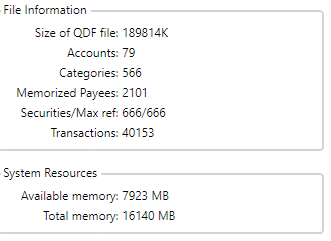
• And I'd also like to see the "File Information" window (See below)
• Is any cloud backup software (Dropbox, MS OneDrive, etc.) actively accessing your Quicken data file while Quicken is running?
• What is the complete path and file name of your Quicken data file (e.g. C:\Users\username\Documents\Quicken\QDATA.QDF)?
• How much total RAM do you have installed?
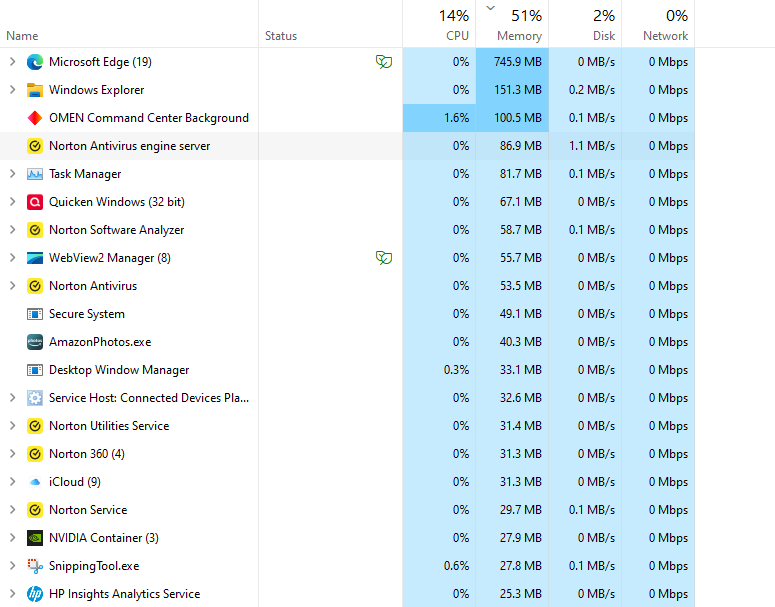
• How much of the available RAM is in use after Quicken has started? Windows Task Manager will give you this information. 80% or higher?
• What version of Windows are you running?
• Are you a day trader or have invested in many hundreds of securities over time? How many securities do you currently own? How many total securities have you ever owned?About file size and number of transactions:
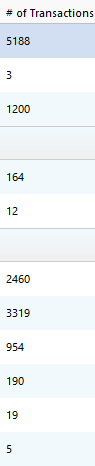
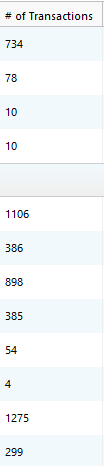
You can find out how many transactions you have in your data file by doing this:- Click Tools / Account List. This should tell you how many transactions you have in each of your accounts in an optional column, "# of Transactions".
If this column is not shown in the Account List, click the Options button at the bottom of the Account List window, then click "Number of Transactions" to add the column. - File Information: Click Help in the Menu Bar. Shift+click About Quicken and it'll give you a File Information box. Please capture an image snapshot of this File Information box and attach it here. Crop, black out or delete personal information from this image.
The Windows Snipping Tool can be used to capture a partial screen image and save it to a file of file type PNG or JPG only.
To attach the image here please review
How do I post a screenshot in the community from a mac
How do I post a screenshot in the community from windows
0 - Click Tools / Account List. This should tell you how many transactions you have in each of your accounts in an optional column, "# of Transactions".
-
File size - 232,715 kb, RAM 16 GB, 49% available, see below, File information below, Running Windows 11, not a day trader, over time have invested in many securities, but have archived, # of transactions below,
Interestingly, I copied my file to my tablet, also Windows 11 with Norton, and it opens accounts in half the time, 6 vs 12 seconds, though it is older with a slower chip than my desktop.
 0
0 -
Thanks for all this information.
You mentioned that you have archived transactions. If you performed a file split or Year End Copy with a cutoff date, that mostly removes reconciled banking transactions, but it typically leaves investment transactions (Buy, Sell, etc.) in the investment registers, to retain complete trading history for tax purposes.Have you ever performed this procedure?
Archive Investment Transactions
For a couple of years now, a new function has been available in Quicken, Archive Transactions. It will split your investment account register into two parts, leaving only those securities' transactions where you currently hold >0 shares in the active register. The rest is moved to a new Archive register within the current data file.
Having less transactions in your active register might improve performance.Please read and carefully follow instructions here: How To Archive Investment Transactions To Improve Performance
Eventually, after a couple of years, you might consider splitting your data file in two, with all the archived investment transaction registers moving to an archive data file and none remaining in the active data file.
File Information otherwise looks OK. The following won't do anything about investment performance but may help with overall register performance.
- You might consider cleaning up the Memorized Payee List, letting Quicken remove unused MPL entries older than [xx] months. I would start with setting this to 18 months, but you may reduce this number if you desire.
- Your number of Categories is a little higher than usual, IMHO. Removing unused categories would be a start.
If you have subcategories nested down to more than 4 levels (you can have up to 16), think about reducing the levels wherever possible.Performance of the same data file on two different computers:
If your data file performs better on what appears to be a smaller computer, this may be related to the number of CPUs you have and their processor speed (GHz).
Quicken does not use multiple processors in parallel. It only uses one CPU. So, I'm guessing that an 8-way 2GHz system may perform slower than a 4-way 2GHz system (you get 1/8th of 2GHz vs 1/4th).0 -
Thank you
0 -
I had used the Archive Transactions before, without improvement. Today, I closed multiple old accounts that had been transferred, some years ago, but not closed. That seemed to cut the loading time in half, to about 6 seconds. It still took over a minute to download to active accounts. I remembered that taking less time, but am not sure.
0 -
Thank you for the follow-up,
I'm glad to hear marking old accounts as closed helped reduce the issue.
How are your active accounts connected? I notice Direct Connect tends to update fairly quickly and is faster than Express Web Connect/Express Web Connect+ (if the financial institution gives you the option).
Thank you!
Quicken Kristina
Make sure to sign up for the email digest to see a round up of your top posts.
0 -
QUICKEN R65.29 is just SLOW. It is pathetic that people have been complaining about it for MONTHS, and nothing has been done.
DO not blame WINDOWS. Don't blame the anti-virus.
My file is on SSD drive, as is the program itself.
I have tried the archive idea, but that just screwed up my datafile. Anything beyond a year has been lost due to the quirks of the archive process. Comparing year-to-year is now a lost capability for me because of 'archive'.
I've done the 'validate' files, and 'super validate ' files with no issues discovered.
Processor affinity - what a joke! A classic "simple" application like quicken should not care or have to care about processor affinity.
I have snoop'd the internet traffic, and quicken is not doing anything in this regard when moving from one brokerage account to another. quicken is just getting lost in its own underwear when moving from account to account. It is so slow that is seems like the program is waiting for some lock or semiphore to timeout before continuing.
It anything, based on the info in this thread, AND THE REPEATABILITY of the issue, the quicken team is doing absolutely nothing with this issue. AND it would appear that the quicken team does not use it own product for themselves. If the team were using the product, this issue would have been fixed a long time ago.
I use the stock-quote feature the most. If I find another tool/program that has this feature, I will be done with quicken. Subscription pricing and poor performance do not make for happy customers.
0 -
could it be that quicken is trying to do something useless as it moves from account to account like, say, update pricing on stocks ??? This slowness is very frustrating.
0 -
@SirWm Please go to Tools > Account List. If the # of transactions column is not showing, click on Options and add a check mark next to it.
What type of accounts are opening slowly?
Are some slower than others?
Do the accounts with more transactions open slower?
How slow are they?
If you go to a different account then back to a slow one, is it faster?
How many transactions are there in a slow account?
QWin Premier subscription0 -
I just checked mine after doing all of the fixes above and when I first open an investment file it takes 10 seconds. When I reopen it, it was down to 3 to 4 seconds. The slowness, both downloading and opening investment accounts, has become noticeably slower over the past several months. I don't know of any other fixes to apply.
0 -
@srwm said "Don't blame the anti-virus."
The only AV I use is Microsoft Defender. After I added my Quicken Windows program and data directories to its exclusion list, QWin ran faster. I can't explain it but theorize that Defender goes crazy because QWin opens and closes files rapidly and often.
Quicken user since version 2 for DOS, as of 2025 using QWin Premier (US) on Win10 Pro & Win11 Pro on 2 PCs.
0 -
After the 'archive' process, each of my BROKERAGE accounts
contain less than 1,300 transactions.
My DISCOVER credit card account has over 10,000 transactions, and opens
very quickly with no real lag observed.The accounts that are opening slowly are all INVESTING accounts
( brokerage, IRA ). Each of these accounts takes 10 seconds or more to open.
( I am using the stopwatch function on my phone. )Each of my BANKING accounts ( checking, savings, credit card ) open
in about 3 seconds, which is acceptable to me.All of the INVESTING accounts are slow in opening. The BANKING accounts are not.
The number of transactions does not seem to be a factor - just the type of account.If I switch from account A to account B and then to account A, the second reference to 'A' is
not any faster.AND, in a new observation, when I exit Quicken, the exit process is so slow that I see
each of the accounts that I opened/used being closed one by one in reverse order
( most recent closed first ). There is a "half window" that appears for each account that is closing.0





Categories
- All Categories
- 24 Product Ideas
- 34 Announcements
- 248 Alerts, Online Banking & Known Product Issues
- 19 Product Alerts
- 265 Welcome to the Community!
- 301 Before you Buy
- 1.5K Product Ideas
- 55.8K Quicken Classic for Windows
- 16.9K Quicken Classic for Mac
- 1K Quicken Mobile
- 834 Quicken on the Web
- 129 Quicken LifeHub